


Office 365 Migration Checklist and Plan
An Office 365 migration is easier to manage when the important decisions are made before mailbox data starts moving. Administrators need a clear picture of the source environment, the users and data in scope, the target configuration, the migration schedule, and what needs to happen at cutover.
This Office 365 migration checklist takes you through the project in six practical stages:
Plan → Prepare → Pilot → Migrate → Cut over → Validate
The exact migration steps depend on where your data is coming from. A Microsoft 365 tenant-to-tenant move, for example, has different prerequisites from Exchange Server, Google Workspace, or IMAP migration. Use this page to organize the overall project, then follow the appropriate EdbMails guide for the source-specific procedure.
Office 365 Migration Plan at a Glance
Before working through individual settings, establish the basic migration plan.
| Phase | Main objective |
|---|---|
| Plan | Define the source, target, users, data, responsibilities, and schedule |
| Prepare | Check source data, target users, licenses, authentication, network and domains |
| Pilot | Test the planned migration with representative users |
| Migrate | Move production users in manageable batches and review the results |
| Cut over | Complete the final migration pass and any required mail-flow or domain changes |
| Validate | Check mailbox data, user access and mail flow before retiring the source |
This gives everyone involved in the project the same view of what happens next and what needs to be completed before moving to the following stage.
Office 365 Pre-Migration Checklist
Good preparation is less about creating a long list of technical tasks and more about answering a few important questions: What do you have? What needs to move? Is the destination ready? And what could affect the transition?
1. Review the source environment
Start by building an accurate picture of the environment you are migrating.
Record the number of users and mailboxes, mailbox sizes, shared mailboxes, archive mailboxes, Public Folders, permissions, custom domains, and applications or devices that depend on the current mail environment.
Also identify the source platform. Preparation for a Microsoft 365 tenant-to-tenant migration differs from the preparation required for Exchange Server, Google Workspace, or an IMAP service.
Review the network and infrastructure that will be used during migration as well. Microsoft's network and migration planning for Microsoft 365 provides additional guidance for evaluating connectivity and network readiness.
2. Decide what actually needs to move
A migration does not have to include everything that exists in the source.
Review inactive accounts, obsolete mailboxes, test users, and data that falls outside the project's scope. Removing unnecessary items from the migration plan can make the scope easier to understand and give you a more realistic estimate of the work involved.
For an Office 365 mailbox migration, the scope may include:
- User mailboxes
- Shared mailboxes
- Archive mailboxes
- Public Folders
- Supported mailbox data
- Required mailbox and folder permissions
3. Prepare the target Microsoft 365 environment
The destination should be ready before you start the pilot.
Confirm that the required target users and mailboxes exist, assign the appropriate Microsoft 365 licenses, verify administrator access, and check the addresses that will be used for source-to-target mapping.
If archive mailboxes or Public Folders are part of the project, prepare their corresponding target environment as well.
For supported scenarios, EdbMails can automatically create Office 365 mailboxes and assign the required licenses during target preparation.
Also review target mailbox capacity and applicable Microsoft 365 service limits, especially when the source contains large mailboxes or archive data.
4. Review authentication and permissions
Confirm that the required source and target administrator accounts can authenticate before scheduling the migration.
Depending on the migration scenario, review Microsoft Entra ID application registration, required permissions, administrator consent, MFA, and any source-specific authentication requirements.
Do not assume the same connection requirements apply to every source. Microsoft 365, Exchange Server, Google Workspace, and IMAP environments use different authentication and access methods.
Testing authentication before the pilot is much easier than discovering an access problem during a production batch.
5. Review domains, DNS and mail flow
Record the existing domain and mail-flow configuration before making any changes.
This may include MX, Autodiscover, SPF and other DNS records that affect mail delivery or user connectivity.
If a custom domain will move between Microsoft 365 tenants, plan that transition as a separate cutover activity. Do not remove the domain from the source simply because the first mailbox migration has completed. For this scenario, follow the Office 365 migration with the same domain guidance.
6. Plan migration batches
For a larger environment, avoid treating every mailbox as one migration batch.
Users can be grouped by department, location, mailbox size, business priority, migration complexity, or planned cutover date.
Select a small group for the pilot first. The pilot should represent the actual environment, so include different mailbox sizes or requirements rather than choosing only the easiest users.
For additional planning recommendations, review the Office 365 migration best practices.
7. Protect important source data
Before removing licenses, changing domains, retiring source systems, or deleting source data, make sure the organization has an appropriate retention, recovery, or backup plan for information that must be preserved.
A completed migration should not be treated as a replacement for the organization's backup or retention policy.
Keep the source environment available until migration validation is complete and the organization is ready to approve decommissioning.
Choose the Right Office 365 Migration Path
"Office 365 migration" can describe several different projects. Once the general preparation is complete, follow the procedure that matches the actual source.
| Source | Migration path |
|---|---|
| Microsoft 365 | Microsoft 365 tenant-to-tenant migration |
| Exchange Server | Exchange to Microsoft 365 migration |
| Google Workspace | Google Workspace to Microsoft 365 migration |
| IMAP server | IMAP to Microsoft 365 migration |
If you are still evaluating the approach, compare the Office 365 migration methods before finalizing the project.
Microsoft 365 to Microsoft 365
For mailboxes moving between Microsoft 365 tenants, use the Office 365 to Office 365 migration workflow.
The plan should account for source and target users, mailbox mapping, licensing, custom domains, shared and archive mailboxes, Public Folders, migration batches, and the final cutover.
Exchange Server to Microsoft 365
For an on-premises Exchange source, verify the Exchange environment and administrator access before starting.
The migration approach can vary depending on the Exchange version, coexistence requirements, organization size, and target configuration.
Follow the Exchange to Office 365 migration guide for the Exchange-specific preparation and migration procedure.
Google Workspace to Microsoft 365
For Google Workspace to Microsoft 365 migration, inventory the users and data included in the project and prepare the Google source using the requirements of the dedicated Google Workspace migration workflow.
Do not apply Microsoft 365 tenant-to-tenant or Exchange-specific prerequisites to a Google Workspace source.
IMAP to Microsoft 365
For an IMAP source, confirm the source server name, port, SSL settings, authentication, and mailboxes included in the migration.
Follow the IMAP to Office 365 migration workflow for the source-specific setup and migration procedure.
Run the Production Migration
Once the pilot is satisfactory, move users according to the planned production batches.
Before starting each batch, make sure the target users and licenses are ready and verify the mailbox mappings. Apply migration filters only when they are required by the project's data scope. EdbMails Office 365 migration filters can be used when the migration needs to include or exclude selected mailbox data.
During migration, monitor progress rather than waiting until the entire project has finished. After each important batch, review the Office 365 migration reports and investigate meaningful failed or skipped items.
Validate representative target mailboxes before proceeding to the final cutover.
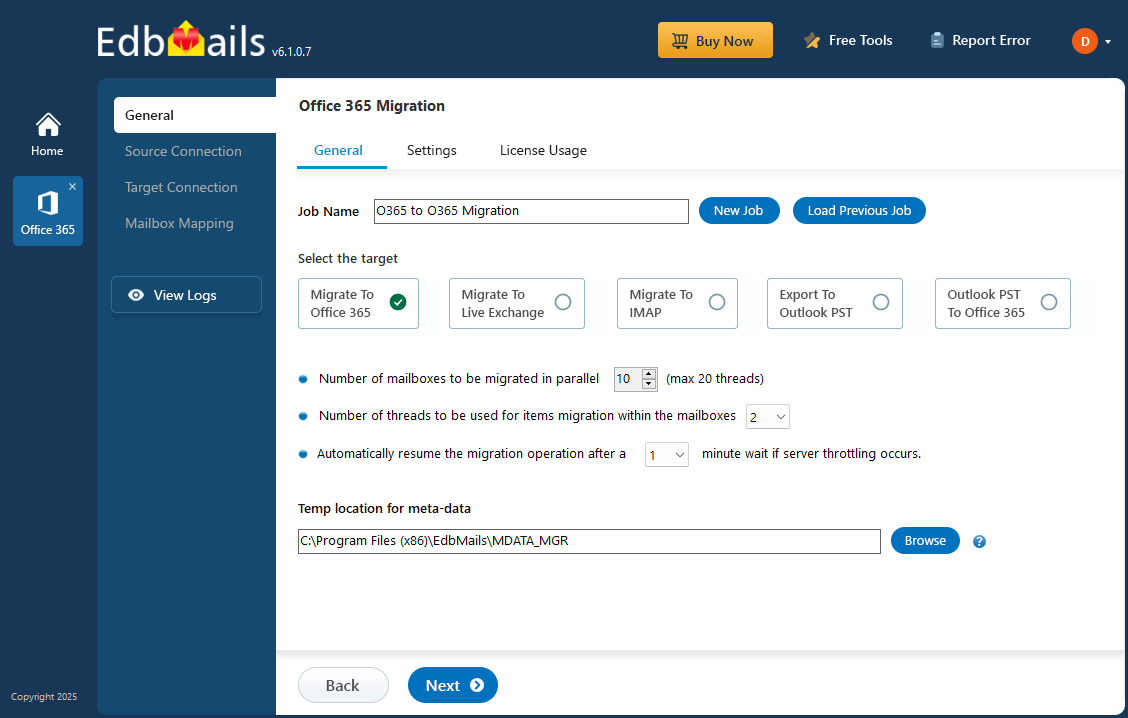
For the full walkthrough with screenshots, installation, configuration, mapping options, and verification, see our complete guide to migrating Office 365 mailboxes.
Office 365 Migration Cutover Checklist
Cutover is the point where users transition fully to the target environment.
Keep this stage short and controlled.
Before cutover:
- Complete the planned production batches.
- Review unresolved migration errors.
- Confirm that source-to-target mappings have not changed.
- Run the required final repeat migration.
- Review the latest migration report.
- Confirm that representative users can access the target.
With EdbMails, the first migration transfers the selected supported data. Subsequent migrations using the same source and target from the previous migration on the same computer can process supported new or changed items incrementally.
Review Office 365 incremental migration when planning the final migration pass.
If the project also requires a domain or mail-flow transition, complete the planned DNS changes at the appropriate point in the cutover and then test inbound and outbound mail.
Do not retire the source environment at this stage. Complete post-migration validation first.
Office 365 Post-Migration Checklist
A migration job showing "completed" does not necessarily mean the project is finished. The final check is whether users can work normally from the target environment.
Validate the migrated mailboxes
Open a representative set of target mailboxes and check the folders and supported mailbox data included in the migration.
Where applicable, also verify shared mailboxes, archive mailboxes, Public Folders, and required permissions. Use the Office 365 mailbox migration validation guidance when carrying out the final verification.
Review migration reports and exceptions
Review failed and skipped items rather than relying only on the overall completion status.
If an issue can be corrected and the affected data still needs to move, resolve the underlying problem, run another supported migration pass, and review the updated report.
Check user access and Outlook
Confirm that users can sign in to the target Microsoft 365 environment and that Outlook connects to the intended mailbox.
Where required by the migration scenario, update or recreate Outlook profiles and test access to shared resources.
Applications or devices that depend on the mail environment should also be tested before the old environment is retired.
If your organization centrally manages Office 365 email signatures, verify the required signature configuration for migrated users as part of the user-readiness checks.
Verify mail flow and DNS
Test mail between migrated users and send test messages both to and from an external address.
If DNS changed during cutover, confirm that MX and Autodiscover now point to the intended environment and review other applicable mail-related records.
Use the DNS changes after Office 365 migration guide for additional post-cutover checks.
If Outlook has difficulty locating the target mailbox after the transition, refer to Autodiscover troubleshooting after migration.
Use the Checklist with the Right Migration Workflow
This checklist is intended to organize the overall project. The detailed procedure still depends on the source environment and the type of mailbox data being moved.
EdbMails Office 365 migration software supports Microsoft 365 mailbox migration with capabilities such as source-to-target mapping, selective migration, migration reports, and repeat migration for supported scenarios.
Use the appropriate EdbMails workflow for Microsoft 365 tenant-to-tenant, Exchange Server, Google Workspace, IMAP, or another supported migration source rather than applying one set of prerequisites to every migration.
Frequently Asked Questions
What should an Office 365 migration checklist include?
What should I include in an Office 365 migration plan?
Do I need to migrate everything from the source?
Why should I run a pilot migration?
When should DNS changes be made?
What should I check after Office 365 migration?
Can I run another migration before final cutover?
When can the old environment be decommissioned?
Quick Links
Export Office 365 mailbox to PST
Office 365 migration with the same domain
