


How to Create a Migration Endpoint in Office 365
Step-by-Step Guide: Endpoint Types, Prerequisites, PowerShell, Concurrency & Troubleshooting
An Office 365 migration endpoint is a connection configuration that allows Exchange Online to communicate with the source environment during mailbox migration. You need one when you move mailboxes with Exchange Online migration services, for example through a migration batch in the Exchange Admin Center, from an on-premises Exchange server, an IMAP server, or Google Workspace.
This guide explains how to create a migration endpoint in Office 365 and is written for Exchange administrators, IT administrators, and migration engineers. The steps depend on the migration method you use: Exchange hybrid (remote move), cutover, IMAP, or Google Workspace migration. Staged migration is no longer available for new projects because Microsoft retired Staged Outlook Anywhere onboarding on May 8, 2025.
Quick Answer: You can create a migration endpoint in Office 365 from the Exchange Admin Center (Migration > Endpoints > Add) or with the New-MigrationEndpoint cmdlet in Exchange Online PowerShell. The required endpoint type depends on the migration source: Exchange Remote for hybrid migration, Outlook Anywhere for cutover migration, IMAP for IMAP servers, and Google Workspace for Google Workspace mailboxes.
| Migration Endpoint at a Glance | Details |
| Purpose | Provides Exchange Online with the connection details needed to reach the source mail system during migration. |
| Required for | Hybrid (remote move) migration • Cutover migration • IMAP migration • Google Workspace migration |
| Not required for | Third-party migration tools that connect to the source and target environments directly and do not use Exchange Online migration services. |
| Configured in | Exchange Admin Center (admin.exchange.microsoft.com) or Exchange Online PowerShell |
| Endpoint types | Exchange Remote • Outlook Anywhere • IMAP • Google Workspace |
What Is a Migration Endpoint?
A migration endpoint is a configuration object stored in Exchange Online that holds everything Microsoft 365 needs to reach your source mail system: the remote server address, the credentials of an admin account with access to source mailboxes, and two throttling values that govern how many mailboxes can be in motion simultaneously.
When a migration batch starts, Exchange Online reads the endpoint to determine where to connect, how to authenticate, and how many simultaneous connections to open. Without a valid endpoint, Exchange Online migration services cannot establish the required connection to the source environment, and the migration batch cannot start moving data.
A migration endpoint is a reusable connection profile. You create it once and reuse it across multiple migration batches. If you are migrating from Exchange servers in different geographic locations, or want to distribute load across several source servers, you can create separate endpoints for each and assign batches accordingly.
Why Migration Endpoints Are Required
Microsoft 365 is a cloud service with no direct visibility into your on-premises or third-party mail environment. A migration endpoint provides that connection. It tells Exchange Online where the source system is, how to authenticate to it, and how many mailboxes to process at the same time.
Without a valid endpoint, Exchange Online migration services cannot establish the required connection to the source environment. For migrations that use Exchange Online migration services, including hybrid remote move, cutover, IMAP, and Google Workspace migrations, the endpoint must exist, or be created in the migration batch wizard, before the first batch can run.
Endpoints also serve a throttling function. The concurrency values stored on each endpoint prevent the source server from being overwhelmed during a large migration. A source Exchange server that handles its normal workload reliably can still be destabilized by dozens of simultaneous migration connections if no throttling is applied.
Migration Endpoint Types in Office 365
Each migration scenario uses a different protocol to move data from the source, and the endpoint type tells Exchange Online which protocol to use. Selecting the wrong type is a common reason for connection test failures. For example, if you choose Exchange Remote for an IMAP server, Exchange Online looks for an MRS Proxy endpoint that does not exist.
| Endpoint Type | Migration Scenario | MRS Proxy |
| Exchange Remote | Hybrid migration | Required |
| Outlook Anywhere | Cutover (Staged retired May 8, 2025) | Not required |
| IMAP | Non-Exchange mail servers | Not required |
| Google Workspace | Google Workspace to Microsoft 365 | Not required |
Important: Microsoft retired Staged Outlook Anywhere onboarding on May 8, 2025. Organizations that did not complete staged migrations before that date must use the hybrid remote onboarding process instead.
Exchange Remote (ExchangeRemoteMove)
Used for hybrid (remote move) migrations where the on-premises Exchange server (2010 SP3 or later) has MRS Proxy enabled. Data moves directly using the native Mailbox Replication Service (MRS) protocol.
Outlook Anywhere
Used for cutover migrations from Exchange Server 2003 or later. Staged migrations from Exchange 2003 and 2007 also used this endpoint type until Microsoft retired Staged Outlook Anywhere onboarding on May 8, 2025. Uses RPC over HTTP. MRS Proxy is not required.
IMAP
Used for any IMAP-compatible source: Gmail, Zimbra, Zoho Mail, Yahoo, Rackspace, or any provider that exposes an IMAP port. Only email and folder structure migrate; calendars and contacts require a separate process.
Google Workspace
Uses the Gmail API, enabling email, contacts, and calendar items to migrate together. Requires a Google service account with domain-wide delegation and specific API scopes in the Google Admin console.
Which Endpoint Type Should You Choose?
Select the endpoint type based on the source environment:
| Source Environment | Migration Method | Endpoint Type |
|---|---|---|
| Exchange Server in a hybrid deployment | Remote move (hybrid) migration | Exchange Remote |
| Legacy Exchange Server (Exchange 2003 or later) | Cutover migration | Outlook Anywhere |
| IMAP server (Gmail, Zimbra, Zoho Mail, or another IMAP-compatible provider) | IMAP migration | IMAP |
| Google Workspace | Google Workspace migration | Google Workspace |
Before Creating a Migration Endpoint
A migration endpoint is one step in the wider migration project. For the full workflow from assessment through cutover, see the Office 365 migration guide. Confirm the following requirements before you create the endpoint.
General Requirements
- Required permissions: Sign in to Exchange Online with an admin account that can manage migrations, such as a member of the Organization Management role group. The source-side account permissions depend on the endpoint type and are listed below.
- Source server readiness: The source server must run a version supported by the migration method, and the required service (MRS Proxy, Outlook Anywhere, IMAP, or Google Workspace API access) must be enabled.
- Authentication requirements: Use a dedicated migration account with a non-expiring password that is excluded from MFA policies. Exchange sources need a valid SSL certificate from a public CA, and Google Workspace sources need a service account JSON key.
- Network requirements: The source endpoint (EWS/MRS Proxy URL, Outlook Anywhere URL, or IMAP port) must be reachable from the internet and allowed through your firewall. Test external access with the Microsoft Remote Connectivity Analyzer before you create the endpoint.
For the complete list of pre-migration tasks, including scope definition, target setup, DNS changes, and batch planning, use the Office 365 migration checklist.
For Exchange Remote Endpoints
- Enable MRS Proxy on the on-premises Exchange server. It is disabled by default.
- Confirm the Exchange Web Services external URL is accessible from the internet using the Microsoft Remote Connectivity Analyzer (testconnectivity.microsoft.com).
- Ensure the SSL certificate is issued by a public CA, is not expired, and includes the server FQDN in the SAN field.
- Confirm the migration admin account is a member of Domain Admins, Exchange Recipient Administrators, or the Organization Management role group (Exchange 2010 or later).
Enable MRS Proxy:
Command: Copy & Paste it
Set-WebServicesVirtualDirectory -Identity "EWS (Default Web Site)" `
-MRSProxyEnabled $true
# Verify
Get-WebServicesVirtualDirectory | Select Identity, MRSProxyEnabled
Add the migration admin account to the Organization Management role group (run in the Exchange Management Shell on-premises):
Command: Copy & Paste it
Add-RoleGroupMember -Identity "Organization Management" `
-Member "migrationadmin"
For Outlook Anywhere (Cutover) Endpoints
- Configure Outlook Anywhere on the on-premises Exchange server and confirm it is reachable from the internet with a certificate issued by a trusted public CA.
- Confirm the migration admin account is a member of Domain Admins, has FullAccess permission on each on-premises mailbox, or has Receive As permission on the mailbox database.
- Cutover migration supports up to 2,000 mailboxes. Microsoft recommends migrating 150 mailboxes or fewer with this method.
For IMAP Endpoints
- Confirm IMAP port and SSL configuration (port 993 with SSL is standard; some providers use 143 with STARTTLS).
- Prepare a credentials CSV with each user's IMAP username and password, or with the credentials of an admin account that has access to all mailboxes on the IMAP server.
For Google Workspace Endpoints
- Create a Google service account with domain-wide delegation in the Google Admin console.
- Enable the required API scopes. Missing scopes cause authorization errors during the connection test.
- Have the service account email, the private key file (JSON key), and a Google Workspace admin email ready.
How to Create a Migration Endpoint in Exchange Online
You can create migration endpoints through the Exchange Admin Center at admin.exchange.microsoft.com or via Exchange Online PowerShell.
Creating an Endpoint in the Exchange Admin Center
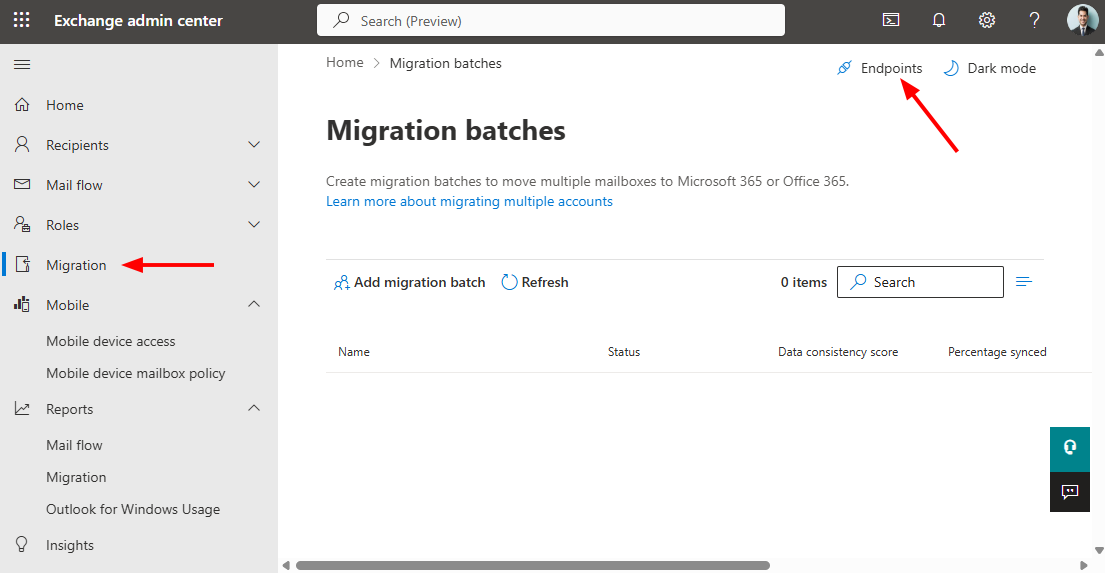
Sign in to the Exchange Admin Center, select Migration, select Endpoints at the top right of the page, select Add, and then select the appropriate endpoint type from the Select the migration type drop-down list.
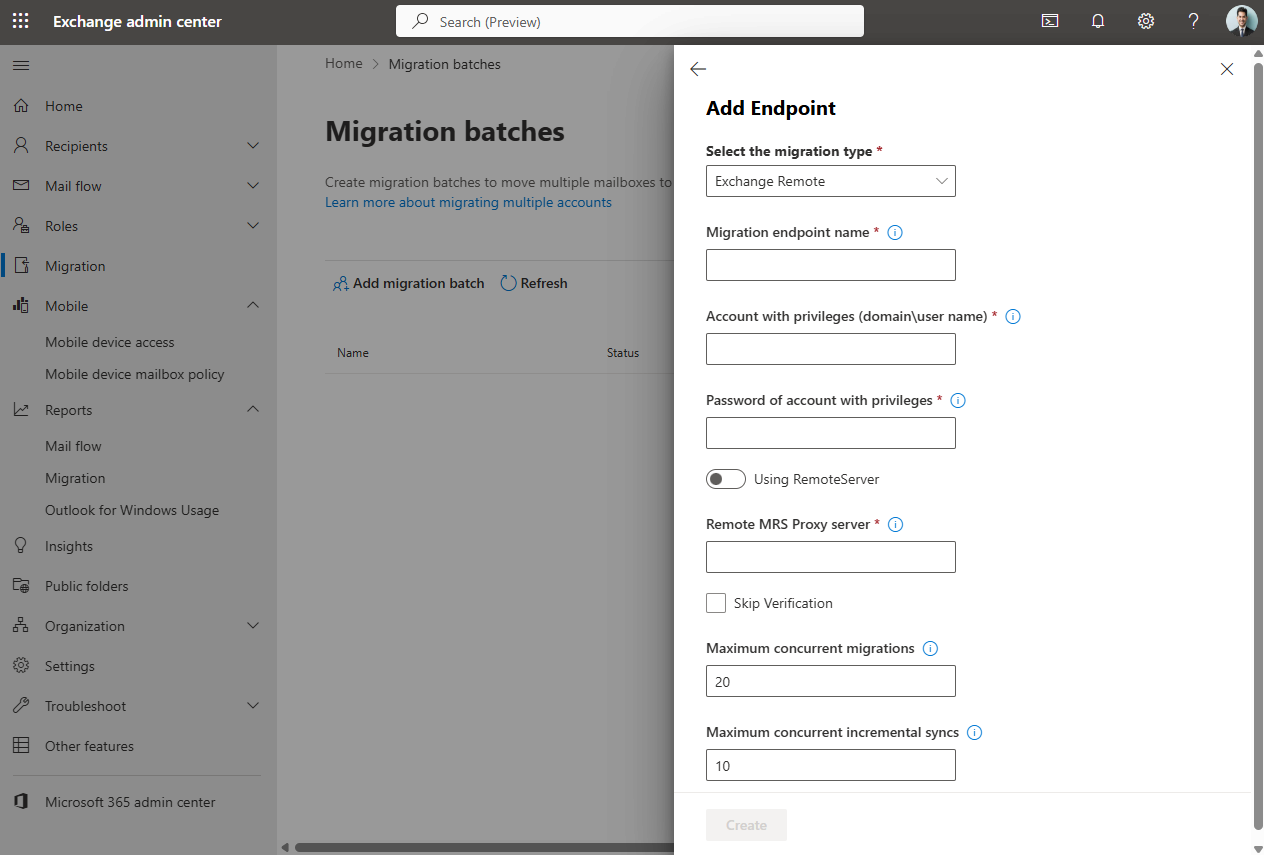
For an Exchange Remote endpoint, the wizard asks for an on-premises email address (for autodiscovery), the migration admin account, and the account password. If auto-detection fails, enter the Remote MRS Proxy server FQDN manually. In multi-server environments, point to an individual server rather than a load balancer.
Creating an Endpoint with PowerShell
Connect to Exchange Online first:
Command: Copy & Paste it
Connect-ExchangeOnline -UserPrincipalName admin@yourdomain.com
Exchange Remote (Hybrid)
Command: Copy & Paste it
$credentials = Get-Credential
New-MigrationEndpoint `
-Name "Hybrid-Endpoint-Primary" `
-ExchangeRemoteMove `
-RemoteServer "mail.yourcompany.com" `
-Credentials $credentials `
-MaxConcurrentMigrations 20 `
-MaxConcurrentIncrementalSyncs 10
IMAP
Command: Copy & Paste it
New-MigrationEndpoint `
-Name "IMAP-Endpoint" `
-IMAP `
-RemoteServer "mail.yourprovider.com" `
-Port 993 `
-Security Ssl `
-MaxConcurrentMigrations 20 `
-MaxConcurrentIncrementalSyncs 10
Verify the endpoint:
Command: Copy & Paste it
Get-MigrationEndpoint | Format-List Identity, EndpointType, RemoteServer, MaxConcurrentMigrations, MaxConcurrentIncrementalSyncs
Test before running a live migration:
Command: Copy & Paste it
Test-MigrationServerAvailability -Endpoint "Hybrid-Endpoint-Primary"
A successful result returns Result: Success. Repeat this test after any network change, certificate renewal, or firewall update.
Editing and Deleting Migration Endpoints
Command: Copy & Paste it
# Update credentials on an existing endpoint
$newCredentials = Get-Credential
Set-MigrationEndpoint -Identity "Hybrid-Endpoint-Primary" `
-Credentials $newCredentials
# Confirm no active batches before deleting
Get-MigrationBatch | Where-Object {$_.SourceEndpoint -like
"*Hybrid-Endpoint-Primary*"} | Select Identity, Status
# Remove the endpoint
Remove-MigrationEndpoint -Identity "Hybrid-Endpoint-Primary"
Migration Endpoint Concurrency Settings Explained
Every migration endpoint carries two throttling values that control how data flows through it. Values that are too high or too low affect both migration speed and source server stability.
| Setting | Default | Practical Range | Notes |
| MaxConcurrentMigrations | 20 | 20–60 per endpoint | Controls the initial sync phase. Increase gradually after a pilot batch. |
| MaxConcurrentIncrementalSyncs | 10 | 25–30% of batch size | Raise before triggering completion on large batches to avoid queue build-up. |
| Tenant MaxConcurrentMigrations | 300 | Up to 1,000 via support | Tenant-wide ceiling. Individual endpoint values cannot exceed this. |
MaxConcurrentMigrations
Controls how many mailboxes can be in their initial bulk data copy phase simultaneously. Start at the default of 20, run a pilot batch, monitor the source server's CPU and IIS connection logs, and increase incrementally. Most environments reach a practical ceiling between 30 and 60.
MaxConcurrentIncrementalSyncs
When you complete a batch, every mailbox needs a final incremental sync simultaneously. Raise this value before triggering completion on any large batch:
Command: Copy & Paste it
# Raise before completing a large batch
Set-MigrationEndpoint -Identity "Hybrid-Endpoint-Primary" `
-MaxConcurrentIncrementalSyncs 50
Set this to at least 25–30% of the batch size you are about to complete. Reduce it again afterward for remaining batches.
Why Higher Is Not Always Faster
Increasing concurrency beyond what the source server can sustain causes timeouts and stall-retry cycles. The result is a migration that is slower overall than it would have been at a lower, sustainable value. If you see frequent StalledDueToSource codes, reduce concurrency rather than increasing it.
Common Migration Endpoint Problems
Most endpoint failures fall into one of the following five categories.
MRS Proxy Not Enabled
MRS Proxy is disabled by default on on-premises Exchange servers. If you create an Exchange Remote endpoint without enabling it first, the connection test fails, even if the network path and credentials are correct.
EWS Not Externally Accessible
The Exchange Web Services URL must be reachable from Microsoft's IP ranges over the internet. An Exchange server on an internal network segment with no external publishing cannot be used as a migration endpoint source without additional infrastructure changes.
SSL Certificate Problems
The SSL certificate on the source Exchange server must be issued by a public certificate authority, must not be expired, and must include the server's EWS FQDN in the Subject Alternative Name field. Self-signed and internal CA certificates cause the connection test to fail.
Credential Issues
Migration endpoints store credentials at creation time and do not automatically refresh when a password changes or expires. A mid-migration password change, account lockout, or MFA policy applied after the endpoint was created can stop active migrations until the credentials on the endpoint are updated.
Concurrency Misconfiguration
Setting concurrency too high overloads the source server, causing timeouts and stall-retry cycles. Setting it too low unnecessarily queues mailboxes and extends the migration window. The appropriate concurrency value is best determined with a pilot batch followed by incremental adjustment.
How to Diagnose and Fix Migration Endpoint Errors
Common Errors During Endpoint Creation
"Failed to connect to the remote server"
The server FQDN is not reachable from Office 365's IP ranges, or MRS Proxy is not enabled. Run the Exchange Web Services Connectivity test at testconnectivity.microsoft.com before retrying.
"The credentials didn't work"
Verify the account format. Outlook Anywhere expects domain\username; Exchange Remote accepts UPN format. Check for account lockout from repeated failed attempts. Confirm Basic authentication is not disabled:
Command: Copy & Paste it
Get-WebServicesVirtualDirectory | Select Identity, BasicAuthentication
"The certificate is not valid"
The certificate must be from a trusted public CA, not expired, and include the server FQDN in the SAN field. Self-signed certificates typically fail this check.
Permission or Access Errors
The migration admin account does not have the required permissions on the source server. For Exchange Remote endpoints, confirm the account is a member of Domain Admins, Exchange Recipient Administrators, or the Organization Management role group. For Outlook Anywhere (cutover) endpoints, confirm the account is a member of Domain Admins, has FullAccess permission on each mailbox, or has Receive As permission on the mailbox database.
"HCW8078" during the Hybrid Configuration Wizard
MRS Proxy not enabled, or EWS external URL not configured. Create the endpoint manually via PowerShell rather than re-running the wizard.
Endpoint shows "NeedsToConnect"
The credentials are no longer valid, usually because of password expiry, account lockout, or an MFA policy applied after endpoint creation. Update them without deleting the endpoint:
Command: Copy & Paste it
$newCredentials = Get-Credential
Set-MigrationEndpoint -Identity "Hybrid-Endpoint-Primary" `
-Credentials $newCredentials
To prevent mid-migration failures: use a dedicated service account with a non-expiring password excluded from MFA policies.
Stall States During Migration
Stall states are usually not failures. In most cases, mailboxes resume automatically once the underlying condition clears. Identify them with:
Command: Copy & Paste it
Get-MoveRequest | Where-Object {$_.Status -eq 'InProgress'} |
Get-MoveRequestStatistics |
Where-Object {$_.StatusDetail -like 'Stalled*'} |
Select DisplayName, StatusDetail, PercentComplete
| Stall Code | What It Means and What to Do |
| StalledDueToSource_EndpointCapacityExceeded | Queue, not a failure. More mailboxes waiting than concurrency settings allow. Raise MaxConcurrentMigrations or MaxConcurrentIncrementalSyncs. |
| StalledDueToSource_MrsProxyTransientError | Transient connectivity failure to on-premises MRS Proxy. Auto-retries. If persistent, check the EWS virtual directory and the network path. |
| StalledDueToTarget_MdbAvailability | Exchange Online is managing its replication queue. Resolves automatically. Contact Microsoft support if it persists for several hours. |
| StalledDueToTarget_BigFunnel | Exchange Online content indexing pipeline is backed up. Auto-recovers within minutes to a few hours. |
| StalledDueToMailboxLock | Source mailbox locked by another on-premises process. Brief. Moves typically resume within a few minutes. |
Native Migration Endpoint vs EdbMails
The endpoint problems described above apply to Microsoft's native migration framework. EdbMails does not use Exchange Online migration services, so it does not require a migration endpoint in Exchange Online or MRS Proxy on the source server. EdbMails connects to the source and target environments through its own connection settings, which have separate prerequisites. For example, Google Workspace migrations with EdbMails still require a Google Cloud service account with domain-wide delegation and the required API scopes.
The table below compares the native endpoint requirements with EdbMails for each migration scenario.
| Migration Scenario | Native Endpoint Requirement | With EdbMails |
| Hybrid Exchange | MRS Proxy + external EWS + public SSL certificate | Connects to the source Exchange server from the machine running EdbMails. No MRS Proxy or Exchange Online migration endpoint required. |
| IMAP Migration | Credentials CSV (per user or admin account); email only, calendars and contacts excluded | Connects with the IMAP server host name, port, and account credentials. Migrates email folders, messages, and attachments. |
| Google Workspace | Service account + domain-wide delegation + API scope configuration | Also uses a Google Cloud service account with domain-wide delegation and API scopes. No Exchange Online migration endpoint required. |
| Cutover | Outlook Anywhere endpoint + external RPC access (Staged retired May 8, 2025) | No Exchange Online migration endpoint required. |
| DAG Environments | Endpoint pointed at an individual MRS Proxy server; separate endpoints to distribute load across servers | No Exchange Online migration endpoint required. |
| Office 365 to Exchange | Requires a hybrid deployment and an Exchange Remote endpoint (offboarding remote move) | Supports Exchange 2007, 2010, 2013, 2016, and 2019 as the migration target. |
Note: EdbMails migrations do not require an endpoint configuration in Exchange Online. The endpoint creation and troubleshooting steps on this page apply only to Microsoft's native migration framework.
Frequently Asked Questions (FAQ)
-
What is a migration endpoint in Office 365?
-
Where are migration endpoints created?
-
Can I edit a migration endpoint?
-
Can I delete a migration endpoint?
-
How do I test a migration endpoint?
-
Why does a migration endpoint fail?
-
Is MRS Proxy required for all migration endpoints?
-
Do I need a new migration endpoint for every migration batch?
-
Can I use the same endpoint for cutover and staged migrations?
-
Does EdbMails require migration endpoints?
Which migration scenarios does EdbMails support?
EdbMails supports the following migration scenarios for Microsoft 365 and Exchange environments:
| Migration Scenario | EdbMails Product |
| Exchange to Office 365 | EdbMails Exchange to Office 365 Migration |
| Office 365 Tenant to Tenant | EdbMails Office 365 Tenant to Tenant Migration |
| Office 365 to Exchange | EdbMails Office 365 to Exchange Migration |
| IMAP to Office 365 | EdbMails IMAP to Office 365 Migration |
| Google Workspace to Office 365 | EdbMails Google Workspace to Office 365 |
| Office 365 to PST | EdbMails Office 365 to PST Export |
| Public Folder to Office 365 | EdbMails Public Folder to Office 365 Migration |
| SharePoint / OneDrive / Teams | EdbMails SharePoint Online Migration |
Summary
Migration endpoints are the foundation of Microsoft's native migration framework. The endpoint type must match the source system, concurrency must be calibrated to what the source server can handle, and credentials must remain valid throughout. A password expiry or new MFA policy applied weeks after endpoint creation can stop active migrations.
For organizations using Microsoft's native tools: enable MRS Proxy before attempting a hybrid endpoint, verify external EWS connectivity before testing, start at default concurrency and adjust after a pilot batch, and use a dedicated service account excluded from password rotation and MFA policies.
For organizations where the native endpoint framework creates friction, such as environments where EWS cannot be published externally, reverse migrations from Office 365 back to Exchange, or projects that need one tool across Exchange, IMAP, and Google Workspace sources, Office 365 migration software such as EdbMails provides an alternative that does not require a migration endpoint in Exchange Online.
