EdbMails EDB Recovery and Migration software
  • Products
    EdbMails
    All-in-one Recovery and Migration
    • EDB Recovery and Migration
    • OST, PST, MBOX, NSF, EML, MSG
    • Office 365, Exchange Migration
    • SharePoint, OneDrive & Teams
    • Google Workspace Migraton
    • IMAP Migration
    • Duplicate Remover
    • EdbMails Data Recovery
    • Backup Solutions
    • All ProductsAll Products

    EDB Recovery and Migration

    EdbMails lets you recover corrupted, damaged, and offline Exchange EDB files, convert EDB mailboxes to PST format, and directly migrate mailbox data to Office 365 and live Exchange Server.

    EDB to PST
    EDB to PST
    Recover corrupted, damaged, offline EDB files and convert Exchange EDB mailboxes to PST file format
    Public Folder to Exchange
    Public Folder to Exchange
    Migrate public folders from an Exchange offline EDB file to live Exchange Server
    EDB to Live Exchange Migration
    EDB to Live Exchange Migration
    Directly migrate offline Exchange database (EDB) files to live Exchange server
    Archive Mailbox to Office 365
    Archive Mailbox to Office 365
    Migrate archive mailboxes from offline EDB files directly to Office 365
    EDB to Office 365 Migration
    EDB to Office 365 Migration
    Directly migrate offline Exchange database (EDB) files to Office 365
    Public Folder to Office 365
    Public Folder to Office 365
    Migrate public folders from an offline Exchange EDB file to Office 365

    OST, PST, MBOX, NSF, EML, MSG Export and Migration

    EdbMails lets you to recover OST and PST files, export OST, PST, MBOX, NSF, EML, and MSG files to PST files, and directly migrate OST, PST, MBOX, and NSF mailbox data to Office 365 and live Exchange Server.

    OST Recovery and Migration
    OST Recovery and Migration
    Recover offline OST files, convert OST to PST, and migrate OST to Office 365 and Exchange Server
    PST Recovery and Migration
    PST Recovery and Migration
    Recover Outlook PST files , Export PST to PST, migrate PST to Office 365 and Exchange Server
    MBOX Export and Migration
    MBOX Export and Migration
    Export MBOX to PST, migrate MBOX to Office 365 and Exchange Server
    NSF Export and Migration
    NSF Export and Migration
    Export NSF to PST, migrate NSF to Office 365 and Exchange Server
    EML to PST Export
    EML to PST Export
    Convert EML files to Outlook PST files
    PST to MSG Export
    PST to MSG Export
    Convert Outlook PST file to MSG file format
    MSG to PST Export
    MSG to PST Export
    Export MSG files to Outlook PST files

    Office 365, Exchange Migration

    EdbMails lets you securely migrate mailboxes across Microsoft 365, Exchange, Google Workspace (Google Workspace Migraton), and IMAP-supported servers such as Outlook, Gmail, Zimbra, Zoho Mail, and cPanel, ensuring zero downtime.

    Office 365 Backup
    Office 365 Migration
    Migrate between Office 365 tenants, Office 365 to Exchange, Office 365 to PST, PST files to Office 365.
    Exchange Server Backup
    Exchange Migration
    Migrate between any Exchange Servers, Exchange to Office 365, Exchange to PST, PST files to Exchange.
    Tenant to Tenant Migration
    Tenant to Tenant Migration
    Migrate Mailboxes, Public Folders, Archive Mailboxes between Office 365 Tenants.
    Exchange to Office 365
    Exchange to Office 365
    Migrate Mailboxes, Public Folders, Archive Mailboxes from live Exchange server to Office 365.
    Office 365 to IMAP
    Office 365 to IMAP
    Migrate Office 365 to IMAP, Office 365 to Gmail, Office 365 to Outlook, Office 365 to Zoho etc.
    Exchange to IMAP
    Exchange to IMAP
    Migrate from live Exchange Server to IMAP servers such as Gmail, Outlook, and Zoho Mail.
    Public Folder to Office 365
    Public Folder to Office 365
    Migrate Public Folders between Office 365 tenants with complete folder hierarchy and mailbox data integrity.
    Exchange to PST
    Exchange to PST
    Export live Exchange Server mailboxes, public folders, and archive mailboxes to Outlook PST files.

    SharePoint, OneDrive & Microsoft Teams Migration

    EdbMails lets you migrate SharePoint sites, OneDrive data, Microsoft Teams, teams, channels, chats, permissions, and documents between Microsoft 365 tenants while maintaining the existing folder structure and data integrity.

    SharePoint, OneDrive & Teams Backup
    SharePoint Online Migration
    Migrate documents, lists, files and folders from SharePoint sites.
    OneDrive for Business Migration
    OneDrive for Business Migration
    Migrate documents, lists, files, folders, private chats from OneDrive.
    Microsoft Teams Migration
    Microsoft Teams Migration
    Migrate Teams, chats, channels, documents, files and folders etc.

    Google Workspace / G Suite Migration

    EdbMails Google Workspace Migration Tool migrates emails, calendars, contacts, and more from Google Workspace to Office 365, Exchange, and IMAP using a Google Admin account without requiring individual user credentials.

    G Suite Migration
    Google Workspace Migration
    Migrate emails, calendars, contacts, tasks from G Suite to Office 365, G Suite to Exchange, G Suite to IMAP Servers
    G Suite to Office 365
    Google Workspace to Office 365
    Migrate emails, calendars, contacts, tasks from Google Workspace / G Suite to Office 365
    G Suite to Exchange Server
    Google Workspace to Exchange Server
    Migrate emails, calendars, contacts, tasks from Google Workspace / G Suite to on-Premise Exchange Server
    G Suite to IMAP
    Google Workspace to IMAP
    Migrate emails, calendars, contacts, tasks from Google Workspace / G Suite to IMAP, Outlook, Zimbra, Zoho etc.

    IMAP Migration

    EdbMails IMAP Migration tool lets you easily migrate emails from IMAP servers such as Outlook, Gmail, Zoho Mail, Zimbra, cPanel, and more. Supports IMAP to IMAP, Office 365, Exchange Server, PST, and bulk PST to IMAP migration.

    IMAP Email Backup & Migration
    IMAP Email Backup & Migration
    Backup and migrate emails from IMAP servers to PST, Office 365, and On-Premises Exchange Server
    IMAP to Office 365
    IMAP to Office 365
    Migrate emails, folders, and attachments from IMAP servers to Office 365
    IMAP to Exchange
    IMAP to Exchange
    Migrate emails, folders, and attachments from IMAP servers to on-premises Exchange Server
    IMAP to PST
    IMAP to PST
    Export emails, folders, and attachments from IMAP servers to Outlook PST files for backup
    PST to IMAP
    PST to IMAP
    Migrate emails, folders, and attachments from bulk PST files to IMAP servers

    Duplicate Remover

    EdbMails Duplicate Remover lets you easily remove duplicate items from Office 365 and Exchange Server, and from IMAP, Outlook, Gmail, Zimbra, Zoho Mail, etc., ensuring a clean and organized mailbox.

    Remove Duplicates
    Remove Duplicates
    Easily clean up your Office 365, Exchange, Outlook and IMAP accounts by removing duplicate emails.
    Remove Duplicates from Office 365
    Remove Duplicates from Office 365
    Remove duplicate emails, calendars, contacts, journal tasks, etc. from Office 365.
    Remove Duplicates from Exchange Server
    Remove Duplicates from Exchange Server
    Remove duplicate emails, calendars, contacts, journal tasks, etc. from live Exchange Server.
    Remove Duplicates from IMAP, Outlook
    Remove Duplicates from IMAP, Outlook
    Remove duplicate emails, attachments from IMAP, Outlook, Gmail, Zimbra, Zoho Mail etc.

    Exchange, SharePoint, OneDrive, Teams and Office 365 Backup

    EdbMails enables secure, automated backup and recovery for Microsoft 365 services including Exchange Online, SharePoint, OneDrive, Teams, and Live Exchange Server with complete data protection and restore flexibility.

    Office 365 Backup
    Office 365 Backup
    Incremental, Granular, Encrypted and Compressed Office 365 Mailboxes Backup
    Exchange Server Backup
    Exchange Server Backup
    Incremental, Granular, Encrypted and Compressed Exchange Mailboxes Backup
    SharePoint, OneDrive & Teams Backup
    SharePoint, OneDrive & Teams Backup
    Backup Online site collections, Team sites, Office 365 groups, all documents etc.

    EdbMails Data Recovery

    EdbMails Data Recovery Software lets you recover permanently deleted data, including photos, videos, documents, and archived files, from partitions on hard drives, SSDs, USB drives, SD cards, and external storage devices.

    EdbMails Data Recovery
    EdbMails Data Recovery
    Recover and restore permanently deleted data from hard drives, SSDs, USB drives, SD cards, and etc.
    Whitepaper Whitepaper
    Request a Demo Request a Demo
    Sign Up Sign Up
  • Features
  • FAQ
  • Offers
  • Pricing
  • Download
  • Support
  • Sign in
User’s Manual
Google Workspace Migration

User Manual

User Manual

  • Overview
  • System Requirements
  • Migration Scenarios
  • Installation
    • Installation process
    • Reinstall or Upgrade
    • How to uninstall
  • FAQs
    • G Suite to Office 365
    • G Suite to IMAP
    • G Suite to Exchange
  • Videos
  • Screenshots
    • G Suite to Office 365
    • G Suite to Exchange
    • G Suite to IMAP
  • How it works?
    • G Suite to Office 365 Migration
    • Migrate Google Workspace to Google Workspaces
    • G Suite to Exchange Migration
    • G Suite to IMAP Migration
    • Export Google Workspace (G Suite) to Outlook PST
  • Google Workspace Admin Configuration
  • Connect to target Office 365
  • Connect to Exchange server for multiple mailboxes migration
    • Connect with Global Admin
    • Connect to Multiple users using CSV file
    • Connect using full access permission
    • Connect individual users for Single / Specific user Migration
  • Connect to Hosted Exchange for its Migration
    • Connect with Full Access permissions
    • Connect to multiple users using CSV file
    • Connect to Individual user for migration
  • Connect to IMAP
    • Connect IMAP Single Server
    • Connect IMAP Multiple Server
  • Knowledge Base
    • Bulk G Suite Mailbox Migration
    • Google Workspace Migration
    • Why Choose EdbMails
    • Automatic Mailbox Mapping
    • Best G Suite Migration Software
    • Migrate G Suite Emails, Contacts & Calendars
    • Fix G Suite Migration Issues
    • Avoid Google Workspace Migration Mistakes
    • Migrate G Suite Emails, Contacts & Calendars
  • Map the Mailboxes
  • Incremental Migration
  • Exchange Throttling Policy
  • Multifactor Authentication
    • Enable MFA in Office 365
    • Create App password for MFA
    • Disable Security Defaults
  1. Home
  2. Google Workspace Migration
  3. Export Google Workspace Email to PST | EdbMails
Download Buy Now

Export Google Workspace (G Suite) to Outlook PST

Organizations often need to export Google Workspace mailboxes to Outlook PST files for offline backup, litigation hold, employee offboarding, compliance archiving, or as a staging step before migrating to another email platform. Since Outlook PST is a proprietary Microsoft file format, Google Workspace does not offer a direct, built-in way to export mailboxes to PST. Manual workarounds exist, but they're slow, manual, and difficult to scale across a domain.
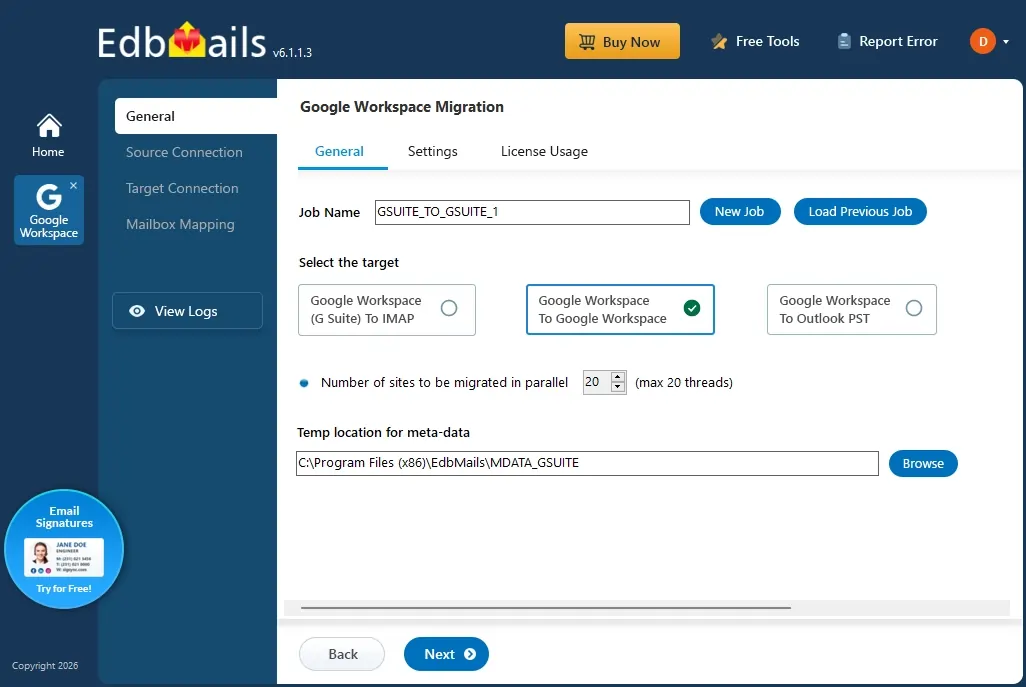
Google Workspace Migration

EdbMails Google Workspace Migration Tool removes this complexity with a dedicated Google Workspace to PST export option that lets administrators export any number of Google Workspace mailboxes, emails, attachments, contacts, calendars, and tasks directly into Outlook PST files.

The application connects to Google Workspace using secure API-based communication with domain-wide delegation, allowing administrators to access and export organizational mailboxes using a single admin account, without requiring individual user credentials. EdbMails preserves the original Gmail folder hierarchy, message metadata, and read/unread status, and lets you save the exported PST files to a local drive, network share, or external storage location of your choice.

With support for bulk mailbox export, advanced filter settings based on date range, folder, sender, or recipient, and automatic PST file splitting for large mailboxes, EdbMails helps administrators export Google Workspace data efficiently while keeping exported PST files within Outlook's supported size limits.

This guide walks through the complete step-by-step procedure to export Google Workspace email to PST using EdbMails.

  1. Why Export Google Workspace to PST?

    Organizations export Google Workspace mailboxes to PST files when they need a portable copy of mailbox data that can be accessed, stored, or imported into other email platforms. Exporting Google Workspace data to PST provides flexibility for backup, archiving, compliance, and mailbox management requirements.

    Common scenarios where organizations export Google Workspace mailboxes to PST include:

    Offline Access to Google Workspace Mail Data

    Exporting mailboxes to PST allows users and administrators to access emails and other mailbox data locally through Microsoft Outlook without requiring continuous access to Google Workspace.

    Email Archiving and Data Retention

    Organizations can export Google Workspace mailboxes to PST files for long-term storage, internal record keeping, and data retention requirements.

    Employee Offboarding and Mailbox Preservationn

    When employees leave an organization, administrators can export their Google Workspace mailboxes to PST files to preserve important business communications and historical data.

    Migration Preparation

    PST files can be used as an intermediate format when moving mailbox data from Google Workspace to Outlook, Microsoft 365, Exchange Server, or other email environments.

    Legal and Compliance Requirements

    Organizations can export mailbox data to PST files for legal review, audits, investigations, or compliance-related data management.

  2. Prerequisites for Google Workspace to PST Export

    Before exporting Google Workspace mailboxes to PST, ensure the following requirements are completed to guarantee a secure and successful export.

    Step 1: Source Google Workspace Requirements

    • An active Google Workspace Admin account with Super Administrator privileges
    • API access is enabled in the Google Workspace Admin console
    • A Service Account created in Google Cloud Console with domain-wide delegation enabled
    • Required API scopes configured for Gmail, Contacts, Calendar, and Tasks access.

     Steps to Configure a Google Workspace (G Suite) Admin Account.

    Step 2: Local Destination Requirements

    • Sufficient free disk space on the destination drive or network path to store the exported PST files
    • Decide in advance whether PST files should be split by size (recommended for mailboxes larger than 20 GB, since Outlook 2019 and earlier versions cap PST files at 50 GB)
  3. Step-by-Step Guide to Export Google Workspace Email to PST

    Follow the steps below to export emails, contacts, calendars, and tasks from Google Workspace to Outlook PST using EdbMails:

    Step 1: Download the EdbMails Application

      • Download and install the EdbMails application on your computer

         See EdbMails system requirements for Google Workspace to PST Export.
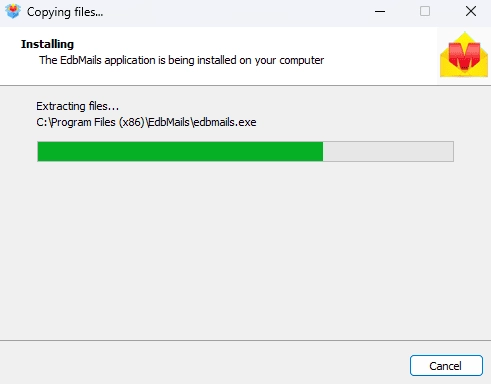
        EdbMails software installation

      • Enter your registered email address and password, then click 'Login'. If you have not created an account yet, choose 'Start Your Free Trial' to continue using the trial version.
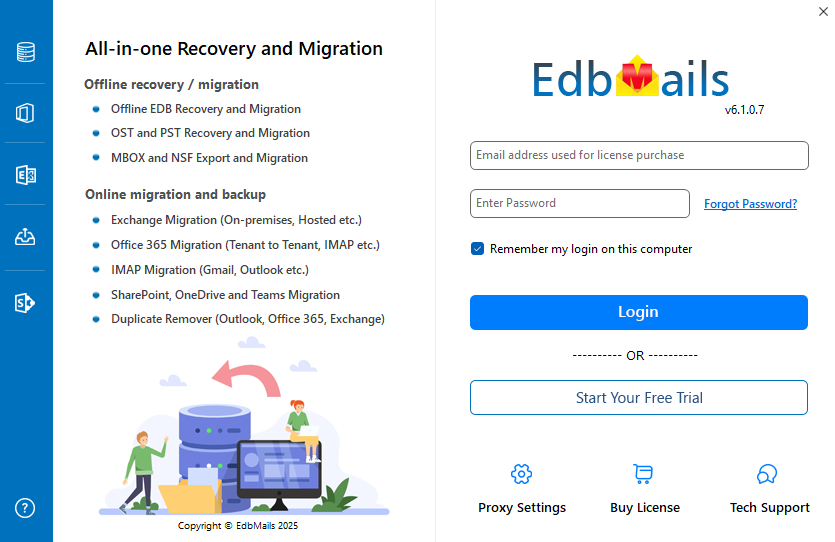
        Login to EdbMails application

      • Select the option 'Google Workspace (G Suite) Migration'.
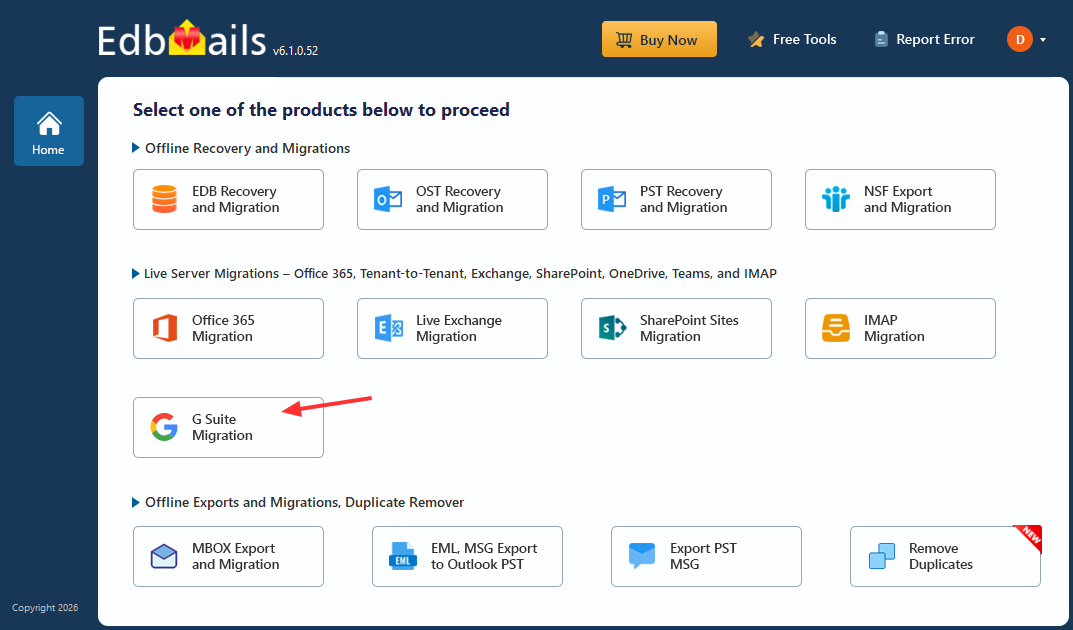
        Google Workspage Migration

      • Select 'Google Workspace to PST Export'.
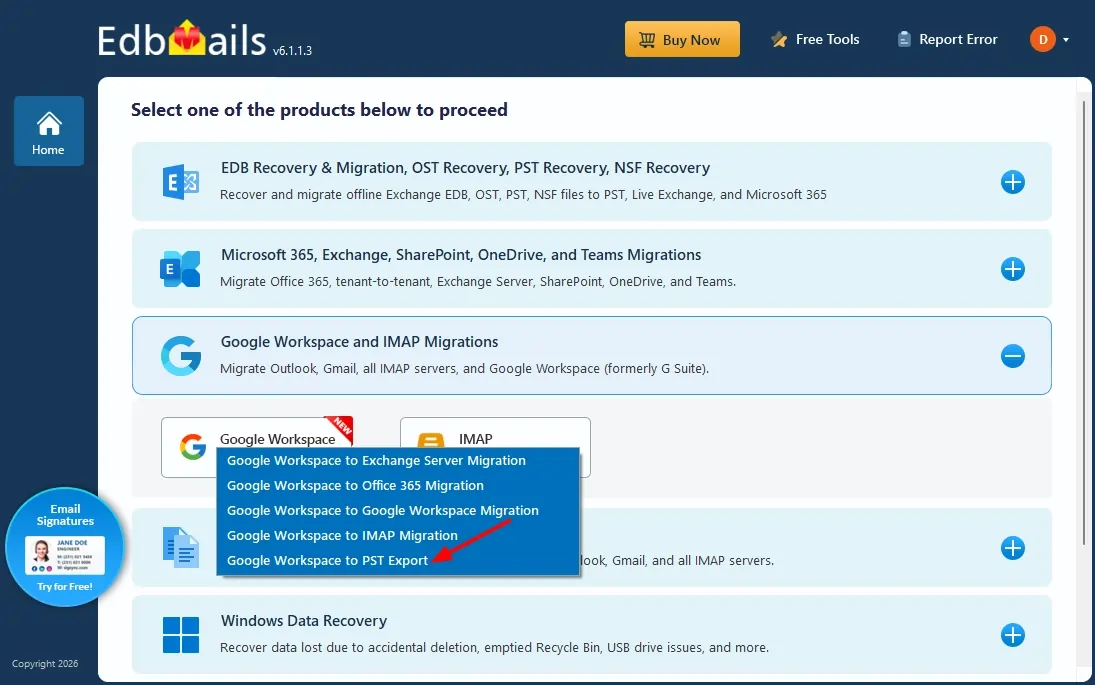
        Google Workspace to PST Export

      • You can proceed with the default job name, or click 'New Job' to create and assign a custom name of your choice.
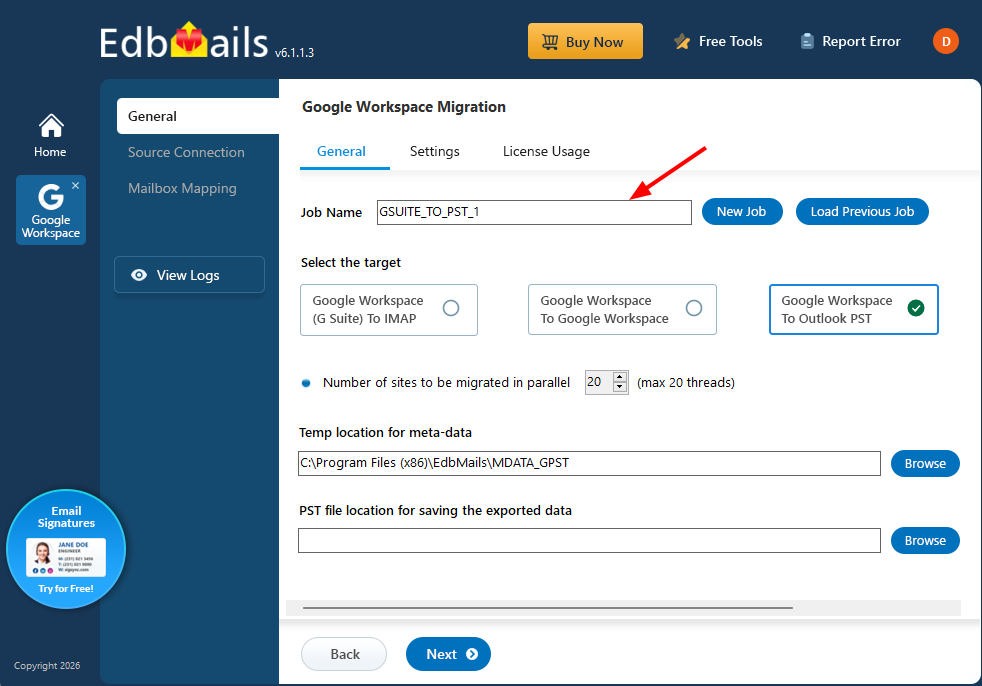
        Enter Migration Job name

      • Click ‘Browse’ to specify the location for saving the PST files..
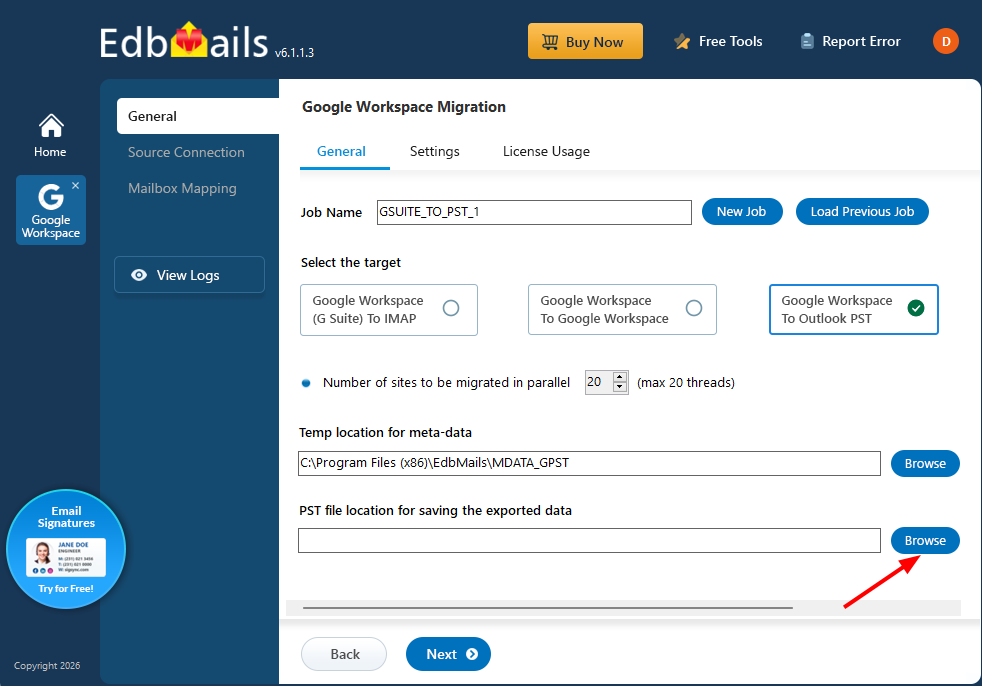
        Browse the location

      • Choose the folder where you want to save the PST files, and ensure the selected drive has sufficient free disk space.
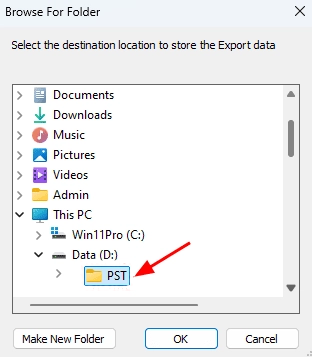
        Select PST location

    • Step 2: Connect to the Source Google Workspace Server

      • Enter the admin email address, click 'Browse' to select the JSON file you downloaded from the Google Cloud Console, and then click 'Login'.

         Steps to Create a Google Cloud Project and Download the JSON File.
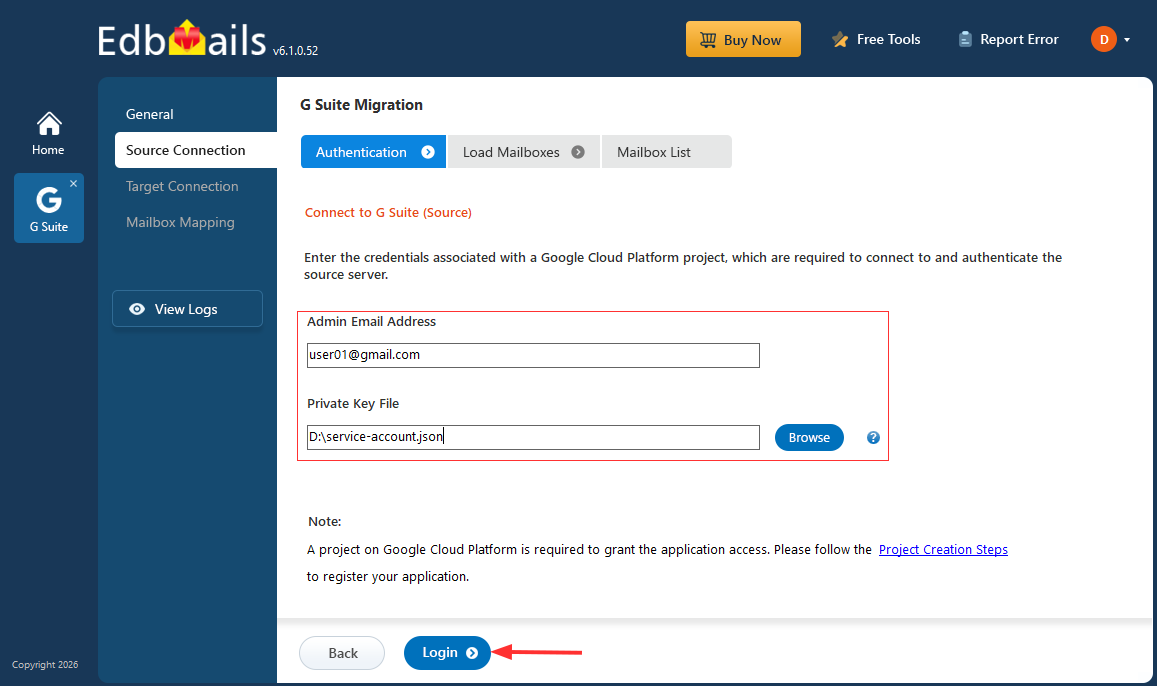
        Login to Source Google Workspace

      • Select one of the methods to load the mailboxes, then click 'Next'.
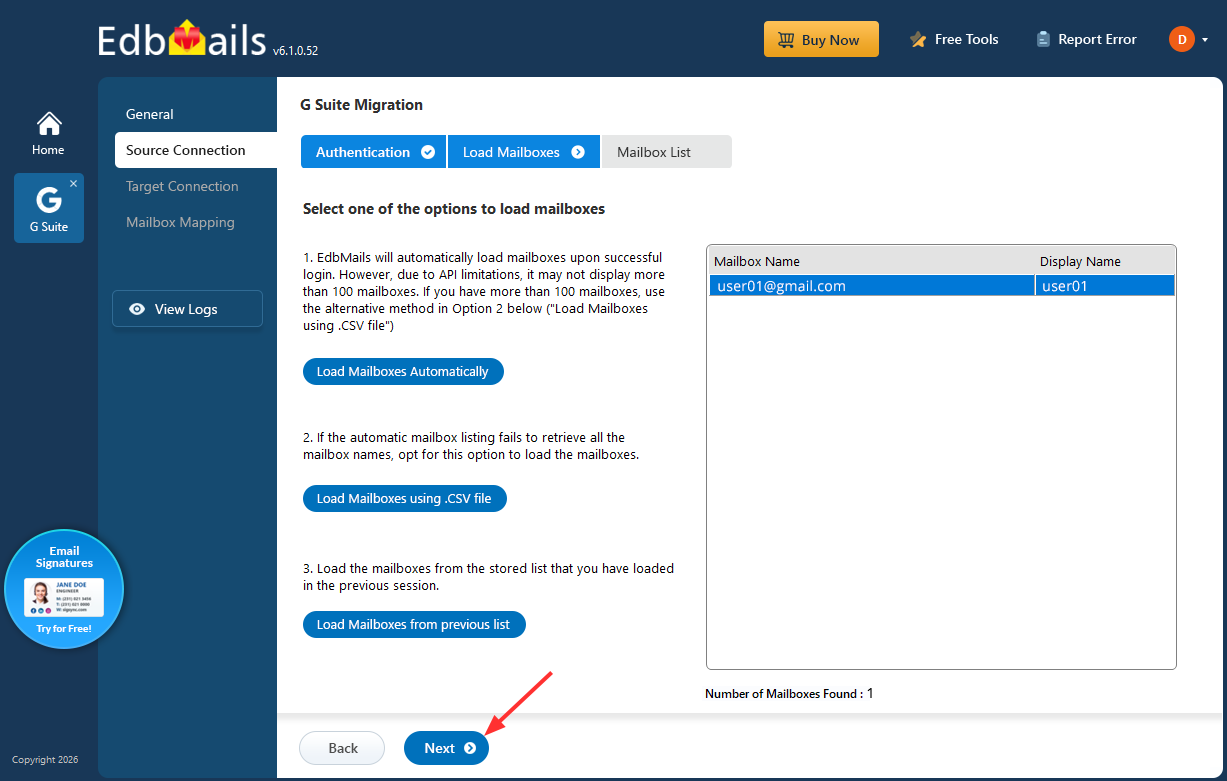
        Load the Mailboxes

      • Select the mailboxes you want to export, then click 'Next' to continue.
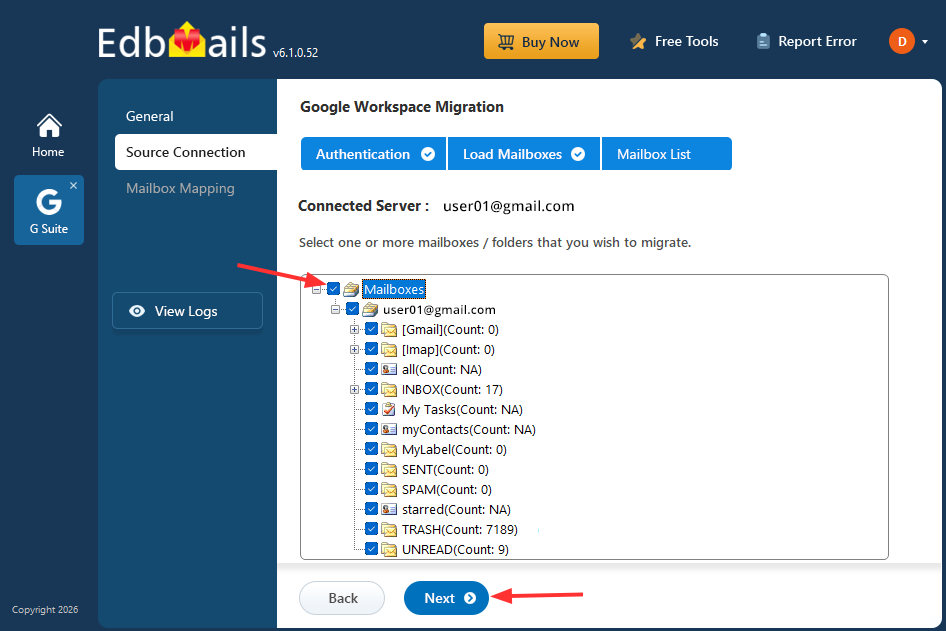
        Select Mailboxes

      • EdbMails lets you customize your export by applying advanced filters. You can also use date-based filtering to export only the items that fall within a specified date range.
    • Step 3: Start Google Workspace to PST Export

      • Verify the selected mailboxes, choose Export as the Action, and click ‘Start Export’ to initiate the export process.
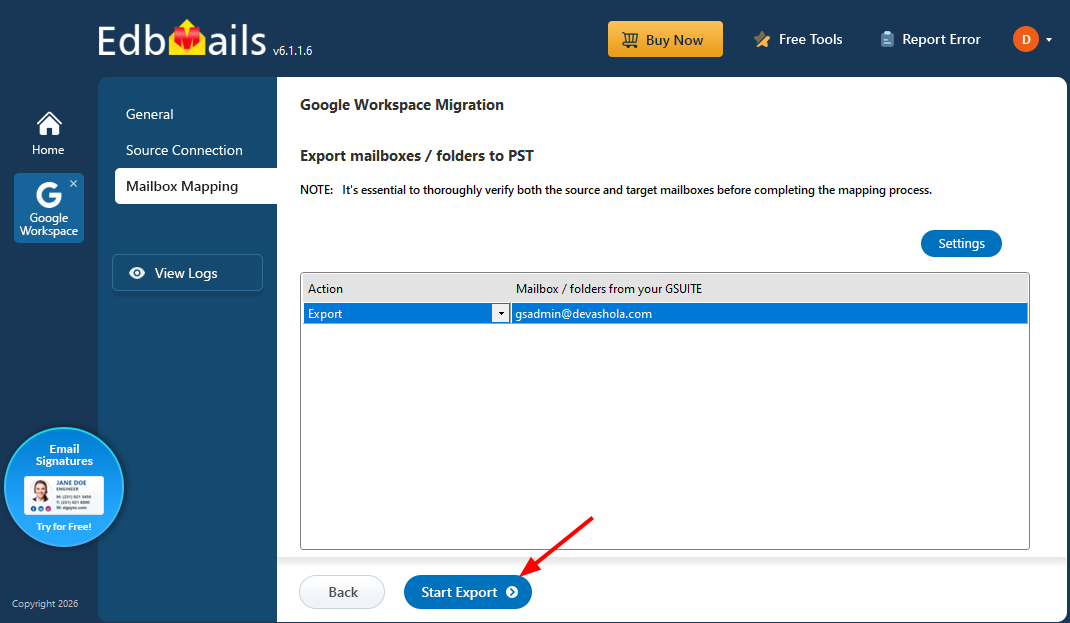
        Start Export

      • The export process begins as shown below. Once the operation is complete, EdbMails displays a confirmation message. An export report is also generated automatically, which you can access by clicking the ‘View Logs’ button
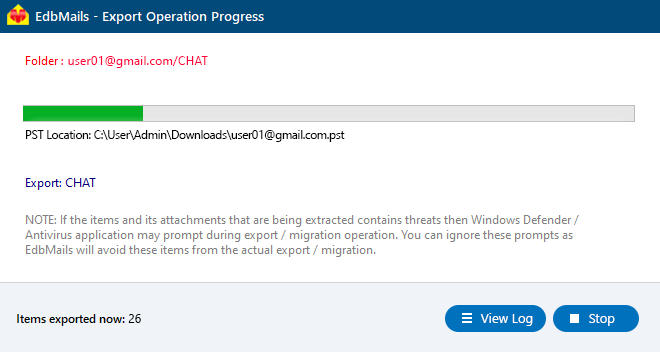
        Export Google Workspace to PST progress

  4. Google Workspace to PST Post-Export Tasks

    Once the Google Workspace to Outlook PST export is complete, perform the following steps to verify and use the exported data

    1. Verify the Exported PST Files

      Open each PST file in Outlook (File > Open & Export > Open Outlook Data File) and confirm that emails, attachments, contacts, calendars, and tasks have been exported correctly, along with the original folder structure.

    2. Import PST Files into Outlook, Office 365, or Exchange

      If the PST files are intended for ongoing use rather than archival, they can be opened directly in Outlook or imported into Office 365 and Exchange Server mailboxes using EdbMails.

    3. Store PST Files Securely

      Save exported PST files to an encrypted or access-controlled location, especially when they are being retained for compliance, legal hold, or backup purposes.

Benefits of EdbMails for Google Workspace to PST Export

  • Complete Data Export: Export emails, attachments, contacts, calendars, and tasks from Google Workspace to PST without data loss, while preserving folder hierarchy and metadata.
  • Secure API-Based Access: Uses secure API authentication with domain-wide delegation to access Google Workspace mailboxes without requiring individual user passwords.
  • Bulk Mailbox Export: Export multiple Google Workspace mailboxes to PST in a single project, reducing manual effort for large organizations.
  • Automatic PST Splitting: Automatically split large exports into multiple PST files of a defined size to stay within Outlook's supported file size limits.
  • Selective Data Export: Apply filters based on date range, folder, sender, or recipient to export only the required data and reduce export time.
  • Real-Time Export Monitoring: Track export progress with live status updates and detailed reports for better visibility and validation.
  • Zero Downtime: Users can continue working in Google Workspace while the export runs in the background.
  • User-Friendly Interface: A simple, step-by-step workflow designed for administrators, without requiring PowerShell scripts or Google Vault licensing.

Frequently Asked Questions

  1. How do I export Google Workspace emails to PST?

    Google Workspace emails can be exported to PST by connecting the source Google Workspace account, selecting the required mailboxes, choosing PST as the export format, and starting the export process. EdbMails allows administrators to export emails, attachments, contacts, calendars, and tasks directly into Outlook PST files.

  2. Can I export multiple Google Workspace mailboxes to PST at once?

    Yes, EdbMails supports bulk Google Workspace mailbox export. Administrators can select multiple mailboxes and export them to PST files in a single operation instead of exporting each mailbox individually.

  3. Can I open Google Workspace PST exports in Outlook?

    Yes, PST files exported from Google Workspace can be opened directly in Microsoft Outlook. The exported PST files contain mailbox data such as emails, attachments, contacts, calendars, and tasks..

  4. Does exporting Google Workspace to PST preserve folder structure and email metadata?

    Yes, EdbMails preserves mailbox hierarchy, Gmail labels, email metadata, and read/unread status during the export process.

  5. Is there a size limit for exporting Google Workspace mailboxes to PST?

    There is no fixed mailbox size limit for exporting Google Workspace data to PST. For large mailboxes, EdbMails provides PST splitting options to divide data into multiple PST files based on the required size..


Additional resources:

  • Google Workspace to Office 365 Migration
  • Google Workspace to Exchange Migration
  • Google Workspace to IMAP Migration
  • Google Workspace to Google Workspace Migration
lady image


 In this manual

IntroductionWhy to Export Migration PrerequisitesMigration StepsPost Migration Tasks

G Suite Migration

100 Mailboxes $299 Only

Buy Now

Need help?

24/7 Customer support

Contact us on Live chat

Personalized Demo

Book a personalized demo

Still need help?

Email us / Call us

@edbmails.com All rights are reserved Privacy Policy | Terms of Use | GDPR | Security | Press Releases

hidden msg
Live Chat

Hi, May I help you?

Hide Chat Now