• Menu
    • Products
      EDB Recovery and Migration
      • Overview
      • Features
      • How it works
      • User Manual
      • FAQ
      • Videos
      • Pricing
      • Screenshots
      Exchange Server Migration
      • Overview
      • Features
      • How it works
      • User Manual
      • FAQ
      • Videos
      • Pricing
      • Screenshots
      Office 365 Migration
      • Overview
      • Features
      • How it works
      • User Manual
      • FAQ
      • Videos
      • Pricing
      • Screenshots
      SharePoint Online Migration
      • Overview
      • Features
      • How it works
      • FAQ
      • Videos
      • Pricing
      • Screenshots
      OneDrive for Business Migration
      • Overview
      • Features
      • How it works
      • FAQ
      • Videos
      • Pricing
      • Screenshots
      Microsoft Teams Migration
      • Overview
      • Features
      • How it works
      • FAQ
      • Videos
      • Pricing
      • Screenshots
      SharePoint Backup
      • Overview
      • Features
      • How it works
      • FAQ
      • Videos
      • Pricing
      • Screenshots
      OneDrive Backup
      • Overview
      • Features
      • How it works
      • FAQ
      • Videos
      • Pricing
      • Screenshots
      IMAP Email Backup & Migration
      • Overview
      • Features
      • How it works
      • User Manual
      • FAQ
      • Videos
      • Pricing
      • Screenshots
      Exchange Server Backup
      • Overview
      • Features
      • How it works
      • FAQ
      • Videos
      • Pricing
      • Screenshots
      Office 365 Backup
      • Overview
      • Features
      • How it works
      • FAQ
      • Videos
      • Pricing
      • Screenshots
      OST Recovery and Migration
      • Overview
      • Features
      • How it works
      • User Manual
      • FAQ
      • Videos
      • Pricing
      • Screenshots
      MBOX Export and Migration
      • Overview
      • Features
      • How it works
      • FAQ
      • Videos
      • Pricing
      • Screenshots
      NSF Export and Migration
      • Overview
      • Features
      • How it works
      • FAQ
      • Videos
      • Pricing
      • Screenshots
      PST Recovery and Migration
      • Overview
      • Features
      • How it works
      • User Manual
      • FAQ
      • Videos
      • Pricing
      • Screenshots
      EML to PST Export
      • Overview
      • How it works
      • Pricing
      PST to MSG Export
      • Overview
      • How it works
      • Pricing
      MSG to PST Export
      • Overview
      • How it works
      • Pricing
      • Screenshots
    • Free Tools
    • Features
    • Reseller
    • Free Trial
    • FAQ
    • Video Tutorials
    • Pricing
    • Download
    • Support
    • Account
EdbMails EDB Recovery and Migration software
  • Reseller
  • Products
    Exchange EDB / Email Recovery Tools
    • EDB Recovery and MigrationRecover EDB to PST, EDB to Office 365 and Exchange NO Duplicate Migration
    • OST Recovery and MigrationRecover OST to PST, OST to Office 365 and Exchange Migration
    • PST Recovery and MigrationRecover Outlook PST, PST to Office 365 and Exchange Migration
    • MBOX Export and MigrationExport MBOX to PST, MBOX to Office 365 and Exchange Migration
    • NSF Export and MigrationExport NSF to PST, NSF to Office 365 and Exchange Migration
    • EML to PST ExportEML files export to Outlook PST format
    • PST to MSG ExportOutlook PST files export to MSG format
    • MSG to PST ExportExport MSG files Outlook PST files
    Exchange and Office 365 Migration
    • Exchange Server MigrationMigrate Exchange 2007, 2010, 2013, 2016, 2019 to Office 365 tenants. Also, migrate between Exchange servers and PST
    • Office 365 MigrationMigrate Source Office 365 tenants to Destination Office 365 tenants. Also, migrate to Exchange Server and PST
    • IMAP Email Backup & MigrationMigrate all IMAP email servers (Gmail, Zimbra, Zoho, Yahoo etc.), Office 365, Exchange and Backup to Outlook PST
    • SharePoint Online MigrationMigrate documents, files and folders from SharePoint sites
    • OneDrive for Business MigrationMigrate documents, files and folders from OneDrive
    • Microsoft Teams MigrationMigrate Teams, documents, files and folders etc.
    Exchange and Office 365 Backup
    • Office 365 BackupIncremental, Granular, Encrypted and Compressed Office 365 Mailboxes Backup
    • Exchange Server BackupIncremental, Granular, Encrypted and Compressed Exchange Mailboxes Backup
    • SharePoint, OneDrive & Teams BackupBackup Online site collections, Team sites, Office 365 groups, all documents etc.
    • Duplicate Remover - Office 365, Exchange, IMAP & Outlook Remove duplicate emails, calendars, contacts, journal etc. from Office 365, Exchange, IMAP, Outlook, Gmail, Zimbra, Zoho Mail etc.
    • More Products
  • Features
  • Video Tutorials
  • Free Tools
  • FAQ
  • Knowledge Base
  • Pricing
  • Download
  • Support
  • Sign in
  • Cart
  1. Home
  2. Office 365 Migration
  3. Microsoft 365 Migration Advanced Filter Settings
Office 365 Migration Features

EdbMails Office 365 Migration

Effortlessly migrate mailboxes, public folders and archive mailboxes from Office 365

Download Buy Now
Office 365 to Exchange Office 365 to PST Public Folder to Office 365 Archive Mailbox to Office 365 Office 365 to IMAP Tenant to Tenant Migration
Office 365 Migration Software Now on Azure Marketplace!
Product Menu
Advanced Filter Settings for Office 365 Migration
  • Overview
  • Features
  • How it works
  • User Manual
  • FAQ
  • Videos
  • Pricing
  • Screenshots

Office 365 Migration Features

  • Migrate with a few clicks; No PowerShell needed
  • Secure Office 365 migration
  • Migrate everything from Office 365 mailboxes
  • Migrate mailboxes from Google, Zimbra, and other platforms to Office 365
  • Easy configuration of source and target Office 365 servers
  • Incremental (Delta) Office 365 migration
  • Pause or resume migration operation
  • Automatically create target mailboxes
  • Automatically map source and target mailboxes
  • Apply date, time, and size filters for data migration
  • Concurrent mailbox migration
  • Migrate with zero downtime
  • Detailed migration reports
  • Cost-effective Office 365 migration
  • Multilingual support
  • Flexible migration scenarios
  • Batch migration support
  • Effortless Public folder migration
  • Archive mailbox transfer
  • Automatic server throttling management
  • CSV-based mailbox import
  • Office 365 Group mailbox migration

Advanced Filter Settings for Office 365 Migration

EdbMails offers advanced filter settings to enhance your Office 365 migration process. These settings allow you to specify which items to include or exclude based on various criteria such as message received date, subject, from address, cc address, bcc address, and the read or unread status of messages. Additionally, you can exclude standard and custom folders, providing further customization to ensure only the necessary data is migrated. With EdbMails, you can achieve a precise and efficient migration that meets your organization's specific needs.

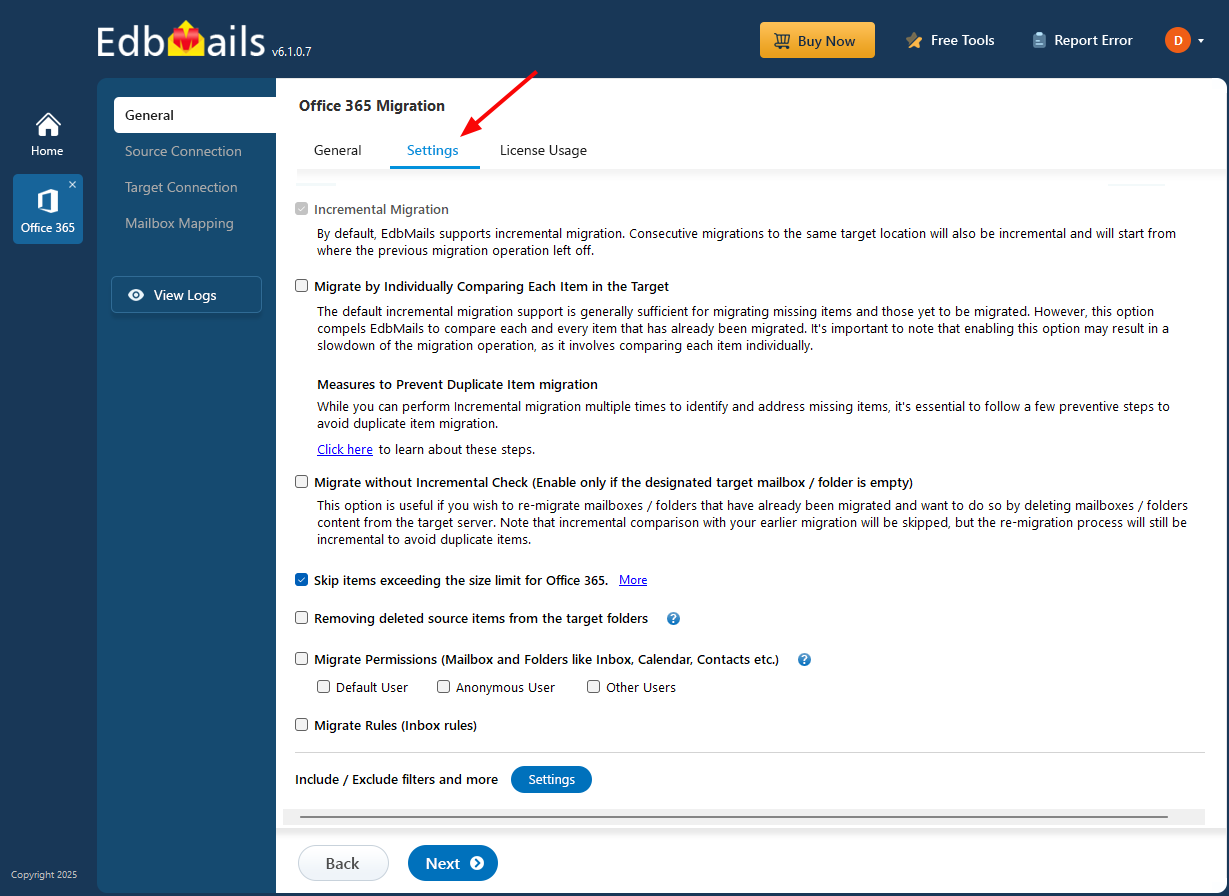
Settings Option in EdbMails

To apply advanced filter settings for the migration operation in EdbMails, click ‘Settings’ on the left pane of the main migration window.

Click ‘Settings’ button for Office 365 Migration

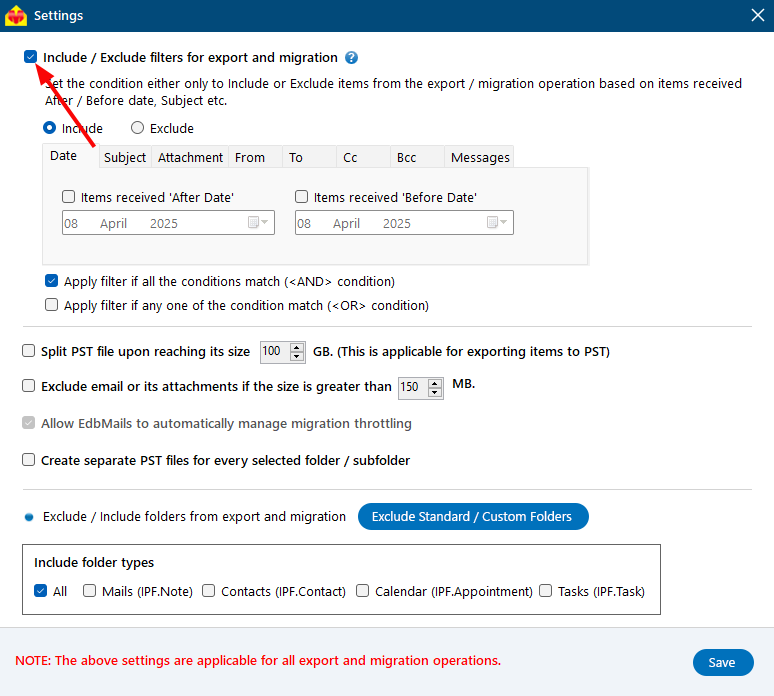
Include / Exclude Filters for Export and Migration:

Before filter setting, ensure to check ‘Include/Exclude filters for export and migration’ at the top of the settings window.

Check ‘Include / Exclude filters for export and o365 migration’

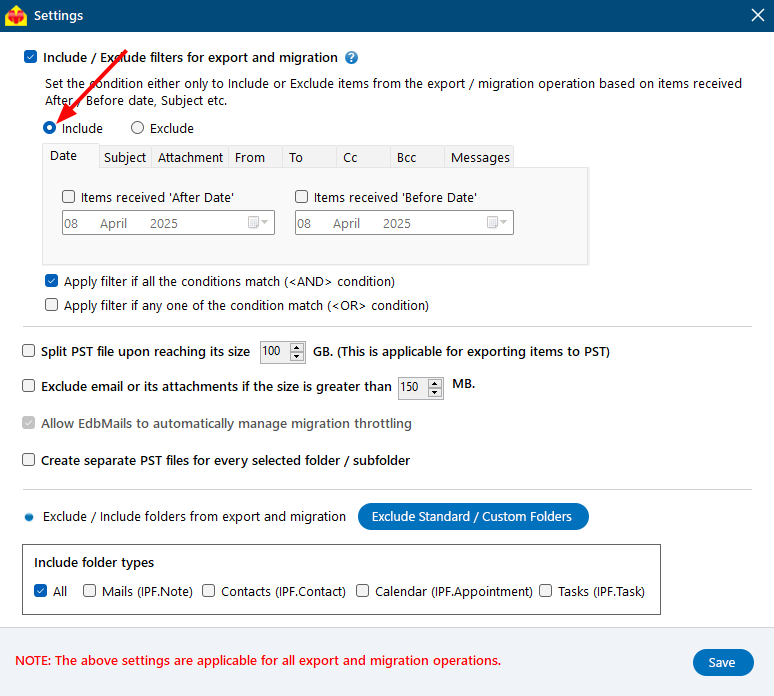
Include:

'Include' option allows you to specify exactly which items should be included in the migration process

Include filters for Office 365 Tenant Migration

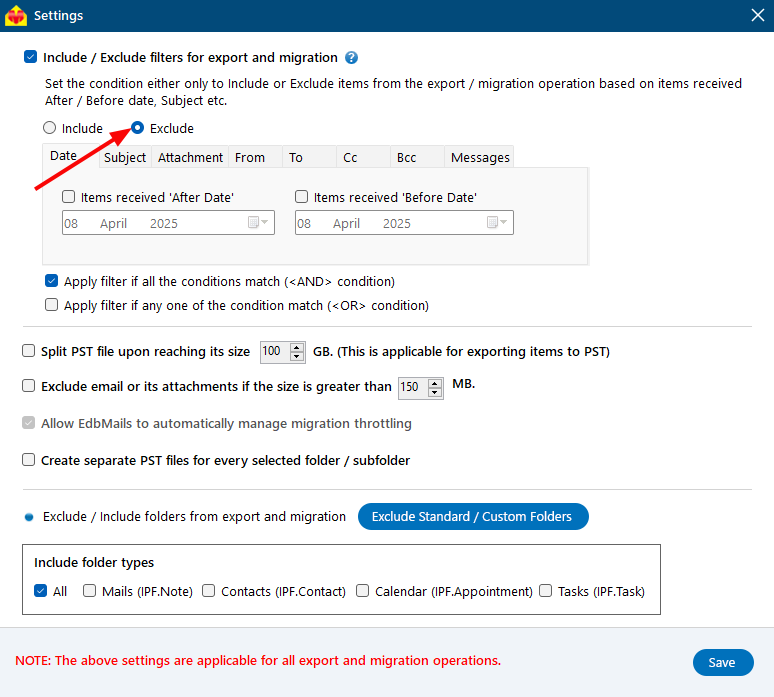
Exclude:

‘Exclude’ option enables skipping the specific items from the migration process.

Exclude filters for Office 365 Tenant to Tenant Migration

Filters:

Following are the filters available to customize your migration operation:

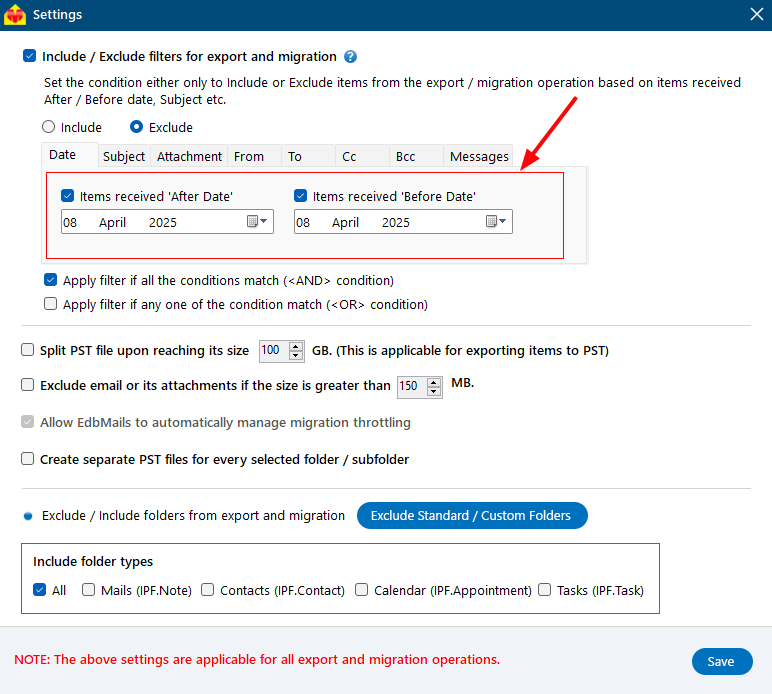
  • Date: Include or exclude the items to be migrated based on the items received within a specific date range. You can set ‘After Date’ or ‘Before Date’ or both ‘After Date and Before Date’.

    Migrate customization

  • Subject: Include or exclude the items to be migrated based on the email / calendar subject.
  • Attachment: Include or exclude items for migration based on the names of attachments contained in your emails.
  • From: Include or exclude emails sent by specific senders.
  • To: Include or exclude emails sent to specific recipients.
  • Cc: Include or exclude emails based on the specific cc addresses.
  • Bcc: Include or exclude emails based on the specific bcc addresses.
  • Messages: Include or exclude emails based on their read or unread status.
  • Apply filters if all the conditions match (<AND> condition): Restrict filters to be applied only if all the mentioned conditions match.
  • Apply filters if any one of the conditions match (<OR> condition): Apply filters if any of the above conditions are met.

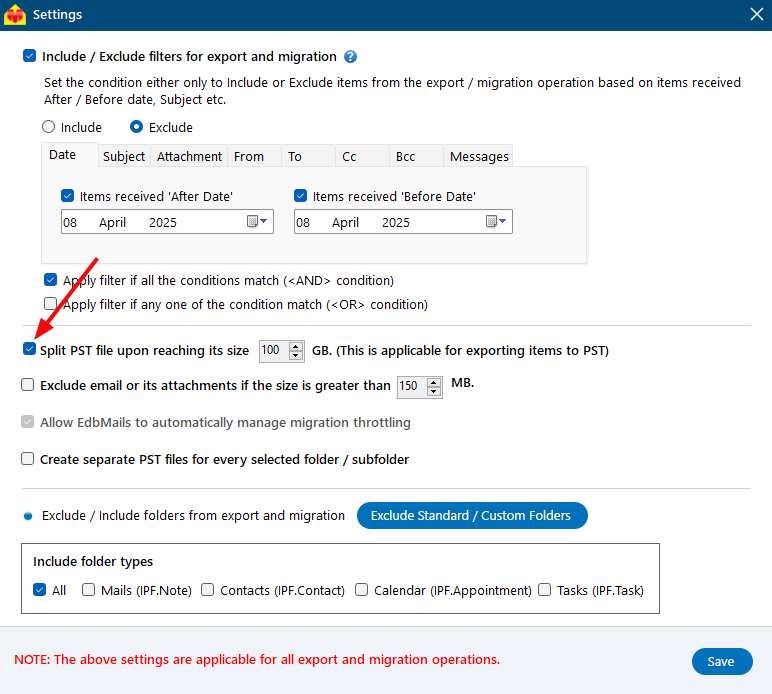
Split PST:

If you want to split PST files while exporting large-sized Office 365 mailboxes, EdbMails provides a Split PST feature. You can customize the size of each PST file created, ranging from 1GB to 100GB. The application divides the PST file programmatically into segments of the specified size. By default, it generates a separate PST file for each individual mailbox.

Split PST to export Office 365 mailboxes

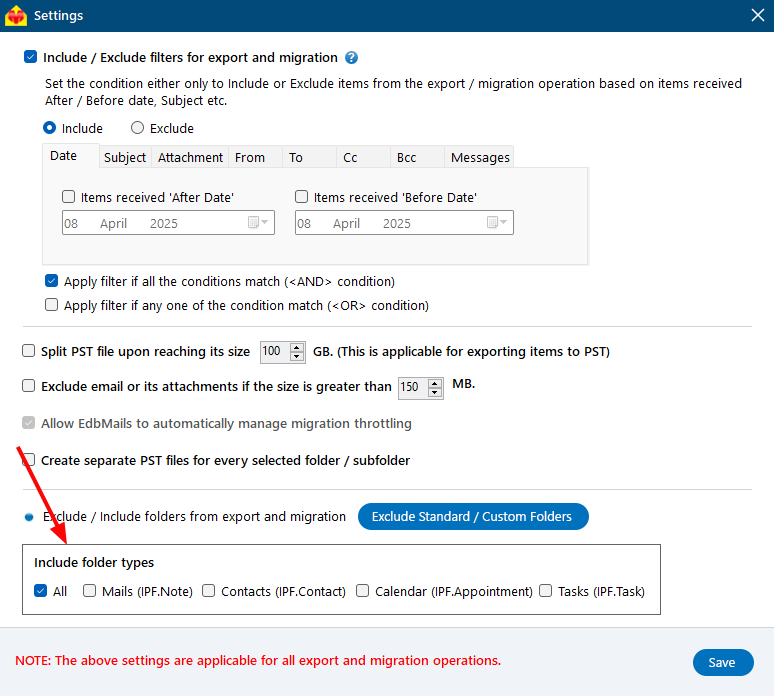
Include Folder Types:

You can choose which types of folders to include in your migration. By default, all folder types (All) are included. You can also select specific types like emails, contacts, calendars, or tasks based on your needs. This flexibility allows you to migrate exactly the data that matters most to your organization.

Select Folder Type

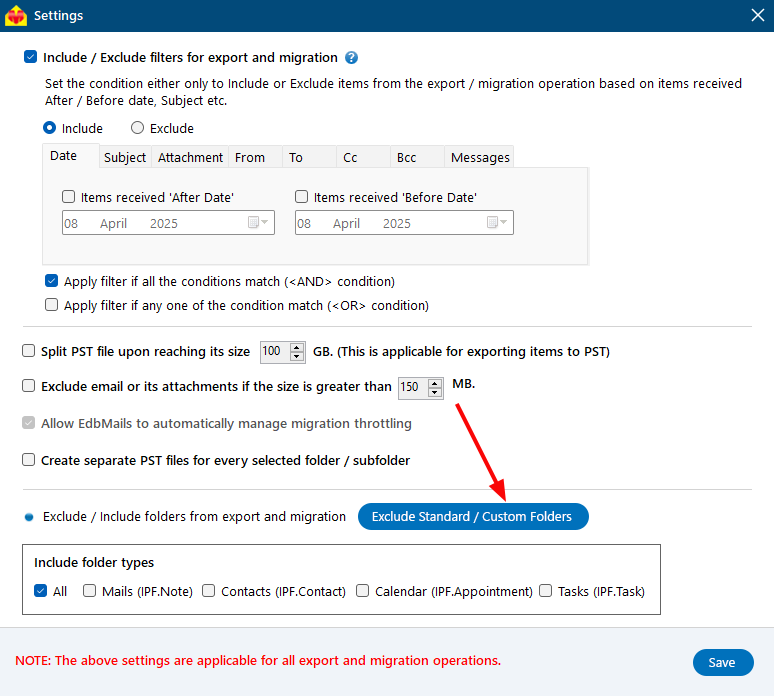
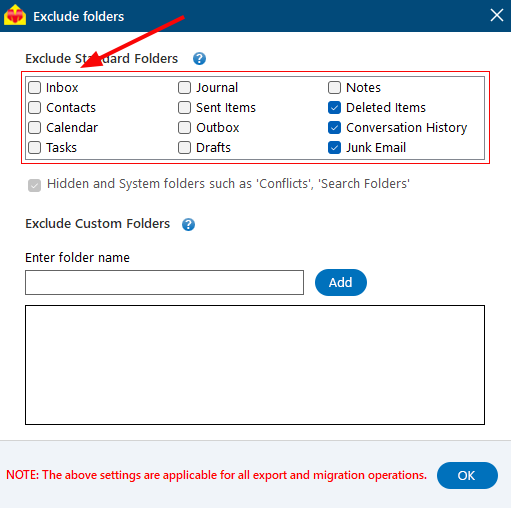
Exclude Standard Folders:

The ‘Exclude Standard / Custom Folders’ button allows you to customize your migration by specifying which default folders should not be migrated to the target server.

Click the ‘Exclude Standard / Custom Folders’ button for Microsoft Tenant to Tenant Migration

By default, the folders 'Deleted Items', 'Conversation History', and 'Junk Email' are excluded from the migration. You can also choose to exclude additional standard folders from the migration.

Exclude Standard Folders for Microsoft Office 365 Migration

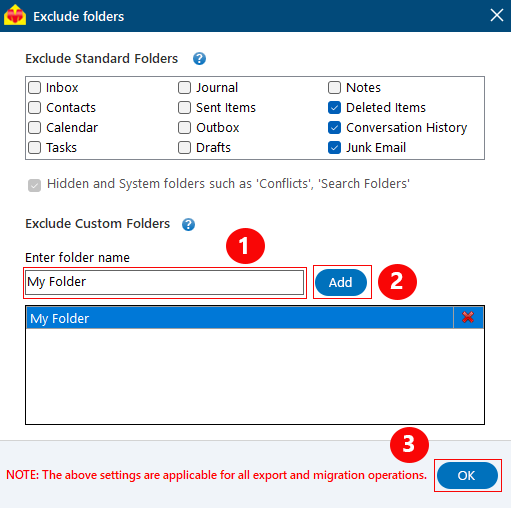
Exclude Custom Folders:

You have the option to exclude custom folders from the migration. Simply enter the folder name and click the 'Add' button. Next, click 'OK' to confirm your selections. This feature allows you to tailor your migration by excluding specific custom folders that do not need to be migrated to the target server.

Exclude Custom Folders for Office 365 Tenant Migration

Click the 'Save' button to apply the settings.


Additional resources:

  • Office 365 tenant to tenant migration
  • Office 365 tenant to tenant Migration step by step guide
  • Automatic mailbox creation on Office 365
  • Automatic Office 365 mailbox mapping
FREE DOWNLOADBUY NOW!
lady image
hidden msg

EdbMails Demo / Trial Version

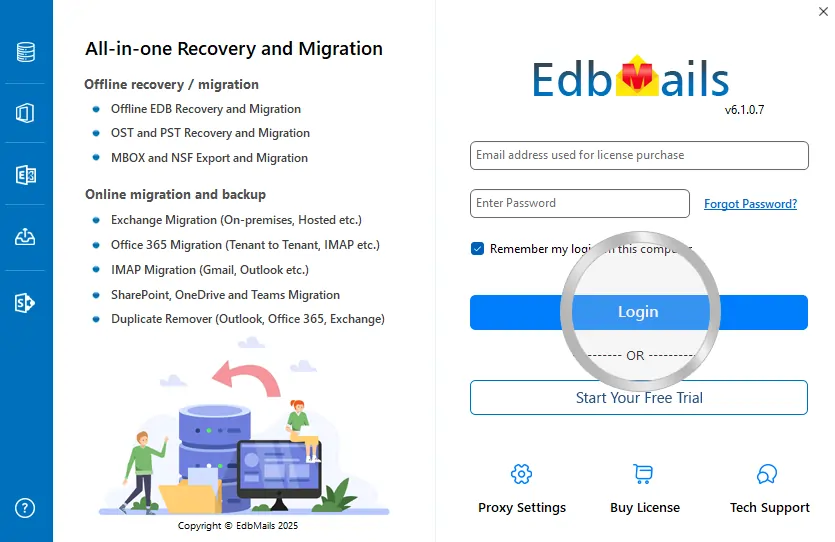
Step 1. Download and install EdbMails

Step 2. Click the 'Start Your Free Trial' button

Demo login EdbMails

  • Home
  • Features
  • Pricing
  • Support
  • Download
  • Sitemap
  • FAQ
  • Video Tutorials
  • Technical Support
  • Live Chat
  • Contact Us
Shifttocloud Inc.
Rehoboth Beach, DE
United States
+1 (302) 416-3056

Privacy Policy | Terms of Use | GDPR | Security | Press Releases

@edbmails.com All rights are reserved

Live Chat

Hi, May I help you?

Hide Chat Now