• Menu
    • Products
      EDB Recovery and Migration
      • Overview
      • Features
      • How it works
      • User Manual
      • FAQ
      • Videos
      • Pricing
      • Screenshots
      Exchange Server Migration
      • Overview
      • Features
      • How it works
      • User Manual
      • FAQ
      • Videos
      • Pricing
      • Screenshots
      Office 365 Migration
      • Overview
      • Features
      • How it works
      • User Manual
      • FAQ
      • Videos
      • Pricing
      • Screenshots
      SharePoint Online Migration
      • Overview
      • Features
      • How it works
      • FAQ
      • Videos
      • Pricing
      • Screenshots
      OneDrive for Business Migration
      • Overview
      • Features
      • How it works
      • FAQ
      • Videos
      • Pricing
      • Screenshots
      Microsoft Teams Migration
      • Overview
      • Features
      • How it works
      • FAQ
      • Videos
      • Pricing
      • Screenshots
      SharePoint Backup
      • Overview
      • Features
      • How it works
      • FAQ
      • Videos
      • Pricing
      • Screenshots
      OneDrive Backup
      • Overview
      • Features
      • How it works
      • FAQ
      • Videos
      • Pricing
      • Screenshots
      IMAP Email Backup & Migration
      • Overview
      • Features
      • How it works
      • User Manual
      • FAQ
      • Videos
      • Pricing
      • Screenshots
      Exchange Server Backup
      • Overview
      • Features
      • How it works
      • FAQ
      • Videos
      • Pricing
      • Screenshots
      Office 365 Backup
      • Overview
      • Features
      • How it works
      • FAQ
      • Videos
      • Pricing
      • Screenshots
      OST Recovery and Migration
      • Overview
      • Features
      • How it works
      • User Manual
      • FAQ
      • Videos
      • Pricing
      • Screenshots
      MBOX Export and Migration
      • Overview
      • Features
      • How it works
      • FAQ
      • Videos
      • Pricing
      • Screenshots
      NSF Export and Migration
      • Overview
      • Features
      • How it works
      • FAQ
      • Videos
      • Pricing
      • Screenshots
      PST Recovery and Migration
      • Overview
      • Features
      • How it works
      • User Manual
      • FAQ
      • Videos
      • Pricing
      • Screenshots
      EML to PST Export
      • Overview
      • How it works
      • Pricing
      PST to MSG Export
      • Overview
      • How it works
      • Pricing
      MSG to PST Export
      • Overview
      • How it works
      • Pricing
      • Screenshots
      G Suite Migration
      • Overview
      • How it works
      • Pricing
      • Screenshots
    • Free Tools
    • Features
    • Reseller
    • Free Trial
    • FAQ
    • Video Tutorials
    • Pricing
    • Download
    • Support
    • Account
EdbMails EDB Recovery and Migration software
  • Reseller
  • Products
    Exchange EDB / Email Recovery Tools
    • EDB Recovery and MigrationRecover EDB to PST, EDB to Office 365 and Exchange NO Duplicate Migration
    • OST Recovery and MigrationRecover OST to PST, OST to Office 365 and Exchange Migration
    • PST Recovery and MigrationRecover Outlook PST, PST to Office 365 and Exchange Migration
    • MBOX Export and MigrationExport MBOX to PST, MBOX to Office 365 and Exchange Migration
    • NSF Export and MigrationExport NSF to PST, NSF to Office 365 and Exchange Migration
    • EML to PST ExportEML files export to Outlook PST format
    • PST to MSG ExportOutlook PST files export to MSG format
    • MSG to PST ExportExport MSG files Outlook PST files
    Exchange and Office 365 Migration
    • Exchange Server MigrationMigrate between any Exchange Servers, Exchange to Office 365, Export Exchange to PST, Migrate PST files to Exchange server
    • Office 365 MigrationMigrate between Office 365 tenants, Office 365 to Exchange, Export Office 365 to PST, Migrates PST files to Office 365
    • IMAP Email Backup & MigrationMigrate between any IMAP Servers (Gmail, Outlook, Zimbra, Zoho, Yahoo etc.), IMAP to Office 365, Exchange, IMAP to PST, PST to IMAP
    • G Suite MigrationMigrate emails, contacts, calendars from G Suite / Google Workspace to Office 365, Exchange, IMAP
    • SharePoint Online MigrationMigrate documents, lists, files and folders from SharePoint sites
    • OneDrive for Business MigrationMigrate documents, lists, files and folders from OneDrive
    • Microsoft Teams MigrationMigrate Teams, chats, channels, documents, files and folders etc.
    Exchange and Office 365 Backup
    • Office 365 BackupIncremental, Granular, Encrypted and Compressed Office 365 Mailboxes Backup
    • Exchange Server BackupIncremental, Granular, Encrypted and Compressed Exchange Mailboxes Backup
    • SharePoint, OneDrive & Teams BackupBackup Online site collections, Team sites, Office 365 groups, all documents etc.
    • Duplicate Remover - Office 365, Exchange, IMAP & Outlook Remove duplicate emails, calendars, contacts, journal etc. from Office 365, Exchange, IMAP, Outlook, Gmail, Zimbra, Zoho Mail etc.
    • More Products
  • Features
  • Video Tutorials
  • Free Tools
  • FAQ
  • Knowledge Base
  • Pricing
  • Download
  • Support
  • Sign in
  • Cart
  1. Home
  2. Office 365 Migration
  3. Migrate to Office 365 without Server Downtime
Office 365 Migration Features

EdbMails Office 365 Migration

Effortlessly migrate mailboxes, public folders and archive mailboxes from Office 365

Download Buy Now
Office 365 to Exchange Office 365 to PST Public Folder to Office 365 Archive Mailbox to Office 365 Office 365 to IMAP Tenant to Tenant Migration
Office 365 Migration Software Now on Azure Marketplace!
Product Menu
Migrate with Zero Downtime
  • Overview
  • Features
  • How it works
  • User Manual
  • FAQ
  • Videos
  • Pricing
  • Screenshots

Office 365 Migration Features

  • Migrate with a few clicks; No PowerShell needed
  • Secure Office 365 migration
  • Migrate everything from Office 365 mailboxes
  • Migrate mailboxes from Google, Zimbra, and other platforms to Office 365
  • Easy configuration of source and target Office 365 servers
  • Incremental (Delta) Office 365 migration
  • Pause or resume migration operation
  • Automatically create target mailboxes
  • Automatically map source and target mailboxes
  • Apply date, time, and size filters for data migration
  • Concurrent mailbox migration
  • Migrate with zero downtime
  • Detailed migration reports
  • Cost-effective Office 365 migration
  • Multilingual support
  • Flexible migration scenarios
  • Batch migration support
  • Effortless Public folder migration
  • Archive mailbox transfer
  • Automatic server throttling management
  • CSV-based mailbox import
  • Office 365 Group mailbox migration

Migrate with Zero Downtime

Migrating data within Office 365, such as Tenant to Tenant migration, is a critical requirement for organizations looking to optimize operations and enhance productivity. However, traditional migration approaches often interrupt daily workflows, requiring administrators to extend work hours to minimize downtime.

EdbMails Office 365 Migration is designed to maintain uninterrupted email access throughout the entire migration process by allowing the source and target environments to coexist. Unlike conventional methods that can cause service disruptions, EdbMails allows administrators to carry out migrations smoothly during standard business hours. This ensures zero disruption to daily operations and supports continuous productivity.

Office 365 Migration With Zero Downtime

In addition, EdbMails supports incremental migration, which transfers only new or modified items after the initial migration. This feature prevents duplicate data during subsequent migrations to the same destination, ensuring a clean and efficient migration process.

Mailbox Creation and Mapping Automation

EdbMails' mailbox creation and mapping automation is designed to ensure zero downtime during email migrations. This feature automates the setup of mailboxes, ensuring they are created and mapped accurately, reducing the chances of human error. By automating this process, organizations can migrate large volumes of mailboxes quickly and efficiently, maintaining business continuity and preventing disruptions that could otherwise result in costly downtime.

Real-time Progress Tracking and Reporting

With EdbMails, real-time progress tracking and reporting are seamlessly integrated into the migration process, ensuring zero downtime. Administrators can monitor the entire migration in real time, with live updates on the status of each mailbox being transferred. This instant feedback enables swift identification of any issues, preventing delays and ensuring that migration activities proceed without interruption. Comprehensive reporting ensures complete transparency throughout the migration, reinforcing zero downtime goals.

Uninterrupted User Experience

EdbMails' user-centric approach to email migration minimizes disruption and enhances productivity. By prioritizing user experience, EdbMails ensures seamless migrations, allowing employees to access their emails with zero downtime. The automation process preserves all user data, settings, and preferences, while intuitive interfaces simplify mailbox management. This approach not only improves user satisfaction but also reduces the administrative burden, ensuring a smooth, uninterrupted workflow throughout the migration transition.

Real-life Scenarios and Benefits

This capability is particularly beneficial across industries where uninterrupted communication is critical:

  1. Healthcare: Hospitals rely heavily on email for patient care coordination and vital communications. Zero downtime migration with EdbMails ensures healthcare professionals can continue their essential tasks without interruption.
  2. Finance: Financial institutions require uninterrupted email access to manage transactions, client communications, and regulatory compliance. EdbMails ensures continuous email service during migration supports these critical operations seamlessly.
  3. Manufacturing: Manufacturers depend on email for supply chain management, production coordination, and customer communications. Zero downtime migration facilitates uninterrupted business operations, ensuring production schedules are maintained without disruptions.
  4. IT & Managed Service Providers (MSPs): MSPs often manage migrations for multiple clients simultaneously. Zero downtime migration allows service providers to complete Office 365 migrations without impacting client operations and ensuring smooth service delivery.
  5. Multi-Location Organizations: Organizations with distributed or remote workforces operate across multiple time zones. EdbMails enables Office 365 migration without server downtime, ensuring uninterrupted collaboration and communication regardless of location.

Conclusion

Zero downtime migration is essential for organizations that depend heavily on email communication to keep operations running smoothly without interruptions. It helps maintain productivity, ensures continuous access to emails, and prevents risks such as data loss or duplication during the migration process. By allowing email services to remain active throughout the transition, organizations can avoid disruptions to critical business workflows.

This capability is especially important for industries such as healthcare, finance, and manufacturing, where constant email availability is necessary to meet operational demands and compliance requirements. EdbMails enables Office 365 migrations with no server downtime, helping organizations sustain business continuity and productivity throughout the migration process.


Additional resources:

  • EdbMails software for Office 365 migration
  • Secure Office 365 migration with EdbMails
  • Office 365 tenant to tenant migration step by step guide
  • Office 365 migration with advanced filter settings
  • Migrate Office 365 emails, contacts, calendars
FREE DOWNLOAD BUY NOW!
lady image
hidden msg

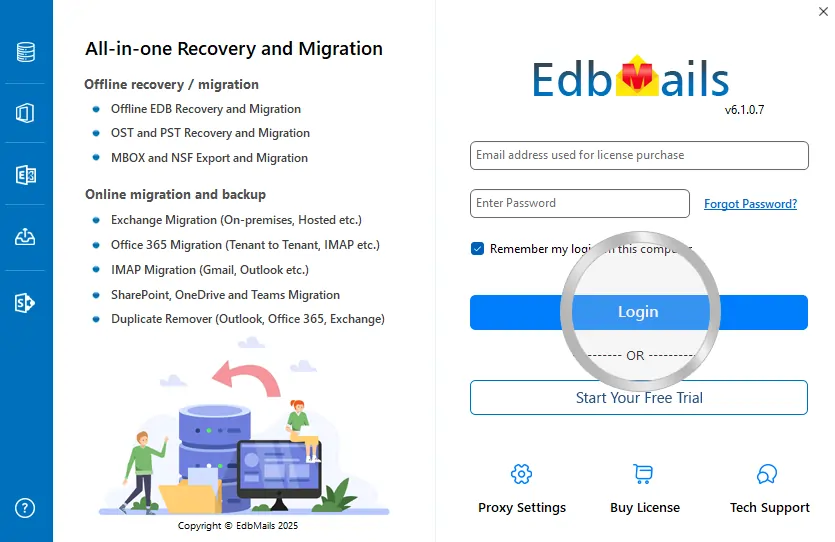
EdbMails Demo / Trial Version

Step 1. Download and install EdbMails

Step 2. Click the 'Start Your Free Trial' button

Demo login EdbMails

  • Home
  • Features
  • Pricing
  • Support
  • Download
  • Sitemap
  • FAQ
  • Video Tutorials
  • Technical Support
  • Live Chat
  • Contact Us
Shifttocloud Inc.
Rehoboth Beach, DE
United States
+1 (302) 416-3056

Privacy Policy | Terms of Use | GDPR | Security | Press Releases

@edbmails.com All rights are reserved

Live Chat

Hi, May I help you?

Hide Chat Now