
EdbMails EDB Recovery and Migration software
  • Products
    Exchange EDB / Email Recovery Tools
    • EDB Recovery and MigrationRecover EDB to PST, EDB to Office 365 and Exchange NO Duplicate Migration
    • OST Recovery and MigrationRecover OST to PST, OST to Office 365 and Exchange Migration
    • PST Recovery and MigrationRecover Outlook PST, PST to Office 365 and Exchange Migration
    • MBOX Export and MigrationExport MBOX to PST, MBOX to Office 365 and Exchange Migration
    • NSF Export and MigrationExport NSF to PST, NSF to Office 365 and Exchange Migration
    • EML to PST ExportEML files export to Outlook PST format
    • PST to MSG ExportOutlook PST files export to MSG format
    • MSG to PST ExportExport MSG files Outlook PST files
    Exchange and Office 365 Migration
    • Exchange Server MigrationMigrate between any Exchange Servers, Exchange to Office 365, Export Exchange to PST, Migrate PST files to Exchange server
    • Office 365 MigrationMigrate between Office 365 tenants, Office 365 to Exchange, Export Office 365 to PST, Migrates PST files to Office 365
    • IMAP Email Backup & MigrationMigrate between any IMAP Servers (Gmail, Outlook, Zimbra, Zoho, Yahoo etc.), IMAP to Office 365, Exchange, IMAP to PST, PST to IMAP
    • G Suite MigrationMigrate emails, contacts, calendars from G Suite / Google Workspace to Office 365, Exchange, IMAP
    • SharePoint Online MigrationMigrate documents, lists, files and folders from SharePoint sites
    • OneDrive for Business MigrationMigrate documents, lists, files and folders from OneDrive
    • Microsoft Teams MigrationMigrate Teams, chats, channels, documents, files and folders etc.
    Exchange and Office 365 Backup
    • Office 365 BackupIncremental, Granular, Encrypted and Compressed Office 365 Mailboxes Backup
    • Exchange Server BackupIncremental, Granular, Encrypted and Compressed Exchange Mailboxes Backup
    • SharePoint, OneDrive & Teams BackupBackup Online site collections, Team sites, Office 365 groups, all documents etc.
    • Duplicate Remover - Office 365, Exchange, IMAP & Outlook Remove duplicate emails, calendars, contacts, journal etc. from Office 365, Exchange, IMAP, Outlook, Gmail, Zimbra, Zoho Mail etc.
    • More Products
  • Features
  • FAQ
  • Pricing
  • Download
  • Support
  • Sign in
User’s Manual
G Suite Migration

User Manual

User Manual

  • Overview
  • Installation
    • Installation process
    • Reinstall or Upgrade
    • How to uninstall
  • FAQs
    • G Suite to Office 365
    • G Suite to IMAP
    • G Suite to Exchange
  • Videos
  • Screenshots
    • G Suite to Office 365
    • G Suite to Exchange
    • G Suite to IMAP
  • How it works?
    • G Suite to Office 365 Migration
    • G Suite to Exchange Migration
    • G Suite to IMAP Migration
  • G Suite Admin Configuration
  • Connect to target Office 365
  • Connect to Exchange server for multiple mailboxes migration
    • Connect with Global Admin
    • Connect to Multiple users using CSV file
    • Connect using full access permission
    • Connect individual users for Single / Specific user Migration
  • Connect to Hosted Exchange for its Migration
    • Connect with Full Access permissions
    • Connect to multiple users using CSV file
    • Connect to Individual user for migration
  • Connect to IMAP
    • Connect IMAP Single Server
    • Connect IMAP Multiple Server
  • Map the Mailboxes
  • Incremental Migration
  • Exchange Throttling Policy
  • Multifactor Authentication
    • Enable MFA in Office 365
    • Create App password for MFA
    • Disable Security Defaults
  1. Home
  2. Product
  3. How to Install EdbMails for G Suite Migration?
Download Buy Now

Installation Process for G Suite Migration

To perform a G Suite migration, install the EdbMails application on a Windows machine that has connectivity to both the source G Suite environment and the destination platform. Once the installation is complete, the application is ready to configure and start migrating mailbox data securely.

Installation Requirements for G Suite Migration

Before installing the application, ensure the following requirements are met.

  • The system where the application is installed must have a stable internet connection and access to both the source G Suite environment and the destination email platform. This connectivity ensures that mailbox data can be accessed and migrated without interruptions.
  • Ensure the installation machine has sufficient resources such as CPU, RAM, and disk space to process mailbox data during the migration.
  • Ensure that firewall rules or network security settings allow the connections required for the migration to run without interruption.

Installation Wizard

The installation process uses a simple step-by-step wizard.

Step 1: Launch the setup

Download the latest version of the EdbMails application and double-click the setup file to start the installation wizard.
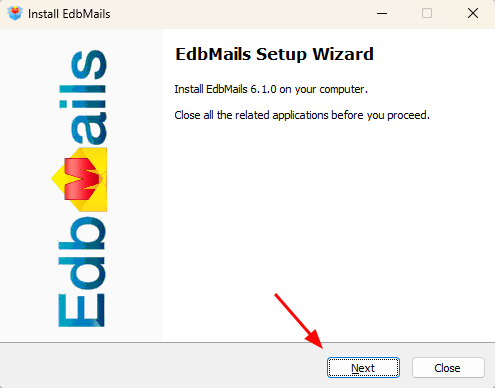
EdbMails Setup Wizard

Step 2: Accept the license agreement

Review the license agreement and click ‘I Agree’ to accept the terms and proceed with the installation.
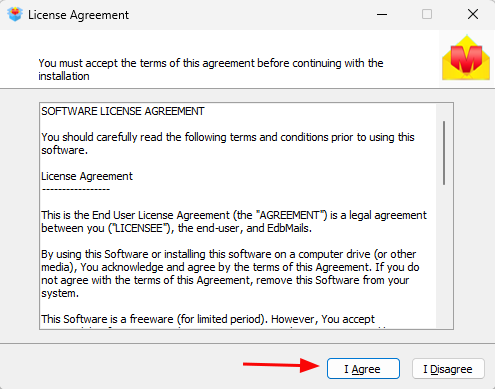
Image License Agreement

Step 3: Installation location

The application will be installed in the default location unless you choose a custom path. If desired, a custom folder may be specified. Ensure the selected path has read/write permissions.
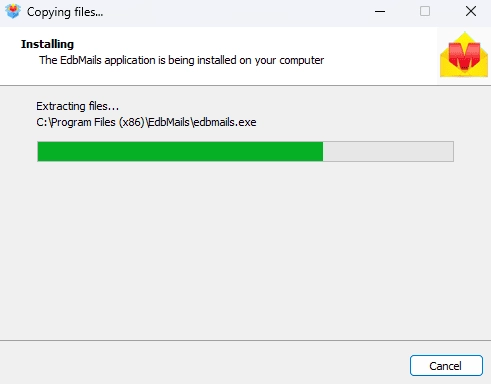
EdbMails Installation process

Step 4: Complete the installation

Once the installation finishes, the application launches automatically and is ready for configuration.
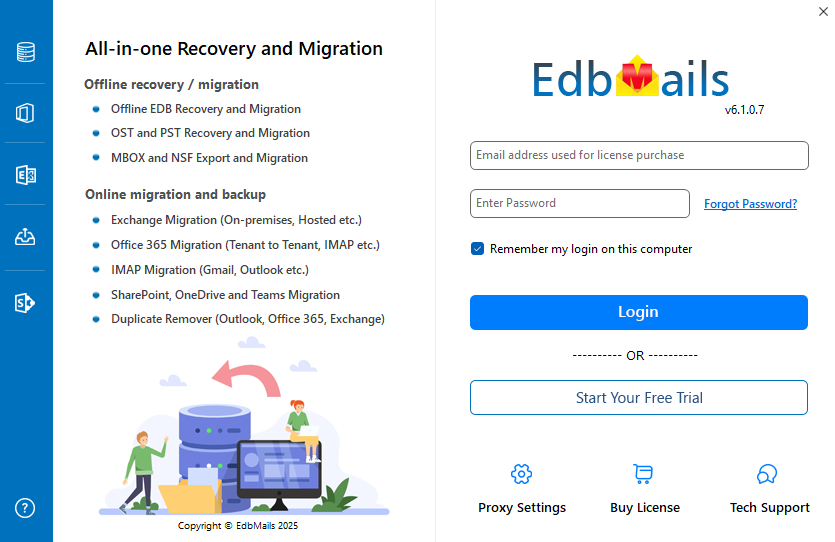
Login to EdbMails Application

Permission Requirements for the Destination Platform

When migrating mailbox data from G Suite to another email platform, the administrator account used in the destination environment must have the required permissions. These permissions allow the migration application to access mailboxes, establish connections, and transfer data securely during the migration process.

Requirements for the target Office 365

When migrating data to the target Office 365 environment, the administrator account used for the migration must have sufficient permissions to access and manage user mailboxes within the tenant. These permissions allow the migration application to authenticate with Office 365, detect available mailboxes, and import mailbox data such as emails, contacts, and calendars into the destination accounts without access issues.

Requirements for the target Exchange Server

For migrations to the target Exchange Server environment, the administrator account should have the necessary privileges to access and manage mailboxes within the Exchange organization. These permissions enable the migration tool to establish a connection with the Exchange Server, identify destination mailboxes, and transfer mailbox data securely during the migration process.

 

 In this manual

Installation processSystem RequirementsInstallation wizard stepsConfiguration Requirements

G Suite Migration

100 Mailboxes $299 Only

Buy Now

Need help?

24/7 Customer support

Contact us on Live chat

Personalized Demo

Book a personalized demo

Still need help?

Email us / Call us

@edbmails.com All rights are reserved Privacy Policy | Terms of Use | GDPR | Security | Press Releases

hidden msg
Live Chat

Hi, May I help you?

Hide Chat Now