
EdbMails EDB Recovery and Migration software
  • Products
    EdbMails
    All-in-one Recovery and Migration

    Trusted and internationally recognized software that delivers award winning solutions.

    Explore our products
    • Offline Recovery Tools
    • Migration Tools
    • G Suite Migration
    • IMAP Migration
    • Duplicate Remover
    • Backup
    • Windows Data Recovery

    Exchange EDB / Email Recovery Tools

    EdbMails offers a comprehensive suite of tools to recover and convert offline EDB, OST, and PST files into Outlook PST, migrate mailboxes to Office 365 and live Exchange Server, and export and migrate data from NSF, MBOX, EML, and MSG formats.

    EDB Recovery and Migration
    Recover EDB to PST, EDB to Office 365 and Exchange NO Duplicate Migration
    NSF Export and Migration
    Export NSF to PST, NSF to Office 365 and Exchange Migration
    OST Recovery and Migration
    Recover OST to PST, OST to Office 365 and Exchange Migration
    EML to PST Export
    EML files export to Outlook PST format
    PST Recovery and Migration
    Recover Outlook PST, PST to Office 365 and Exchange Migration
    PST to MSG Export
    Outlook PST files export to MSG format
    MBOX Export and Migration
    Export MBOX to PST, MBOX to Office 365 and Exchange Migration
    MSG to PST Export
    Export MSG files to Outlook PST files

    Exchange, Office 365, IMAP, SharePoint, OneDrive, Teams

    EdbMails lets you securely migrate mailboxes across Microsoft 365, Exchange, Google Workspace (G Suite), and IMAP-supported servers such as Outlook, Gmail, Zimbra, Zoho Mail, and cPanel, ensuring zero downtime.

    Exchange Server Migration
    Migrate between any Exchange Servers, Exchange to Office 365, Exchange to PST, PST files to Exchange.
    SharePoint Online Migration
    Migrate documents, lists, files and folders from SharePoint sites.
    Office 365 Migration
    Migrate between Office 365 tenants, Office 365 to Exchange, Office 365 to PST, PST files to Office 365.
    OneDrive for Business Migration
    Migrate documents, lists, files and folders from OneDrive.
    Microsoft Teams Migration
    Migrate Teams, chats, channels, documents, files and folders etc.

    Google Workspace / G Suite Migration

    EdbMails G Suite Migration Tool lets you easily migrate emails, calendars, contacts, tasks, and more from G Suite to Office 365, Exchange Server, and IMAP servers using a Google Admin account without requiring individual user credentials.

    G Suite Migration
    Migrate emails, calendars, contacts, tasks from G Suite to Office 365, G Suite to Exchange, G Suite to IMAP Servers
    G Suite to Office 365
    Migrate emails, calendars, contacts, tasks from Google Workspace / G Suite to Office 365
    G Suite to Exchange Server
    Migrate emails, calendars, contacts, tasks from Google Workspace / G Suite to on-Premise Exchange Server
    G Suite to IMAP
    Migrate emails, calendars, contacts, tasks from Google Workspace / G Suite to IMAP, Outlook, Zimbra, Zoho etc.

    IMAP Migration

    EdbMails IMAP Migration tool lets you easily migrate emails from IMAP servers such as Outlook, Gmail, Zoho Mail, Zimbra, cPanel, and more. Supports IMAP to IMAP, Office 365, Exchange Server, PST, and bulk PST to IMAP migration.

    IMAP Email Backup & Migration
    Backup and migrate emails from IMAP servers to PST, Office 365, and On-Premises Exchange Server
    IMAP to Office 365
    Migrate emails, folders, and attachments from IMAP servers to Office 365
    IMAP to Exchange
    Migrate emails, folders, and attachments from IMAP servers to on-premises Exchange Server
    IMAP to PST
    Export emails, folders, and attachments from IMAP servers to Outlook PST files for backup
    PST to IMAP
    Migrate emails, folders, and attachments from bulk PST files to IMAP servers

    Duplicate Remover

    EdbMails Duplicate Remover lets you easily remove duplicate items from Office 365 and Exchange Server, and from IMAP, Outlook, Gmail, Zimbra, Zoho Mail, etc., ensuring a clean and organized mailbox.

    Remove Duplicates from Office 365
    Remove duplicate emails, calendars, contacts, journal tasks, etc. from Office 365.
    Remove Duplicates from Exchange Server
    Remove duplicate emails, calendars, contacts, journal tasks, etc. from live Exchange Server.
    Remove Duplicates from IMAP, Outlook
    Remove duplicate emails, attachments from IMAP, Outlook, Gmail, Zimbra, Zoho Mail etc.

    Exchange, SharePoint, OneDrive, Teams and Office 365 Backup

    EdbMails enables secure, automated backup and recovery for Microsoft 365 services including Exchange Online, SharePoint, OneDrive, Teams, and Live Exchange Server with complete data protection and restore flexibility.

    Office 365 Backup
    Incremental, Granular, Encrypted and Compressed Office 365 Mailboxes Backup
    Exchange Server Backup
    Incremental, Granular, Encrypted and Compressed Exchange Mailboxes Backup
    SharePoint, OneDrive & Teams Backup
    Backup Online site collections, Team sites, Office 365 groups, all documents etc.

    Windows Data Recovery

    EdbMails Windows Data Recovery Software lets you recover permanently deleted data, including photos, videos, documents, and archived files, from partitions on hard drives, SSDs, USB drives, SD cards, and external storage devices.

    Windows Data Recovery
    Recover and restore permanently deleted data from hard drives, SSDs, USB drives, SD cards, and etc.
    Whitepaper
    Request a Demo
    Sign Up
  • Features
  • FAQ
  • Pricing
  • Download
  • Support
  • Sign in
User’s Manual
G Suite Migration

User Manual

User Manual

  • Overview
  • System Requirements
  • Migration Scenarios
  • Installation
    • Installation process
    • Reinstall or Upgrade
    • How to uninstall
  • FAQs
    • G Suite to Office 365
    • G Suite to IMAP
    • G Suite to Exchange
  • Videos
  • Screenshots
    • G Suite to Office 365
    • G Suite to Exchange
    • G Suite to IMAP
  • How it works?
    • G Suite to Office 365 Migration
    • G Suite to Exchange Migration
    • G Suite to IMAP Migration
  • G Suite Admin Configuration
  • Connect to target Office 365
  • Connect to Exchange server for multiple mailboxes migration
    • Connect with Global Admin
    • Connect to Multiple users using CSV file
    • Connect using full access permission
    • Connect individual users for Single / Specific user Migration
  • Connect to Hosted Exchange for its Migration
    • Connect with Full Access permissions
    • Connect to multiple users using CSV file
    • Connect to Individual user for migration
  • Connect to IMAP
    • Connect IMAP Single Server
    • Connect IMAP Multiple Server
  • Knowledge Base
    • Bulk G Suite Mailbox Migration
    • Google Workspace Migration
    • Why Choose EdbMails
    • Automatic Mailbox Mapping
    • Best G Suite Migration Software
    • Migrate G Suite Emails, Contacts & Calendars
  • Map the Mailboxes
  • Incremental Migration
  • Exchange Throttling Policy
  • Multifactor Authentication
    • Enable MFA in Office 365
    • Create App password for MFA
    • Disable Security Defaults
  1. Home
  2. Product
  3. Best Google Workspace Migration Software | EdbMails
Download Buy Now

Best Google Workspace Migration Software

Migrating from Google Workspace is not just about transferring emails - it involves handling large volumes of business-critical data, ensuring accurate mailbox mapping, maintaining security, and keeping operations running without disruption. For organizations managing hundreds or thousands of users, even small inefficiencies in the migration process can lead to delays, errors, and increased administrative workload.
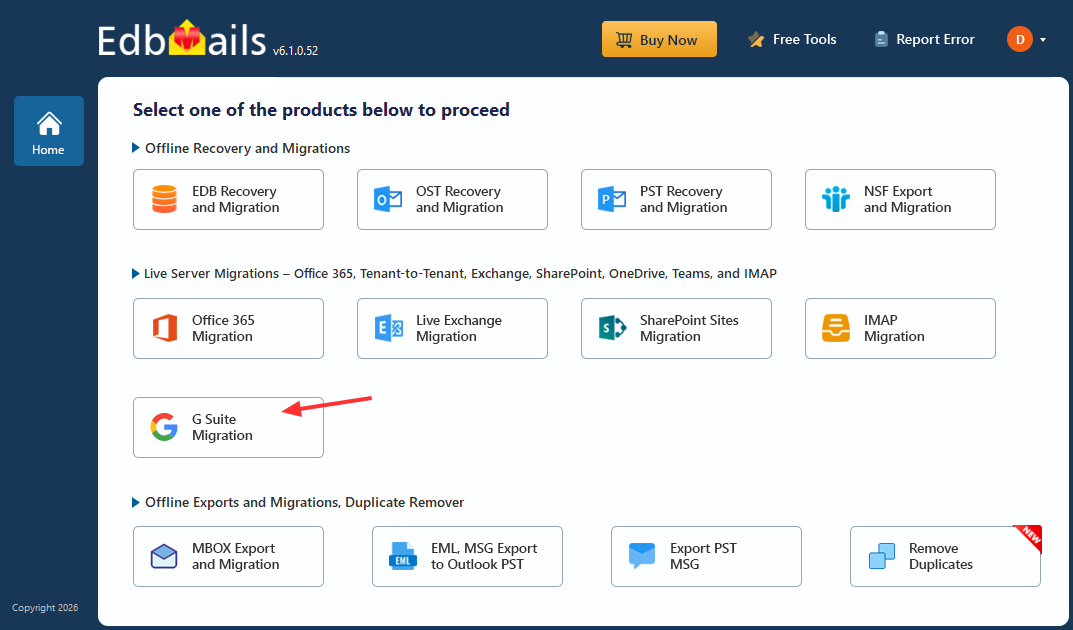
G Suite Migration

This is why choosing the right migration solution becomes essential. A reliable tool must offer automation, scalability, and precise data handling to support enterprise-level requirements. EdbMails is designed to meet these demands, enabling organizations to perform Google Workspace migrations efficiently, securely, and with zero downtime while maintaining complete data integrity.

Key Features to Look for in the Best Google Workspace Migration Software

When evaluating a Google Workspace migration tool, organizations should focus on features that ensure security, accuracy, and scalability - especially in large environments. The right solution should simplify complex tasks while maintaining performance and data integrity.

  1. Secure API-Based Authentication

    A reliable migration tool should use modern authentication methods such as OAuth 2.0 and domain-wide delegation. This allows administrators to securely access mailboxes without exposing user credentials. EdbMails uses API-based authentication to enable secure, admin-level access, reducing both security risks and administrative effort.

  2. Automatic Mailbox Mapping

    Mailbox mapping can quickly become complex in large environments. Automation helps align source and target mailboxes using user attributes, reducing manual effort and the chances of errors. EdbMails supports automatic mailbox mapping based on attributes like first name, last name, and display name, making the process more efficient and reliable.

  3. Incremental Migration

    Incremental migration allows only newly added or modified data to be transferred after the initial migration. This helps prevent duplication and supports staged migration strategies. In practice, EdbMails uses incremental synchronization to keep source and target environments aligned while optimizing bandwidth and performance.

  4. Bulk and Concurrent Migration

    For enterprise environments, the ability to migrate multiple mailboxes simultaneously is essential. Bulk and concurrent migration capabilities significantly reduce overall migration time.

    Many modern tools, including EdbMails, support concurrent processing to handle large volumes of mailboxes efficiently.

     Bulk Mailbox Migration from Google Workspace to Office 365

  5. Advanced Filtering Options

    Migration tools should provide filtering options to transfer only the required data. This improves efficiency and reduces unnecessary data movement. EdbMails allow administrators to apply filters based on date range, sender, or folders, helping optimize migration scope.

  6. Detailed Migration Reports

    Comprehensive reporting is important for tracking progress and validating migration results. It also helps identify and resolve issues quickly.

    For instance, EdbMails provides detailed logs and reports that give administrators clear visibility into the migration process.

  7. Zero Downtime Migration

    A key requirement for any migration is maintaining business continuity. The process should run in the background so users can continue working without interruption. EdbMails supports migrations with zero downtime, ensuring that organizations can transition smoothly without impacting daily operations.

Why Do Businesses Prefer EdbMails for Google Workspace Migration?

After understanding the key capabilities required in a Google Workspace migration tool, the next step is choosing a solution that can deliver those capabilities effectively in real-world environments. This is where EdbMails stands out.

Rather than just offering features, EdbMails focuses on simplifying complex migration scenarios, reducing risks, and ensuring a smooth transition for organizations of all sizes—from small businesses to large enterprises.

Enterprise-Grade Performance for Google Workspace Migration

Google Workspace migration projects often involve large volumes of data across hundreds or thousands of mailboxes, making performance and reliability essential. EdbMails is designed for high-volume Google Workspace migration with optimized processing and concurrent mailbox handling, enabling faster data transfer while maintaining accuracy and consistency. This helps organizations complete G Suite migration projects within tight timelines, ensuring stable performance with zero disruption in enterprise-scale environments.

Eliminates Dependency on End Users

One of the biggest challenges in any G Suite migration is collecting and managing user credentials. This process is time-consuming and introduces security risks.

EdbMails removes this dependency by enabling admin-based migration, allowing IT teams to access and migrate all mailboxes centrally. This not only improves security but also simplifies the entire migration workflow.

Reduces Migration Failures and Rework

Migration failures can lead to delays, repeated efforts, and data inconsistencies. EdbMails minimizes these risks by ensuring a more controlled and reliable migration process.

With intelligent data handling and synchronization, organizations can avoid duplicate data, incomplete transfers, and repeated migration cycles—resulting in a cleaner and more efficient migration.

EdbMails Offers Secure and Compliant Migration

Security is a core requirement in any migration project. EdbMails uses secure API-based authentication with OAuth 2.0 and domain-wide delegation, enabling administrators to access mailboxes safely without collecting individual user credentials. This approach helps maintain compliance and protects sensitive business data.

Minimizes Manual Effort for IT Teams

Manual configurations, mailbox mapping, and repeated monitoring can quickly become overwhelming in large migrations. EdbMails reduces this burden through automation and a guided workflow.

This allows IT administrators to focus on planning and validation rather than spending hours on repetitive tasks, improving overall productivity.

Incremental Migration Support by EdbMails G Suite Migration

EdbMails supports incremental migration, allowing only newly added or modified items to be transferred after the initial migration. This prevents duplicate data, reduces bandwidth usage, and enables organizations to perform staged migrations while keeping both environments synchronized.

Better Visibility and Control Throughout Migration

Lack of visibility is a common concern during migration projects. Without clear insights, it becomes difficult to track progress or identify issues early.

EdbMails provides clear visibility into each stage of the migration, enabling administrators to monitor progress, validate results, and take corrective action when needed. This level of control ensures a more predictable and manageable migration experience.

Flexible for SMBs and Enterprise Environments

Whether it’s a small business with a few users or an enterprise handling large-scale migrations, flexibility is essential. EdbMails is built to support diverse environments with varying requirements.

Its scalable architecture ensures consistent performance across different organization sizes, making it a reliable choice for both small teams and large enterprises.

Ensures Business Continuity During Migration

Business disruption is one of the biggest concerns during migration. Any downtime can impact productivity and user experience.

EdbMails supports a migration approach that allows users to continue accessing their mailboxes during the transition. This ensures business continuity and eliminates operational downtime.

Supported Google Workspace Migration Scenarios by EdbMails

EdbMails supports a wide range of Google Workspace migration scenarios, making it a flexible and scalable solution for organizations with diverse infrastructure requirements. Whether migrating to cloud, on-premises, or IMAP-based environments, it enables a smooth and efficient transition with zero downtime.

Google Workspace to Microsoft 365 Migration

EdbMails enables seamless migration from Google Workspace to Microsoft 365, transferring emails, contacts, calendars, and other mailbox data while preserving folder structure and metadata. It supports migration to primary mailboxes, shared mailboxes, and archive mailboxes, making it suitable for enterprise environments.

 Step-by-Step Guide to Migrate from G Suite to Office 365

Google Workspace to Exchange Server Migration

Organizations moving to on-premises or hybrid environments can migrate from Google Workspace to Exchange Server with ease. EdbMails supports multiple Exchange versions and ensures secure, accurate data transfer while maintaining mailbox structure and data integrity.

 Step-by-Step Migration Process: G Suite to Exchange Migration

Google Workspace to IMAP Migration

EdbMails also supports migration to any IMAP-enabled server, including platforms like Outlook, Zoho, Zimbra, and other email hosting providers. This provides flexibility for organizations that require custom or third-party email environments.

 Step-by-Step Migration Process: G Suite to IMAP

Key Benefits of EdbMails for Enterprise Migration Projects

For large organizations, choosing the right migration software directly impacts project success. EdbMails provides:

Key Benefits of Automatic Mailbox Mapping in Google Workspace Migration

For large organizations, choosing the right migration software directly impacts project success. EdbMails provides:

  • Scalability for handling large mailbox volumes
  • Automation to reduce manual effort
  • Accuracy to ensure complete data integrity
  • Security for protecting sensitive information
  • Efficiency to complete migrations faster

These benefits make it a reliable solution for enterprise-level migration projects.

Best Practices for Successful Migration

To achieve optimal results, organizations should follow these best practices:

  • Run a pilot migration before full deployment
  • Verify mailbox mapping before starting
  • Use incremental migration for staged transitions
  • Monitor logs and reports throughout the process
  • Communicate migration plans with users

Following these steps ensures a smooth and controlled migration experience.

Conclusion: Choosing the Best Google Workspace Migration Software

Selecting the best Google Workspace migration software is critical for ensuring a successful transition. Organizations need a solution that offers automation, scalability, security, and reliability to handle complex migration requirements.

With its advanced features, enterprise-grade performance, and ability to execute migrations with zero downtime, EdbMails stands out as a powerful and dependable choice. It simplifies complex migration processes, reduces risks, and enables organizations to migrate their data efficiently and securely.


 In this manual

IntroductionKey Benefits of EdbMailsBest Practices

G Suite Migration

100 Mailboxes $299 Only

Buy Now

Need help?

24/7 Customer support

Contact us on Live chat

Personalized Demo

Book a personalized demo

Still need help?

Email us / Call us

@edbmails.com All rights are reserved Privacy Policy | Terms of Use | GDPR | Security | Press Releases

hidden msg
Live Chat

Hi, May I help you?

Hide Chat Now
