
EdbMails EDB Recovery and Migration software
  • Products
    EdbMails
    All-in-one Recovery and Migration
    • EDB Recovery and Migration
    • OST, PST, MBOX, NSF, EML, MSG
    • Office 365, Exchange Migration
    • SharePoint, OneDrive & Teams
    • Google Workspace Migration
    • IMAP Migration
    • Duplicate Remover
    • EdbMails Data Recovery
    • Backup Solutions
    • All ProductsAll Products

    EDB Recovery and Migration

    EdbMails lets you recover corrupted, damaged, and offline Exchange EDB files, convert EDB mailboxes to PST format, and directly migrate mailbox data to Office 365 and live Exchange Server.

    EDB to PST
    EDB to PST
    Recover corrupted, damaged, offline EDB files and convert Exchange EDB mailboxes to PST file format
    Public Folder to Exchange
    Public Folder to Exchange
    Migrate public folders from an Exchange offline EDB file to live Exchange Server
    EDB to Live Exchange Migration
    EDB to Live Exchange Migration
    Directly migrate offline Exchange database (EDB) files to live Exchange server
    Archive Mailbox to Office 365
    Archive Mailbox to Office 365
    Migrate archive mailboxes from offline EDB files directly to Office 365
    EDB to Office 365 Migration
    EDB to Office 365 Migration
    Directly migrate offline Exchange database (EDB) files to Office 365
    Public Folder to Office 365
    Public Folder to Office 365
    Migrate public folders from an offline Exchange EDB file to Office 365

    OST, PST, MBOX, NSF, EML, MSG Export and Migration

    EdbMails lets you to recover OST and PST files, export OST, PST, MBOX, NSF, EML, and MSG files to PST files, and directly migrate OST, PST, MBOX, and NSF mailbox data to Office 365 and live Exchange Server.

    OST Recovery and Migration
    OST Recovery and Migration
    Recover offline OST files, convert OST to PST, and migrate OST to Office 365 and Exchange Server
    PST Recovery and Migration
    PST Recovery and Migration
    Recover Outlook PST files , Export PST to PST, migrate PST to Office 365 and Exchange Server
    MBOX Export and Migration
    MBOX Export and Migration
    Export MBOX to PST, migrate MBOX to Office 365 and Exchange Server
    NSF Export and Migration
    NSF Export and Migration
    Export NSF to PST, migrate NSF to Office 365 and Exchange Server
    EML to PST Export
    EML to PST Export
    Convert EML files to Outlook PST files
    PST to MSG Export
    PST to MSG Export
    Convert Outlook PST file to MSG file format
    MSG to PST Export
    MSG to PST Export
    Export MSG files to Outlook PST files

    Office 365, Exchange Migration

    EdbMails lets you securely migrate mailboxes across Microsoft 365, Exchange, Google Workspace (Google Workspace Migraton), and IMAP-supported servers such as Outlook, Gmail, Zimbra, Zoho Mail, and cPanel, ensuring zero downtime.

    Office 365 Backup
    Office 365 Migration
    Migrate between Office 365 tenants, Office 365 to Exchange, Office 365 to PST, PST files to Office 365.
    Exchange Server Backup
    Exchange Migration
    Migrate between any Exchange Servers, Exchange to Office 365, Exchange to PST, PST files to Exchange.
    Tenant to Tenant Migration
    Tenant to Tenant Migration
    Migrate Mailboxes, Public Folders, Archive Mailboxes between Office 365 Tenants.
    Exchange to Office 365
    Exchange to Office 365
    Migrate Mailboxes, Public Folders, Archive Mailboxes from live Exchange server to Office 365.
    Office 365 to IMAP
    Office 365 to IMAP
    Migrate Office 365 to IMAP, Office 365 to Gmail, Office 365 to Outlook, Office 365 to Zoho etc.
    Exchange to IMAP
    Exchange to IMAP
    Migrate from live Exchange Server to IMAP servers such as Gmail, Outlook, and Zoho Mail.
    Public Folder to Office 365
    Public Folder to Office 365
    Migrate Public Folders between Office 365 tenants with complete folder hierarchy and mailbox data integrity.
    Exchange to PST
    Exchange to PST
    Export live Exchange Server mailboxes, public folders, and archive mailboxes to Outlook PST files.

    SharePoint, OneDrive & Microsoft Teams Migration

    EdbMails lets you migrate SharePoint sites, OneDrive data, Microsoft Teams, teams, channels, chats, permissions, and documents between Microsoft 365 tenants while maintaining the existing folder structure and data integrity.

    SharePoint, OneDrive & Teams Backup
    SharePoint Online Migration
    Migrate documents, lists, files and folders from SharePoint sites.
    OneDrive for Business Migration
    OneDrive for Business Migration
    Migrate documents, lists, files, folders, private chats from OneDrive.
    Microsoft Teams Migration
    Microsoft Teams Migration
    Migrate Teams, chats, channels, documents, files and folders etc.

    Google Workspace / G Suite Migration

    EdbMails offers secure Google Workspace migration to Office 365, Exchange, or IMAP, and export to PST covering emails, contacts, calendars and tasks.

    Google Workspace Migration
    Google Workspace Migration
    Migrate emails, calendars, contacts, tasks from Google workspace to Google workspace, office 365, Exchange and IMAP. Export to PST
    Google Workspace to Office 365
    Google Workspace to Office 365
    Migrate emails, calendars, contacts, tasks from Google Workspace / G Suite to Office 365
    Google Workspace to Exchange Server
    Google Workspace to Exchange Server
    Migrate emails, calendars, contacts, tasks from Google Workspace / G Suite to on-Premise Exchange Server
    Google Workspace to IMAP
    Google Workspace to IMAP
    Migrate emails, calendars, contacts, tasks from Google Workspace / G Suite to IMAP, Outlook, Zimbra, Zoho etc.
    Google Workspace to Google Workspace Migration
    Google Workspace to Google Workspace
    Migrate emails, calendars, contacts, tasks between two Google Workspace / G Suite tenants
    Google Workspace to PST
    Google Workspace to PST
    Export emails, calendars, contacts, tasks from Google Workspace / G Suite to Outlook PST files

    IMAP Migration

    EdbMails IMAP Migration tool lets you easily migrate emails from IMAP servers such as Outlook, Gmail, Zoho Mail, Zimbra, cPanel, and more. Supports IMAP to IMAP, Office 365, Exchange Server, PST, and bulk PST to IMAP migration.

    IMAP Email Backup & Migration
    IMAP Email Backup & Migration
    Backup and migrate emails from IMAP servers to PST, Office 365, and On-Premises Exchange Server
    IMAP to Office 365
    IMAP to Office 365
    Migrate emails, folders, and attachments from IMAP servers to Office 365
    IMAP to Exchange
    IMAP to Exchange
    Migrate emails, folders, and attachments from IMAP servers to on-premises Exchange Server
    IMAP to PST
    IMAP to PST
    Export emails, folders, and attachments from IMAP servers to Outlook PST files for backup
    PST to IMAP
    PST to IMAP
    Migrate emails, folders, and attachments from bulk PST files to IMAP servers

    Duplicate Remover

    EdbMails Duplicate Remover lets you easily remove duplicate items from Office 365 and Exchange Server, and from IMAP, Outlook, Gmail, Zimbra, Zoho Mail, etc., ensuring a clean and organized mailbox.

    Remove Duplicates
    Remove Duplicates
    Easily clean up your Office 365, Exchange, Outlook and IMAP accounts by removing duplicate emails.
    Remove Duplicates from Office 365
    Remove Duplicates from Office 365
    Remove duplicate emails, calendars, contacts, journal tasks, etc. from Office 365.
    Remove Duplicates from Exchange Server
    Remove Duplicates from Exchange Server
    Remove duplicate emails, calendars, contacts, journal tasks, etc. from live Exchange Server.
    Remove Duplicates from IMAP, Outlook
    Remove Duplicates from IMAP, Outlook
    Remove duplicate emails, attachments from IMAP, Outlook, Gmail, Zimbra, Zoho Mail etc.

    Exchange, SharePoint, OneDrive, Teams and Office 365 Backup

    EdbMails enables secure, automated backup and recovery for Microsoft 365 services including Exchange Online, SharePoint, OneDrive, Teams, and Live Exchange Server with complete data protection and restore flexibility.

    Office 365 Backup
    Office 365 Backup
    Incremental, Granular, Encrypted and Compressed Office 365 Mailboxes Backup
    Exchange Server Backup
    Exchange Server Backup
    Incremental, Granular, Encrypted and Compressed Exchange Mailboxes Backup
    SharePoint, OneDrive & Teams Backup
    SharePoint, OneDrive & Teams Backup
    Backup Online site collections, Team sites, Office 365 groups, all documents etc.

    EdbMails Data Recovery

    EdbMails Data Recovery Software lets you recover permanently deleted data, including photos, videos, documents, and archived files, from partitions on hard drives, SSDs, USB drives, SD cards, and external storage devices.

    EdbMails Data Recovery
    EdbMails Data Recovery
    Recover and restore permanently deleted data from hard drives, SSDs, USB drives, SD cards, and etc.
    Whitepaper Whitepaper
    Request a Demo Request a Demo
    Sign Up Sign Up
  • Features
  • FAQ
  • Offers
  • Pricing
  • Download
  • Support
  • Sign in
User’s Manual
Google Workspace Migration

User Manual

User Manual

  • Overview
  • System Requirements
  • Migration Scenarios
  • Installation
    • Installation process
    • Reinstall or Upgrade
    • How to uninstall
  • FAQs
    • Google Workspace to Office 365
    • Google Workspace to IMAP
    • Google Workspace to Exchange
    • Google Workspace to Google Workspace
    • Google Workspace to PST Export
  • Videos
  • Screenshots
    • Google Workspace to Office 365
    • Google Workspace to Exchange
    • Google Workspace to IMAP
  • How it works?
    • Google Workspace to Office 365 Migration
    • Migrate Google Workspace to Google Workspace
    • Google Workspace to Exchange Migration
    • Google Workspace to IMAP Migration
    • Export Google Workspace to Outlook PST
  • Google Workspace Admin Configuration
  • Connect to target Office 365
  • Connect to Exchange server for multiple mailboxes migration
    • Connect with Global Admin
    • Connect to Multiple users using CSV file
    • Connect using full access permission
    • Connect individual users for Single / Specific user Migration
  • Connect to Hosted Exchange for its Migration
    • Connect with Full Access permissions
    • Connect to multiple users using CSV file
    • Connect to Individual user for migration
  • Connect to IMAP
    • Connect IMAP Single Server
    • Connect IMAP Multiple Server
  • Knowledge Base
    • Bulk Google Workspace Mailbox Migration
    • Google Workspace Migration
    • Why Choose EdbMails
    • Automatic Mailbox Mapping
    • Best Google Workspace Migration Software
    • Migrate Google Workspace Emails, Contacts & Calendars
    • Fix Google Workspace Migration Issues
    • Avoid Google Workspace Migration Mistakes
    • Mistakes to Avoid During Google Workspace Migration
    • Migrate Large Google Workspace Mailboxes
    • Google Workspace Metadata Preservation
    • Fix Google Workspace API Permission Errors
    • Google Workspace Contacts Migration
    • Google Workspace Tasks Migration
    • Google Workspace Migration Performance
    • Selective Google Workspace Mailbox Migration
    • Batch Google Workspace Mailbox Migration
  • Map the Mailboxes
  • Incremental Migration
  • Exchange Throttling Policy
  • Multifactor Authentication
    • Enable MFA in Office 365
    • Create App password for MFA
    • Disable Security Defaults
  1. Home
  2. Google Workspace Migration
  3. Selective Mailbox Migration from Google Workspace | EdbMails
Download Buy Now

How to Migrate Only Selected Mailboxes from Google Workspace

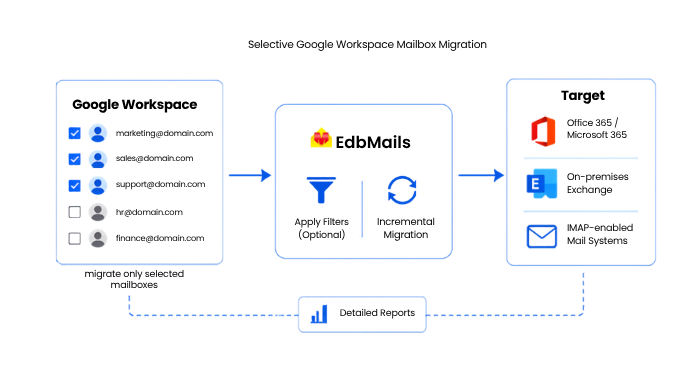
Not every organization can move its entire Google Workspace tenant in one go, and honestly, most shouldn't try. A phased rollout, where a handful of mailboxes go first and the rest follow once the process is validated, is how experienced IT teams keep a migration from turning into a helpdesk fire drill. This guide walks through how to run a selective mailbox migration using the EdbMails Google Workspace Migration Tool, and why picking specific mailboxes instead of migrating everything at once is often the smarter move.
Selective Google Workspace Mailbox Migration

What Selective Mailbox Migration Actually Means

Selective mailbox migration is simply the ability to choose which mailboxes move, and when, rather than being forced into an all-or-nothing transfer. Instead of pointing a migration tool at your entire domain and hoping for the best, you pick a defined group of users, say, the marketing team or a set of pilot accounts, and migrate just their data first. This isn't the same as filtering data within a single mailbox (though EdbMails supports that too, by date range or folder). Selective mailbox migration works at the user level: some mailboxes migrate now, others stay put until you're ready for them.

Why Phased Migrations Make Sense

A full-tenant cutover sounds efficient on paper. In practice, it concentrates every possible risk into a single weekend. If something goes wrong with mailbox mapping, folder structure, or calendar sync, you find out after hundreds of users are already affected.

Migrating in phases spreads that risk out and gives IT teams a few real advantages:

  • Smaller blast radius: If an issue shows up during the first batch, it affects ten users instead of a thousand.
  • Real-world validation: You can confirm that folder hierarchy, contacts, and calendar events transfer correctly before committing the rest of the organization.
  • Department-by-department rollout: Some businesses migrate by function, moving sales or support first while other teams keep working uninterrupted in Google Workspace.
  • License and bandwidth planning: Migrating in smaller batches makes it easier to manage target-tenant licensing and avoid saturating available bandwidth.
  • Executive or VIP mailboxes handled with extra care: High-priority accounts can be migrated separately, outside the main batch, with closer monitoring.

None of this is unique to Google Workspace migrations, but Google Workspace environments in particular tend to have a mix of shared drives, group mailboxes, and departmental accounts that make a staged approach worth the extra planning.

Does EdbMails Support Selective Mailbox Migration?

Yes. EdbMails is built around administrator-based authentication, which means you connect once using a Google Workspace admin account and API-based access rather than collecting individual passwords from every user. Once connected, EdbMails pulls up the full list of mailboxes in the domain, and from there you choose exactly which ones to include in the current migration run.

On top of that mailbox-level selection, EdbMails also lets you apply filters within the mailboxes you do choose:

  • Migrate only items within a specific date range
  • Migrate specific folders or labels instead of the entire mailbox
  • Migrate selected item types rather than the full data set

This combination, choosing which mailboxes move and controlling what data moves with them, is what makes selective migration practical for organizations that need a phased rollout rather than a single cutover.

Step-by-Step: Migrating Selected Mailboxes from Google Workspace

1. Download and Install EdbMails

Start with the EdbMails installer. A free trial is available, and it's worth using it to test your selective migration plan on a small batch before running the full project. The trial version migrates all mailboxes with 30 items per folder, which is enough to confirm folder structure and formatting land correctly on the target side.
Installing EdbMails Application

2. Connect to Your Google Workspace Source

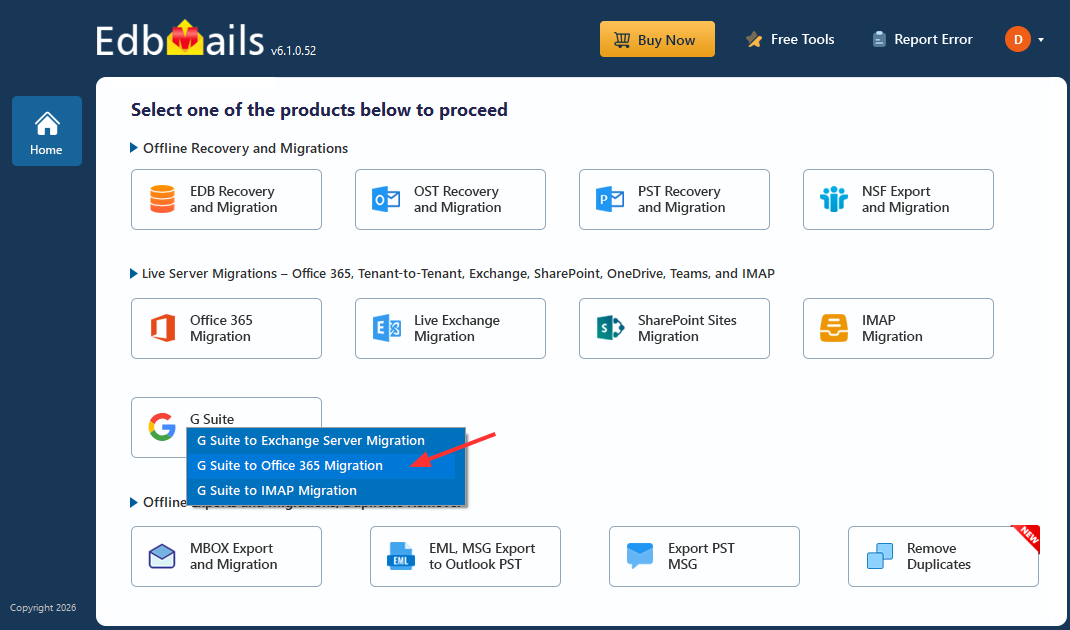
Launch EdbMails and select Google Workspace as the source. Authenticate using an admin account and the required API permissions. Because this uses administrator-level access, you don't need to gather credentials from each individual user, which matters a lot when you're only migrating a subset of accounts and don't want to loop in people who aren't part of this phase yet.
Connect to Your Google Workspace Source

3. Select the Mailboxes for This Migration Batch

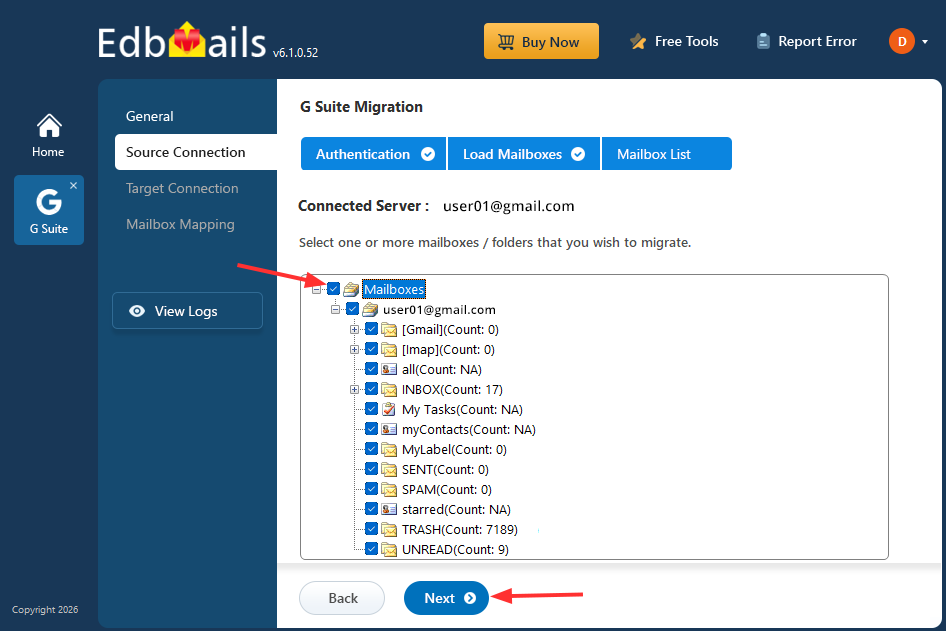
Once connected, EdbMails displays the available mailboxes in the domain. This is where the selective migration actually happens: instead of selecting all, check only the mailboxes you've decided belong in this phase, whether that's a pilot group, a single department, or a list of priority users.
Select Mailboxes

4. Connect to the Target Platform

Depending on where you're migrating to, connect to your target Office 365 tenant, on-premises Exchange Server, or IMAP-enabled mail system. EdbMails supports all three destinations from the same source connection.
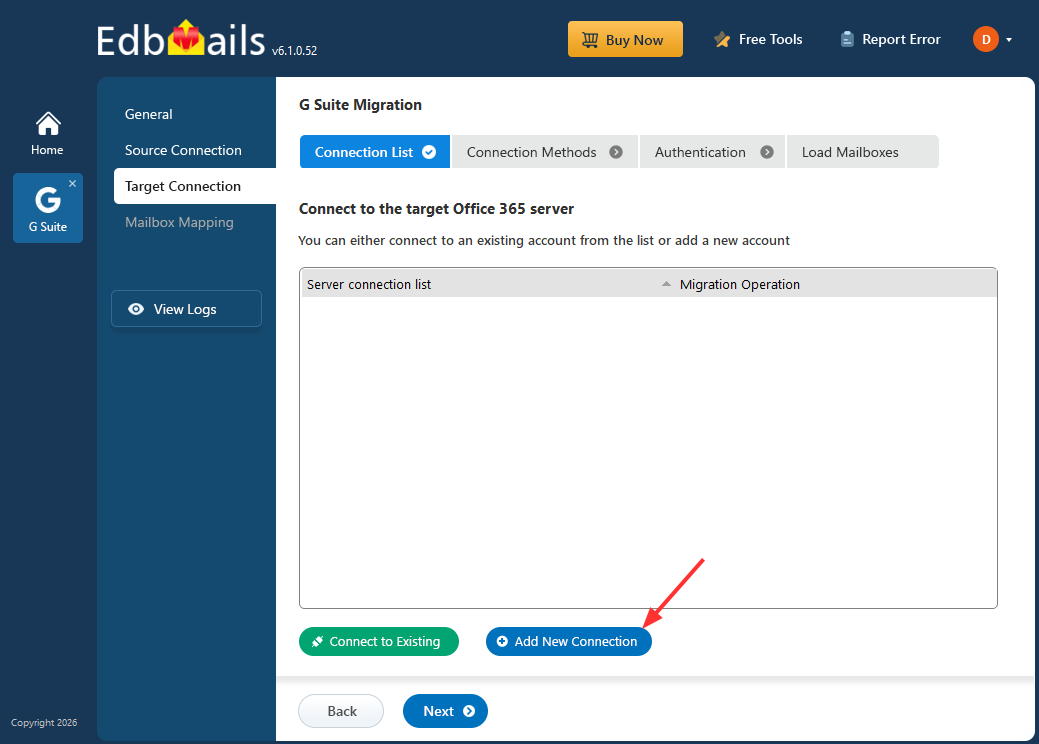
Connect to the Target Platform

5. Map Mailboxes and Start the Migration

EdbMails automatically maps source mailboxes to their corresponding target mailboxes based on matching identifiers, though manual mapping is available if you'd rather control it directly. Once mapping is confirmed, start the migration for the selected batch.
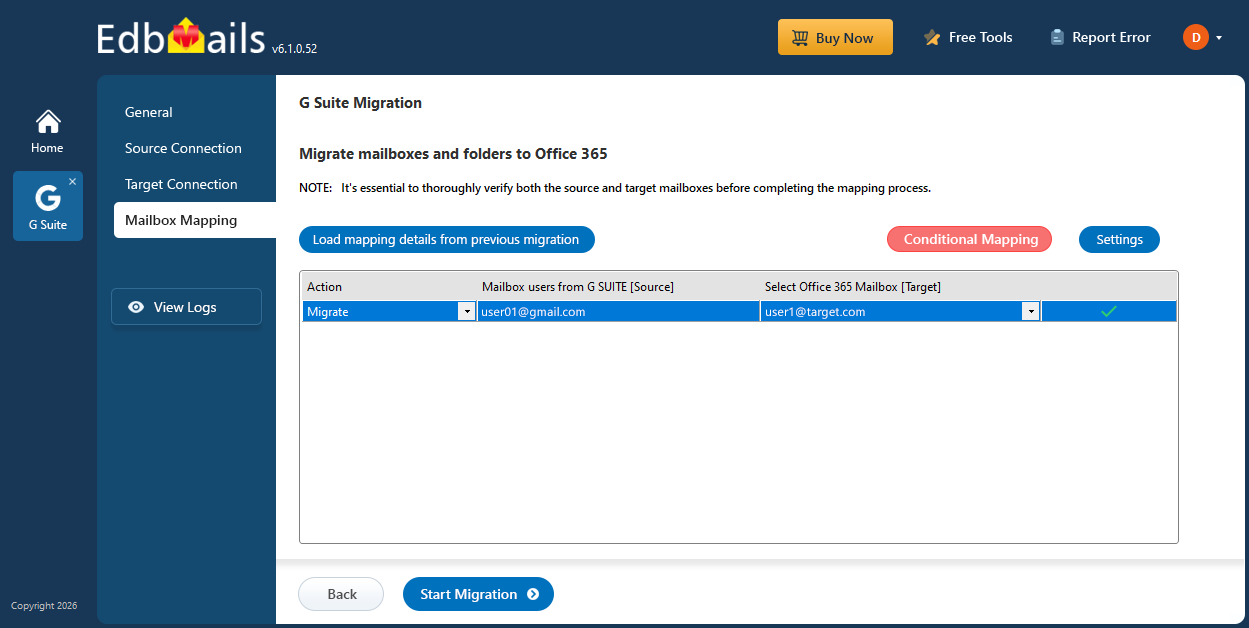
Google Workspace to Office 365 Mailbox Mapping

6. Apply Data Filters If Needed

If you want to narrow things down even further within the selected mailboxes, apply filters by date range or by specific folders. This is particularly useful for a first-phase migration where the goal is to validate the process with recent data before committing to a full historical transfer.

7. Run Incremental Migration for Later Phases

After the first batch completes, use incremental migration to sync any new or changed items in those mailboxes without duplicating data already transferred. When you're ready to move the next group of mailboxes, repeat the selection process for that batch. This is what makes a multi-phase migration manageable: each round only moves what's new or what hasn't been migrated yet.

Common Scenarios for Selective Migration

Pilot testing before a full rollout: IT teams often migrate a handful of test mailboxes first to confirm everything, folder structure, calendar entries, contact groups, works as expected before scheduling the rest of the organization.

Department-based cutover: Rather than migrating the whole company at once, some organizations move one department at a time, keeping the rest of the business on Google Workspace until their turn comes up.

Mergers and reorganizations: When only part of a Google Workspace domain needs to move to a new platform (for example, after a divestiture), selective migration lets you move just the affected users without touching the rest of the tenant.

Migrating high-priority accounts separately: Executive or leadership mailboxes are sometimes migrated on their own schedule, with closer monitoring, separate from the bulk of the organization.

Best Practices for a Selective Migration Project

Start small: Run your first batch with a handful of non-critical mailboxes to confirm the process before scaling up.

Document your batches: Keep a simple record of which mailboxes have migrated, which are pending, and when each batch ran. It sounds basic, but it's the single most common thing that gets missed in phased projects.

Use incremental migration between phases: This avoids re-transferring data that already moved and keeps each subsequent batch fast.

Check migration reports after every batch: EdbMails generates detailed reports after each run, which is the easiest way to confirm a batch completed cleanly before moving on to the next one.

Communicate timing to affected users: Even a well-run selective migration causes some disruption for the mailboxes in that batch, so give those users a heads-up before their turn.

Get Started

Selective mailbox migration gives you control over the pace and order of your move away from Google Workspace, instead of forcing a single high-risk cutover. Download the application and try a small test batch first, or book a personalized demo if you'd like help planning a phased migration for your organization.


Additional Resources:

  • Google Workspace Migration Scenarios
  • Google Workspace to Office 365 Migration
  • Google Workspace to Exchange Server Migration
  • Google Workspace to IMAP Migration
  • Automatic Mailbox Mapping
  • Google Workspace Migration FAQ
  • Bulk Google Workspace Mailbox Migration
lady image


 In this manual

IntroductionSelective Mailbox MigrationWhy Phase MigrationsDoes EdbMails SupportMigration stepsCommon ScenariosBest PracticesGet Started

Google Workspace Migration

100 Mailboxes $299 Only

Buy Now

Need help?

24/7 Customer support

Contact us on Live chat

Personalized Demo

Book a personalized demo

Still need help?

Email us / Call us

@edbmails.com All rights are reserved Privacy Policy | Terms of Use | GDPR | Security | Press Releases

hidden msg
Live Chat

Hi, May I help you?

Hide Chat Now