
EdbMails EDB Recovery and Migration software
  • Products
    EdbMails
    All-in-one Recovery and Migration
    • EDB Recovery and Migration
    • OST, PST, MBOX, NSF, EML, MSG
    • Office 365, Exchange Migration
    • SharePoint, OneDrive & Teams
    • Google Workspace Migration
    • IMAP Migration
    • Duplicate Remover
    • EdbMails Data Recovery
    • Backup Solutions
    • All ProductsAll Products

    EDB Recovery and Migration

    EdbMails lets you recover corrupted, damaged, and offline Exchange EDB files, convert EDB mailboxes to PST format, and directly migrate mailbox data to Office 365 and live Exchange Server.

    EDB to PST
    EDB to PST
    Recover corrupted, damaged, offline EDB files and convert Exchange EDB mailboxes to PST file format
    Public Folder to Exchange
    Public Folder to Exchange
    Migrate public folders from an Exchange offline EDB file to live Exchange Server
    EDB to Live Exchange Migration
    EDB to Live Exchange Migration
    Directly migrate offline Exchange database (EDB) files to live Exchange server
    Archive Mailbox to Office 365
    Archive Mailbox to Office 365
    Migrate archive mailboxes from offline EDB files directly to Office 365
    EDB to Office 365 Migration
    EDB to Office 365 Migration
    Directly migrate offline Exchange database (EDB) files to Office 365
    Public Folder to Office 365
    Public Folder to Office 365
    Migrate public folders from an offline Exchange EDB file to Office 365

    OST, PST, MBOX, NSF, EML, MSG Export and Migration

    EdbMails lets you to recover OST and PST files, export OST, PST, MBOX, NSF, EML, and MSG files to PST files, and directly migrate OST, PST, MBOX, and NSF mailbox data to Office 365 and live Exchange Server.

    OST Recovery and Migration
    OST Recovery and Migration
    Recover offline OST files, convert OST to PST, and migrate OST to Office 365 and Exchange Server
    PST Recovery and Migration
    PST Recovery and Migration
    Recover Outlook PST files , Export PST to PST, migrate PST to Office 365 and Exchange Server
    MBOX Export and Migration
    MBOX Export and Migration
    Export MBOX to PST, migrate MBOX to Office 365 and Exchange Server
    NSF Export and Migration
    NSF Export and Migration
    Export NSF to PST, migrate NSF to Office 365 and Exchange Server
    EML to PST Export
    EML to PST Export
    Convert EML files to Outlook PST files
    PST to MSG Export
    PST to MSG Export
    Convert Outlook PST file to MSG file format
    MSG to PST Export
    MSG to PST Export
    Export MSG files to Outlook PST files

    Office 365, Exchange Migration

    EdbMails lets you securely migrate mailboxes across Microsoft 365, Exchange, Google Workspace (Google Workspace Migraton), and IMAP-supported servers such as Outlook, Gmail, Zimbra, Zoho Mail, and cPanel, ensuring zero downtime.

    Office 365 Backup
    Office 365 Migration
    Migrate between Office 365 tenants, Office 365 to Exchange, Office 365 to PST, PST files to Office 365.
    Exchange Server Backup
    Exchange Migration
    Migrate between any Exchange Servers, Exchange to Office 365, Exchange to PST, PST files to Exchange.
    Tenant to Tenant Migration
    Tenant to Tenant Migration
    Migrate Mailboxes, Public Folders, Archive Mailboxes between Office 365 Tenants.
    Exchange to Office 365
    Exchange to Office 365
    Migrate Mailboxes, Public Folders, Archive Mailboxes from live Exchange server to Office 365.
    Office 365 to IMAP
    Office 365 to IMAP
    Migrate Office 365 to IMAP, Office 365 to Gmail, Office 365 to Outlook, Office 365 to Zoho etc.
    Exchange to IMAP
    Exchange to IMAP
    Migrate from live Exchange Server to IMAP servers such as Gmail, Outlook, and Zoho Mail.
    Public Folder to Office 365
    Public Folder to Office 365
    Migrate Public Folders between Office 365 tenants with complete folder hierarchy and mailbox data integrity.
    Exchange to PST
    Exchange to PST
    Export live Exchange Server mailboxes, public folders, and archive mailboxes to Outlook PST files.

    SharePoint, OneDrive & Microsoft Teams Migration

    EdbMails lets you migrate SharePoint sites, OneDrive data, Microsoft Teams, teams, channels, chats, permissions, and documents between Microsoft 365 tenants while maintaining the existing folder structure and data integrity.

    SharePoint, OneDrive & Teams Backup
    SharePoint Online Migration
    Migrate documents, lists, files and folders from SharePoint sites.
    OneDrive for Business Migration
    OneDrive for Business Migration
    Migrate documents, lists, files, folders, private chats from OneDrive.
    Microsoft Teams Migration
    Microsoft Teams Migration
    Migrate Teams, chats, channels, documents, files and folders etc.

    Google Workspace / G Suite Migration

    EdbMails offers secure Google Workspace migration to Office 365, Exchange, or IMAP, and export to PST covering emails, contacts, calendars and tasks.

    Google Workspace Migration
    Google Workspace Migration
    Migrate emails, calendars, contacts, tasks from Google workspace to Google workspace, office 365, Exchange and IMAP. Export to PST
    Google Workspace to Office 365
    Google Workspace to Office 365
    Migrate emails, calendars, contacts, tasks from Google Workspace / G Suite to Office 365
    Google Workspace to Exchange Server
    Google Workspace to Exchange Server
    Migrate emails, calendars, contacts, tasks from Google Workspace / G Suite to on-Premise Exchange Server
    Google Workspace to IMAP
    Google Workspace to IMAP
    Migrate emails, calendars, contacts, tasks from Google Workspace / G Suite to IMAP, Outlook, Zimbra, Zoho etc.
    Google Workspace to Google Workspace Migration
    Google Workspace to Google Workspace
    Migrate emails, calendars, contacts, tasks between two Google Workspace / G Suite tenants
    Google Workspace to PST
    Google Workspace to PST
    Export emails, calendars, contacts, tasks from Google Workspace / G Suite to Outlook PST files

    IMAP Migration

    EdbMails IMAP Migration tool lets you easily migrate emails from IMAP servers such as Outlook, Gmail, Zoho Mail, Zimbra, cPanel, and more. Supports IMAP to IMAP, Office 365, Exchange Server, PST, and bulk PST to IMAP migration.

    IMAP Email Backup & Migration
    IMAP Email Backup & Migration
    Backup and migrate emails from IMAP servers to PST, Office 365, and On-Premises Exchange Server
    IMAP to Office 365
    IMAP to Office 365
    Migrate emails, folders, and attachments from IMAP servers to Office 365
    IMAP to Exchange
    IMAP to Exchange
    Migrate emails, folders, and attachments from IMAP servers to on-premises Exchange Server
    IMAP to PST
    IMAP to PST
    Export emails, folders, and attachments from IMAP servers to Outlook PST files for backup
    PST to IMAP
    PST to IMAP
    Migrate emails, folders, and attachments from bulk PST files to IMAP servers

    Duplicate Remover

    EdbMails Duplicate Remover lets you easily remove duplicate items from Office 365 and Exchange Server, and from IMAP, Outlook, Gmail, Zimbra, Zoho Mail, etc., ensuring a clean and organized mailbox.

    Remove Duplicates
    Remove Duplicates
    Easily clean up your Office 365, Exchange, Outlook and IMAP accounts by removing duplicate emails.
    Remove Duplicates from Office 365
    Remove Duplicates from Office 365
    Remove duplicate emails, calendars, contacts, journal tasks, etc. from Office 365.
    Remove Duplicates from Exchange Server
    Remove Duplicates from Exchange Server
    Remove duplicate emails, calendars, contacts, journal tasks, etc. from live Exchange Server.
    Remove Duplicates from IMAP, Outlook
    Remove Duplicates from IMAP, Outlook
    Remove duplicate emails, attachments from IMAP, Outlook, Gmail, Zimbra, Zoho Mail etc.

    Exchange, SharePoint, OneDrive, Teams and Office 365 Backup

    EdbMails enables secure, automated backup and recovery for Microsoft 365 services including Exchange Online, SharePoint, OneDrive, Teams, and Live Exchange Server with complete data protection and restore flexibility.

    Office 365 Backup
    Office 365 Backup
    Incremental, Granular, Encrypted and Compressed Office 365 Mailboxes Backup
    Exchange Server Backup
    Exchange Server Backup
    Incremental, Granular, Encrypted and Compressed Exchange Mailboxes Backup
    SharePoint, OneDrive & Teams Backup
    SharePoint, OneDrive & Teams Backup
    Backup Online site collections, Team sites, Office 365 groups, all documents etc.

    EdbMails Data Recovery

    EdbMails Data Recovery Software lets you recover permanently deleted data, including photos, videos, documents, and archived files, from partitions on hard drives, SSDs, USB drives, SD cards, and external storage devices.

    EdbMails Data Recovery
    EdbMails Data Recovery
    Recover and restore permanently deleted data from hard drives, SSDs, USB drives, SD cards, and etc.
    Whitepaper Whitepaper
    Request a Demo Request a Demo
    Sign Up Sign Up
  • Features
  • FAQ
  • Offers
  • Pricing
  • Download
  • Support
  • Sign in
User’s Manual
Google Workspace Migration

User Manual

User Manual

  • Overview
  • System Requirements
  • Migration Scenarios
  • Installation
    • Installation process
    • Reinstall or Upgrade
    • How to uninstall
  • FAQs
    • Google Workspace to Office 365
    • Google Workspace to IMAP
    • Google Workspace to Exchange
    • Google Workspace to Google Workspace
    • Google Workspace to PST Export
  • Videos
  • Screenshots
    • Google Workspace to Office 365
    • Google Workspace to Exchange
    • Google Workspace to IMAP
  • How it works?
    • Google Workspace to Office 365 Migration
    • Migrate Google Workspace to Google Workspace
    • Google Workspace to Exchange Migration
    • Google Workspace to IMAP Migration
    • Export Google Workspace to Outlook PST
  • Google Workspace Admin Configuration
  • Connect to target Office 365
  • Connect to Exchange server for multiple mailboxes migration
    • Connect with Global Admin
    • Connect to Multiple users using CSV file
    • Connect using full access permission
    • Connect individual users for Single / Specific user Migration
  • Connect to Hosted Exchange for its Migration
    • Connect with Full Access permissions
    • Connect to multiple users using CSV file
    • Connect to Individual user for migration
  • Connect to IMAP
    • Connect IMAP Single Server
    • Connect IMAP Multiple Server
  • Knowledge Base
    • Bulk Google Workspace Mailbox Migration
    • Google Workspace Migration
    • Why Choose EdbMails
    • Automatic Mailbox Mapping
    • Best Google Workspace Migration Software
    • Migrate Google Workspace Emails, Contacts & Calendars
    • Fix Google Workspace Migration Issues
    • Avoid Google Workspace Migration Mistakes
    • Mistakes to Avoid During Google Workspace Migration
    • Migrate Large Google Workspace Mailboxes
    • Google Workspace Metadata Preservation
    • Fix Google Workspace API Permission Errors
    • Google Workspace Contacts Migration
    • Google Workspace Tasks Migration
    • Google Workspace Migration Performance
    • Selective Google Workspace Mailbox Migration
    • Batch Google Workspace Mailbox Migration
  • Map the Mailboxes
  • Incremental Migration
  • Exchange Throttling Policy
  • Multifactor Authentication
    • Enable MFA in Office 365
    • Create App password for MFA
    • Disable Security Defaults
  1. Home
  2. Google Workspace Migration
  3. How to Migrate Google Workspace Mailboxes in Batches
Download Buy Now

How to Migrate Google Workspace Mailboxes in Batches

Migrating a single Google Workspace mailbox is generally a straightforward administrative task. However, large-scale migrations involving hundreds or thousands of mailboxes introduce additional challenges such as authentication inconsistencies, Google API rate limiting, interrupted migration sessions, mailbox mapping errors, and incomplete data synchronization. Without centralized management and automated retry mechanisms, these issues can significantly increase administrative effort and delay project completion. That's the reality most IT teams run into the first time they try to move an entire domain out of Google Workspace by hand.
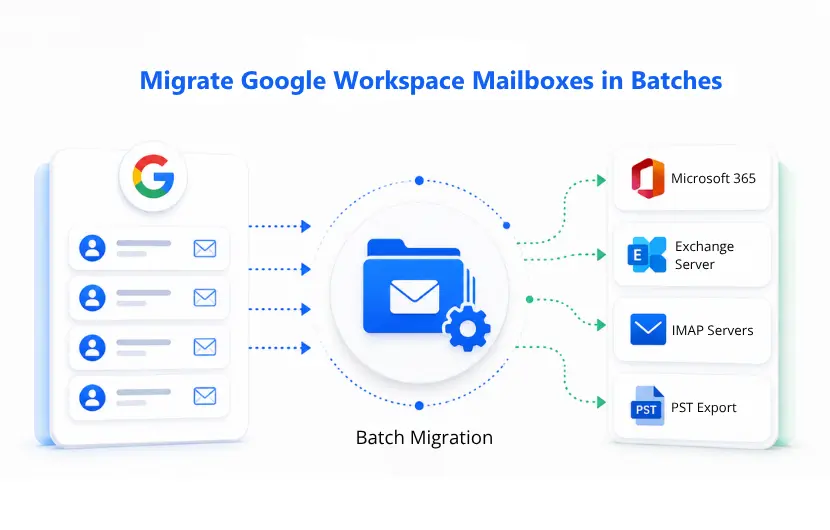
Batch Google Workspace Mailbox Migration

Batch mailbox migration solves this by treating the whole user base as one coordinated job instead of hundreds of separate ones. Instead of logging into each account, exporting data, and re-importing it on the other side, an admin account authorizes the transfer once, and every selected mailbox moves in parallel under the same set of rules. EdbMails simplifies batch Google Workspace migration by allowing administrators to authenticate once with administrative credentials and migrate multiple mailboxes parallely. It supports the migration of emails, contacts, calendars, and tasks to Microsoft 365, Exchange Server, and IMAP-compatible mail servers with centralized mailbox management, automated mailbox mapping, and continuous migration monitoring.

This guide walks through what batch migration actually involves, when it's the right call, and how to run one from start to finish.

What Counts as a Batch Mailbox Migration

Batch migration means moving a defined group of mailboxes together, under one job, with shared settings for mapping and filtering. It's different from a single mailbox migration, where you connect to one account and move its data on its own, and it's also different from running the same migration tool separately for every user by hand.

The distinction matters because the failure points are different. A single mailbox migration can hit per-user API limits on very large accounts, but it rarely runs into mapping conflicts since there's only one destination to configure. A domain with hundreds of mailboxes is meant to run in parallel, since migrating them one at a time would take far too long to be practical, but that parallelism draws on a shared, project-wide API quota across every concurrent job. Without a managed concurrency limit and automatic throttling, a batch job can exhaust that quota quickly, and with hundreds of source-to-destination pairings configured at once, mapping conflicts become more likely too. A batch migration tool needs to run mailboxes in parallel within a controlled concurrency limit, with rate limits and backoff handled automatically, since a single mailbox migration doesn't demand that level of coordination.

When Batch Migration Actually Makes Sense

Not every move needs a bulk job, but most organizational changes do. The common triggers include:

  • Switching platforms entirely: Moving the whole company from Google Workspace to Microsoft 365 to get better integration with Teams, SharePoint, and OneDrive.
  • Consolidating after an acquisition or merger: Multiple domains need to land in one target tenant, often on a deadline set by leadership rather than IT.
  • Moving to on-premises Exchange: Some organizations want direct control over their mail environment, security policies, and retention rules that a hosted platform doesn't offer.
  • Decommissioning Google Workspace: If a subscription is ending, every mailbox needs somewhere to go before the data disappears.
  • Compliance and archiving mandates: Certain industries require email retained on a specific platform or exported to PST for long-term storage.

If any of these apply to more than a handful of users, doing it mailbox by mailbox is a waste of a week that batch migration avoids entirely.

How to Run a Batch Migration with EdbMails

The process below covers a Google Workspace to Office 365 batch job, but the same steps apply to Exchange and IMAP targets, just with a different connection screen in Step 3.

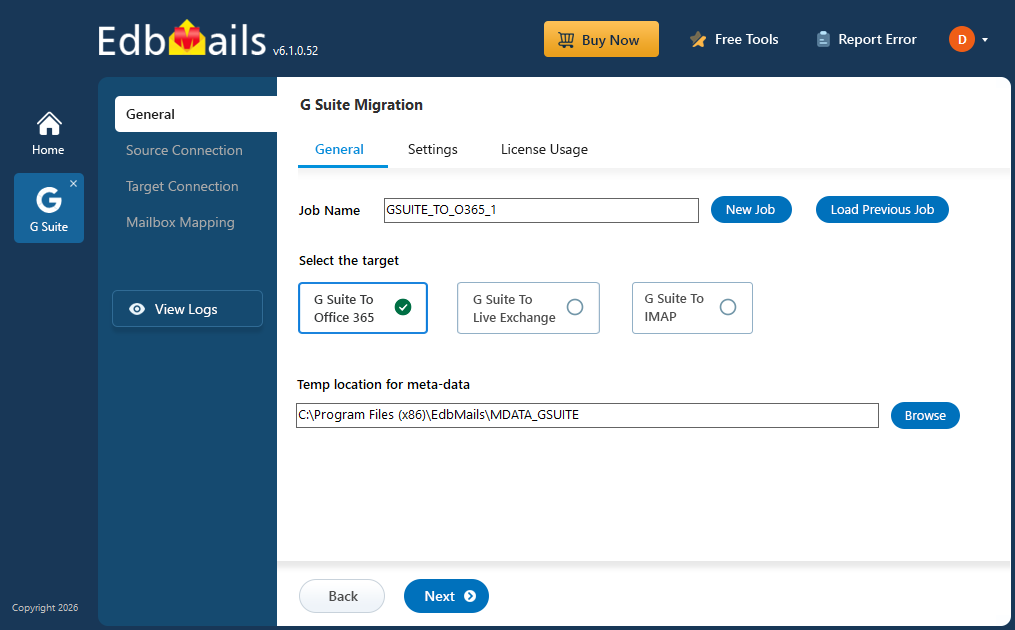
Step 1: Install EdbMails and Start the Job

Batch Google Workspace Migration

Download and install the EdbMails application, then check the system requirements for Google Workspace migration before you begin. Log in with your registered account, or start a free trial if you're testing the tool for the first time. The trial migrates up to 30 items per folder, which is enough to validate the process before buying a license.

From the main screen, select 'Google Workspace Migration', then 'Google Workspace to Office 365 Migration'. Name the job or keep the default, since this name is what shows up in later reports if you're running multiple batches for different departments.

 Explore the complete Google Workspace to Office 365 Migration steps.

Step 2: Connect to the Source and Select Mailboxes

Enter the admin email address and upload the JSON key file from your Google Cloud Console (see Google Workspace Admin Configuration for the setup steps). Authentication happens through domain-wide delegation, which means individual user passwords are never needed or requested.

Once connected, load the mailboxes one of three ways: automatically (capped around 100 due to API limits), from a CSV file for larger domains, or from a previously saved list if you're re-running a migration. Select every mailbox that belongs in this batch and move on.

Step 3: Connect to the Target Server

Add a new connection to the destination, whether that's Office 365, Exchange, or IMAP. For an Office 365 target, sign in with a Global Admin account so EdbMails can auto-register in Entra ID, or use manual registration if your organization requires it. Load the target mailboxes the same way you loaded the source, either automatically or via CSV.

Step 4: Map Source and Target Mailboxes

This is the step most manual migrations get wrong. EdbMails matches source and destination mailboxes automatically based on email address, and it will create the mailbox on the target server and assign a license if one doesn't already exist. Review the proposed pairings before confirming; catching a mismatched mapping here takes thirty seconds, catching it after 400 mailboxes have already moved does not. For more detail on how this works, see Automatic Mailbox Mapping.

Step 5: Start the Migration and Review the Report

Click ‘Start Migration’ and watch the progress bar as mailboxes move in parallel rather than one at a time. When the job finishes, open the migration report to see per-mailbox item counts, folder statistics, and any errors that need a second look before you sign off on the cutover.

What Makes Batch Migration Reliable at Scale

A batch job that just fires 500 mailbox transfers at once and hopes for the best isn't much better than doing it manually; it just fails faster. A few things separate a tool that handles scale well from one that doesn't.

Concurrent processing

EdbMails runs multiple mailboxes at the same time, migrating up to 20 mailboxes in parallel within a single batch. That cuts the total run time significantly on domains with hundreds of users, compared to a tool that processes accounts sequentially.

Automatic Throttling management

Google and Microsoft both cap how many API requests they'll accept in a given window, and a naive bulk job will hit that ceiling and start failing silently. EdbMails monitors server responses in real time and adjusts its own speed to stay under the limit, retrying dropped requests in the background without stopping the batch. This part is automatic for both the Google Workspace source and an Office 365 target.

Incremental (delta) migration

A first pass rarely captures everything, since new mail keeps arriving while the batch runs. Rather than starting from scratch, EdbMails tracks message IDs, timestamps, and folder hierarchy from the initial run, then migrates only what's new or changed on the next pass. Details on how this comparison works are covered in incremental Migration. If a migration session gets interrupted by a network drop or a throttled connection, it resumes from the last completed item instead of restarting the whole batch.

Zero downtime

Because the migration doesn't interrupt existing accounts, users keep sending and receiving mail on their existing accounts the entire time. The switch to the new platform happens at cutover, once the incremental sync has caught everything up, not before.

Filtering

Not every batch needs to move everything. Filters by date range, sender, recipient, subject, or folder let admins limit a run to exactly what's required, which matters for phased rollouts or compliance-driven projects where only certain data types are in scope.

Common Batch Migration Mistakes to Avoid

A few patterns cause most of the trouble in large-scale moves:

  • Re-running a migration against a mailbox that already has unrelated data on the target. If items were added to the destination outside of EdbMails, a re-migration can create duplicates. Start with a clean target where possible.
  • Selecting the same mailbox as both source and target, which just duplicates data inside the same account.
  • Running parallel migrations for the same mailbox from two different computers. Keep re-migrations on the same machine that ran the original batch.
  • Mixing migration methods, such as combining EdbMails with manual PST imports or PowerShell scripts for the same accounts. Stick to one method per mailbox to avoid conflicting records.
  • Skipping the mapping review. Automatic mapping is accurate, but it's still worth a quick check before 500 mailboxes start moving based on it.

Perform a pilot batch migration with EdbMails

Before migrating every mailbox, validate your migration plan with a pilot batch. Testing a representative group of users helps verify mailbox mapping, permissions, folder synchronization, and overall migration performance while identifying potential issues before the production cutover. EdbMails supports concurrent mailbox processing, automatically handles Microsoft 365 and Exchange API throttling, and maintains detailed logs for each migrated mailbox. Once the pilot completes successfully, IT teams can review the audit trail, confirm data integrity, and proceed with the full batch migration with greater confidence and reduced operational risk. Download a free trial to test a batch run against your own domain before committing to a full migration.


Additional Resources:

  • Google Workspace to Office 365 Migration
  • Google Workspace to Exchange Server Migration
  • Google Workspace to IMAP Migration
  • Migration Scenarios
  • System Requirements
  • Automatic Mailbox Mapping
  • Google Workspace Migration FAQ
lady image


 In this manual

IntroductionMailbox Batch CountBatch Migration BenefitsBatch Migration StepsReliable At ScaleCommon Migration MistakesPerform a pilot

Google Workspace Migration

100 Mailboxes $299 Only

Buy Now

Need help?

24/7 Customer support

Contact us on Live chat

Personalized Demo

Book a personalized demo

Still need help?

Email us / Call us

@edbmails.com All rights are reserved Privacy Policy | Terms of Use | GDPR | Security | Press Releases

hidden msg
Live Chat

Hi, May I help you?

Hide Chat Now
