
EdbMails EDB Recovery and Migration software
  • Products
    EdbMails
    All-in-one Recovery and Migration
    • EDB Recovery and Migration
    • OST, PST, MBOX, NSF, EML, MSG
    • Office 365, Exchange Migration
    • SharePoint, OneDrive & Teams
    • Google Workspace Migration
    • IMAP Migration
    • Duplicate Remover
    • EdbMails Data Recovery
    • Backup Solutions
    • All ProductsAll Products

    EDB Recovery and Migration

    EdbMails lets you recover corrupted, damaged, and offline Exchange EDB files, convert EDB mailboxes to PST format, and directly migrate mailbox data to Office 365 and live Exchange Server.

    EDB to PST
    EDB to PST
    Recover corrupted, damaged, offline EDB files and convert Exchange EDB mailboxes to PST file format
    Public Folder to Exchange
    Public Folder to Exchange
    Migrate public folders from an Exchange offline EDB file to live Exchange Server
    EDB to Live Exchange Migration
    EDB to Live Exchange Migration
    Directly migrate offline Exchange database (EDB) files to live Exchange server
    Archive Mailbox to Office 365
    Archive Mailbox to Office 365
    Migrate archive mailboxes from offline EDB files directly to Office 365
    EDB to Office 365 Migration
    EDB to Office 365 Migration
    Directly migrate offline Exchange database (EDB) files to Office 365
    Public Folder to Office 365
    Public Folder to Office 365
    Migrate public folders from an offline Exchange EDB file to Office 365

    OST, PST, MBOX, NSF, EML, MSG Export and Migration

    EdbMails lets you to recover OST and PST files, export OST, PST, MBOX, NSF, EML, and MSG files to PST files, and directly migrate OST, PST, MBOX, and NSF mailbox data to Office 365 and live Exchange Server.

    OST Recovery and Migration
    OST Recovery and Migration
    Recover offline OST files, convert OST to PST, and migrate OST to Office 365 and Exchange Server
    PST Recovery and Migration
    PST Recovery and Migration
    Recover Outlook PST files , Export PST to PST, migrate PST to Office 365 and Exchange Server
    MBOX Export and Migration
    MBOX Export and Migration
    Export MBOX to PST, migrate MBOX to Office 365 and Exchange Server
    NSF Export and Migration
    NSF Export and Migration
    Export NSF to PST, migrate NSF to Office 365 and Exchange Server
    EML to PST Export
    EML to PST Export
    Convert EML files to Outlook PST files
    PST to MSG Export
    PST to MSG Export
    Convert Outlook PST file to MSG file format
    MSG to PST Export
    MSG to PST Export
    Export MSG files to Outlook PST files

    Office 365, Exchange Migration

    EdbMails lets you securely migrate mailboxes across Microsoft 365, Exchange, Google Workspace (Google Workspace Migraton), and IMAP-supported servers such as Outlook, Gmail, Zimbra, Zoho Mail, and cPanel, ensuring zero downtime.

    Office 365 Backup
    Office 365 Migration
    Migrate between Office 365 tenants, Office 365 to Exchange, Office 365 to PST, PST files to Office 365.
    Exchange Server Backup
    Exchange Migration
    Migrate between any Exchange Servers, Exchange to Office 365, Exchange to PST, PST files to Exchange.
    Tenant to Tenant Migration
    Tenant to Tenant Migration
    Migrate Mailboxes, Public Folders, Archive Mailboxes between Office 365 Tenants.
    Exchange to Office 365
    Exchange to Office 365
    Migrate Mailboxes, Public Folders, Archive Mailboxes from live Exchange server to Office 365.
    Office 365 to IMAP
    Office 365 to IMAP
    Migrate Office 365 to IMAP, Office 365 to Gmail, Office 365 to Outlook, Office 365 to Zoho etc.
    Exchange to IMAP
    Exchange to IMAP
    Migrate from live Exchange Server to IMAP servers such as Gmail, Outlook, and Zoho Mail.
    Public Folder to Office 365
    Public Folder to Office 365
    Migrate Public Folders between Office 365 tenants with complete folder hierarchy and mailbox data integrity.
    Exchange to PST
    Exchange to PST
    Export live Exchange Server mailboxes, public folders, and archive mailboxes to Outlook PST files.

    SharePoint, OneDrive & Microsoft Teams Migration

    EdbMails lets you migrate SharePoint sites, OneDrive data, Microsoft Teams, teams, channels, chats, permissions, and documents between Microsoft 365 tenants while maintaining the existing folder structure and data integrity.

    SharePoint, OneDrive & Teams Backup
    SharePoint Online Migration
    Migrate documents, lists, files and folders from SharePoint sites.
    OneDrive for Business Migration
    OneDrive for Business Migration
    Migrate documents, lists, files, folders, private chats from OneDrive.
    Microsoft Teams Migration
    Microsoft Teams Migration
    Migrate Teams, chats, channels, documents, files and folders etc.

    Google Workspace / G Suite Migration

    EdbMails offers secure Google Workspace migration to Office 365, Exchange, or IMAP, and export to PST covering emails, contacts, calendars and tasks.

    Google Workspace Migration
    Google Workspace Migration
    Migrate emails, calendars, contacts, tasks from Google workspace to Google workspace, office 365, Exchange and IMAP. Export to PST
    Google Workspace to Office 365
    Google Workspace to Office 365
    Migrate emails, calendars, contacts, tasks from Google Workspace / G Suite to Office 365
    Google Workspace to Exchange Server
    Google Workspace to Exchange Server
    Migrate emails, calendars, contacts, tasks from Google Workspace / G Suite to on-Premise Exchange Server
    Google Workspace to IMAP
    Google Workspace to IMAP
    Migrate emails, calendars, contacts, tasks from Google Workspace / G Suite to IMAP, Outlook, Zimbra, Zoho etc.
    Google Workspace to Google Workspace Migration
    Google Workspace to Google Workspace
    Migrate emails, calendars, contacts, tasks between two Google Workspace / G Suite tenants
    Google Workspace to PST
    Google Workspace to PST
    Export emails, calendars, contacts, tasks from Google Workspace / G Suite to Outlook PST files

    IMAP Migration

    EdbMails IMAP Migration tool lets you easily migrate emails from IMAP servers such as Outlook, Gmail, Zoho Mail, Zimbra, cPanel, and more. Supports IMAP to IMAP, Office 365, Exchange Server, PST, and bulk PST to IMAP migration.

    IMAP Email Backup & Migration
    IMAP Email Backup & Migration
    Backup and migrate emails from IMAP servers to PST, Office 365, and On-Premises Exchange Server
    IMAP to Office 365
    IMAP to Office 365
    Migrate emails, folders, and attachments from IMAP servers to Office 365
    IMAP to Exchange
    IMAP to Exchange
    Migrate emails, folders, and attachments from IMAP servers to on-premises Exchange Server
    IMAP to PST
    IMAP to PST
    Export emails, folders, and attachments from IMAP servers to Outlook PST files for backup
    PST to IMAP
    PST to IMAP
    Migrate emails, folders, and attachments from bulk PST files to IMAP servers

    Duplicate Remover

    EdbMails Duplicate Remover lets you easily remove duplicate items from Office 365 and Exchange Server, and from IMAP, Outlook, Gmail, Zimbra, Zoho Mail, etc., ensuring a clean and organized mailbox.

    Remove Duplicates
    Remove Duplicates
    Easily clean up your Office 365, Exchange, Outlook and IMAP accounts by removing duplicate emails.
    Remove Duplicates from Office 365
    Remove Duplicates from Office 365
    Remove duplicate emails, calendars, contacts, journal tasks, etc. from Office 365.
    Remove Duplicates from Exchange Server
    Remove Duplicates from Exchange Server
    Remove duplicate emails, calendars, contacts, journal tasks, etc. from live Exchange Server.
    Remove Duplicates from IMAP, Outlook
    Remove Duplicates from IMAP, Outlook
    Remove duplicate emails, attachments from IMAP, Outlook, Gmail, Zimbra, Zoho Mail etc.

    Exchange, SharePoint, OneDrive, Teams and Office 365 Backup

    EdbMails enables secure, automated backup and recovery for Microsoft 365 services including Exchange Online, SharePoint, OneDrive, Teams, and Live Exchange Server with complete data protection and restore flexibility.

    Office 365 Backup
    Office 365 Backup
    Incremental, Granular, Encrypted and Compressed Office 365 Mailboxes Backup
    Exchange Server Backup
    Exchange Server Backup
    Incremental, Granular, Encrypted and Compressed Exchange Mailboxes Backup
    SharePoint, OneDrive & Teams Backup
    SharePoint, OneDrive & Teams Backup
    Backup Online site collections, Team sites, Office 365 groups, all documents etc.

    EdbMails Data Recovery

    EdbMails Data Recovery Software lets you recover permanently deleted data, including photos, videos, documents, and archived files, from partitions on hard drives, SSDs, USB drives, SD cards, and external storage devices.

    EdbMails Data Recovery
    EdbMails Data Recovery
    Recover and restore permanently deleted data from hard drives, SSDs, USB drives, SD cards, and etc.
    Whitepaper Whitepaper
    Request a Demo Request a Demo
    Sign Up Sign Up
  • Features
  • FAQ
  • Offers
  • Pricing
  • Download
  • Support
  • Sign in
User’s Manual
Google Workspace Migration

User Manual

User Manual

  • Overview
  • System Requirements
  • Migration Scenarios
  • Installation
    • Installation process
    • Reinstall or Upgrade
    • How to uninstall
  • FAQs
    • Google Workspace to Office 365
    • Google Workspace to IMAP
    • Google Workspace to Exchange
    • Google Workspace to Google Workspace
    • Google Workspace to PST Export
  • Videos
  • Screenshots
    • Google Workspace to Office 365
    • Google Workspace to Exchange
    • Google Workspace to IMAP
  • How it works?
    • Google Workspace to Office 365 Migration
    • Migrate Google Workspace to Google Workspace
    • Google Workspace to Exchange Migration
    • Google Workspace to IMAP Migration
    • Export Google Workspace to Outlook PST
  • Google Workspace Admin Configuration
  • Connect to target Office 365
  • Connect to Exchange server for multiple mailboxes migration
    • Connect with Global Admin
    • Connect to Multiple users using CSV file
    • Connect using full access permission
    • Connect individual users for Single / Specific user Migration
  • Connect to Hosted Exchange for its Migration
    • Connect with Full Access permissions
    • Connect to multiple users using CSV file
    • Connect to Individual user for migration
  • Connect to IMAP
    • Connect IMAP Single Server
    • Connect IMAP Multiple Server
  • Knowledge Base
    • Bulk Google Workspace Mailbox Migration
    • Google Workspace Migration
    • Why Choose EdbMails
    • Automatic Mailbox Mapping
    • Best Google Workspace Migration Software
    • Migrate Google Workspace Emails, Contacts & Calendars
    • Fix Google Workspace Migration Issues
    • Avoid Google Workspace Migration Mistakes
    • Mistakes to Avoid During Google Workspace Migration
    • Migrate Large Google Workspace Mailboxes
    • Google Workspace Metadata Preservation
    • Fix Google Workspace API Permission Errors
    • Google Workspace Contacts Migration
    • Google Workspace Tasks Migration
    • Google Workspace Migration Performance
    • Selective Google Workspace Mailbox Migration
    • Batch Google Workspace Mailbox Migration
  • Map the Mailboxes
  • Incremental Migration
  • Exchange Throttling Policy
  • Multifactor Authentication
    • Enable MFA in Office 365
    • Create App password for MFA
    • Disable Security Defaults
  1. Home
  2. Google Workspace Migration
  3. Google Workspace Migration Performance Guide | EdbMails
Download Buy Now

Google Workspace Migration Performance Optimization Guide

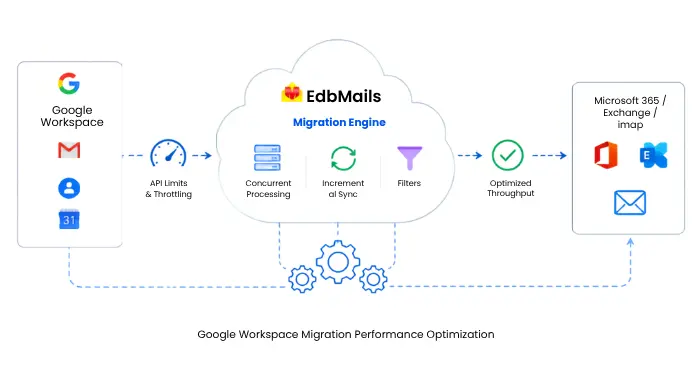
Migration speed is one of the first things IT teams want to pin down before they move off Google Workspace, and it almost never comes down to a single cause. How long it takes to move mailboxes into Microsoft 365, Exchange Server, or an IMAP host depends on a mix of API quotas, network throughput, mailbox size, and how the migration workload is scheduled. Those variables are what separate a project that wraps up over a weekend from one that drags on for weeks, and most of them are set by the source and target servers rather than by the migration software you run.
Google Workspace Migration Performance Optimization

This guide breaks down the factors that shape Google Workspace migration performance and the settings you can adjust to squeeze more throughput out of the same environment. These optimization principles are relevant to any API-driven Google Workspace migration. Since mailbox migration depends on the behavior and limitations of the underlying source and destination APIs, this guide uses the Google Workspace Migration Tool as a technical reference to demonstrate how factors such as API quotas, throttling, concurrent processing, and incremental synchronization affect migration performance.

What Actually Determines Migration Performance

It helps to think of a migration as a pipeline with several points where data can back up. The source (Google Workspace) can only serve data as fast as its APIs allow. The target (Microsoft 365, Exchange, or IMAP) can only ingest data as fast as its own limits permit. Between them sits your network and the machine running the migration. Throughput is capped by whichever of these is slowest at any given moment. You can throw more parallel threads at the job, but if Google is rate-limiting your requests, extra threads just sit and wait. The goal of tuning is not to run flat out. It is to keep every stage of that pipeline busy without tripping a limit that stalls the whole run.

Google and Microsoft API Limits Set the Ceiling

Both platforms enforce quotas on how much data you can pull and push through their APIs, and these quotas are the real ceiling on migration speed. On the Google side, Workspace APIs apply per-user rate limits and daily quotas. Hammer a single mailbox with too many concurrent requests, and Google responds with back-off errors that force the migration to slow down or retry. This is why raw parallelism against one large mailbox rarely helps. Google would rather you spread requests across many users than saturate one. On the target side, Microsoft 365 and on-premises Exchange apply their own throttling limits per mailbox and per tenant, and the default policy is usually tuned for everyday mail flow rather than a bulk migration. See the Exchange migration speed guide for how to review and relax that policy before a large run.

Handling Google Workspace and Exchange API Throttling

Throttling is not an error you can eliminate. It is a control mechanism, and any migration of real size will hit it at some point. What matters is how the migration reacts when it does. A migration tool that continues issuing API requests after receiving a throttling response can increase the likelihood of extended back-off intervals, further reducing throughput. EdbMails continuously monitors server responses and dynamically adjusts request rates to remain within the current API and service limits. If a request encounters a transient failure, such as a throttling response or temporary network interruption, the application automatically applies exponential back-off and retries the operation without interrupting the migration session.

This adaptive retry mechanism helps maintain migration continuity, minimizes manual intervention, and improves the likelihood of completing large-scale migrations without unnecessary delays. If you would rather handle some of this at the source, a few habits reduce throttling pressure: schedule large batches during off-peak hours when the servers are under less load, keep sensible intervals between batches, and avoid stacking other heavy administrative tasks on the same tenant while a migration is running. For target-side tuning specifics, the guide on common Google Workspace migration issues and how to fix them covers the errors that trace back to throttling.

Mailbox Size and Total Data Volume

Nothing slows a migration like a handful of oversized mailboxes. Accounts holding 50 GB or more, or years of archived mail, take disproportionately long because every item has to be read from Google, transferred, and written to the target one by one. A single 80 GB mailbox can hold up a batch long after the smaller accounts have finished. Two strategies reduce this drag. First, migrate the bulk of the data in an initial pass, then handle the largest mailboxes separately so they do not block the queue. Second, cut the volume you move in the first place. Not every mailbox needs its entire history transferred on day one, and much of what sits in an old inbox is stale. The guidance on handling large Google Workspace mailbox migrations goes deeper into staging heavy accounts without stretching the timeline.

Network Bandwidth and Where the Migration Runs

The migration throughput is directly limited by the available network connection between the source and destination environments. When network capacity is constrained, bandwidth becomes the primary limiting factor on data transfer rates, often before API throttling or service quotas are reached. Validate the actual available bandwidth and network stability before estimating migration performance. A few practical points make a measurable difference. Run the migration from a machine with a stable, high-throughput connection rather than a laptop on office Wi-Fi. Keep that machine awake and free of aggressive power-saving or sleep settings that can interrupt a long-running job. For very large environments, EdbMails can be installed on more than one computer so different sets of mailboxes migrate in parallel across separate connections, which effectively multiplies your available throughput.

Concurrent Migration: Process Mailboxes in Parallel

Moving mailboxes one after another is the single biggest waste of time in a large migration. If each of the 500 accounts is processed sequentially, the total is simply the sum of all mailbox processing times, and you are leaving most of your capacity idle. Concurrent migration solves this by processing multiple mailboxes simultaneously, distributing the workload across threads. Because the load is spread across many users rather than concentrated on one, it also plays well with per-user API limits. EdbMails scales this the same way whether you are moving 50 mailboxes or 50,000, and folder structure, labels, and message metadata still land correctly on the target. For organizations moving large user counts, the bulk Google Workspace mailbox migration approach combines concurrency with automated setup so you are not configuring accounts by hand. You can see the full set of throughput-related capabilities on the features page.

Incremental migration

A migration is rarely a single pass. Mail keeps arriving in Google Workspace right up until you cut over, and if your tool re-transfers everything on each run, you pay the full cost again every time and risk duplicates in the target. Incremental migration fixes both problems. EdbMails records what has already been transferred and, on each subsequent run, moves only the items that are new or changed since the last pass. That keeps repeat runs short and stops duplicate messages from piling up in the destination. In practice, the workflow looks like this: run a full initial migration well ahead of cutover, then run quick incremental migration passes to catch the delta, with a final pass immediately before you switch users over. Skipping that last incremental sync is one of the most common reasons a few days of recent mail goes missing after cutover.

How EdbMails reduces migration time with advanced mailbox filtersl

The fastest data to migrate is the data you decide not to migrate. Advanced filters let you exclude anything that does not need to travel, which cuts the payload and the time in one move. EdbMails supports filtering by date range, folder, subject, sender, recipient, and CC or BCC. That makes it simple to migrate, say, only the last two years of mail, or to leave out large low-value folders during the initial pass and pick them up later. This kind of selective migration is especially useful for phased rollouts and compliance-driven projects where you only want a defined slice of data in the destination.

Best practices to improve migration throughput

When you want to improve throughput on an active migration, work through these in order:

  • Confirm the migration account has domain-wide delegation and the correct API scopes, so requests are not failing and retrying for permission reasons. The Google Workspace admin configuration steps cover this.
  • On an Exchange target, apply a relaxed throttling policy to the migration account for the duration of the project.
  • Enable concurrent migration and let the tool manage throttling automatically rather than forcing a fixed thread count.
  • Pull the largest mailboxes out of the main batch and migrate them separately.
  • Apply date or folder filters to drop data you do not need on the first pass.
  • Schedule heavy batches for off-peak hours.
  • Use incremental passes to keep repeat runs short, and never skip the final sync before cutover.

Getting a faster, more predictable migration

Migration performance is mostly a matter of respecting the limits at each stage of the pipeline and keeping every stage busy without tripping a throttle. Concurrency handles the volume, incremental runs keep repeat passes cheap, filters trim the payload, and automatic throttling management keeps the whole thing from stalling when a server pushes back. EdbMails builds these controls into the Google Workspace Migration Tool, so most of the tuning happens on its own, with automatic mailbox mapping and detailed per-mailbox reports giving you visibility at every step. If you are planning a move, download the free trial to benchmark throughput against your own mailboxes and connection before you commit, or review the pricing for larger rollouts.


 In this manual

IntroductionPerformance FactorsThrottling ManagementConcurrent MigrationIncremental Migration

Google Workspace Migration

100 Mailboxes $299 Only

Buy Now

Need help?

24/7 Customer support

Contact us on Live chat

Personalized Demo

Book a personalized demo

Still need help?

Email us / Call us

@edbmails.com All rights are reserved Privacy Policy | Terms of Use | GDPR | Security | Press Releases

hidden msg
Live Chat

Hi, May I help you?

Hide Chat Now