
EdbMails EDB Recovery and Migration software
  • Products
    EdbMails
    All-in-one Recovery and Migration
    • EDB Recovery and Migration
    • OST, PST, MBOX, NSF, EML, MSG
    • Office 365, Exchange Migration
    • SharePoint, OneDrive & Teams
    • Google Workspace Migration
    • IMAP Migration
    • Duplicate Remover
    • EdbMails Data Recovery
    • Backup Solutions
    • All ProductsAll Products

    EDB Recovery and Migration

    EdbMails lets you recover corrupted, damaged, and offline Exchange EDB files, convert EDB mailboxes to PST format, and directly migrate mailbox data to Office 365 and live Exchange Server.

    EDB to PST
    EDB to PST
    Recover corrupted, damaged, offline EDB files and convert Exchange EDB mailboxes to PST file format
    Public Folder to Exchange
    Public Folder to Exchange
    Migrate public folders from an Exchange offline EDB file to live Exchange Server
    EDB to Live Exchange Migration
    EDB to Live Exchange Migration
    Directly migrate offline Exchange database (EDB) files to live Exchange server
    Archive Mailbox to Office 365
    Archive Mailbox to Office 365
    Migrate archive mailboxes from offline EDB files directly to Office 365
    EDB to Office 365 Migration
    EDB to Office 365 Migration
    Directly migrate offline Exchange database (EDB) files to Office 365
    Public Folder to Office 365
    Public Folder to Office 365
    Migrate public folders from an offline Exchange EDB file to Office 365

    OST, PST, MBOX, NSF, EML, MSG Export and Migration

    EdbMails lets you to recover OST and PST files, export OST, PST, MBOX, NSF, EML, and MSG files to PST files, and directly migrate OST, PST, MBOX, and NSF mailbox data to Office 365 and live Exchange Server.

    OST Recovery and Migration
    OST Recovery and Migration
    Recover offline OST files, convert OST to PST, and migrate OST to Office 365 and Exchange Server
    PST Recovery and Migration
    PST Recovery and Migration
    Recover Outlook PST files , Export PST to PST, migrate PST to Office 365 and Exchange Server
    MBOX Export and Migration
    MBOX Export and Migration
    Export MBOX to PST, migrate MBOX to Office 365 and Exchange Server
    NSF Export and Migration
    NSF Export and Migration
    Export NSF to PST, migrate NSF to Office 365 and Exchange Server
    EML to PST Export
    EML to PST Export
    Convert EML files to Outlook PST files
    PST to MSG Export
    PST to MSG Export
    Convert Outlook PST file to MSG file format
    MSG to PST Export
    MSG to PST Export
    Export MSG files to Outlook PST files

    Office 365, Exchange Migration

    EdbMails lets you securely migrate mailboxes across Microsoft 365, Exchange, Google Workspace (Google Workspace Migraton), and IMAP-supported servers such as Outlook, Gmail, Zimbra, Zoho Mail, and cPanel, ensuring zero downtime.

    Office 365 Backup
    Office 365 Migration
    Migrate between Office 365 tenants, Office 365 to Exchange, Office 365 to PST, PST files to Office 365.
    Exchange Server Backup
    Exchange Migration
    Migrate between any Exchange Servers, Exchange to Office 365, Exchange to PST, PST files to Exchange.
    Tenant to Tenant Migration
    Tenant to Tenant Migration
    Migrate Mailboxes, Public Folders, Archive Mailboxes between Office 365 Tenants.
    Exchange to Office 365
    Exchange to Office 365
    Migrate Mailboxes, Public Folders, Archive Mailboxes from live Exchange server to Office 365.
    Office 365 to IMAP
    Office 365 to IMAP
    Migrate Office 365 to IMAP, Office 365 to Gmail, Office 365 to Outlook, Office 365 to Zoho etc.
    Exchange to IMAP
    Exchange to IMAP
    Migrate from live Exchange Server to IMAP servers such as Gmail, Outlook, and Zoho Mail.
    Public Folder to Office 365
    Public Folder to Office 365
    Migrate Public Folders between Office 365 tenants with complete folder hierarchy and mailbox data integrity.
    Exchange to PST
    Exchange to PST
    Export live Exchange Server mailboxes, public folders, and archive mailboxes to Outlook PST files.

    SharePoint, OneDrive & Microsoft Teams Migration

    EdbMails lets you migrate SharePoint sites, OneDrive data, Microsoft Teams, teams, channels, chats, permissions, and documents between Microsoft 365 tenants while maintaining the existing folder structure and data integrity.

    SharePoint, OneDrive & Teams Backup
    SharePoint Online Migration
    Migrate documents, lists, files and folders from SharePoint sites.
    OneDrive for Business Migration
    OneDrive for Business Migration
    Migrate documents, lists, files, folders, private chats from OneDrive.
    Microsoft Teams Migration
    Microsoft Teams Migration
    Migrate Teams, chats, channels, documents, files and folders etc.

    Google Workspace / G Suite Migration

    EdbMails offers secure Google Workspace migration to Office 365, Exchange, or IMAP, and export to PST covering emails, contacts, calendars and tasks.

    Google Workspace Migration
    Google Workspace Migration
    Migrate emails, calendars, contacts, tasks from Google workspace to Google workspace, office 365, Exchange and IMAP. Export to PST
    Google Workspace to Office 365
    Google Workspace to Office 365
    Migrate emails, calendars, contacts, tasks from Google Workspace / G Suite to Office 365
    Google Workspace to Exchange Server
    Google Workspace to Exchange Server
    Migrate emails, calendars, contacts, tasks from Google Workspace / G Suite to on-Premise Exchange Server
    Google Workspace to IMAP
    Google Workspace to IMAP
    Migrate emails, calendars, contacts, tasks from Google Workspace / G Suite to IMAP, Outlook, Zimbra, Zoho etc.
    Google Workspace to Google Workspace Migration
    Google Workspace to Google Workspace
    Migrate emails, calendars, contacts, tasks between two Google Workspace / G Suite tenants
    Google Workspace to PST
    Google Workspace to PST
    Export emails, calendars, contacts, tasks from Google Workspace / G Suite to Outlook PST files

    IMAP Migration

    EdbMails IMAP Migration tool lets you easily migrate emails from IMAP servers such as Outlook, Gmail, Zoho Mail, Zimbra, cPanel, and more. Supports IMAP to IMAP, Office 365, Exchange Server, PST, and bulk PST to IMAP migration.

    IMAP Email Backup & Migration
    IMAP Email Backup & Migration
    Backup and migrate emails from IMAP servers to PST, Office 365, and On-Premises Exchange Server
    IMAP to Office 365
    IMAP to Office 365
    Migrate emails, folders, and attachments from IMAP servers to Office 365
    IMAP to Exchange
    IMAP to Exchange
    Migrate emails, folders, and attachments from IMAP servers to on-premises Exchange Server
    IMAP to PST
    IMAP to PST
    Export emails, folders, and attachments from IMAP servers to Outlook PST files for backup
    PST to IMAP
    PST to IMAP
    Migrate emails, folders, and attachments from bulk PST files to IMAP servers

    Duplicate Remover

    EdbMails Duplicate Remover lets you easily remove duplicate items from Office 365 and Exchange Server, and from IMAP, Outlook, Gmail, Zimbra, Zoho Mail, etc., ensuring a clean and organized mailbox.

    Remove Duplicates
    Remove Duplicates
    Easily clean up your Office 365, Exchange, Outlook and IMAP accounts by removing duplicate emails.
    Remove Duplicates from Office 365
    Remove Duplicates from Office 365
    Remove duplicate emails, calendars, contacts, journal tasks, etc. from Office 365.
    Remove Duplicates from Exchange Server
    Remove Duplicates from Exchange Server
    Remove duplicate emails, calendars, contacts, journal tasks, etc. from live Exchange Server.
    Remove Duplicates from IMAP, Outlook
    Remove Duplicates from IMAP, Outlook
    Remove duplicate emails, attachments from IMAP, Outlook, Gmail, Zimbra, Zoho Mail etc.

    Exchange, SharePoint, OneDrive, Teams and Office 365 Backup

    EdbMails enables secure, automated backup and recovery for Microsoft 365 services including Exchange Online, SharePoint, OneDrive, Teams, and Live Exchange Server with complete data protection and restore flexibility.

    Office 365 Backup
    Office 365 Backup
    Incremental, Granular, Encrypted and Compressed Office 365 Mailboxes Backup
    Exchange Server Backup
    Exchange Server Backup
    Incremental, Granular, Encrypted and Compressed Exchange Mailboxes Backup
    SharePoint, OneDrive & Teams Backup
    SharePoint, OneDrive & Teams Backup
    Backup Online site collections, Team sites, Office 365 groups, all documents etc.

    EdbMails Data Recovery

    EdbMails Data Recovery Software lets you recover permanently deleted data, including photos, videos, documents, and archived files, from partitions on hard drives, SSDs, USB drives, SD cards, and external storage devices.

    EdbMails Data Recovery
    EdbMails Data Recovery
    Recover and restore permanently deleted data from hard drives, SSDs, USB drives, SD cards, and etc.
    Whitepaper Whitepaper
    Request a Demo Request a Demo
    Sign Up Sign Up
  • Features
  • FAQ
  • Offers
  • Pricing
  • Download
  • Support
  • Sign in
User’s Manual
Google Workspace Migration

User Manual

User Manual

  • Overview
  • System Requirements
  • Migration Scenarios
  • Installation
    • Installation process
    • Reinstall or Upgrade
    • How to uninstall
  • FAQs
    • Google Workspace to Office 365
    • Google Workspace to IMAP
    • Google Workspace to Exchange
    • Google Workspace to Google Workspace
    • Google Workspace to PST Export
  • Videos
  • Screenshots
    • Google Workspace to Office 365
    • Google Workspace to Exchange
    • Google Workspace to IMAP
  • How it works?
    • Google Workspace to Office 365 Migration
    • Migrate Google Workspace to Google Workspace
    • Google Workspace to Exchange Migration
    • Google Workspace to IMAP Migration
    • Export Google Workspace to Outlook PST
  • Google Workspace Admin Configuration
  • Connect to target Office 365
  • Connect to Exchange server for multiple mailboxes migration
    • Connect with Global Admin
    • Connect to Multiple users using CSV file
    • Connect using full access permission
    • Connect individual users for Single / Specific user Migration
  • Connect to Hosted Exchange for its Migration
    • Connect with Full Access permissions
    • Connect to multiple users using CSV file
    • Connect to Individual user for migration
  • Connect to IMAP
    • Connect IMAP Single Server
    • Connect IMAP Multiple Server
  • Knowledge Base
    • Bulk Google Workspace Mailbox Migration
    • Google Workspace Migration
    • Why Choose EdbMails
    • Automatic Mailbox Mapping
    • Best Google Workspace Migration Software
    • Migrate Google Workspace Emails, Contacts & Calendars
    • Fix Google Workspace Migration Issues
    • Avoid Google Workspace Migration Mistakes
    • Mistakes to Avoid During Google Workspace Migration
    • Migrate Large Google Workspace Mailboxes
    • Google Workspace Metadata Preservation
    • Fix Google Workspace API Permission Errors
    • Google Workspace Contacts Migration
    • Google Workspace Tasks Migration
    • Google Workspace Migration Performance
    • Selective Google Workspace Mailbox Migration
    • Batch Google Workspace Mailbox Migration
  • Map the Mailboxes
  • Incremental Migration
  • Exchange Throttling Policy
  • Multifactor Authentication
    • Enable MFA in Office 365
    • Create App password for MFA
    • Disable Security Defaults
  1. Home
  2. Google Workspace Migration
  3. Preserve Email Metadata During Google Workspace Migration
Download Buy Now

Preserving Read/Unread Status and Email Metadata During Migration

Moving mailboxes from Google Workspace (G Suite) to a new platform is never just about getting the messages across. If a migration strips out timestamps, flattens the read/unread flags, or scrambles who sent what to whom, users end up with a mailbox that technically has all their email but doesn't behave like their email anymore. The EdbMails Google Workspace Migration Tool will migrate read/unread status email while keeping metadata and message state intact so a mailbox looks and works the same after migration as it did before.

This guide explains what metadata actually gets preserved during a Google Workspace migration, why it matters more than most people expect, and how to confirm it made it across in one piece.
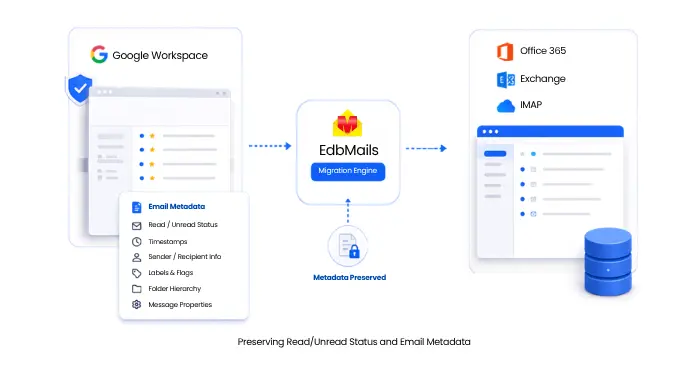

Preserving Read/Unread Status and Email Metadata

What Counts as Email Metadata

Metadata is everything about a message that isn't the message body itself. It's the layer of information that makes an inbox searchable, sortable, and trustworthy. For a Google Workspace migration, this includes:

  • Sent and received timestamps: the exact date and time each message was sent or arrived, not the date it happens to be re-imported.
  • Read/unread status: whether a user had already opened a message before migration.
  • Flags and labels: starred items, Gmail labels, categories, and any custom tagging applied in the source mailbox.
  • Sender and recipient details: the To, From, Cc, and Bcc fields exactly as they appeared originally.
  • Folder and label hierarchy: how messages were organized, including nested folders and label structures.
  • Message properties: formatting, inline images, and attachment associations tied to each email.

None of this is visible in the email body, but all of it shapes how a mailbox feels once it lands on the new platform. Lose the timestamps and a user's sent history gets reordered. Lose the read/unread flags and every message looks new again, even ones opened months ago.

Why Metadata Preservation Matters During Migration

Search and retrieval

Most people rely on date ranges to find old emails: "the invoice from around March," or "that thread from last quarter." If migration shifts message timestamps, search results stop matching what users remember, and finding a specific email becomes guesswork instead of a quick lookup.

Compliance and legal holds

Organizations in regulated industries often need to prove exactly when a message was sent or received. Altered timestamps or missing sender/recipient data can undermine audit trails, weaken e-discovery responses, and break retention policies that depend on accurate, unaltered metadata.

User experience on day one

Nothing erodes confidence in a migration faster than opening a new mailbox and finding thousands of messages marked unread. A flood of false unread flags signals to employees that something went wrong with the migration, even when the content itself is fine. Preserved read/unread status lets employees pick up exactly where they left off, without re-sorting years of correspondence just to find what's actually new.

Workflow continuity

Flags, labels, and folder structure aren't cosmetic details. Teams build filters, rules, and daily habits around them. When a migration flattens that structure, the time employees spent organizing their mailbox disappears along with it, and rebuilding those habits from scratch costs real productivity.

How EdbMails Preserves Metadata During Migration

EdbMails treats metadata as part of the message itself rather than something to reconstruct afterwards. During a Google Workspace to Office 365, Exchange, or IMAP migration, the tool reads each email's full property set, including timestamps, read/unread flags, sender and recipient headers, and folder placement, then replicates it on the destination server rather than assigning new values on arrival.

A few specifics worth knowing:

  • Original folder hierarchy is mapped, not rebuilt: EdbMails carries over the Gmail label and folder structure, so nested folders appear in the same arrangement on the target mailbox, whether that's Office 365, Exchange Server, or an IMAP-based system.
  • Read/unread status transfers as-is: A message left unread in Gmail stays unread after migration; one already opened stays marked read. This holds across every supported target, from Google Workspace to Office 365 to Google Workspace to Exchange and Google Workspace to IMAP.
  • Selective filters can use metadata too: Administrators can filter migrations by date range, sender or recipient address, or even by message read/unread status, which is useful for staged migrations or compliance-driven selective transfers.
  • Incremental migration relies on metadata to avoid duplicates: EdbMails supports incremental migration to avoid duplicates on re-runs. Instead of storing your full mailbox contents, it keeps a small, encrypted record of previously migrated items on your local machine. On follow-up runs, it checks that record and pulls across only new or changed messages, saving bandwidth and cutting migration time.
  • Secure transfer throughout: All metadata and message content move over encrypted connections using OAuth 2.0 and TLS, so nothing is exposed in transit.

Because mailboxes are migrated using a Google Admin account rather than individual user logins, this metadata preservation applies consistently across every mailbox in a bulk migration, not just a handful of test accounts.

How to Verify Metadata After Migration

A quick check after migration goes a long way toward catching anything unexpected before users log in. Here's a practical way to do it:

  • Spot-check a sample of mailboxes: Pick a few accounts with a mix of old and recent mail, and confirm that timestamps on messages match the original Gmail account.
  • Compare read/unread counts: Check the unread count in a folder before and after migration. They should match, or be lower only if new mail arrived during the process.
  • Open a few flagged or labelled messages: Confirm stars, labels, and categories carried over correctly and that folder structure looks the same as the source.
  • Review the migration report: EdbMails generates logs and completion reports during the process, which list migrated item counts per mailbox and any items that failed to transfer, so administrators don't have to check everything manually.
  • Test search and sort: Try sorting by date and searching within a date range on the migrated mailbox to confirm the results line up with expectations.

For a full breakdown of everything that gets migrated alongside metadata, including attachments, contacts, calendars, and tasks, see Migrate Google Workspace Emails, Contacts & Calendars.

Frequently Asked Questions

  1. Does EdbMails change email timestamps during migration?

    No. Original sent and received timestamps are preserved exactly as they appeared in the source Google Workspace mailbox.

  2. Will emails already read in Gmail show as unread after migration?

    No. Read/unread status transfers along with the message, so previously opened emails remain marked as read on the target platform.

  3. Can I filter a migration based on read/unread status?

    Yes. EdbMails supports filtering by message read/unread status, along with date ranges and sender or recipient addresses, which is useful for selective or staged migrations.

  4. Does folder structure stay the same after migration?

    Yes. Folder and label hierarchy from Google Workspace is mapped to the equivalent structure on the destination platform, so navigation stays familiar.

  5. Is metadata preserved across all supported migration targets?

    Yes. This applies whether the destination is Office 365, on-premises or hosted Exchange Server, or an IMAP-based platform.


Additional Resources:

  • Google Workspace Migration Tool
  • Google Workspace Migration Scenarios
  • Automatic Mailbox Mapping
  • Google Workspace Migration FAQs
  • Why Choose EdbMails for Google Workspace Migration
lady image

 In this manual

IntroductionMetadata PreservationMetadata VerificationFAQs

Google Workspace Migration

100 Mailboxes $299 Only

Buy Now

Need help?

24/7 Customer support

Contact us on Live chat

Personalized Demo

Book a personalized demo

Still need help?

Email us / Call us

@edbmails.com All rights are reserved Privacy Policy | Terms of Use | GDPR | Security | Press Releases

hidden msg
Live Chat

Hi, May I help you?

Hide Chat Now
