
EdbMails EDB Recovery and Migration software
  • Products
    EdbMails
    All-in-one Recovery and Migration

    Trusted and internationally recognized software that delivers award winning solutions.

    Explore our products
    • Offline Recovery Tools
    • Migration Tools
    • G Suite Migration
    • IMAP Migration
    • Duplicate Remover
    • Backup
    • Windows Data Recovery

    Exchange EDB / Email Recovery Tools

    EdbMails offers a comprehensive suite of tools to recover and convert offline EDB, OST, and PST files into Outlook PST, migrate mailboxes to Office 365 and live Exchange Server, and export and migrate data from NSF, MBOX, EML, and MSG formats.

    EDB Recovery and Migration
    Recover EDB to PST, EDB to Office 365 and Exchange NO Duplicate Migration
    NSF Export and Migration
    Export NSF to PST, NSF to Office 365 and Exchange Migration
    OST Recovery and Migration
    Recover OST to PST, OST to Office 365 and Exchange Migration
    EML to PST Export
    EML files export to Outlook PST format
    PST Recovery and Migration
    Recover Outlook PST, PST to Office 365 and Exchange Migration
    PST to MSG Export
    Outlook PST files export to MSG format
    MBOX Export and Migration
    Export MBOX to PST, MBOX to Office 365 and Exchange Migration
    MSG to PST Export
    Export MSG files to Outlook PST files

    Exchange, Office 365, IMAP, SharePoint, OneDrive, Teams

    EdbMails lets you securely migrate mailboxes across Microsoft 365, Exchange, Google Workspace (G Suite), and IMAP-supported servers such as Outlook, Gmail, Zimbra, Zoho Mail, and cPanel, ensuring zero downtime.

    Exchange Server Migration
    Migrate between any Exchange Servers, Exchange to Office 365, Exchange to PST, PST files to Exchange.
    SharePoint Online Migration
    Migrate documents, lists, files and folders from SharePoint sites.
    Office 365 Migration
    Migrate between Office 365 tenants, Office 365 to Exchange, Office 365 to PST, PST files to Office 365.
    OneDrive for Business Migration
    Migrate documents, lists, files and folders from OneDrive.
    Microsoft Teams Migration
    Migrate Teams, chats, channels, documents, files and folders etc.

    Google Workspace / G Suite Migration

    EdbMails G Suite Migration Tool lets you easily migrate emails, calendars, contacts, tasks, and more from G Suite to Office 365, Exchange Server, and IMAP servers using a Google Admin account without requiring individual user credentials.

    G Suite Migration
    Migrate emails, calendars, contacts, tasks from G Suite to Office 365, G Suite to Exchange, G Suite to IMAP Servers
    G Suite to Office 365
    Migrate emails, calendars, contacts, tasks from Google Workspace / G Suite to Office 365
    G Suite to Exchange Server
    Migrate emails, calendars, contacts, tasks from Google Workspace / G Suite to on-Premise Exchange Server
    G Suite to IMAP
    Migrate emails, calendars, contacts, tasks from Google Workspace / G Suite to IMAP, Outlook, Zimbra, Zoho etc.

    IMAP Migration

    EdbMails IMAP Migration tool lets you easily migrate emails from IMAP servers such as Outlook, Gmail, Zoho Mail, Zimbra, cPanel, and more. Supports IMAP to IMAP, Office 365, Exchange Server, PST, and bulk PST to IMAP migration.

    IMAP Email Backup & Migration
    Backup and migrate emails from IMAP servers to PST, Office 365, and On-Premises Exchange Server
    IMAP to Office 365
    Migrate emails, folders, and attachments from IMAP servers to Office 365
    IMAP to Exchange
    Migrate emails, folders, and attachments from IMAP servers to on-premises Exchange Server
    IMAP to PST
    Export emails, folders, and attachments from IMAP servers to Outlook PST files for backup
    PST to IMAP
    Migrate emails, folders, and attachments from bulk PST files to IMAP servers

    Duplicate Remover

    EdbMails Duplicate Remover lets you easily remove duplicate items from Office 365 and Exchange Server, and from IMAP, Outlook, Gmail, Zimbra, Zoho Mail, etc., ensuring a clean and organized mailbox.

    Remove Duplicates from Office 365
    Remove duplicate emails, calendars, contacts, journal tasks, etc. from Office 365.
    Remove Duplicates from Exchange Server
    Remove duplicate emails, calendars, contacts, journal tasks, etc. from live Exchange Server.
    Remove Duplicates from IMAP, Outlook
    Remove duplicate emails, attachments from IMAP, Outlook, Gmail, Zimbra, Zoho Mail etc.

    Exchange, SharePoint, OneDrive, Teams and Office 365 Backup

    EdbMails enables secure, automated backup and recovery for Microsoft 365 services including Exchange Online, SharePoint, OneDrive, Teams, and Live Exchange Server with complete data protection and restore flexibility.

    Office 365 Backup
    Incremental, Granular, Encrypted and Compressed Office 365 Mailboxes Backup
    Exchange Server Backup
    Incremental, Granular, Encrypted and Compressed Exchange Mailboxes Backup
    SharePoint, OneDrive & Teams Backup
    Backup Online site collections, Team sites, Office 365 groups, all documents etc.

    Windows Data Recovery

    EdbMails Windows Data Recovery Software lets you recover permanently deleted data, including photos, videos, documents, and archived files, from partitions on hard drives, SSDs, USB drives, SD cards, and external storage devices.

    Windows Data Recovery
    Recover and restore permanently deleted data from hard drives, SSDs, USB drives, SD cards, and etc.
    Whitepaper
    Request a Demo
    Sign Up
  • Features
  • FAQ
  • Pricing
  • Download
  • Support
  • Sign in
User’s Manual
G Suite Migration

User Manual

User Manual

  • Overview
  • System Requirements
  • Migration Scenarios
  • Installation
    • Installation process
    • Reinstall or Upgrade
    • How to uninstall
  • FAQs
    • G Suite to Office 365
    • G Suite to IMAP
    • G Suite to Exchange
  • Videos
  • Screenshots
    • G Suite to Office 365
    • G Suite to Exchange
    • G Suite to IMAP
  • How it works?
    • G Suite to Office 365 Migration
    • G Suite to Exchange Migration
    • G Suite to IMAP Migration
  • G Suite Admin Configuration
  • Connect to target Office 365
  • Connect to Exchange server for multiple mailboxes migration
    • Connect with Global Admin
    • Connect to Multiple users using CSV file
    • Connect using full access permission
    • Connect individual users for Single / Specific user Migration
  • Connect to Hosted Exchange for its Migration
    • Connect with Full Access permissions
    • Connect to multiple users using CSV file
    • Connect to Individual user for migration
  • Connect to IMAP
    • Connect IMAP Single Server
    • Connect IMAP Multiple Server
  • Knowledge Base
    • Bulk G Suite Mailbox Migration
    • Google Workspace Migration
    • Why Choose EdbMails
    • Automatic Mailbox Mapping
    • Best G Suite Migration Software
    • Migrate G Suite Emails, Contacts & Calendars
  • Map the Mailboxes
  • Incremental Migration
  • Exchange Throttling Policy
  • Multifactor Authentication
    • Enable MFA in Office 365
    • Create App password for MFA
    • Disable Security Defaults
  1. Home
  2. Product
  3. How to migrate Google Workspace Emails, Contacts and Calendars | EdbMails
Download Buy Now

Migrate Google Workspace Emails, Contacts and Calendars

Google Workspace migration involves moving business-critical data such as emails, contacts, calendars, and tasks from one environment to another while ensuring accuracy, consistency, and continuity. Organizations perform Google Workspace migration when switching to platforms like Microsoft 365, Exchange Server, or IMAP systems, or when consolidating multiple accounts.

However, a successful migration is not limited to emails alone. Google Workspace contains interconnected data such as attachments, contacts, calendars, tasks, metadata, and folder structure, all of which must be preserved to maintain full usability after migration.
G Suite Migration

Any loss or mismatch in these components can affect communication history, scheduling, collaboration, and overall productivity. This is why a structured migration approach is required.

EdbMails Google Workspace Migration Tool ensures complete migration of all mailbox components with accuracy, maintaining structure and data integrity throughout the process.


What Data Does EdbMails Migrate from Google Workspace?

A complete migration requires handling all mailbox elements together. EdbMails ensures that no critical data is left behind.

  • Emails with Attachments
    Emails are migrated along with their attachments to preserve complete communication history. Attachments such as contracts, invoices, reports, and business documents remain linked to their original emails without alteration.
  • Contacts
    All contact information including names, email addresses, phone numbers, and additional attributes is migrated to ensure communication continuity in the new environment.
  • Calendars and Tasks
    Calendar events, meetings, reminders, and schedules are migrated along with tasks and actionable items. This ensures users do not lose important planning or workflow data.
  • Metadata
    Metadata such as email timestamps, sender and recipient details, labels, flags, and read/unread status is preserved to maintain full context and traceability of data.
  • Folder Structure
    Mailbox hierarchy including folders and labels is retained exactly as it exists in Google Workspace, ensuring familiar navigation after migration.

Why Complete Data Migration Matters

Google Workspace data is interconnected, and each component depends on the other for meaningful usage. Migrating only partial data can lead to broken workflows and missing context.

For example:

  • Emails without attachments lose business context
  • Calendars without events affect scheduling
  • Contacts without details disrupt communication
  • Missing metadata removes traceability
  • Altered folder structure creates confusion in data organization

To avoid these issues, a complete migration approach is essential where all components are transferred together in a structured manner.

How EdbMails Ensures Complete Google Workspace Migration

EdbMails Google Workspace Migration Tool is designed to handle migration in a structured way where all mailbox components are treated as a single unified dataset rather than separate elements. This ensures that data relationships, structure, and usability remain intact throughout the process.

Instead of focusing only on transfer, EdbMails ensures end-to-end preservation of mailbox integrity, which includes emails, attachments, contacts, calendars, tasks, metadata, and folder hierarchy.

During migration, the tool ensures:

  • Emails are migrated along with attachments without breaking associations
  • Contacts are transferred with complete field-level information
  • Calendars and tasks retain scheduling data, reminders, and event structures
  • Metadata such as timestamps, message status, and labels is preserved for full context
  • Folder structure is maintained to ensure consistent navigation in the target system

This unified handling ensures that migrated data behaves the same way in the destination environment as it did in Google Workspace, without requiring manual restructuring or correction.

Key Benefits of EdbMails for Enterprise Migration Projects

For large organizations, choosing the right migration software directly impacts project success. EdbMails provides:

Benefits of Using EdbMails for Google Workspace Migration

Using EdbMails Google Workspace Migration Tool provides operational and functional advantages that go beyond simple data transfer.

  • The primary benefit is data consistency, where all mailbox components are migrated together in a synchronized manner, ensuring that no dependent element is lost or separated from its context.
  • It also provides migration reliability at scale, making it suitable for both small organizations and enterprise environments where multiple mailboxes and large datasets need to be handled simultaneously.
  • Another key advantage is reduced post-migration effort, since folder structure, metadata, and relationships are preserved. This eliminates the need for manual reorganization or correction after migration.
  • In addition, the tool improves migration control and visibility, allowing administrators to track progress and verify completion with confidence.
  • Overall, it ensures that organizations achieve a stable and predictable migration outcome while maintaining full usability of data in the target system.

Migration Process Overview

Migrating Google Workspace data using EdbMails Google Workspace Migration Tool follows a structured workflow designed to ensure complete and accurate transfer of emails, attachments, contacts, calendars, tasks, metadata, and folder structure.

The process is straightforward and does not require complex configuration:

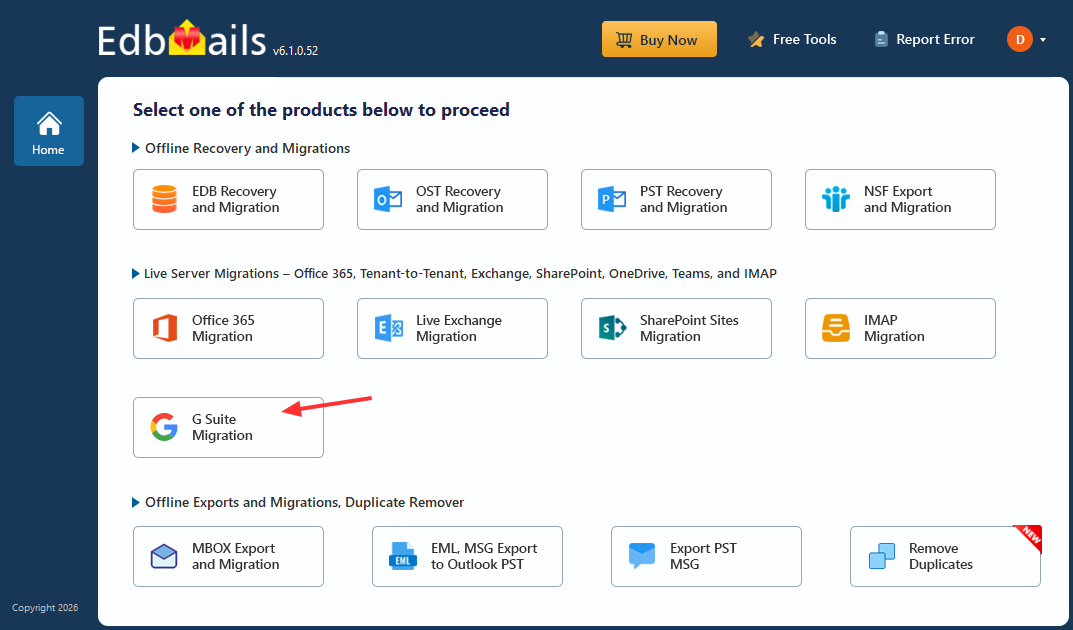
  • Launch the EdbMails application and select Google Workspace (G Suite) Migration
  • Connect to the source Google Workspace account and authenticate securely
  • Load user mailboxes and select the required data such as emails, contacts, calendars, and tasks
  • Connect to the destination platform such as Microsoft 365, Exchange Server, or IMAP
  • Map source and destination mailboxes to ensure correct data alignment
  • Start the migration process and monitor progress in real time
  • Review migration logs and reports to verify data accuracy and completeness

Once migration is complete, users can validate that mailbox data including attachments, metadata, and folder structure is fully preserved in the destination environment.

For detailed step-by-step instructions, refer to below links:

 G Suite to Office 365 Migration

 G Suite to Exchange to Migration

 G Suite to IMAp Migration

Frequently Asked Questions

  1. Can I migrate Google Workspace to Microsoft 365?

    Yes. With EdbMails Google Workspace Migration Tool, you can migrate complete mailbox data from Google Workspace to Microsoft 365, including emails, attachments, contacts, calendars, tasks, metadata, and folder structure. This ensures that all user data remains consistent and usable in the destination environment.

  2. Does the migration include email attachments?

    Yes. All email attachments are migrated along with their respective emails in their original format. This ensures that documents such as invoices, contracts, reports, and other business files remain fully linked to their corresponding email conversations after migration.

  3. Will metadata and folder structure be preserved during migration?

    Yes. EdbMails preserves complete metadata such as timestamps, sender and recipient details, message status, labels, and other email properties. Along with this, the original folder hierarchy and mailbox organization structure are maintained so users can continue working with familiar navigation in the target system.

  4. Can I migrate only selected mailboxes or specific data?

    Yes. EdbMails allows selective migration where you can choose specific mailboxes, folders, or data types such as emails, contacts, calendars, or tasks. You can also apply filters based on date range or folder structure to control exactly what data is migrated.

  5. Does EdbMails support other Google Workspace migration scenarios?

    Yes. EdbMails supports multiple migration scenarios including Google Workspace to Microsoft 365, Google Workspace to Live Exchange, and Google Workspace to IMAP servers. It is designed to handle both small-scale and enterprise-level migrations with full data integrity.

Conclusion

Migrating Google Workspace data requires more than simply transferring emails between platforms. It involves ensuring that all related components—including emails, attachments, contacts, calendars, tasks, metadata, and folder structure—are migrated accurately and remain fully usable in the destination environment.

Any inconsistency or data loss during migration can affect communication history, scheduling accuracy, and overall productivity. This makes it essential to follow a structured migration approach that preserves both data and its underlying relationships.

EdbMails G Suite Migration Tool simplifies this process by enabling secure and complete migration of all mailbox data while maintaining its original structure, properties, and context. This helps organizations achieve a smooth transition with consistent data integrity and zero disruption to users and business operations.


Additional resources:

  • G Suite to Office 365 Migration
  • G Suite to live Exchange Migration
  • G Suite to IMAP Migration
  • G Suite Admin Configuration
lady image


 In this manual

IntroductionWhy Complete Data MigrationBenefits of Using EdbMails

G Suite Migration

100 Mailboxes $299 Only

Buy Now

Need help?

24/7 Customer support

Contact us on Live chat

Personalized Demo

Book a personalized demo

Still need help?

Email us / Call us

@edbmails.com All rights are reserved Privacy Policy | Terms of Use | GDPR | Security | Press Releases

hidden msg
Live Chat

Hi, May I help you?

Hide Chat Now