
EdbMails EDB Recovery and Migration software
  • Products
    EdbMails
    All-in-one Recovery and Migration
    • EDB Recovery and Migration
    • OST, PST, MBOX, NSF, EML, MSG
    • Office 365, Exchange Migration
    • SharePoint, OneDrive & Teams
    • Google Workspace Migration
    • IMAP Migration
    • Duplicate Remover
    • EdbMails Data Recovery
    • Backup Solutions
    • All ProductsAll Products

    EDB Recovery and Migration

    EdbMails lets you recover corrupted, damaged, and offline Exchange EDB files, convert EDB mailboxes to PST format, and directly migrate mailbox data to Office 365 and live Exchange Server.

    EDB to PST
    EDB to PST
    Recover corrupted, damaged, offline EDB files and convert Exchange EDB mailboxes to PST file format
    Public Folder to Exchange
    Public Folder to Exchange
    Migrate public folders from an Exchange offline EDB file to live Exchange Server
    EDB to Live Exchange Migration
    EDB to Live Exchange Migration
    Directly migrate offline Exchange database (EDB) files to live Exchange server
    Archive Mailbox to Office 365
    Archive Mailbox to Office 365
    Migrate archive mailboxes from offline EDB files directly to Office 365
    EDB to Office 365 Migration
    EDB to Office 365 Migration
    Directly migrate offline Exchange database (EDB) files to Office 365
    Public Folder to Office 365
    Public Folder to Office 365
    Migrate public folders from an offline Exchange EDB file to Office 365

    OST, PST, MBOX, NSF, EML, MSG Export and Migration

    EdbMails lets you to recover OST and PST files, export OST, PST, MBOX, NSF, EML, and MSG files to PST files, and directly migrate OST, PST, MBOX, and NSF mailbox data to Office 365 and live Exchange Server.

    OST Recovery and Migration
    OST Recovery and Migration
    Recover offline OST files, convert OST to PST, and migrate OST to Office 365 and Exchange Server
    PST Recovery and Migration
    PST Recovery and Migration
    Recover Outlook PST files , Export PST to PST, migrate PST to Office 365 and Exchange Server
    MBOX Export and Migration
    MBOX Export and Migration
    Export MBOX to PST, migrate MBOX to Office 365 and Exchange Server
    NSF Export and Migration
    NSF Export and Migration
    Export NSF to PST, migrate NSF to Office 365 and Exchange Server
    EML to PST Export
    EML to PST Export
    Convert EML files to Outlook PST files
    PST to MSG Export
    PST to MSG Export
    Convert Outlook PST file to MSG file format
    MSG to PST Export
    MSG to PST Export
    Export MSG files to Outlook PST files

    Office 365, Exchange Migration

    EdbMails lets you securely migrate mailboxes across Microsoft 365, Exchange, Google Workspace (Google Workspace Migraton), and IMAP-supported servers such as Outlook, Gmail, Zimbra, Zoho Mail, and cPanel, ensuring zero downtime.

    Office 365 Backup
    Office 365 Migration
    Migrate between Office 365 tenants, Office 365 to Exchange, Office 365 to PST, PST files to Office 365.
    Exchange Server Backup
    Exchange Migration
    Migrate between any Exchange Servers, Exchange to Office 365, Exchange to PST, PST files to Exchange.
    Tenant to Tenant Migration
    Tenant to Tenant Migration
    Migrate Mailboxes, Public Folders, Archive Mailboxes between Office 365 Tenants.
    Exchange to Office 365
    Exchange to Office 365
    Migrate Mailboxes, Public Folders, Archive Mailboxes from live Exchange server to Office 365.
    Office 365 to IMAP
    Office 365 to IMAP
    Migrate Office 365 to IMAP, Office 365 to Gmail, Office 365 to Outlook, Office 365 to Zoho etc.
    Exchange to IMAP
    Exchange to IMAP
    Migrate from live Exchange Server to IMAP servers such as Gmail, Outlook, and Zoho Mail.
    Public Folder to Office 365
    Public Folder to Office 365
    Migrate Public Folders between Office 365 tenants with complete folder hierarchy and mailbox data integrity.
    Exchange to PST
    Exchange to PST
    Export live Exchange Server mailboxes, public folders, and archive mailboxes to Outlook PST files.

    SharePoint, OneDrive & Microsoft Teams Migration

    EdbMails lets you migrate SharePoint sites, OneDrive data, Microsoft Teams, teams, channels, chats, permissions, and documents between Microsoft 365 tenants while maintaining the existing folder structure and data integrity.

    SharePoint, OneDrive & Teams Backup
    SharePoint Online Migration
    Migrate documents, lists, files and folders from SharePoint sites.
    OneDrive for Business Migration
    OneDrive for Business Migration
    Migrate documents, lists, files, folders, private chats from OneDrive.
    Microsoft Teams Migration
    Microsoft Teams Migration
    Migrate Teams, chats, channels, documents, files and folders etc.

    Google Workspace / G Suite Migration

    EdbMails offers secure Google Workspace migration to Office 365, Exchange, or IMAP, and export to PST covering emails, contacts, calendars and tasks.

    Google Workspace Migration
    Google Workspace Migration
    Migrate emails, calendars, contacts, tasks from Google workspace to Google workspace, office 365, Exchange and IMAP. Export to PST
    Google Workspace to Office 365
    Google Workspace to Office 365
    Migrate emails, calendars, contacts, tasks from Google Workspace / G Suite to Office 365
    Google Workspace to Exchange Server
    Google Workspace to Exchange Server
    Migrate emails, calendars, contacts, tasks from Google Workspace / G Suite to on-Premise Exchange Server
    Google Workspace to IMAP
    Google Workspace to IMAP
    Migrate emails, calendars, contacts, tasks from Google Workspace / G Suite to IMAP, Outlook, Zimbra, Zoho etc.
    Google Workspace to Google Workspace Migration
    Google Workspace to Google Workspace
    Migrate emails, calendars, contacts, tasks between two Google Workspace / G Suite tenants
    Google Workspace to PST
    Google Workspace to PST
    Export emails, calendars, contacts, tasks from Google Workspace / G Suite to Outlook PST files

    IMAP Migration

    EdbMails IMAP Migration tool lets you easily migrate emails from IMAP servers such as Outlook, Gmail, Zoho Mail, Zimbra, cPanel, and more. Supports IMAP to IMAP, Office 365, Exchange Server, PST, and bulk PST to IMAP migration.

    IMAP Email Backup & Migration
    IMAP Email Backup & Migration
    Backup and migrate emails from IMAP servers to PST, Office 365, and On-Premises Exchange Server
    IMAP to Office 365
    IMAP to Office 365
    Migrate emails, folders, and attachments from IMAP servers to Office 365
    IMAP to Exchange
    IMAP to Exchange
    Migrate emails, folders, and attachments from IMAP servers to on-premises Exchange Server
    IMAP to PST
    IMAP to PST
    Export emails, folders, and attachments from IMAP servers to Outlook PST files for backup
    PST to IMAP
    PST to IMAP
    Migrate emails, folders, and attachments from bulk PST files to IMAP servers

    Duplicate Remover

    EdbMails Duplicate Remover lets you easily remove duplicate items from Office 365 and Exchange Server, and from IMAP, Outlook, Gmail, Zimbra, Zoho Mail, etc., ensuring a clean and organized mailbox.

    Remove Duplicates
    Remove Duplicates
    Easily clean up your Office 365, Exchange, Outlook and IMAP accounts by removing duplicate emails.
    Remove Duplicates from Office 365
    Remove Duplicates from Office 365
    Remove duplicate emails, calendars, contacts, journal tasks, etc. from Office 365.
    Remove Duplicates from Exchange Server
    Remove Duplicates from Exchange Server
    Remove duplicate emails, calendars, contacts, journal tasks, etc. from live Exchange Server.
    Remove Duplicates from IMAP, Outlook
    Remove Duplicates from IMAP, Outlook
    Remove duplicate emails, attachments from IMAP, Outlook, Gmail, Zimbra, Zoho Mail etc.

    Exchange, SharePoint, OneDrive, Teams and Office 365 Backup

    EdbMails enables secure, automated backup and recovery for Microsoft 365 services including Exchange Online, SharePoint, OneDrive, Teams, and Live Exchange Server with complete data protection and restore flexibility.

    Office 365 Backup
    Office 365 Backup
    Incremental, Granular, Encrypted and Compressed Office 365 Mailboxes Backup
    Exchange Server Backup
    Exchange Server Backup
    Incremental, Granular, Encrypted and Compressed Exchange Mailboxes Backup
    SharePoint, OneDrive & Teams Backup
    SharePoint, OneDrive & Teams Backup
    Backup Online site collections, Team sites, Office 365 groups, all documents etc.

    EdbMails Data Recovery

    EdbMails Data Recovery Software lets you recover permanently deleted data, including photos, videos, documents, and archived files, from partitions on hard drives, SSDs, USB drives, SD cards, and external storage devices.

    EdbMails Data Recovery
    EdbMails Data Recovery
    Recover and restore permanently deleted data from hard drives, SSDs, USB drives, SD cards, and etc.
    Whitepaper Whitepaper
    Request a Demo Request a Demo
    Sign Up Sign Up
  • Features
  • FAQ
  • Offers
  • Pricing
  • Download
  • Support
  • Sign in
User’s Manual
Google Workspace Migration

User Manual

User Manual

  • Overview
  • System Requirements
  • Migration Scenarios
  • Installation
    • Installation process
    • Reinstall or Upgrade
    • How to uninstall
  • FAQs
    • Google Workspace to Office 365
    • Google Workspace to IMAP
    • Google Workspace to Exchange
    • Google Workspace to Google Workspace
    • Google Workspace to PST Export
  • Videos
  • Screenshots
    • Google Workspace to Office 365
    • Google Workspace to Exchange
    • Google Workspace to IMAP
  • How it works?
    • Google Workspace to Office 365 Migration
    • Migrate Google Workspace to Google Workspace
    • Google Workspace to Exchange Migration
    • Google Workspace to IMAP Migration
    • Export Google Workspace to Outlook PST
  • Google Workspace Admin Configuration
  • Connect to target Office 365
  • Connect to Exchange server for multiple mailboxes migration
    • Connect with Global Admin
    • Connect to Multiple users using CSV file
    • Connect using full access permission
    • Connect individual users for Single / Specific user Migration
  • Connect to Hosted Exchange for its Migration
    • Connect with Full Access permissions
    • Connect to multiple users using CSV file
    • Connect to Individual user for migration
  • Connect to IMAP
    • Connect IMAP Single Server
    • Connect IMAP Multiple Server
  • Knowledge Base
    • Bulk Google Workspace Mailbox Migration
    • Google Workspace Migration
    • Why Choose EdbMails
    • Automatic Mailbox Mapping
    • Best Google Workspace Migration Software
    • Migrate Google Workspace Emails, Contacts & Calendars
    • Fix Google Workspace Migration Issues
    • Avoid Google Workspace Migration Mistakes
    • Mistakes to Avoid During Google Workspace Migration
    • Migrate Large Google Workspace Mailboxes
    • Google Workspace Metadata Preservation
    • Fix Google Workspace API Permission Errors
    • Google Workspace Contacts Migration
    • Google Workspace Tasks Migration
    • Google Workspace Migration Performance
    • Selective Google Workspace Mailbox Migration
    • Batch Google Workspace Mailbox Migration
  • Map the Mailboxes
  • Incremental Migration
  • Exchange Throttling Policy
  • Multifactor Authentication
    • Enable MFA in Office 365
    • Create App password for MFA
    • Disable Security Defaults
  1. Home
  2. Google Workspace Migration
  3. Fix Google Workspace API Permission Errors | EdbMails
Download Buy Now

Fix Google Workspace API Permission Errors

If your Google Workspace migration stalls with an "insufficient permission" or "unauthorized_client" message the moment you try to authenticate, you're dealing with one of the most common roadblocks in Google Workspace migrations. It almost always comes down to a Google Cloud project that isn't fully wired up for domain-wide access, not a problem with the migration tool itself.

This guide walks through why the error shows up, how to trace it back to its actual source in Google Admin Console and Google Cloud Console, and how to get EdbMails Google Workspace Migration Tool re-authenticated once the permissions are corrected. EdbMails uses a service account with domain-wide delegation to migrate mailboxes without needing individual user passwords, which means the entire migration depends on Google authorizing that service account correctly. Get one scope or one policy wrong, and authentication fails before a single mailbox even starts moving.
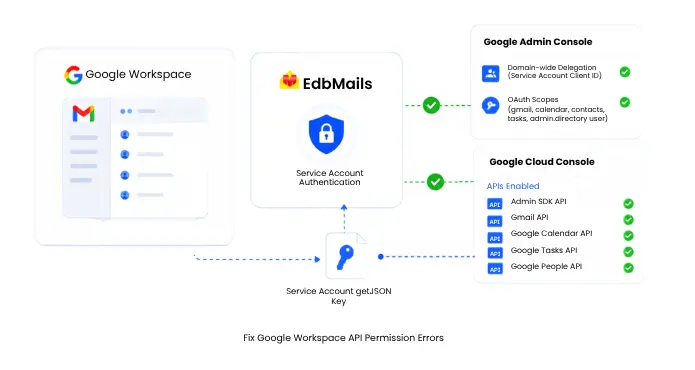

Fix Google Workspace API Permission Errors

What Does the "Insufficient Permission" Error Actually Mean?

When Google Workspace migration tools authenticate through a service account, they're asking Google's APIs for permission to act on behalf of your users, read their mail, calendars, contacts, and tasks, without logging into each mailbox individually. The "insufficient permission" or "403: The caller does not have permission" error means Google received the request but rejected it because something in that authorization chain is incomplete.

This is different from a login failure. You're not being told your credentials are wrong. You're being told that the credentials are valid, but they don't have the rights Google is asking for. That distinction matters, because it points you toward the Admin Console and Cloud Console, not toward retyping a password.

Common Causes of API Permission Errors in Google Workspace Migration

Most permission errors during authentication trace back to one of four places. Rarely is it more than one at a time, so working through them in order usually finds the culprit fast.

1. Required Google APIs Are Not Enabled

Before a service account can touch any mailbox data, the underlying APIs it depends on need to be switched on inside the Google Cloud project. For a full mail, calendar, contacts, and tasks migration, that means:

  • Admin SDK API
  • Gmail API
  • Google Calendar API
  • Google Tasks API
  • Google People API

If even one of these is left disabled, calls that touch that specific data type will fail with a permission error, even though everything else about the setup looks correct. This is one of the easiest causes to miss, because the service account and delegation can be configured perfectly and the migration will still fail on, say, calendar data alone.

2. OAuth Scopes Don't Match What the Migration Tool Requests

Domain-wide delegation works by pairing a service account's Client ID with a specific list of OAuth scopes in the Admin Console. If the scopes you authorized don't match what the migration software is actually requesting, Google grants access to some data and blocks the rest. A typical read-access scope set looks like this:

  • https://www.googleapis.com/auth/admin.directory.user.readonly
  • https://www.googleapis.com/auth/gmail.readonly
  • https://www.googleapis.com/auth/calendar.readonly
  • https://www.googleapis.com/auth/tasks.readonly
  • https://www.googleapis.com/auth/contacts.readonly

A single typo, an extra space, or a scope pasted into the wrong field is enough to break authorization for that data type, and Google won't tell you which scope was the problem. It just returns a permission error.

3. Domain-Wide Delegation Isn't Fully Authorized

Domain-wide delegation has to be granted at the domain level by a Super Administrator, not just created at the service account level in Cloud Console. If the Client ID was never added under ‘Security’ > ‘Access and data control’ > ‘API Controls’ > ‘Manage Domain-Wide Delegation’ in the Admin Console, or if it was added but the scopes were saved incorrectly, the service account technically exists but has no domain-level authority. Migration software will authenticate the service account itself without issue, then get rejected the moment it tries to impersonate a user mailbox.

4. Organization Policies Are Blocking Service Account Keys

Some organizations lock down service account key creation entirely, usually as a security default. If your account can create a service account but can't generate the JSON key needed to authorize it, the culprit is almost always one of these two organization policies:

  • iam.managed.disableServiceAccountKeyCreation
  • iam.disableServiceAccountKeyCreation

With either policy enabled, no user, including super admins and project owners, can generate a service account key. This one is easy to misdiagnose, because it doesn't look like a permission error on the surface. It looks like the "Create Key" button simply doesn't work.

Step-by-Step Fix in Google Admin Console and Cloud Console

Follow the steps in the order shown to avoid configuration issues and unnecessary troubleshooting.

  1. Confirm every required API is enabled: In Google Cloud Console, go to APIs & Services > Library and check that Admin SDK API, Gmail API, Google Calendar API, Google Tasks API, and Google People API all show as Enabled, not just Available.
  2. Verify the service account exists and copy its Client ID: Under IAM & Admin > Service Accounts, open the account being used for migration and note the numeric Client ID, not the email address. Domain-wide delegation is authorized by Client ID.
  3. Check domain-wide delegation in Admin Console: Sign in as a Super Administrator, open Security > Access and data control > API Controls > Manage Domain-Wide Delegation, and confirm the Client ID is listed. If it's missing, add it with "Add New."
  4. Re-enter the OAuth scopes exactly: Paste the full comma-separated scope list into the OAuth Scopes field rather than typing it manually, then click Authorize and Save. Even a trailing space can cause a mismatch.
  5. Check the two key-creation policies if the JSON key won't generate: In Cloud Console, go to IAM & Admin > Organization Policies and search for both iam.managed.disableServiceAccountKeyCreation and iam.disableServiceAccountKeyCreation. If either is enforced, you'll need Organization Policy Administrator rights to override it at the project level and set enforcement to off.
  6. Allow time for propagation: Domain-wide delegation and organization policy changes don't always apply instantly. Give it five to ten minutes before retrying authentication, particularly in larger domains.

For the full walkthrough with screenshots of every screen involved, see the Google Workspace Admin Configuration guide.

Re-Authenticating in EdbMails

Once the API, scope, and policy issues are resolved on the Google side, EdbMails needs to pick up the corrected credentials.

  1. Download the fresh JSON key generated after fixing delegation and policies.
  2. Open EdbMails and go back to the Google Workspace connection screen.
  3. Remove the previously uploaded JSON key rather than layering a new one on top of it, since a stale key can still trigger authentication conflicts.
  4. Upload the new key and re-enter your Workspace domain and admin email.
  5. Run a test connection before starting or resuming the migration. EdbMails will validate access to the Admin SDK, Gmail, Calendar, Contacts, and Tasks APIs individually, so if one is still misconfigured, you'll see exactly which one failed instead of a generic error.

If authentication succeeds for some data types but not others, that's a strong signal you're still missing one specific API or scope rather than facing a broader account issue. Go back through steps 1 and 2 above with that data type in mind.

Preventing This From Happening Again

A few habits make repeat permission errors far less likely on future migrations or reruns:

  • Keep a record of the exact API list and scope list used for the current project, since Google Cloud project settings don't carry over automatically if you create a new project later.
  • Assign domain-wide delegation changes to a small, known group of Super Admins rather than letting multiple people configure it independently.
  • Check organization policies before generating a new JSON key on any project, not just the first one.
  • Run a small pilot migration, a handful of test mailboxes, before committing to a full domain migration. It surfaces permission gaps early, when they're a five-minute fix instead of a stalled production migration.

Authentication issues in Google Workspace migration are almost always fixable within Google's own console screens rather than anything in the migration software itself. Once the API list, scopes, delegation, and organization policies line up, re-authentication in EdbMails is a two-minute step, and the migration continues from wherever it left off.


Additional Resources:

  • Google Workspace Admin Configuration for Migration
  • Common Google Workspace Migration Issues and How to Fix Them
  • Google Workspace to Office 365 Migration FAQs
  • Migrate Google Workspace Without User Credentials
  • Multifactor Authentication setup
lady image

 In this manual

IntroductionInsufficient PermissionCommon Causes of APIGoogle Admin and CloudRe-AuthenticatingPrevent Future Issues

Google Workspace Migration

100 Mailboxes $299 Only

Buy Now

Need help?

24/7 Customer support

Contact us on Live chat

Personalized Demo

Book a personalized demo

Still need help?

Email us / Call us

@edbmails.com All rights are reserved Privacy Policy | Terms of Use | GDPR | Security | Press Releases

hidden msg
Live Chat

Hi, May I help you?

Hide Chat Now
