
EdbMails EDB Recovery and Migration software
  • Products
    EdbMails
    All-in-one Recovery and Migration
    • EDB Recovery and Migration
    • OST, PST, MBOX, NSF, EML, MSG
    • Office 365, Exchange Migration
    • SharePoint, OneDrive & Teams
    • Google Workspace Migration
    • IMAP Migration
    • Duplicate Remover
    • EdbMails Data Recovery
    • Backup Solutions
    • All ProductsAll Products

    EDB Recovery and Migration

    EdbMails lets you recover corrupted, damaged, and offline Exchange EDB files, convert EDB mailboxes to PST format, and directly migrate mailbox data to Office 365 and live Exchange Server.

    EDB to PST
    EDB to PST
    Recover corrupted, damaged, offline EDB files and convert Exchange EDB mailboxes to PST file format
    Public Folder to Exchange
    Public Folder to Exchange
    Migrate public folders from an Exchange offline EDB file to live Exchange Server
    EDB to Live Exchange Migration
    EDB to Live Exchange Migration
    Directly migrate offline Exchange database (EDB) files to live Exchange server
    Archive Mailbox to Office 365
    Archive Mailbox to Office 365
    Migrate archive mailboxes from offline EDB files directly to Office 365
    EDB to Office 365 Migration
    EDB to Office 365 Migration
    Directly migrate offline Exchange database (EDB) files to Office 365
    Public Folder to Office 365
    Public Folder to Office 365
    Migrate public folders from an offline Exchange EDB file to Office 365

    OST, PST, MBOX, NSF, EML, MSG Export and Migration

    EdbMails lets you to recover OST and PST files, export OST, PST, MBOX, NSF, EML, and MSG files to PST files, and directly migrate OST, PST, MBOX, and NSF mailbox data to Office 365 and live Exchange Server.

    OST Recovery and Migration
    OST Recovery and Migration
    Recover offline OST files, convert OST to PST, and migrate OST to Office 365 and Exchange Server
    PST Recovery and Migration
    PST Recovery and Migration
    Recover Outlook PST files , Export PST to PST, migrate PST to Office 365 and Exchange Server
    MBOX Export and Migration
    MBOX Export and Migration
    Export MBOX to PST, migrate MBOX to Office 365 and Exchange Server
    NSF Export and Migration
    NSF Export and Migration
    Export NSF to PST, migrate NSF to Office 365 and Exchange Server
    EML to PST Export
    EML to PST Export
    Convert EML files to Outlook PST files
    PST to MSG Export
    PST to MSG Export
    Convert Outlook PST file to MSG file format
    MSG to PST Export
    MSG to PST Export
    Export MSG files to Outlook PST files

    Office 365, Exchange Migration

    EdbMails lets you securely migrate mailboxes across Microsoft 365, Exchange, Google Workspace (Google Workspace Migraton), and IMAP-supported servers such as Outlook, Gmail, Zimbra, Zoho Mail, and cPanel, ensuring zero downtime.

    Office 365 Backup
    Office 365 Migration
    Migrate between Office 365 tenants, Office 365 to Exchange, Office 365 to PST, PST files to Office 365.
    Exchange Server Backup
    Exchange Migration
    Migrate between any Exchange Servers, Exchange to Office 365, Exchange to PST, PST files to Exchange.
    Tenant to Tenant Migration
    Tenant to Tenant Migration
    Migrate Mailboxes, Public Folders, Archive Mailboxes between Office 365 Tenants.
    Exchange to Office 365
    Exchange to Office 365
    Migrate Mailboxes, Public Folders, Archive Mailboxes from live Exchange server to Office 365.
    Office 365 to IMAP
    Office 365 to IMAP
    Migrate Office 365 to IMAP, Office 365 to Gmail, Office 365 to Outlook, Office 365 to Zoho etc.
    Exchange to IMAP
    Exchange to IMAP
    Migrate from live Exchange Server to IMAP servers such as Gmail, Outlook, and Zoho Mail.
    Public Folder to Office 365
    Public Folder to Office 365
    Migrate Public Folders between Office 365 tenants with complete folder hierarchy and mailbox data integrity.
    Exchange to PST
    Exchange to PST
    Export live Exchange Server mailboxes, public folders, and archive mailboxes to Outlook PST files.

    SharePoint, OneDrive & Microsoft Teams Migration

    EdbMails lets you migrate SharePoint sites, OneDrive data, Microsoft Teams, teams, channels, chats, permissions, and documents between Microsoft 365 tenants while maintaining the existing folder structure and data integrity.

    SharePoint, OneDrive & Teams Backup
    SharePoint Online Migration
    Migrate documents, lists, files and folders from SharePoint sites.
    OneDrive for Business Migration
    OneDrive for Business Migration
    Migrate documents, lists, files, folders, private chats from OneDrive.
    Microsoft Teams Migration
    Microsoft Teams Migration
    Migrate Teams, chats, channels, documents, files and folders etc.

    Google Workspace / G Suite Migration

    EdbMails offers secure Google Workspace migration to Office 365, Exchange, or IMAP, and export to PST covering emails, contacts, calendars and tasks.

    Google Workspace Migration
    Google Workspace Migration
    Migrate emails, calendars, contacts, tasks from Google workspace to Google workspace, office 365, Exchange and IMAP. Export to PST
    Google Workspace to Office 365
    Google Workspace to Office 365
    Migrate emails, calendars, contacts, tasks from Google Workspace / G Suite to Office 365
    Google Workspace to Exchange Server
    Google Workspace to Exchange Server
    Migrate emails, calendars, contacts, tasks from Google Workspace / G Suite to on-Premise Exchange Server
    Google Workspace to IMAP
    Google Workspace to IMAP
    Migrate emails, calendars, contacts, tasks from Google Workspace / G Suite to IMAP, Outlook, Zimbra, Zoho etc.
    Google Workspace to Google Workspace Migration
    Google Workspace to Google Workspace
    Migrate emails, calendars, contacts, tasks between two Google Workspace / G Suite tenants
    Google Workspace to PST
    Google Workspace to PST
    Export emails, calendars, contacts, tasks from Google Workspace / G Suite to Outlook PST files

    IMAP Migration

    EdbMails IMAP Migration tool lets you easily migrate emails from IMAP servers such as Outlook, Gmail, Zoho Mail, Zimbra, cPanel, and more. Supports IMAP to IMAP, Office 365, Exchange Server, PST, and bulk PST to IMAP migration.

    IMAP Email Backup & Migration
    IMAP Email Backup & Migration
    Backup and migrate emails from IMAP servers to PST, Office 365, and On-Premises Exchange Server
    IMAP to Office 365
    IMAP to Office 365
    Migrate emails, folders, and attachments from IMAP servers to Office 365
    IMAP to Exchange
    IMAP to Exchange
    Migrate emails, folders, and attachments from IMAP servers to on-premises Exchange Server
    IMAP to PST
    IMAP to PST
    Export emails, folders, and attachments from IMAP servers to Outlook PST files for backup
    PST to IMAP
    PST to IMAP
    Migrate emails, folders, and attachments from bulk PST files to IMAP servers

    Duplicate Remover

    EdbMails Duplicate Remover lets you easily remove duplicate items from Office 365 and Exchange Server, and from IMAP, Outlook, Gmail, Zimbra, Zoho Mail, etc., ensuring a clean and organized mailbox.

    Remove Duplicates
    Remove Duplicates
    Easily clean up your Office 365, Exchange, Outlook and IMAP accounts by removing duplicate emails.
    Remove Duplicates from Office 365
    Remove Duplicates from Office 365
    Remove duplicate emails, calendars, contacts, journal tasks, etc. from Office 365.
    Remove Duplicates from Exchange Server
    Remove Duplicates from Exchange Server
    Remove duplicate emails, calendars, contacts, journal tasks, etc. from live Exchange Server.
    Remove Duplicates from IMAP, Outlook
    Remove Duplicates from IMAP, Outlook
    Remove duplicate emails, attachments from IMAP, Outlook, Gmail, Zimbra, Zoho Mail etc.

    Exchange, SharePoint, OneDrive, Teams and Office 365 Backup

    EdbMails enables secure, automated backup and recovery for Microsoft 365 services including Exchange Online, SharePoint, OneDrive, Teams, and Live Exchange Server with complete data protection and restore flexibility.

    Office 365 Backup
    Office 365 Backup
    Incremental, Granular, Encrypted and Compressed Office 365 Mailboxes Backup
    Exchange Server Backup
    Exchange Server Backup
    Incremental, Granular, Encrypted and Compressed Exchange Mailboxes Backup
    SharePoint, OneDrive & Teams Backup
    SharePoint, OneDrive & Teams Backup
    Backup Online site collections, Team sites, Office 365 groups, all documents etc.

    EdbMails Data Recovery

    EdbMails Data Recovery Software lets you recover permanently deleted data, including photos, videos, documents, and archived files, from partitions on hard drives, SSDs, USB drives, SD cards, and external storage devices.

    EdbMails Data Recovery
    EdbMails Data Recovery
    Recover and restore permanently deleted data from hard drives, SSDs, USB drives, SD cards, and etc.
    Whitepaper Whitepaper
    Request a Demo Request a Demo
    Sign Up Sign Up
  • Features
  • FAQ
  • Offers
  • Pricing
  • Download
  • Support
  • Sign in
User’s Manual
Google Workspace Migration

User Manual

User Manual

  • Overview
  • System Requirements
  • Migration Scenarios
  • Installation
    • Installation process
    • Reinstall or Upgrade
    • How to uninstall
  • FAQs
    • Google Workspace to Office 365
    • Google Workspace to IMAP
    • Google Workspace to Exchange
    • Google Workspace to Google Workspace
    • Google Workspace to PST Export
  • Videos
  • Screenshots
    • Google Workspace to Office 365
    • Google Workspace to Exchange
    • Google Workspace to IMAP
  • How it works?
    • Google Workspace to Office 365 Migration
    • Migrate Google Workspace to Google Workspace
    • Google Workspace to Exchange Migration
    • Google Workspace to IMAP Migration
    • Export Google Workspace to Outlook PST
  • Google Workspace Migration Settings
  • Google Workspace Admin Configuration
  • Connect to target Office 365
  • Connect to Exchange server for multiple mailboxes migration
    • Connect with Global Admin
    • Connect to Multiple users using CSV file
    • Connect using full access permission
    • Connect individual users for Single / Specific user Migration
  • Connect to Hosted Exchange for its Migration
    • Connect with Full Access permissions
    • Connect to multiple users using CSV file
    • Connect to Individual user for migration
  • Connect to IMAP
    • Connect IMAP Single Server
    • Connect IMAP Multiple Server
  • Knowledge Base
    • Bulk Google Workspace Mailbox Migration
    • Google Workspace Migration
    • Why Choose EdbMails
    • Automatic Mailbox Mapping
    • Best Google Workspace Migration Software
    • Migrate Google Workspace Emails, Contacts & Calendars
    • Fix Google Workspace Migration Issues
    • Avoid Google Workspace Migration Mistakes
    • Mistakes to Avoid During Google Workspace Migration
    • Migrate Large Google Workspace Mailboxes
    • Google Workspace Metadata Preservation
    • Fix Google Workspace API Permission Errors
    • Google Workspace Contacts Migration
    • Google Workspace Tasks Migration
    • Google Workspace Migration Performance
    • Selective Google Workspace Mailbox Migration
    • Batch Google Workspace Mailbox Migration
  • Map the Mailboxes
  • Incremental Migration
  • Exchange Throttling Policy
  • Multifactor Authentication
    • Enable MFA in Office 365
    • Create App password for MFA
    • Disable Security Defaults
  1. Home
  2. Google Workspace Migration
  3. Google Workspace Migration Settings and Filters | EdbMails
Download Buy Now

Google Workspace Migration Settings

EdbMails lets you control exactly how your Google Workspace migration runs, from how repeat migrations are handled to how much of your data is carried over. Incremental migration is built in, so consecutive runs to the same target pick up only new or changed items, and you can add a stricter item-by-item comparison or re-migrate to an empty target when needed. You can also filter what gets migrated by received date, subject, attachment, sender, recipient, CC, BCC, or read/unread status, split large mailboxes into smaller PST files, exclude oversized emails or attachments, migrate message content without attachments, and leave out specific standard or custom folders. This gives you full control over what actually gets migrated, instead of moving everything by default.

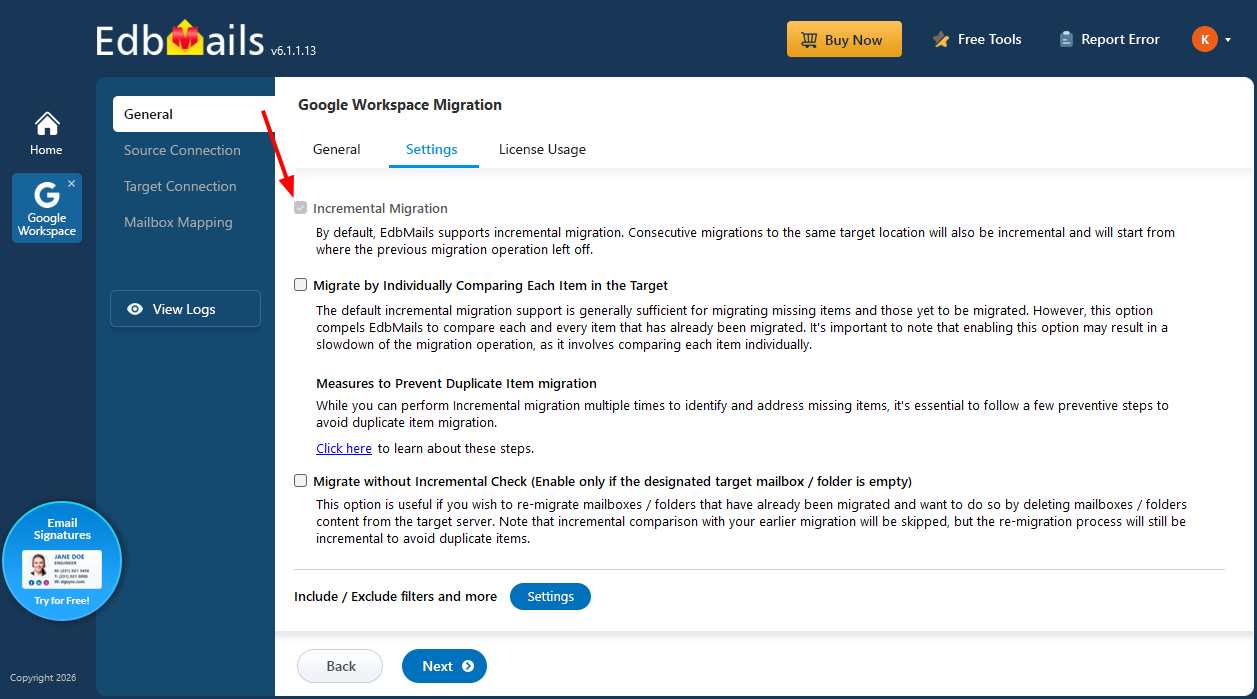
Incremental Migration

Incremental (Delta) migration is turned on by default and applies to every migration. When you run the migration more than once between the same source and target, EdbMails compares the source against what was already migrated and moves only the new or changed items since your last run. This lets you re-run the migration to catch anything that arrived or changed in the source afterward, without creating duplicate items on the target.
Incremental Migration

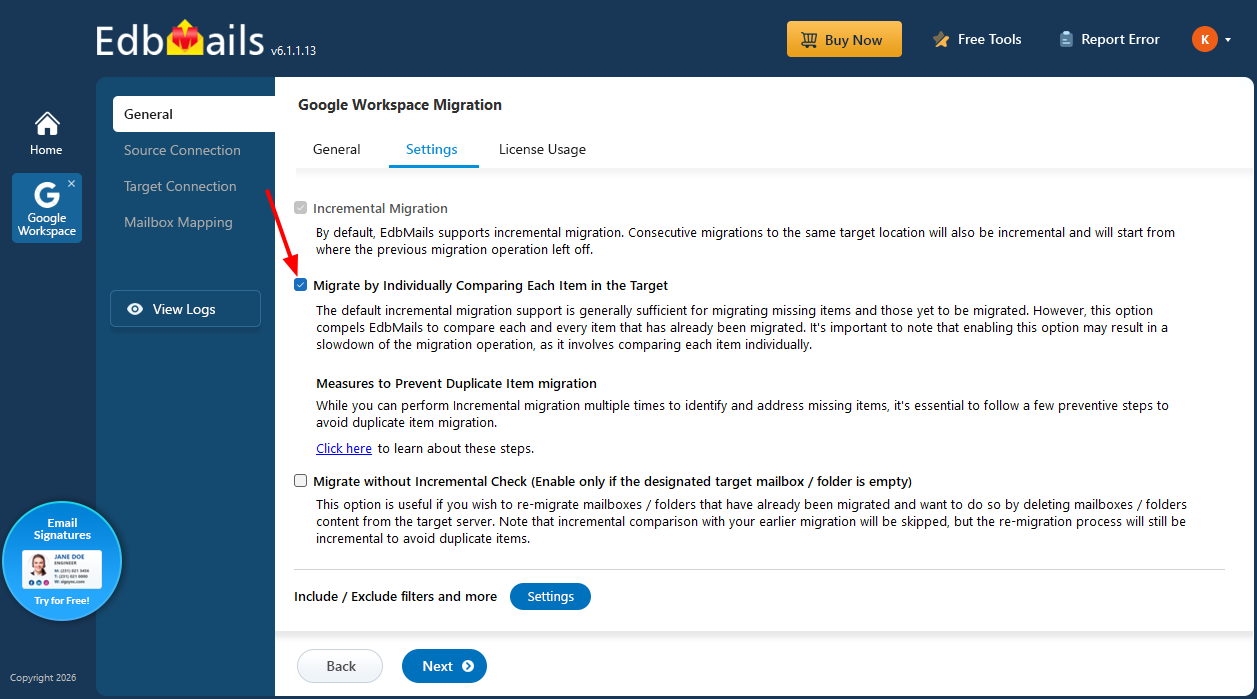
Migrate by Individually Comparing Each Item in the Target

For most migrations, the default incremental behavior is enough to bring over missing items and anything not yet migrated. This option adds a stricter level of checking, comparing every item that has already been migrated against the target rather than relying on the standard incremental check. Because EdbMails examines each item on its own, the comparison takes longer, so it suits situations where you want that extra level of verification and are comfortable with a slower migration.
Migrate by Individually Comparing Each Item in the Target

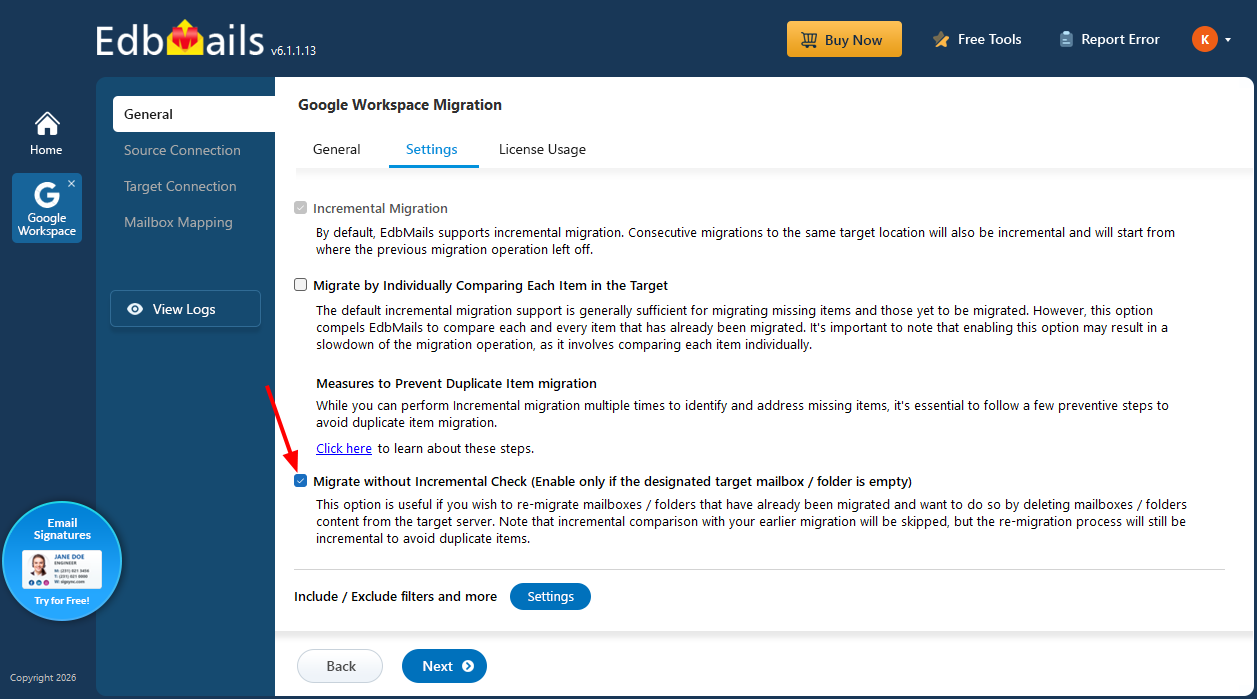
Migrate without Incremental Check

This option is useful when you want to re-migrate mailboxes or folders that were already migrated, for example after deleting their contents from the target server. The incremental comparison with your previous migration is skipped, but the re-migration still runs incrementally so that duplicate items are avoided.
Migrate without Incremental Check

Include / Exclude Filters and More

The Settings button next to this option opens a window where you can narrow down exactly what gets migrated instead of moving everything. The choices you make here apply to all export and migration operations, so they are worth a look when you only want a subset of your data carried over.

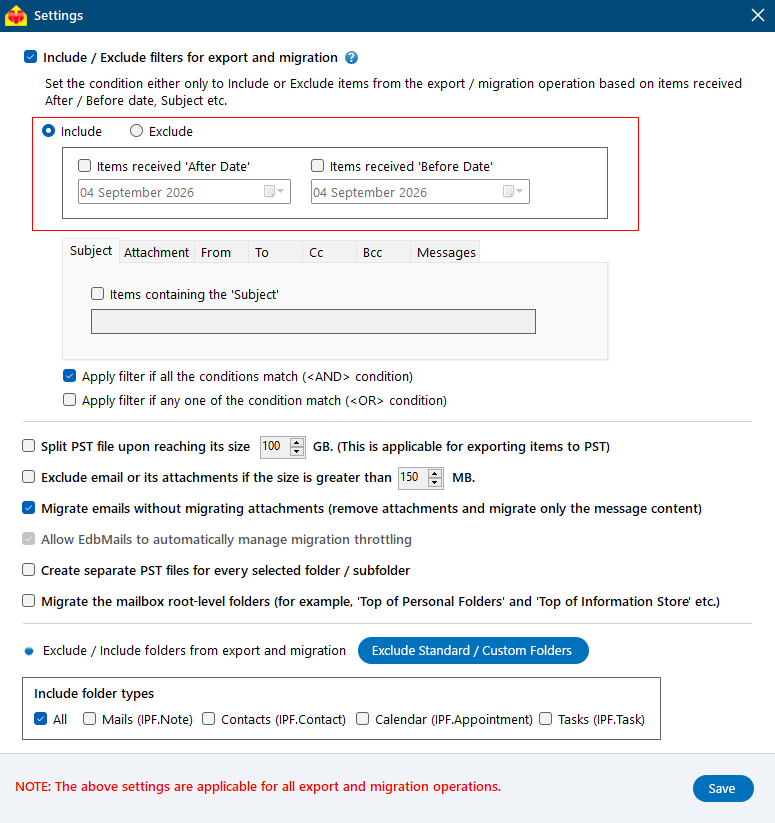
Include / Exclude Filters for Export and Migration

Select this checkbox to filter items by a condition rather than migrating the whole mailbox, then choose whether to include or exclude the matching items.

Include: Choose this to migrate only the items that match your filter criteria, so the migration carries over just the data you need.

Exclude: Choose this to skip the items that match your filter criteria, so everything except those items is migrated.
Include / Exclude filters

Filters: EdbMails gives you filters to customize your migration operation. The Date Filter includes or excludes items based on the date they were received, letting you define an 'After Date', a 'Before Date', or both to migrate items within a particular date range. You can also filter by Subject for the email or calendar subject, Attachments for the names of attachments contained in emails, From for emails sent by specific senders, To for emails sent to specific recipients, Cc and Bcc for specific CC and BCC addresses, and Messages for emails based on their read or unread status.

When you apply more than one filter, you control how they work together. Choose Apply filters if all the conditions match for an AND condition, where filters are applied only when all specified conditions are satisfied, or Apply filters if any one of the conditions match for an OR condition, where filters are applied when at least one of the specified conditions is met.
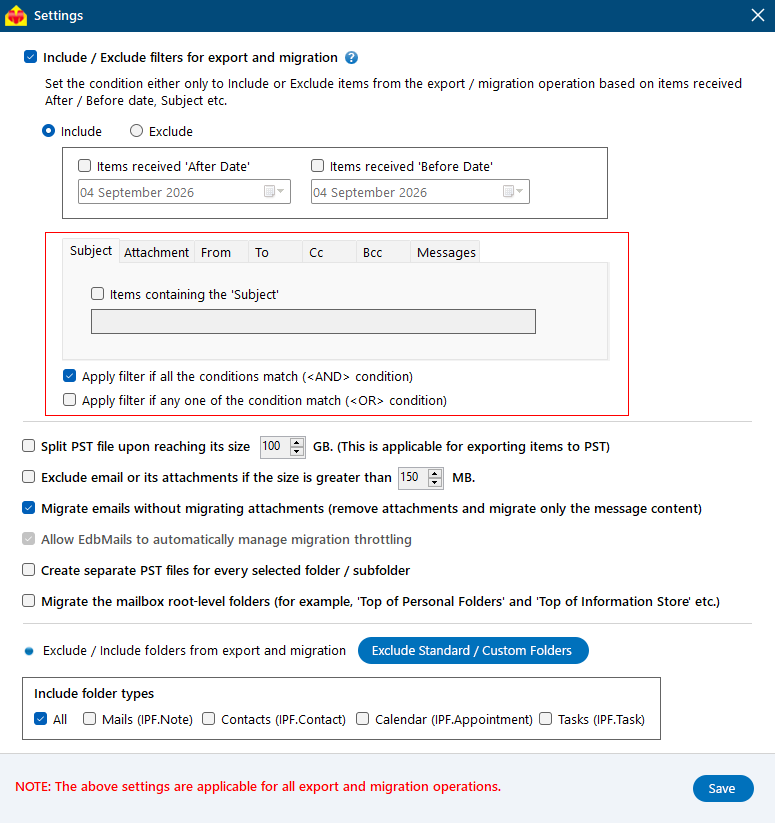
Include / Exclude filters options

Split PST file upon reaching its size

This applies when you are exporting items to PST. Set a size in GB, and EdbMails starts a new PST file once the current one reaches that limit. It keeps individual PST files at a manageable size instead of producing one very large file. By default, a separate PST file is created for each mailbox.
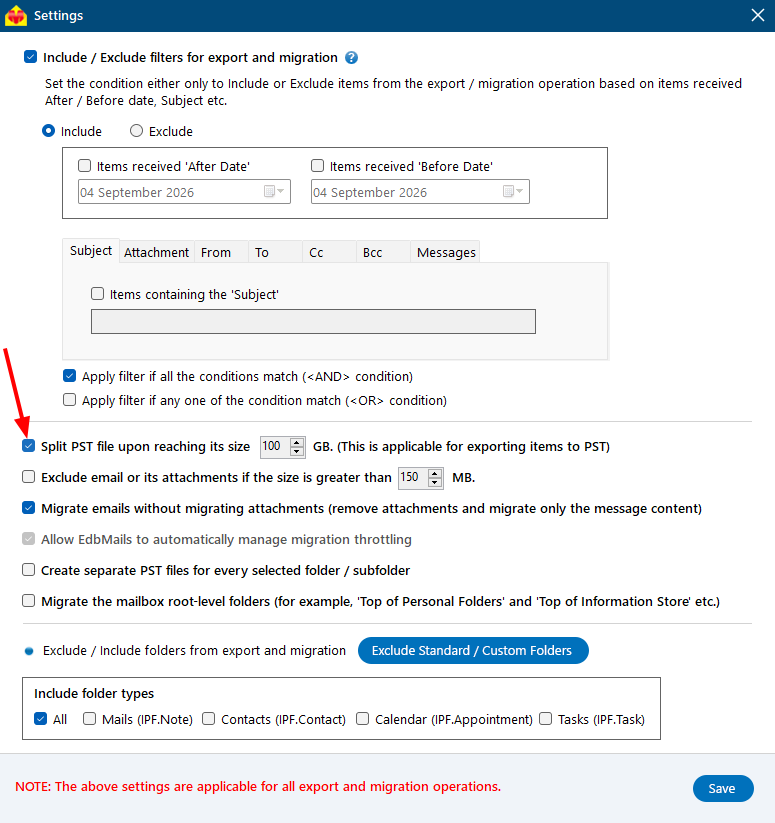
Split PST file upon reaching its size

Exclude email or its attachments if the size is greater than

Set a size in MB to leave out items above that threshold. This is handy when you want to skip unusually large emails or attachments to keep the migration lighter, which helps when you are working with storage-limited target plans.
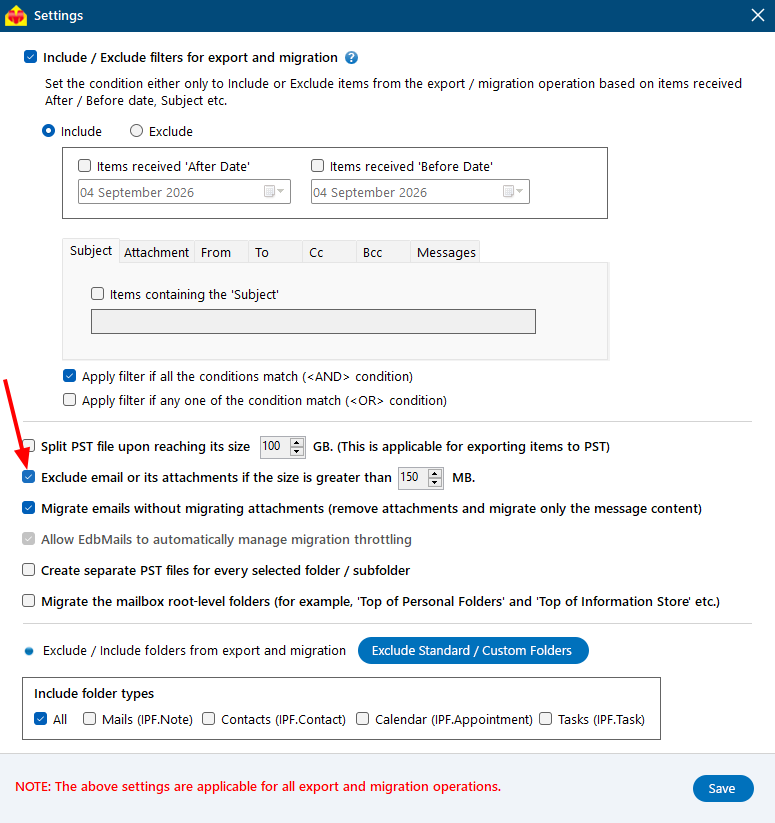
Exclude email or its attachment

Migrate emails without migrating attachments

Turn this on to bring over only the message content and leave attachments behind. The emails still migrate, just without their attached files. This reduces the overall migration size and saves storage space when large attachments are not essential.
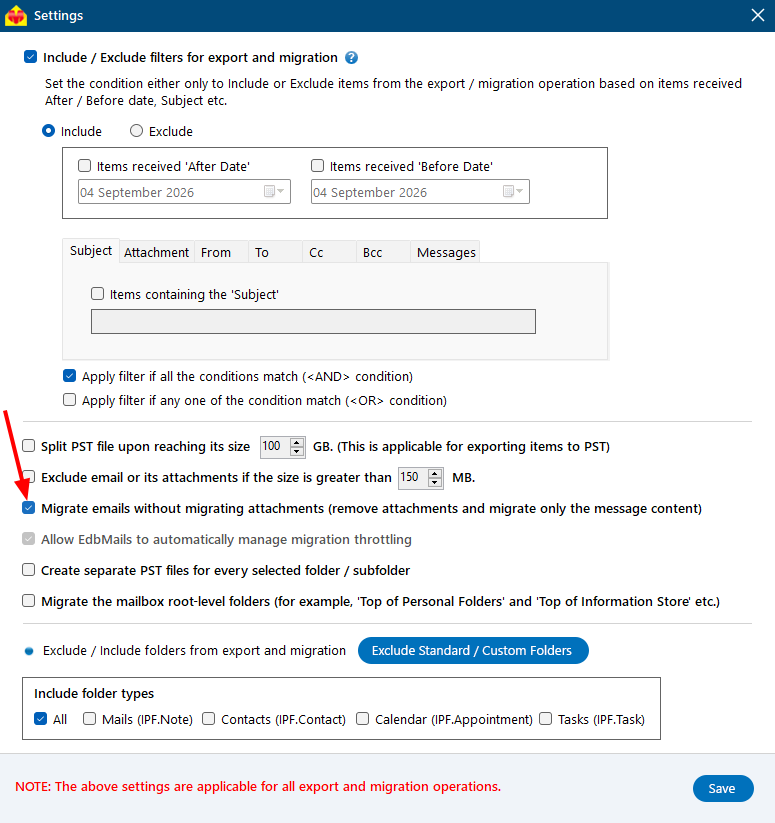
Migrate emails without attachments

Allow EdbMails to automatically manage migration throttling

This option is enabled by default. During migration, servers such as Microsoft 365 apply throttling limits that can slow down or interrupt the transfer of data. EdbMails automatically works within these limits and adjusts its migration speed as needed, so your migration keeps running smoothly without manual intervention.
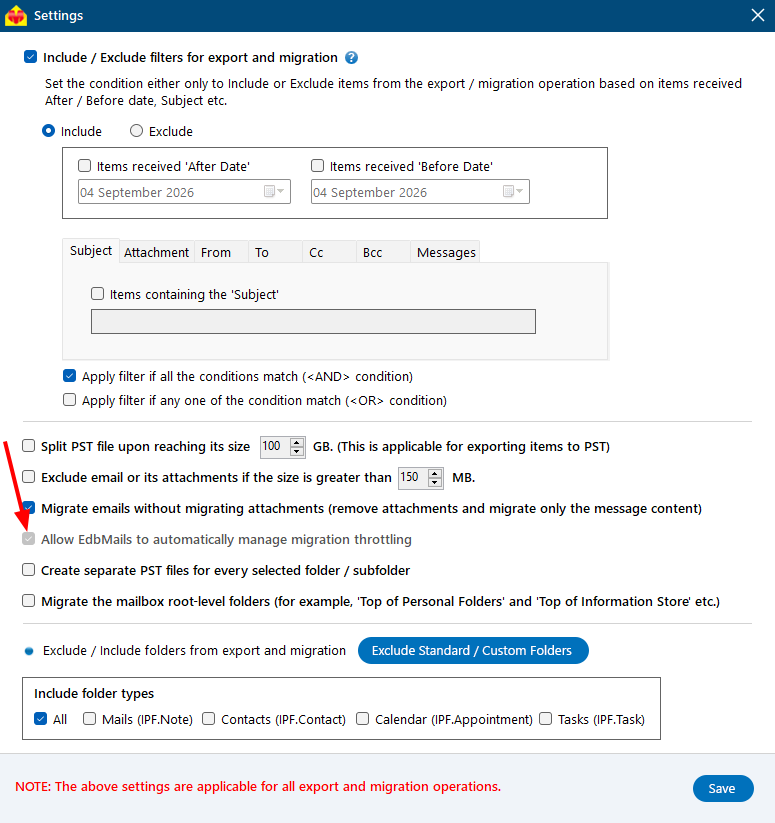
Automatically Manage Migration Throttling

Create separate PST files for every selected folder / subfolder

When you are exporting to PST, this creates an individual PST file for each folder and subfolder you selected, rather than combining them into one. It is useful when you want your exported data organized folder by folder, making it easier to manage or review each folder separately.
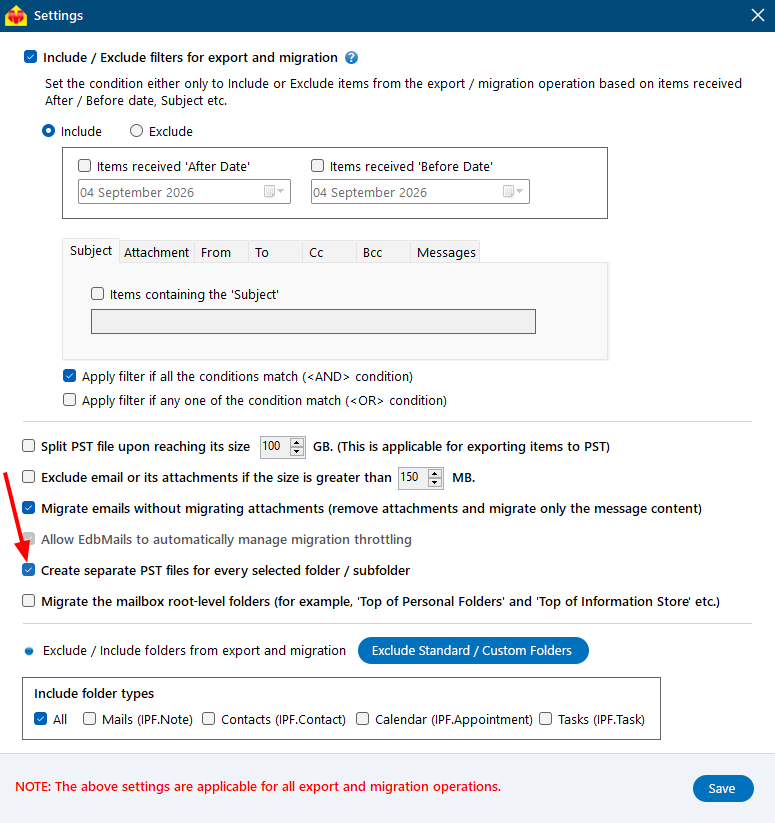
Create separate PST files

Migrate the mailbox root-level folders

Some mailbox items sit at the root level, outside the standard folder hierarchy, usually under containers such as 'Top of Personal Folders' or 'Top of Information Store'. Turn this on to include those root-level folders in the migration so that content outside the usual folder structure is not overlooked.
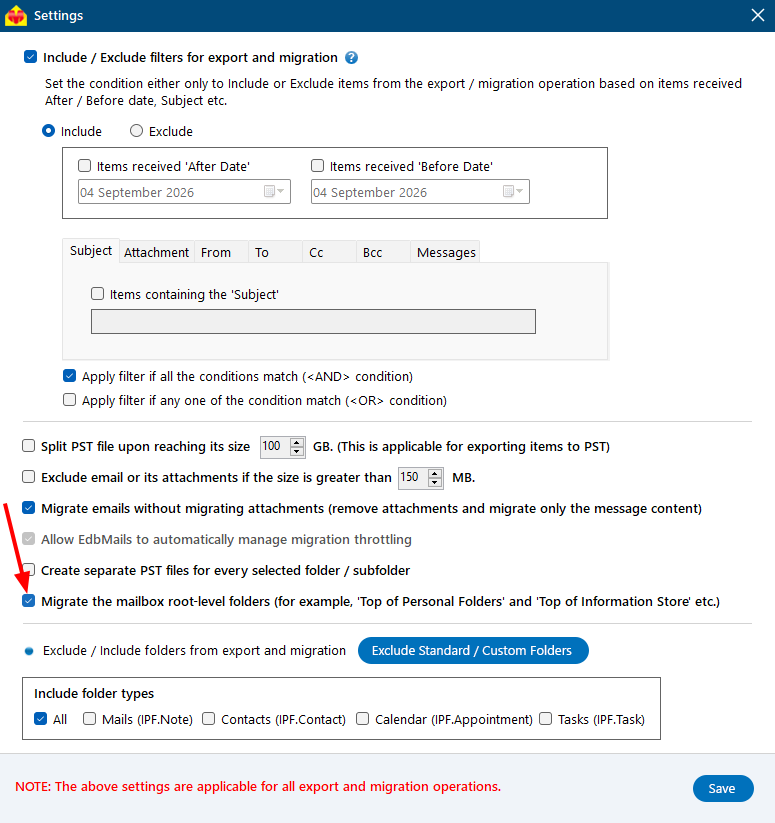
Migrate the mailbox root-level folders

Exclude Standard / Custom Folders

The Exclude Standard / Custom Folders button lets you choose specific standard or custom folders to leave out of the migration. By default, folders such as 'Deleted Items', 'Conversation History', and 'Junk Email' are left out, and you can add more standard folders or enter custom folder names to exclude as well.
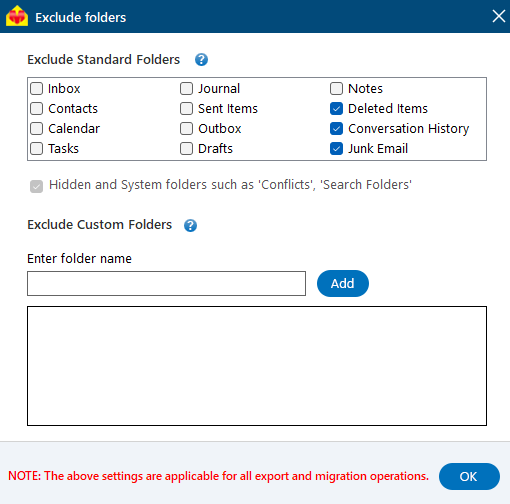
Exclude Standard / Custom Folders

Include folder types

This is where you pick which kinds of items to migrate. All covers everything, or you can select individual types: Mail, Contacts, Calendar, and Tasks. Choose only the types you need if you want to migrate, say, mail without contacts or calendar data.
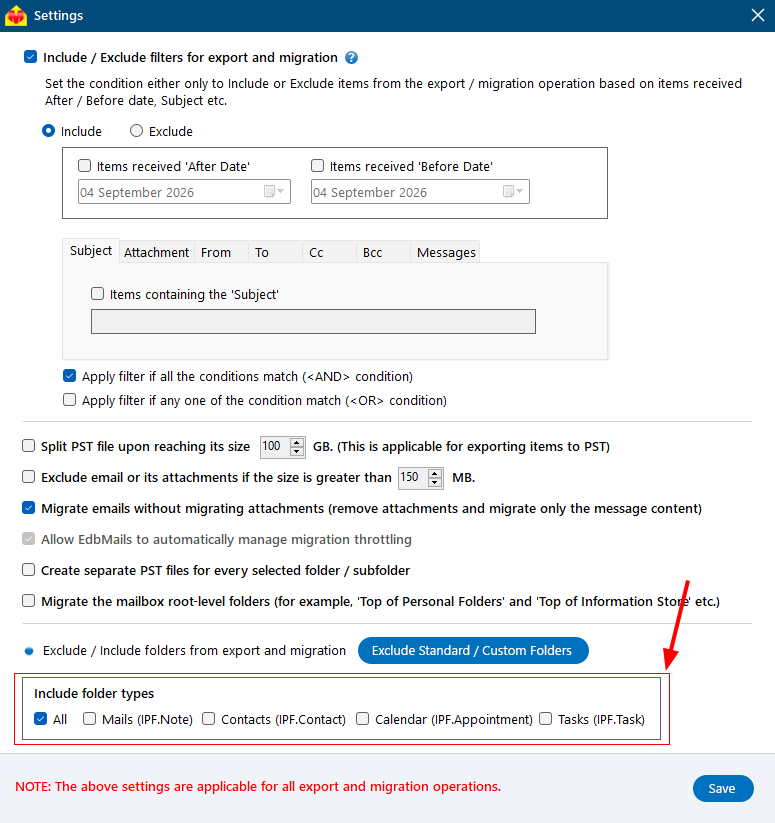
Include folder types

Click the 'Save' button to apply the settings.

 In this manual

IntroductionInclude / Exclude Filters

Google Workspace Migration

100 Mailboxes $299 Only

Buy Now

Need help?

24/7 Customer support

Contact us on Live chat

Personalized Demo

Book a personalized demo

Still need help?

Email us / Call us

@edbmails.com All rights are reserved Privacy Policy | Terms of Use | GDPR | Security | Press Releases

hidden msg
Live Chat

Hi, May I help you?

Hide Chat Now