EdbMails EDB Recovery and Migration software
  • Products
    EdbMails
    All-in-one Recovery and Migration
    • EDB Recovery and Migration
    • OST, PST, MBOX, NSF, EML, MSG
    • Office 365, Exchange Migration
    • SharePoint, OneDrive & Teams
    • Google Workspace Migration
    • IMAP Migration
    • Duplicate Remover
    • EdbMails Data Recovery
    • Backup Solutions
    • All ProductsAll Products

    EDB Recovery and Migration

    EdbMails lets you recover corrupted, damaged, and offline Exchange EDB files, convert EDB mailboxes to PST format, and directly migrate mailbox data to Office 365 and live Exchange Server.

    EDB to PST
    EDB to PST
    Recover corrupted, damaged, offline EDB files and convert Exchange EDB mailboxes to PST file format
    Public Folder to Exchange
    Public Folder to Exchange
    Migrate public folders from an Exchange offline EDB file to live Exchange Server
    EDB to Live Exchange Migration
    EDB to Live Exchange Migration
    Directly migrate offline Exchange database (EDB) files to live Exchange server
    Archive Mailbox to Office 365
    Archive Mailbox to Office 365
    Migrate archive mailboxes from offline EDB files directly to Office 365
    EDB to Office 365 Migration
    EDB to Office 365 Migration
    Directly migrate offline Exchange database (EDB) files to Office 365
    Public Folder to Office 365
    Public Folder to Office 365
    Migrate public folders from an offline Exchange EDB file to Office 365

    OST, PST, MBOX, NSF, EML, MSG Export and Migration

    EdbMails lets you to recover OST and PST files, export OST, PST, MBOX, NSF, EML, and MSG files to PST files, and directly migrate OST, PST, MBOX, and NSF mailbox data to Office 365 and live Exchange Server.

    OST Recovery and Migration
    OST Recovery and Migration
    Recover offline OST files, convert OST to PST, and migrate OST to Office 365 and Exchange Server
    PST Recovery and Migration
    PST Recovery and Migration
    Recover Outlook PST files , Export PST to PST, migrate PST to Office 365 and Exchange Server
    MBOX Export and Migration
    MBOX Export and Migration
    Export MBOX to PST, migrate MBOX to Office 365 and Exchange Server
    NSF Export and Migration
    NSF Export and Migration
    Export NSF to PST, migrate NSF to Office 365 and Exchange Server
    EML to PST Export
    EML to PST Export
    Convert EML files to Outlook PST files
    PST to MSG Export
    PST to MSG Export
    Convert Outlook PST file to MSG file format
    MSG to PST Export
    MSG to PST Export
    Export MSG files to Outlook PST files

    Office 365, Exchange Migration

    EdbMails lets you securely migrate mailboxes across Microsoft 365, Exchange, Google Workspace (Google Workspace Migraton), and IMAP-supported servers such as Outlook, Gmail, Zimbra, Zoho Mail, and cPanel, ensuring zero downtime.

    Office 365 Backup
    Office 365 Migration
    Migrate between Office 365 tenants, Office 365 to Exchange, Office 365 to PST, PST files to Office 365.
    Exchange Server Backup
    Exchange Migration
    Migrate between any Exchange Servers, Exchange to Office 365, Exchange to PST, PST files to Exchange.
    Tenant to Tenant Migration
    Tenant to Tenant Migration
    Migrate Mailboxes, Public Folders, Archive Mailboxes between Office 365 Tenants.
    Exchange to Office 365
    Exchange to Office 365
    Migrate Mailboxes, Public Folders, Archive Mailboxes from live Exchange server to Office 365.
    Office 365 to IMAP
    Office 365 to IMAP
    Migrate Office 365 to IMAP, Office 365 to Gmail, Office 365 to Outlook, Office 365 to Zoho etc.
    Exchange to IMAP
    Exchange to IMAP
    Migrate from live Exchange Server to IMAP servers such as Gmail, Outlook, and Zoho Mail.
    Public Folder to Office 365
    Public Folder to Office 365
    Migrate Public Folders between Office 365 tenants with complete folder hierarchy and mailbox data integrity.
    Exchange to PST
    Exchange to PST
    Export live Exchange Server mailboxes, public folders, and archive mailboxes to Outlook PST files.

    SharePoint, OneDrive & Microsoft Teams Migration

    EdbMails lets you migrate SharePoint sites, OneDrive data, Microsoft Teams, teams, channels, chats, permissions, and documents between Microsoft 365 tenants while maintaining the existing folder structure and data integrity.

    SharePoint, OneDrive & Teams Backup
    SharePoint Online Migration
    Migrate documents, lists, files and folders from SharePoint sites.
    OneDrive for Business Migration
    OneDrive for Business Migration
    Migrate documents, lists, files, folders, private chats from OneDrive.
    Microsoft Teams Migration
    Microsoft Teams Migration
    Migrate Teams, chats, channels, documents, files and folders etc.

    Google Workspace / G Suite Migration

    EdbMails offers secure Google Workspace migration to Office 365, Exchange, or IMAP, and export to PST covering emails, contacts, calendars and tasks.

    Google Workspace Migration
    Google Workspace Migration
    Migrate emails, calendars, contacts, tasks from Google workspace to Google workspace, office 365, Exchange and IMAP. Export to PST
    Google Workspace to Office 365
    Google Workspace to Office 365
    Migrate emails, calendars, contacts, tasks from Google Workspace / G Suite to Office 365
    Google Workspace to Exchange Server
    Google Workspace to Exchange Server
    Migrate emails, calendars, contacts, tasks from Google Workspace / G Suite to on-Premise Exchange Server
    Google Workspace to IMAP
    Google Workspace to IMAP
    Migrate emails, calendars, contacts, tasks from Google Workspace / G Suite to IMAP, Outlook, Zimbra, Zoho etc.
    Google Workspace to Google Workspace Migration
    Google Workspace to Google Workspace
    Migrate emails, calendars, contacts, tasks between two Google Workspace / G Suite tenants
    Google Workspace to PST
    Google Workspace to PST
    Export emails, calendars, contacts, tasks from Google Workspace / G Suite to Outlook PST files

    IMAP Migration

    EdbMails IMAP Migration tool lets you easily migrate emails from IMAP servers such as Outlook, Gmail, Zoho Mail, Zimbra, cPanel, and more. Supports IMAP to IMAP, Office 365, Exchange Server, PST, and bulk PST to IMAP migration.

    IMAP Email Backup & Migration
    IMAP Email Backup & Migration
    Backup and migrate emails from IMAP servers to PST, Office 365, and On-Premises Exchange Server
    IMAP to Office 365
    IMAP to Office 365
    Migrate emails, folders, and attachments from IMAP servers to Office 365
    IMAP to Exchange
    IMAP to Exchange
    Migrate emails, folders, and attachments from IMAP servers to on-premises Exchange Server
    IMAP to PST
    IMAP to PST
    Export emails, folders, and attachments from IMAP servers to Outlook PST files for backup
    PST to IMAP
    PST to IMAP
    Migrate emails, folders, and attachments from bulk PST files to IMAP servers

    Duplicate Remover

    EdbMails Duplicate Remover lets you easily remove duplicate items from Office 365 and Exchange Server, and from IMAP, Outlook, Gmail, Zimbra, Zoho Mail, etc., ensuring a clean and organized mailbox.

    Remove Duplicates
    Remove Duplicates
    Easily clean up your Office 365, Exchange, Outlook and IMAP accounts by removing duplicate emails.
    Remove Duplicates from Office 365
    Remove Duplicates from Office 365
    Remove duplicate emails, calendars, contacts, journal tasks, etc. from Office 365.
    Remove Duplicates from Exchange Server
    Remove Duplicates from Exchange Server
    Remove duplicate emails, calendars, contacts, journal tasks, etc. from live Exchange Server.
    Remove Duplicates from IMAP, Outlook
    Remove Duplicates from IMAP, Outlook
    Remove duplicate emails, attachments from IMAP, Outlook, Gmail, Zimbra, Zoho Mail etc.

    Exchange, SharePoint, OneDrive, Teams and Office 365 Backup

    EdbMails enables secure, automated backup and recovery for Microsoft 365 services including Exchange Online, SharePoint, OneDrive, Teams, and Live Exchange Server with complete data protection and restore flexibility.

    Office 365 Backup
    Office 365 Backup
    Incremental, Granular, Encrypted and Compressed Office 365 Mailboxes Backup
    Exchange Server Backup
    Exchange Server Backup
    Incremental, Granular, Encrypted and Compressed Exchange Mailboxes Backup
    SharePoint, OneDrive & Teams Backup
    SharePoint, OneDrive & Teams Backup
    Backup Online site collections, Team sites, Office 365 groups, all documents etc.

    EdbMails Data Recovery

    EdbMails Data Recovery Software lets you recover permanently deleted data, including photos, videos, documents, and archived files, from partitions on hard drives, SSDs, USB drives, SD cards, and external storage devices.

    EdbMails Data Recovery
    EdbMails Data Recovery
    Recover and restore permanently deleted data from hard drives, SSDs, USB drives, SD cards, and etc.
    Whitepaper Whitepaper
    Request a Demo Request a Demo
    Sign Up Sign Up
  • Features
  • FAQ
  • Offers
  • Pricing
  • Download
  • Support
  • Sign in
User’s Manual
OST Recovery and Migration

User Manual

User Manual

  • Overview
  • System Requirements
  • Installation
    • Installation process
    • Reinstall or Upgrade
    • How to uninstall
  • Initial Setup
  • FAQ
    • OST to PST - FAQs
    • OST to Office 365 Migration
    • OST to Exchange Migration
  • Videos
    • OST to PST - Video
    • OST to Office 365 Migration
    • OST to Exchange Migration
  • Screenshots
    • OST to PST - Sceenshots
    • OST to Office 365 Migration
    • OST to Exchange Migration
  • How it works?
    • OST to PST - Guide
    • OST to Office 365 Migration
    • OST to Exchange Migration
  • Connect to Exchange server for multiple mailboxes migration
    • Connect with Global Admin
    • Connect to multiple users using CSV file
    • Connect using full access permission
    • Connect individual users for Single / Specific user Migration
  • Connect to Hosted Exchange for its Migration
    • Connect with Full Access permissions
    • Using multiple user credentials with CSV file
    • Connecting to Individual user for its migration
  • Connect to target Office 365
  • Modern Authentication Using OAuth 2.0
    • Microsoft 365 modern authentication
    • Automatic Registration
    • Manual Registration
  • Set Exchange Server Impersonation rights
    • Exchange 2007 and below
    • Exchange 2010, 2013, 2016 and 2019
    • Set using Exchange Server GUI
  • Knowledge Base
    • Corrupt OST file recovery
    • Unicode and ANSI OST format
    • Split OST file
    • Rebuild OST file
    • Exchange mailbox backup
    • Recover orphaned OST file
    • Recover all Exchange and Outlook OST files
    • Recover metadata and attachments
    • Export unlimited OST files to PST
    • Free OST file viewer
    • Granular recovery of OST file
    • Recover encrypted OST file
    • Recover deleted mailboxes from OST
    • Export email, calendars, contacts
    • Selective OST export
    • Migrate OST to Office 365
    • OST to Live Exchange
    • Outlook OST cannot be accessed
    • Log report
    • Fix Outlook not connecting to server error
    • Fix Outlook the set of folders cannot be opened
    • Fix Outlook not syncing error
    • Outlook Cached Exchange mode
    • Fix Outlook data file cannot be accessed
    • Fix the error Outlook inbox not updating
    • Your mailbox has been temporarily moved on Exchange server
    • Open OST file in Outlook
    • Repair corrupted OST files from Outlook 365
    • Save Outlook emails to hard drive
    • Import OST file into Outlook
    • Your Outlook data file cannot be configured
    • Errors have been detected in the OST
    • Recover Password Protected OST File
    • Recover Archived Mailbox from OST
    • Recover OST File After Exchange Server Failure
    • Recover Deleted OST After Outlook Profile Deletion
    • Recover Outlook Mailbox from OST File
    • Export Shared Mailbox from OST
    • Export OST with Date Filter
    • Restore Orphaned OST to Exchange Server
    • Export OST with Date Filter
    • Recover Mailbox After Exchange Migration Failure
    • Fix Outlook OST Compatibility Issues
    • Recover Outlook Mailbox After Windows Upgrade
    • OST Recovery Software vs Manual Methods
    • How Outlook Stores Mailbox Data in OST
    • When Outlook Creates an OST File
    • Common Causes of OST Corruption
    • Recover Mailbox After Exchange Mailbox Deletion
    • Recover Mailbox From Disconnected Exchange Account
    • Restore Mailbox After Exchange Database Failure
    • Recover Mailbox After Microsoft 365 Account Removal
    • Restore OST File on New Drive
  • Incremental Migration
  • Exchange Throttling Policy
  • Map the Mailboxes
  • Multifactor Authentication
    • Enable MFA in Office 365
    • Create App password for MFA
    • Disable Security Defaults
  1. Home
  2. OST Recovery and Migration
  3. OST to PST Converter FAQs - Conversion & Recovery Help | EdbMails
Download Buy Now

OST to PST Converter FAQs

Find answers to common questions about converting OST files to PST, recovering corrupt or orphaned OST files, Outlook and Exchange Server requirements, source OST file-size limits, selective mailbox export, free-trial limits and other OST recovery scenarios.

EdbMails can scan and preview offline OST files without the original Exchange mailbox or Outlook profile. For complete product details, pricing and download options, visit the EdbMails OST to PST Converter page.

OST to PST Conversion Basics

  1. What is OST to PST conversion?

    An OST (Offline Storage Table) file is created by Microsoft Outlook to store a local copy of mailbox data from Exchange or Microsoft 365. PST (Personal Storage Table) is a portable Outlook data file that can be opened independently of any mail server or account.

    OST to PST conversion is the process of reading the data stored in an OST file and exporting it into a PST file so the mailbox content, including emails, contacts, calendars, tasks, and attachments, can be accessed in Outlook without requiring the original server connection or account.

  2. Why would I need to convert an OST file to PST?

    You may need to convert an OST file to PST in the following situations:

    1. The Exchange server has crashed or the mailbox on the Exchange server has been deleted and you need to access the emails.
    2. You need to migrate emails to a different server.
    3. Outlook is not syncing with Exchange server.
    4. The OST file has become orphaned, corrupted or inaccessible.
  3. Can I convert OST to PST manually using Outlook?

    Outlook can export mailbox data to PST when the original Outlook profile and mailbox are still accessible. Manual export is generally not suitable for an orphaned OST, deleted Outlook profile, unavailable Exchange mailbox or severely corrupted OST.

    In those situations, dedicated OST recovery software is required to read the offline OST file directly. See OST Recovery Software vs Manual Methods.

  4. Can an OST file be opened directly in Outlook on another computer?

    No. An OST file is tied to the Outlook profile and Exchange or Microsoft 365 account that created it. Outlook on another computer will not open an OST file from a different machine or account directly. To access the data, the OST file must first be converted to PST using a recovery tool such as EdbMails, which reads the offline OST independently of any profile or server connection.

  5. How do I convert an OST file to PST using EdbMails?

    EdbMails lets you export your entire OST mailbox or select specific folders — such as Inbox, Contacts or Calendar — and save them directly to a PST file.

    Follow the step-by-step OST to PST conversion guide for the full walkthrough.

Outlook and Exchange Requirements

  1. Should I have Outlook installed to convert an OST file to PST?

    EdbMails can scan, recover and preview an OST file without Outlook or the original Exchange profile. Microsoft Outlook with a configured profile is required when exporting recovered OST data to PST. Outlook is not required for direct OST to Microsoft 365 or Exchange migration.

  2. Is Exchange Server required to convert an OST file to PST?

    No. EdbMails reads offline OST files independently, so the original Exchange Server does not need to be running or accessible for OST recovery and PST conversion.

  3. Do I need the original Outlook profile to convert an OST file?

    No. EdbMails can scan an offline or orphaned OST file without the original Outlook profile. This is useful when the profile was deleted, Windows was reinstalled or the mailbox is no longer available.

  4. Do I need an internet connection to convert an OST file?

    An internet connection is not required to scan and recover OST file data. EdbMails reads the OST file locally from your drive. An internet connection may be required for the initial download, account activation or to contact technical support.

Corrupt, Orphaned and Inaccessible OST Recovery

  1. Can I convert a corrupt OST file to PST?

    Yes. EdbMails reads the OST file independently of the original Exchange or Microsoft 365 account. If the mailbox no longer exists or the server is decommissioned, EdbMails can still scan the offline OST and export recoverable data to PST. See Recover orphaned OST file.

  2. Can EdbMails recover an OST after the Exchange mailbox has been deleted?

    Yes. Because EdbMails reads the OST file directly from disk rather than connecting to Exchange, it can recover mailbox data even after the corresponding Exchange mailbox has been deleted. The OST file itself must still be accessible on the local drive or a network share. See Recover Mailbox After Exchange Mailbox Deletion.

  3. Can I recover an OST after deleting the Outlook profile?

    Yes. Deleting an Outlook profile does not delete the OST file itself. As long as the OST file remains on disk, EdbMails can scan it and export the recoverable mailbox data to PST without needing the original profile. See Recover Deleted OST After Outlook Profile Deletion.

  4. Can EdbMails recover password-protected or encrypted OST files?

    Yes. EdbMails can recover and convert password-protected and encrypted OST files to PST. See Recover encrypted OST file and Recover Password Protected OST File for details.

  5. Can deleted emails and mailbox items be recovered from an OST file?

    Recoverable deleted items can be previewed and exported where the underlying data remains recoverable in the OST file structure. EdbMails scans hidden areas of the OST that are no longer accessible through Outlook. See Recover deleted mailboxes from OST.

OST Conversion Features and Limitations

  1. Is there an OST file-size limitation?

    EdbMails does not impose an application-level source OST file-size limit. Actual processing time and storage requirements depend on OST size, mailbox item count, system resources and available disk space.

  2. Can I preview OST data before converting it?

    Yes. After scanning the OST file, EdbMails displays the recovered mailbox in a folder tree view. You can click any folder — Emails, Contacts, Calendar, Notes, Tasks — to list its items and view a detailed preview of individual items on the right side of the interface before deciding what to export.

    1. Open the EdbMails application and sign in with your credentials.
    2. Select OST Recovery and browse to the OST file you want to recover.
    3. EdbMails scans the OST file and lists the mailbox folders in the tree view.
    4. Click on any folder to preview its items and details.
  3. Can I convert only selected OST folders or mailbox items?

    Yes. After scanning the OST, EdbMails presents the full folder hierarchy and lets you select specific folders, sub-folders or individual items for export. Date filters are also available to narrow the export to items within a specific date range. See Selective OST export.

  4. Can I convert multiple OST files?

    Yes. EdbMails supports recovery and conversion of an unlimited number of OST files to PST format. See Export unlimited OST files to PST.

  5. Does EdbMails preserve attachments, metadata and folder hierarchy?

    Yes. EdbMails preserves the original folder and subfolder hierarchy, email metadata — including To, From, CC, BCC, date, subject and read/unread status — and all attachments during the conversion from OST to PST. See Recover metadata and attachments.

  6. Can large OST conversions be split into multiple PST files?

    Yes. EdbMails can split the resulting PST output into multiple smaller PST files. This is useful when the converted data is large and a single PST file would exceed practical size limits. See Split OST file.

  7. Which output formats are supported besides PST?

    Yes. EdbMails OST to PST Converter lets you save OST file data into EML, MHT and HTML formats in addition to PST.

  8. Does EdbMails preserve Unicode and non-English mailbox content?

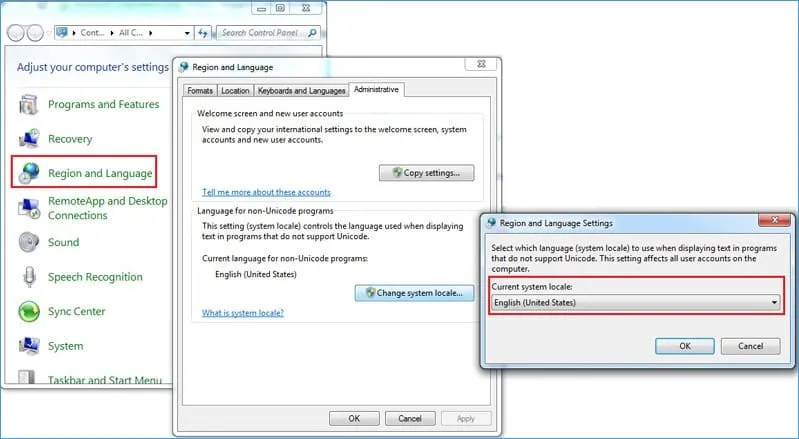
    Yes. EdbMails is designed to support OST files with both English and non-English (Unicode) characters. If you observe any character conversion issue, change your System locale to English via the Region and Language option in your system Control Panel and try again. See

    System locale setting for Unicode OST export

  9. How long does OST to PST conversion take?

    Conversion time depends on the number of mailbox items — emails, contacts, calendar entries, tasks and so on — in the OST file, the file size, system resources and available disk space. EdbMails is built for high-performance conversion, but there is no fixed time estimate that applies to all OST files.

  10. Can I create a PST archive copy of data recovered from an OST file?

    Yes. After EdbMails converts your OST data to PST, you can store the resulting PST file as an archive copy of the recovered mailbox data. This is useful for retention, compliance or as a local backup of the data that was in the OST file at the time of conversion.

Free Trial, Licensing and Support

  1. How much OST data can I convert with the free trial?

    In the free trial version, you can export up to 30 items from each and every folder of the entire mailbox, including Inbox, Contacts, Calendars, Notes and Tasks. To convert without this limit, you need to purchase a licence. See the free OST to PST converter page for details.

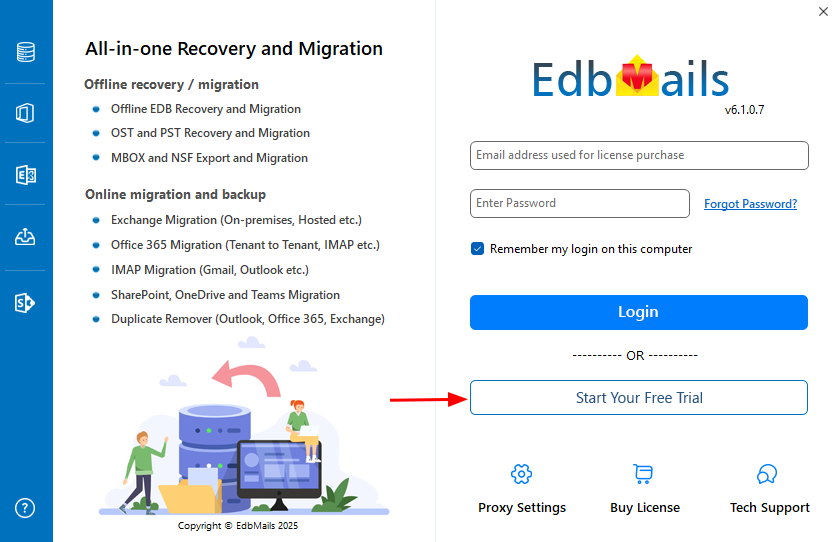
  2. How do I start the free trial?
    1. download and install the EdbMails application.
    2. Click the Start Your Free Trial button when prompted at login.

      Start free trial in EdbMails

  3. Do I need separate EdbMails installations for OST to PST, Microsoft 365 and Exchange migration?

    No. There is only one EdbMails setup that includes all the functionality: OST to PST, OST to Office 365 and OST to Live Exchange Server migration.

  4. How fast will I receive the key after purchasing the EdbMails licence?

    EdbMails does not require a separate key after purchasing the licence. Your account is automatically upgraded to the licence type you purchased. Download and install the application and sign in using the EdbMails account credentials — email address and password — that you created during licence purchase.

  5. What should I do if I run into an issue during the export?

    If you face any issues during or after the export, contact Technical Support. Support is available 24/7 via live chat, email and phone.

OST Troubleshooting Resources

For specific Outlook and OST error messages, see the relevant troubleshooting articles below.

Fix: default outlook profile.ost is in use and cannot be accessed Fix Outlook not connecting to server Fix: The set of folders cannot be opened in Outlook Fix Outlook not syncing error Fix Outlook data file cannot be accessed Errors have been detected in the OST file Repair corrupted OST files from Outlook 365 Fix Outlook OST compatibility issues

Related OST Resources

OST to PST Converter OST to PST Converter Features How to Convert OST to PST Corrupt OST file recovery Recover orphaned OST file Selective OST to PST export Export OST with Date Filter Unicode and ANSI OST format Split OST file to multiple PST files Recover metadata and attachments Recover deleted mailbox items from OST OST Recovery Software vs Manual Methods

 In this manual

IntroductionConversion BasicsOutlook & Exchange RequirementsOST RecoveryConversion FeaturesFree Trial, LicensingTrouble Shooting ResourcesRelated OST Resources

OST to PST converter

Just $45 Onwards

Buy Now

Need help?

24/7 Customer support

Contact us on Live chat

Personalized Demo

Book a personalized demo

Still need help?

Email us / Call us

@edbmails.com All rights are reserved Privacy Policy | Terms of Use | GDPR | Security | Press Releases

hidden msg
Live Chat

Hi, May I help you?

Hide Chat Now