
EdbMails EDB Recovery and Migration software
  • Products
    EdbMails
    All-in-one Recovery and Migration
    • EDB Recovery and Migration
    • OST, PST, MBOX, NSF, EML, MSG
    • Office 365, Exchange Migration
    • SharePoint, OneDrive & Teams
    • Google Workspace Migration
    • IMAP Migration
    • Duplicate Remover
    • EdbMails Data Recovery
    • Backup Solutions
    • All ProductsAll Products

    EDB Recovery and Migration

    EdbMails lets you recover corrupted, damaged, and offline Exchange EDB files, convert EDB mailboxes to PST format, and directly migrate mailbox data to Office 365 and live Exchange Server.

    EDB to PST
    EDB to PST
    Recover corrupted, damaged, offline EDB files and convert Exchange EDB mailboxes to PST file format
    Public Folder to Exchange
    Public Folder to Exchange
    Migrate public folders from an Exchange offline EDB file to live Exchange Server
    EDB to Live Exchange Migration
    EDB to Live Exchange Migration
    Directly migrate offline Exchange database (EDB) files to live Exchange server
    Archive Mailbox to Office 365
    Archive Mailbox to Office 365
    Migrate archive mailboxes from offline EDB files directly to Office 365
    EDB to Office 365 Migration
    EDB to Office 365 Migration
    Directly migrate offline Exchange database (EDB) files to Office 365
    Public Folder to Office 365
    Public Folder to Office 365
    Migrate public folders from an offline Exchange EDB file to Office 365

    OST, PST, MBOX, NSF, EML, MSG Export and Migration

    EdbMails lets you to recover OST and PST files, export OST, PST, MBOX, NSF, EML, and MSG files to PST files, and directly migrate OST, PST, MBOX, and NSF mailbox data to Office 365 and live Exchange Server.

    OST Recovery and Migration
    OST Recovery and Migration
    Recover offline OST files, convert OST to PST, and migrate OST to Office 365 and Exchange Server
    PST Recovery and Migration
    PST Recovery and Migration
    Recover Outlook PST files , Export PST to PST, migrate PST to Office 365 and Exchange Server
    MBOX Export and Migration
    MBOX Export and Migration
    Export MBOX to PST, migrate MBOX to Office 365 and Exchange Server
    NSF Export and Migration
    NSF Export and Migration
    Export NSF to PST, migrate NSF to Office 365 and Exchange Server
    EML to PST Export
    EML to PST Export
    Convert EML files to Outlook PST files
    PST to MSG Export
    PST to MSG Export
    Convert Outlook PST file to MSG file format
    MSG to PST Export
    MSG to PST Export
    Export MSG files to Outlook PST files

    Office 365, Exchange Migration

    EdbMails lets you securely migrate mailboxes across Microsoft 365, Exchange, Google Workspace (Google Workspace Migration), and IMAP-supported servers such as Outlook, Gmail, Zimbra, Zoho Mail, and cPanel, ensuring zero downtime.

    Office 365 Backup
    Office 365 Migration
    Migrate between Office 365 tenants, Office 365 to Exchange, Office 365 to PST, PST files to Office 365.
    Exchange Server Backup
    Exchange Migration
    Migrate between any Exchange Servers, Exchange to Office 365, Exchange to PST, PST files to Exchange.
    Tenant to Tenant Migration
    Tenant to Tenant Migration
    Migrate Mailboxes, Public Folders, Archive Mailboxes between Office 365 Tenants.
    Exchange to Office 365
    Exchange to Office 365
    Migrate Mailboxes, Public Folders, Archive Mailboxes from live Exchange server to Office 365.
    Office 365 to IMAP
    Office 365 to IMAP
    Migrate Office 365 to IMAP, Office 365 to Gmail, Office 365 to Outlook, Office 365 to Zoho etc.
    Exchange to IMAP
    Exchange to IMAP
    Migrate from live Exchange Server to IMAP servers such as Gmail, Outlook, and Zoho Mail.
    Public Folder to Office 365
    Public Folder to Office 365
    Migrate Public Folders between Office 365 tenants with complete folder hierarchy and mailbox data integrity.
    Exchange to PST
    Exchange to PST
    Export live Exchange Server mailboxes, public folders, and archive mailboxes to Outlook PST files.

    SharePoint, OneDrive & Microsoft Teams Migration

    EdbMails lets you migrate SharePoint sites, OneDrive data, Microsoft Teams, teams, channels, chats, permissions, and documents between Microsoft 365 tenants while maintaining the existing folder structure and data integrity.

    SharePoint, OneDrive & Teams Backup
    SharePoint Online Migration
    Migrate documents, lists, files and folders from SharePoint sites.
    OneDrive for Business Migration
    OneDrive for Business Migration
    Migrate documents, lists, files, folders, private chats from OneDrive.
    Microsoft Teams Migration
    Microsoft Teams Migration
    Migrate Teams, chats, channels, documents, files and folders etc.

    Google Workspace / G Suite Migration

    EdbMails offers secure Google Workspace migration to Office 365, Exchange, or IMAP, and export to PST covering emails, contacts, calendars and tasks.

    Google Workspace Migration
    Google Workspace Migration
    Migrate emails, calendars, contacts, tasks from Google workspace to Google workspace, office 365, Exchange and IMAP. Export to PST
    Google Workspace to Office 365
    Google Workspace to Office 365
    Migrate emails, calendars, contacts, tasks from Google Workspace / G Suite to Office 365
    Google Workspace to Exchange Server
    Google Workspace to Exchange Server
    Migrate emails, calendars, contacts, tasks from Google Workspace / G Suite to on-Premise Exchange Server
    Google Workspace to IMAP
    Google Workspace to IMAP
    Migrate emails, calendars, contacts, tasks from Google Workspace / G Suite to IMAP, Outlook, Zimbra, Zoho etc.
    Google Workspace to Google Workspace Migration
    Google Workspace to Google Workspace
    Migrate emails, calendars, contacts, tasks between two Google Workspace / G Suite tenants
    Google Workspace to PST
    Google Workspace to PST
    Export emails, calendars, contacts, tasks from Google Workspace / G Suite to Outlook PST files

    IMAP Migration

    EdbMails IMAP Migration tool lets you easily migrate emails from IMAP servers such as Outlook, Gmail, Zoho Mail, Zimbra, cPanel, and more. Supports IMAP to IMAP, Office 365, Exchange Server, PST, and bulk PST to IMAP migration.

    IMAP Email Backup & Migration
    IMAP Email Backup & Migration
    Backup and migrate emails from IMAP servers to PST, Office 365, and On-Premises Exchange Server
    IMAP to Office 365
    IMAP to Office 365
    Migrate emails, folders, and attachments from IMAP servers to Office 365
    IMAP to Exchange
    IMAP to Exchange
    Migrate emails, folders, and attachments from IMAP servers to on-premises Exchange Server
    IMAP to PST
    IMAP to PST
    Export emails, folders, and attachments from IMAP servers to Outlook PST files for backup
    PST to IMAP
    PST to IMAP
    Migrate emails, folders, and attachments from bulk PST files to IMAP servers

    Duplicate Remover

    EdbMails Duplicate Remover lets you easily remove duplicate items from Office 365 and Exchange Server, and from IMAP, Outlook, Gmail, Zimbra, Zoho Mail, etc., ensuring a clean and organized mailbox.

    Remove Duplicates
    Remove Duplicates
    Easily clean up your Office 365, Exchange, Outlook and IMAP accounts by removing duplicate emails.
    Remove Duplicates from Office 365
    Remove Duplicates from Office 365
    Remove duplicate emails, calendars, contacts, journal tasks, etc. from Office 365.
    Remove Duplicates from Exchange Server
    Remove Duplicates from Exchange Server
    Remove duplicate emails, calendars, contacts, journal tasks, etc. from live Exchange Server.
    Remove Duplicates from IMAP, Outlook
    Remove Duplicates from IMAP, Outlook
    Remove duplicate emails, attachments from IMAP, Outlook, Gmail, Zimbra, Zoho Mail etc.

    Exchange, SharePoint, OneDrive, Teams and Office 365 Backup

    EdbMails enables secure, automated backup and recovery for Microsoft 365 services including Exchange Online, SharePoint, OneDrive, Teams, and Live Exchange Server with complete data protection and restore flexibility.

    Office 365 Backup
    Office 365 Backup
    Incremental, Granular, Encrypted and Compressed Office 365 Mailboxes Backup
    Exchange Server Backup
    Exchange Server Backup
    Incremental, Granular, Encrypted and Compressed Exchange Mailboxes Backup
    SharePoint, OneDrive & Teams Backup
    SharePoint, OneDrive & Teams Backup
    Backup Online site collections, Team sites, Office 365 groups, all documents etc.

    EdbMails Data Recovery

    EdbMails Data Recovery Software lets you recover permanently deleted data, including photos, videos, documents, and archived files, from partitions on hard drives, SSDs, USB drives, SD cards, and external storage devices.

    EdbMails Data Recovery
    EdbMails Data Recovery
    Recover and restore permanently deleted data from hard drives, SSDs, USB drives, SD cards, and etc.
    Whitepaper Whitepaper
    Request a Demo Request a Demo
    Sign Up Sign Up
  • Features
  • FAQ
  • Offers
  • Pricing
  • Download
  • Support
  • Sign in
User’s Manual
Google Workspace Migration

User Manual

User Manual

  • Overview
  • System Requirements
  • Migration Scenarios
  • Installation
    • Installation process
    • Reinstall or Upgrade
    • How to uninstall
  • FAQs
    • Google Workspace to Office 365
    • Google Workspace to IMAP
    • Google Workspace to Exchange
    • Google Workspace to Google Workspace
    • Google Workspace to PST Export
  • Videos
  • Screenshots
    • Google Workspace to Office 365
    • Google Workspace to Exchange
    • Google Workspace to IMAP
  • How it works?
    • Google Workspace to Office 365 Migration
    • Migrate Google Workspace to Google Workspace
    • Google Workspace to Exchange Migration
    • Google Workspace to IMAP Migration
    • Export Google Workspace to Outlook PST
  • Google Workspace Migration Settings
  • Google Workspace Admin Configuration
  • Connect to target Office 365
  • Connect to Exchange server for multiple mailboxes migration
    • Connect with Global Admin
    • Connect to Multiple users using CSV file
    • Connect using full access permission
    • Connect individual users for Single / Specific user Migration
  • Connect to Hosted Exchange for its Migration
    • Connect with Full Access permissions
    • Connect to multiple users using CSV file
    • Connect to Individual user for migration
  • Connect to IMAP
    • Connect IMAP Single Server
    • Connect IMAP Multiple Server
  • Knowledge Base
    • Bulk Google Workspace Mailbox Migration
    • Google Workspace Migration
    • Why Choose EdbMails
    • Automatic Mailbox Mapping
    • Best Google Workspace Migration Software
    • Migrate Google Workspace Emails, Contacts & Calendars
    • Fix Google Workspace Migration Issues
    • Avoid Google Workspace Migration Mistakes
    • Mistakes to Avoid During Google Workspace Migration
    • Migrate Large Google Workspace Mailboxes
    • Google Workspace Metadata Preservation
    • Fix Google Workspace API Permission Errors
    • Google Workspace Contacts Migration
    • Google Workspace Tasks Migration
    • Google Workspace Migration Performance
    • Selective Google Workspace Mailbox Migration
    • Batch Google Workspace Mailbox Migration
  • Map the Mailboxes
  • Incremental Migration
  • Exchange Throttling Policy
  • Multifactor Authentication
    • Enable MFA in Office 365
    • Create App password for MFA
    • Disable Security Defaults
  1. Home
  2. Google Workspace Migration
  3. Verify Google Workspace to Microsoft 365 Migration Success
Download Buy Now

How to Verify a Successful Google Workspace to Microsoft 365 Migration

Verification scope: This page focuses on post-migration validation after Google Workspace to Microsoft 365 migration. It complements the step-by-step migration guide and the commercial migration-tool page.

A migration that finishes without errors is not the same as one that finished correctly. The tool can report "complete" while calendar entries, contact groups, or entire folders are still missing for a handful of mailboxes. Administrators who skip verification usually find out from end users, after cutover, which is the worst possible time.
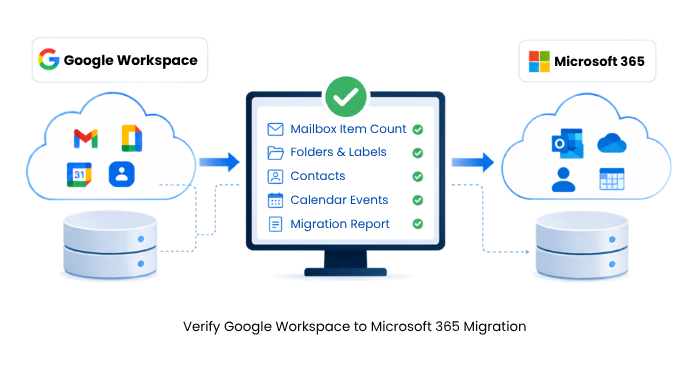
Verify Google Workspace to Microsoft 365 Migration

This guide covers what to check after moving mailboxes from Google Workspace to Microsoft 365, how to read the results, and what to do when something does not match. The steps apply regardless of which tool ran the migration. If you're evaluating tools for the migration itself, EdbMails offers a Google Workspace Migration Tool that can migrate emails, contacts, calendars, and tasks from Google Workspace to Google Workspace, Microsoft 365 (Office 365), Exchange and IMAP.


Why Migration Verification Matters

Gmail uses labels, and a single message can carry several at once. Microsoft 365 uses a strict folder hierarchy, where each item lives in exactly one folder. Every migration tool translates one structure into the other, and that translation is where item counts drift or folders land in the wrong place. A "migration complete" message only confirms the process ran to the end, not that every mailbox came through intact.

What Counts as a Successful Migration

Three conditions need to be met together: item counts match within an explainable margin, folder and label structure maps correctly, and metadata such as read status, timestamps, and sender information carries over intact. Matching counts with a broken folder structure is not a successful migration, even if the summary screen looks clean.

  1. Step-by-Step Verification Process

    Compare Mailbox Item Counts

    Check emails, contacts, and calendar events per mailbox against the source, using Google Workspace admin console reports and Outlook or OWA folder counts. Small gaps can be normal, for example, when a message matches Microsoft 365's spam filtering criteria. Large gaps need investigation before you move on to the next mailbox.

    Check Folder and Label Structure

    Open a sample of mailboxes and confirm that Gmail labels appear as the expected Microsoft 365 folders, including nested labels. A message carrying multiple labels shouldn't collapse into a single flat folder on the destination side, and a parent-child label relationship in Gmail should carry over as nested folders after migration.

    Validate Contacts and Calendar Events

    Contacts should keep names, phone numbers, email addresses, and group membership. Calendar events need to retain the correct date, time, time zone, recurrence pattern, and attendee list. Recurring meetings are worth checking specifically, since a broken recurrence pattern is easy to miss on a quick scan but disruptive once staff rely on it.

    Review the Migration Report

    Most migration tools, including EdbMails, produce a per-mailbox report after each run listing item counts, folder statistics, and any items that failed to transfer. Treat this report as your first checkpoint, not your last. It won't catch a label mapped to the wrong folder or an event that migrated with the wrong time zone, which is why manual spot checks still matter.

    Spot-Check a Sample of Mailboxes

    Full manual review of every mailbox isn't practical in a bulk migration involving hundreds of users. Pick a representative sample instead: a few high-volume mailboxes, a few with heavy calendar use, and anything flagged with a warning in the report. Reviewing this sample closely, rather than skimming a summary count, is what catches problems a report alone would miss.

Common Verification Problems

  1. Missing or Incomplete Items

    Symptom: item counts on the destination fall noticeably short of the source for specific mailboxes.

    Cause: usually throttling limits on the Google or Microsoft side interrupting a batch mid-transfer, or a permission scope that didn't cover every mailbox at runtime.

    Resolution: re-run the migration for the affected mailboxes only, not the entire batch.

  2. Duplicate Items After Multiple Migration Passes

    Symptom: users see the same email or calendar event appear twice after a second migration run.

    Cause: re-running a migration without incremental tracking, so items that already transferred get copied again.

    Resolution: use a tool with incremental migration support, such as EdbMails, which tracks what's already been moved and transfers only new or changed items on later passes.

  3. Folder or Label Mismatches

    Symptom: labels appear flattened, missing, or nested incorrectly in the destination mailbox.

    Cause: usually nested labels or labels containing special characters that didn't translate cleanly.

    Resolution: correct the mapping and re-run the affected folders. Manually moving items inside the destination mailbox risks further inconsistency and should be avoided.

Closing Verification Gaps with Incremental Migration

When verification turns up missing or outdated items, avoid a full re-migration for mailboxes that are otherwise complete. See Incremental Migration for how delta passes target only new or changed items without duplicating existing data. This is the standard approach for keeping the destination current between the first migration pass and final cutover, and it means verification doesn't need to happen only once. A quick check after each incremental pass keeps problems easier to isolate while the affected mailbox list is still small.

Final Sign-Off Before Cutover

Before switching MX records or notifying users, confirm the migration report shows zero unresolved errors for the mailboxes in scope, your spot-check sample passed without discrepancies, and any re-migrated items after a fix have been re-verified rather than assumed fixed. Keep the final report on file. It serves as documentation if a user later reports a missing item, and as an audit record for compliance purposes or management sign-off.

Frequently Asked Questions

  1. How long should verification take for a large migration?

    It scales with mailbox count and how deep you sample, not with total data volume. A batch of a few hundred mailboxes typically needs a few hours for report review plus manual spot checks, not a full re-review of every account.

  2. What if item counts match but users still report missing emails?

    Check spam or junk folder filtering rules on the Microsoft 365 side first. A message can migrate successfully but land somewhere the user isn't checking.

  3. Is a second full migration pass ever necessary after failed verification?

    Rarely. Most verification failures affect a subset of mailboxes or folders. Re-running only the affected scope, ideally through an incremental pass, avoids duplicating data that already transferred correctly.

  4. Should verification happen before or after MX record cutover?

    Before. Verifying while the source system is still live and unchanged gives you a stable comparison baseline. Verifying after cutover means the source may already have new mail that was never in scope for the migration.


Additional resources

  • Google Workspace Contacts Migration
  • Google Workspace Migration Performance
  • Google Workspace Scenarios
  • Google Workspace to Office 365 Migration
Additional resources and related guides

 In this manual

IntroductionMigration Verification BenefitsSuccessful Migration CriteriaVerification StepsCommon IssuesReducing Migration GapsFinal Cutover ApprovalFrequently Asked Questions

Google Workspace Migration

100 Mailboxes $299 Only

Buy Now

Need help?

24/7 Customer support

Contact us on Live chat

Personalized Demo

Book a personalized demo

Still need help?

Email us / Call us

@edbmails.com All rights are reserved Privacy Policy | Terms of Use | GDPR | Security | Press Releases

hidden msg
Live Chat

Hi, May I help you?

Hide Chat Now