EdbMails EDB Recovery and Migration software
  • Products
    EdbMails
    All-in-one Recovery and Migration
    • EDB Recovery and Migration
    • OST, PST, MBOX, NSF, EML, MSG
    • Office 365, Exchange Migration
    • SharePoint, OneDrive & Teams
    • Google Workspace Migration
    • IMAP Migration
    • Duplicate Remover
    • EdbMails Data Recovery
    • Backup Solutions
    • All ProductsAll Products

    EDB Recovery and Migration

    EdbMails lets you recover corrupted, damaged, and offline Exchange EDB files, convert EDB mailboxes to PST format, and directly migrate mailbox data to Office 365 and live Exchange Server.

    EDB to PST
    EDB to PST
    Recover corrupted, damaged, offline EDB files and convert Exchange EDB mailboxes to PST file format
    Public Folder to Exchange
    Public Folder to Exchange
    Migrate public folders from an Exchange offline EDB file to live Exchange Server
    EDB to Live Exchange Migration
    EDB to Live Exchange Migration
    Directly migrate offline Exchange database (EDB) files to live Exchange server
    Archive Mailbox to Office 365
    Archive Mailbox to Office 365
    Migrate archive mailboxes from offline EDB files directly to Office 365
    EDB to Office 365 Migration
    EDB to Office 365 Migration
    Directly migrate offline Exchange database (EDB) files to Office 365
    Public Folder to Office 365
    Public Folder to Office 365
    Migrate public folders from an offline Exchange EDB file to Office 365

    OST, PST, MBOX, NSF, EML, MSG Export and Migration

    EdbMails lets you to recover OST and PST files, export OST, PST, MBOX, NSF, EML, and MSG files to PST files, and directly migrate OST, PST, MBOX, and NSF mailbox data to Office 365 and live Exchange Server.

    OST Recovery and Migration
    OST Recovery and Migration
    Recover offline OST files, convert OST to PST, and migrate OST to Office 365 and Exchange Server
    PST Recovery and Migration
    PST Recovery and Migration
    Recover Outlook PST files , Export PST to PST, migrate PST to Office 365 and Exchange Server
    MBOX Export and Migration
    MBOX Export and Migration
    Export MBOX to PST, migrate MBOX to Office 365 and Exchange Server
    NSF Export and Migration
    NSF Export and Migration
    Export NSF to PST, migrate NSF to Office 365 and Exchange Server
    EML to PST Export
    EML to PST Export
    Convert EML files to Outlook PST files
    PST to MSG Export
    PST to MSG Export
    Convert Outlook PST file to MSG file format
    MSG to PST Export
    MSG to PST Export
    Export MSG files to Outlook PST files

    Office 365, Exchange Migration

    EdbMails lets you securely migrate mailboxes across Microsoft 365, Exchange, Google Workspace (Google Workspace Migration), and IMAP-supported servers such as Outlook, Gmail, Zimbra, Zoho Mail, and cPanel, ensuring zero downtime.

    Office 365 Backup
    Office 365 Migration
    Migrate between Office 365 tenants, Office 365 to Exchange, Office 365 to PST, PST files to Office 365.
    Exchange Server Backup
    Exchange Migration
    Migrate between any Exchange Servers, Exchange to Office 365, Exchange to PST, PST files to Exchange.
    Tenant to Tenant Migration
    Tenant to Tenant Migration
    Migrate Mailboxes, Public Folders, Archive Mailboxes between Office 365 Tenants.
    Exchange to Office 365
    Exchange to Office 365
    Migrate Mailboxes, Public Folders, Archive Mailboxes from live Exchange server to Office 365.
    Office 365 to IMAP
    Office 365 to IMAP
    Migrate Office 365 to IMAP, Office 365 to Gmail, Office 365 to Outlook, Office 365 to Zoho etc.
    Exchange to IMAP
    Exchange to IMAP
    Migrate from live Exchange Server to IMAP servers such as Gmail, Outlook, and Zoho Mail.
    Public Folder to Office 365
    Public Folder to Office 365
    Migrate Public Folders between Office 365 tenants with complete folder hierarchy and mailbox data integrity.
    Exchange to PST
    Exchange to PST
    Export live Exchange Server mailboxes, public folders, and archive mailboxes to Outlook PST files.

    SharePoint, OneDrive & Microsoft Teams Migration

    EdbMails lets you migrate SharePoint sites, OneDrive data, Microsoft Teams, teams, channels, chats, permissions, and documents between Microsoft 365 tenants while maintaining the existing folder structure and data integrity.

    SharePoint, OneDrive & Teams Backup
    SharePoint Online Migration
    Migrate documents, lists, files and folders from SharePoint sites.
    OneDrive for Business Migration
    OneDrive for Business Migration
    Migrate documents, lists, files, folders, private chats from OneDrive.
    Microsoft Teams Migration
    Microsoft Teams Migration
    Migrate Teams, chats, channels, documents, files and folders etc.

    Google Workspace / G Suite Migration

    EdbMails offers secure Google Workspace migration to Office 365, Exchange, or IMAP, and export to PST covering emails, contacts, calendars and tasks.

    Google Workspace Migration
    Google Workspace Migration
    Migrate emails, calendars, contacts, tasks from Google workspace to Google workspace, office 365, Exchange and IMAP. Export to PST
    Google Workspace to Office 365
    Google Workspace to Office 365
    Migrate emails, calendars, contacts, tasks from Google Workspace / G Suite to Office 365
    Google Workspace to Exchange Server
    Google Workspace to Exchange Server
    Migrate emails, calendars, contacts, tasks from Google Workspace / G Suite to on-Premise Exchange Server
    Google Workspace to IMAP
    Google Workspace to IMAP
    Migrate emails, calendars, contacts, tasks from Google Workspace / G Suite to IMAP, Outlook, Zimbra, Zoho etc.
    Google Workspace to Google Workspace Migration
    Google Workspace to Google Workspace
    Migrate emails, calendars, contacts, tasks between two Google Workspace / G Suite tenants
    Google Workspace to PST
    Google Workspace to PST
    Export emails, calendars, contacts, tasks from Google Workspace / G Suite to Outlook PST files

    IMAP Migration

    EdbMails IMAP Migration tool lets you easily migrate emails from IMAP servers such as Outlook, Gmail, Zoho Mail, Zimbra, cPanel, and more. Supports IMAP to IMAP, Office 365, Exchange Server, PST, and bulk PST to IMAP migration.

    IMAP Email Backup & Migration
    IMAP Email Backup & Migration
    Backup and migrate emails from IMAP servers to PST, Office 365, and On-Premises Exchange Server
    IMAP to Office 365
    IMAP to Office 365
    Migrate emails, folders, and attachments from IMAP servers to Office 365
    IMAP to Exchange
    IMAP to Exchange
    Migrate emails, folders, and attachments from IMAP servers to on-premises Exchange Server
    IMAP to PST
    IMAP to PST
    Export emails, folders, and attachments from IMAP servers to Outlook PST files for backup
    PST to IMAP
    PST to IMAP
    Migrate emails, folders, and attachments from bulk PST files to IMAP servers

    Duplicate Remover

    EdbMails Duplicate Remover lets you easily remove duplicate items from Office 365 and Exchange Server, and from IMAP, Outlook, Gmail, Zimbra, Zoho Mail, etc., ensuring a clean and organized mailbox.

    Remove Duplicates
    Remove Duplicates
    Easily clean up your Office 365, Exchange, Outlook and IMAP accounts by removing duplicate emails.
    Remove Duplicates from Office 365
    Remove Duplicates from Office 365
    Remove duplicate emails, calendars, contacts, journal tasks, etc. from Office 365.
    Remove Duplicates from Exchange Server
    Remove Duplicates from Exchange Server
    Remove duplicate emails, calendars, contacts, journal tasks, etc. from live Exchange Server.
    Remove Duplicates from IMAP, Outlook
    Remove Duplicates from IMAP, Outlook
    Remove duplicate emails, attachments from IMAP, Outlook, Gmail, Zimbra, Zoho Mail etc.

    Exchange, SharePoint, OneDrive, Teams and Office 365 Backup

    EdbMails enables secure, automated backup and recovery for Microsoft 365 services including Exchange Online, SharePoint, OneDrive, Teams, and Live Exchange Server with complete data protection and restore flexibility.

    Office 365 Backup
    Office 365 Backup
    Incremental, Granular, Encrypted and Compressed Office 365 Mailboxes Backup
    Exchange Server Backup
    Exchange Server Backup
    Incremental, Granular, Encrypted and Compressed Exchange Mailboxes Backup
    SharePoint, OneDrive & Teams Backup
    SharePoint, OneDrive & Teams Backup
    Backup Online site collections, Team sites, Office 365 groups, all documents etc.

    EdbMails Data Recovery

    EdbMails Data Recovery Software lets you recover permanently deleted data, including photos, videos, documents, and archived files, from partitions on hard drives, SSDs, USB drives, SD cards, and external storage devices.

    EdbMails Data Recovery
    EdbMails Data Recovery
    Recover and restore permanently deleted data from hard drives, SSDs, USB drives, SD cards, and etc.
    Whitepaper Whitepaper
    Request a Demo Request a Demo
    Sign Up Sign Up
  • Features
  • FAQ
  • Offers
  • Pricing
  • Download
  • Support
  • Sign in
User’s Manual
PST Recovery and Migration

User Manual

User Manual

  • Overview
  • System Requirements
  • Installation
    • Installation process
    • Reinstall or Upgrade
    • How to uninstall
  • Initial Setup
  • FAQ
    • Outlook PST Converter
    • PST to Office 365 Migration
    • PST to Exchange Migration
  • Videos
    • Outlook PST Converter
    • PST to Office 365 Migration
    • PST to Exchange Migration
  • Screenshots
    • Outlook to PST
    • PST to Office 365 Migration
    • PST to Exchange Migration
  • How it works?
    • Outlook PST Converter
    • PST to Office 365 Migration
    • PST to Exchange Migration
  • Connect to Exchange server for multiple mailboxes migration
    • Connect with Global Admin
    • Connect with Individual user's credentials using CSV file
    • Connect using full access permission
    • Connect individual users for Single / Specific user Migration
  • Connect to Hosted Exchange for its Migration
    • Connect with Full Access permissions
    • Using multiple user credentials with CSV file
    • Connecting to Individual user for its migration
  • Connect to Office 365
    • Connect with Global Admin
    • Connect to Office 365 with full access permission
    • Connect to Office 365 with CSV file option
    • Connect to Office 365 as single user mailbox
  • Set Exchange Server Impersonation rights
    • Exchange 2007 and below
    • Exchange 2010, 2013, 2016 and 2019
    • Set using Exchange Server GUI
  • Split PST File
  • Incremental Migration
  • Exchange Throttling Policy
  • Map the Mailboxes
  • Multifactor Authentication
    • Enable MFA in Office 365
    • Create App password for MFA
    • Disable Security Defaults
  1. Home
  2. All Products
  3. PST
  4. How to Split PST file
Download Buy Now

How to Split Oversized Outlook PST Files into Smaller Files

Large Outlook PST files can become difficult to manage, especially when they contain years of emails, attachments, contacts, and calendar items. Oversized PST files can cause Outlook performance issues, slow folder access, or file-size limit errors. Splitting a PST file into smaller files makes it easier to manage, store, and access your mailbox data.

With EdbMails PST Recovery Tool, you can split oversized Outlook PST files into multiple smaller PST files based on your preferred file size. The software allows you to preview mailbox contents, select specific folders or the entire mailbox, and export the data into new PST files while preserving the original folder hierarchy and mailbox properties.

EdbMails creates new PST files without modifying the source file. Whether you need to split a large PST file or recover data from a damaged or inaccessible PST file, the software simplifies exporting mailbox data into smaller, manageable files.

Why Split Outlook PST Files?

You may need to split Outlook PST files when they approach the size limit for their format and Outlook version. When a PST file nears its limit, Outlook may show errors while saving new items or accessing existing mailbox data.

  • Unicode PST files: Outlook 2003 and later versions use Unicode PST files. Outlook 2010 and later have a default size limit of 50 GB, while Outlook 2003 and 2007 have a default limit of 20 GB. Splitting oversized PST files keeps the newly exported files below the configured size limit.
  • ANSI PST files: Outlook 2002 and earlier versions use ANSI PST files, which have a maximum size of approximately 2 GB. Files near this limit may stop accepting new items or become damaged. ANSI PST files remain subject to this limit unless their data is exported to the newer Unicode format.
  • Large mailbox archives: PST files that contain years of emails and attachments can be difficult to transfer or import. Dividing the exported data into smaller PST files lets administrators transfer or import archives in stages.
  • Storage and backup restrictions: Some backup systems, file systems, and transfer services limit the size of individual files. Splitting the PST output keeps each file within those limits without reducing the total amount of mailbox data.

Prerequisites to Split a PST File

Before you begin splitting a PST file, ensure that you have the following:

  • EdbMails installed on a supported Windows computer.
  • Microsoft Outlook (classic) installed with a configured Outlook profile for PST export.
  • The Outlook PST file that you want to split.
  • Sufficient free disk space to save the newly exported PST files.
  • A backup copy of your original PST file.

Steps to Split a Large PST File Using EdbMails

Step 1: Download and Install EdbMails

  • Download EdbMails and install the application on your Windows computer.
  • Launch EdbMails and log in using your registered email address and password.
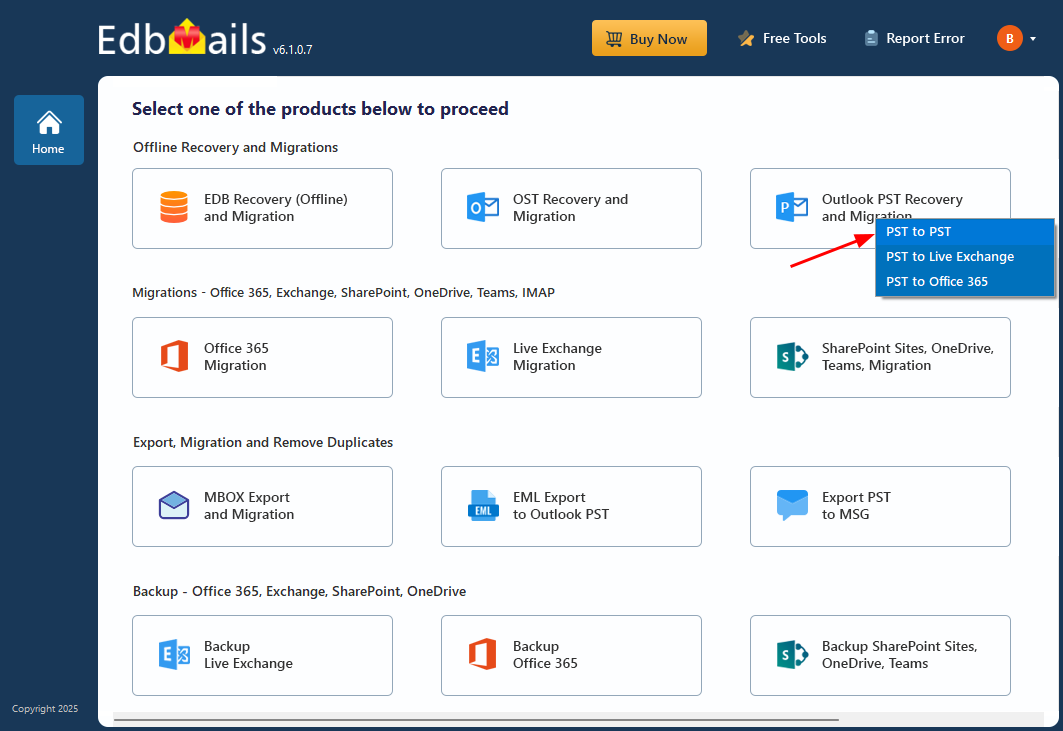
  • Select 'Outlook PST Recovery and Migration' from the product list.
  • Select 'PST to PST'.

Select PST to PST

  • Use the default job name or create a new job and continue.
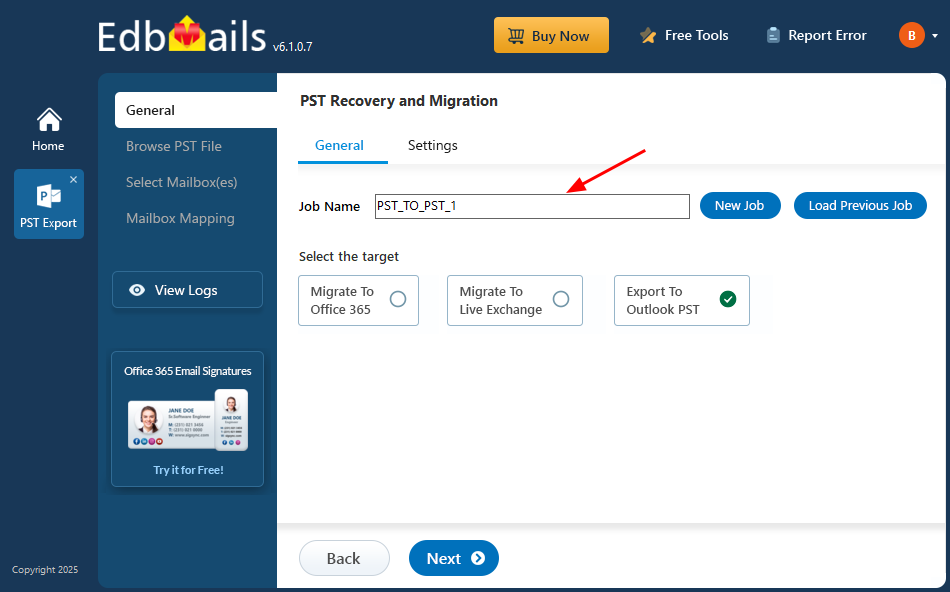
Enter export job name

Step 2: Select the Source PST File

  • Click 'Browse for PST file' and select the PST file you want to split.
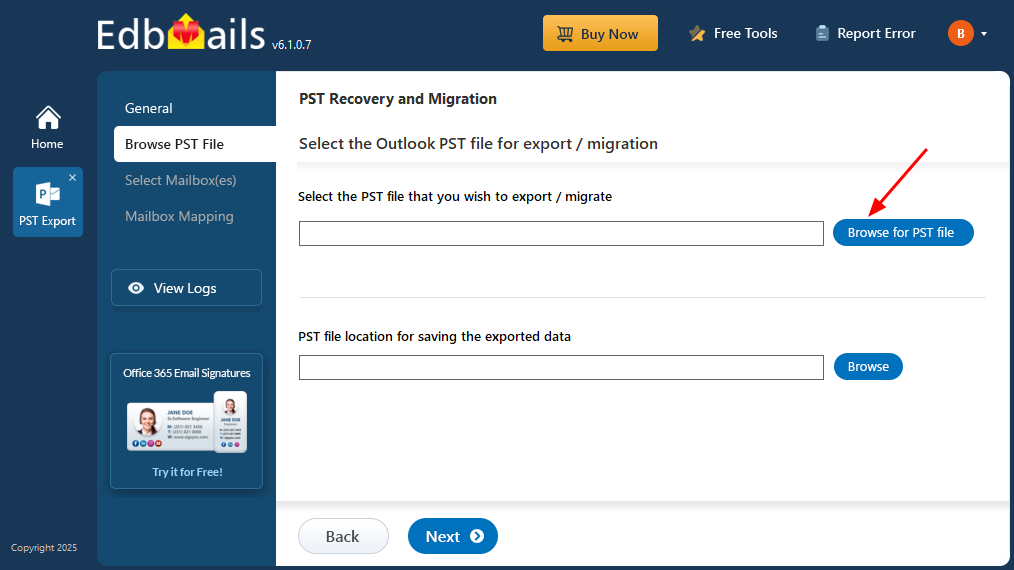
Browse for PST file

  • Click 'Browse' to select the destination folder where you want to save the newly created PST files.

Browse PST Save location

  • Click 'Next' to continue.

Step 3: Preview and Select the Mailbox Folders

  • Expand the mailbox folders to preview emails, attachments, contacts, calendar items, tasks, and notes.

 Note: You can select the entire mailbox to split all its contents into smaller PST files or select specific folders to export only the required mailbox data.
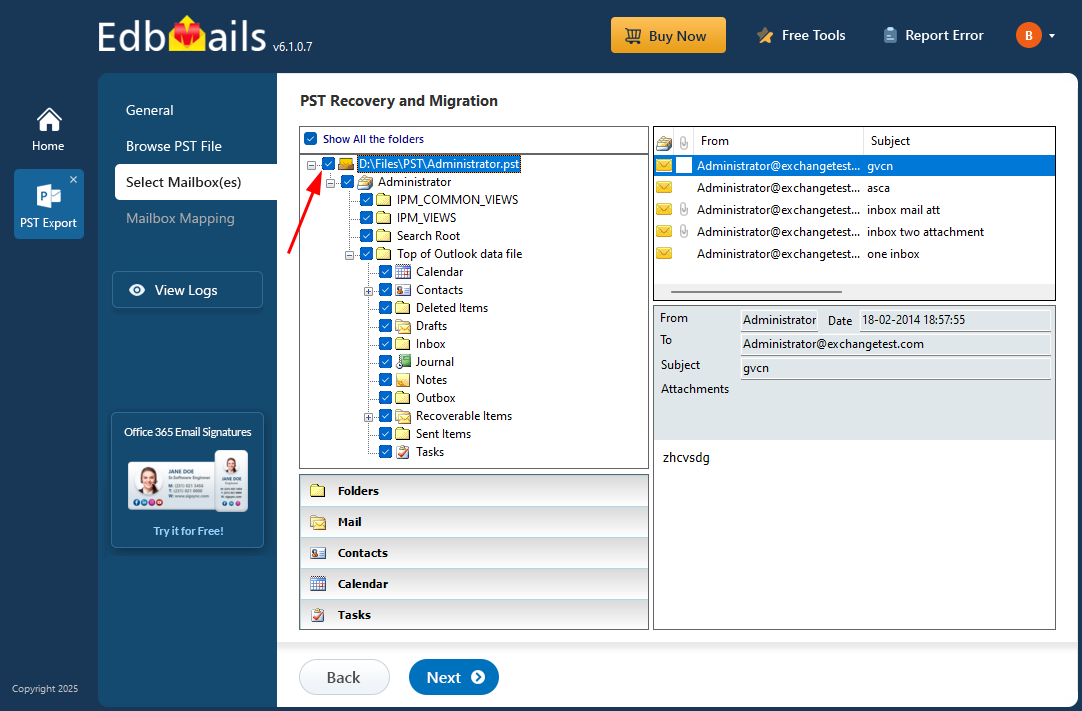
Select mailboxes or folders

  • Click 'Next' to proceed with the export configuration.

Step 4: Configure the PST Split Size

  • Click 'Settings', enable the 'Split PST file' option, specify the desired file size limit, and save the settings.
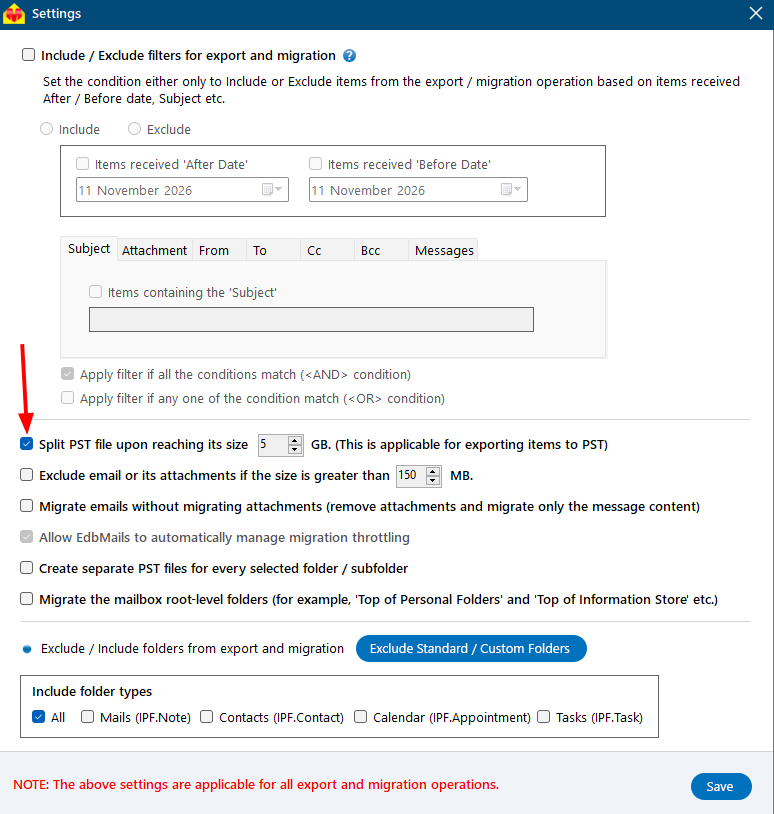
Enable Split PST File

Step 5: Start Exporting the PST File into Smaller Files

  • Click 'Start Export' to begin the PST export process.
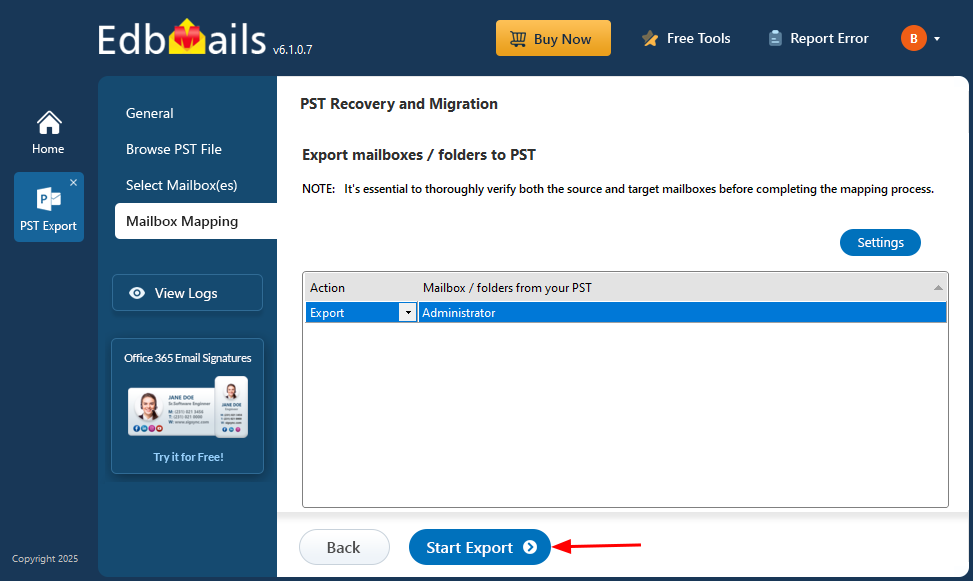
Start Export

  • Once the export is complete, EdbMails displays a completion message. Click 'View Logs' to review the export report and verify the exported mailbox item counts.

Validate Split PST Output

After completing the PST splitting process, verify the newly created PST files to ensure that the required mailbox data has been exported correctly.

  • Check the exported PST files: Open the destination folder and confirm that the smaller PST files have been created.
  • Open the PST files in Outlook: Use File > Open & Export > Open Outlook Data File to open each PST file.
  • Verify mailbox contents: Check that emails, attachments, contacts, calendars, and folder structures are accessible.
  • Review the export logs: Use the 'View Logs' option in EdbMails to check the export status and exported item counts.
  • Keep the original PST file: Retain the source PST file until you have verified the exported data.

Frequently Asked Questions

  1. How do I split a PST file into smaller files?

    You can split a PST file using EdbMails PST Recovery. Select the source PST file and destination folder, enable the 'Split PST file' option in Settings, and specify the desired file size. Start the export, and EdbMails automatically creates multiple smaller PST files based on the configured size limit.

  2. How can I split oversized Outlook PST files without losing data?

    EdbMails allows you to split oversized Outlook PST files by exporting mailbox data into new, smaller PST files without modifying the original file. The software preserves supported emails, attachments, contacts, calendars, and folder structure during the export. You can verify the exported data in Outlook while retaining the original PST file as a backup.

  3. Can I split a large PST file exceeding 50 GB?

    Yes. EdbMails supports processing PST files larger than 50 GB and exporting their recoverable mailbox data into smaller PST files. The processing time depends on the file condition, system resources, and available disk space.

  4. Can EdbMails split a corrupted or inaccessible PST file?

    Yes. EdbMails can scan corrupted or inaccessible PST files and recover mailbox data for export into multiple smaller PST files. You can preview the recoverable emails and folders before starting the export. The original damaged PST file remains unchanged. Items that are no longer present in the damaged file cannot be recovered.

  5. Do I need Outlook installed to split PST files?

    Yes. Microsoft Outlook (classic) with a configured Outlook profile is required to export mailbox data into PST files using EdbMails. However, you can scan and preview the source PST file without opening it in Outlook.

  6. Will splitting a PST file preserve emails, attachments, and folder structure?

    Yes. EdbMails preserves the supported mailbox folder hierarchy, emails, attachments, contacts, calendars, and other mailbox properties during PST export. Each resulting PST file contains the folders and mailbox items exported into that file.

  7. Can I split only selected folders from an oversized PST file?

    Yes. EdbMails allows you to select specific mailbox folders before exporting the data. For example, you can select only the Inbox, Sent Items, or Archive folders and export their contents into smaller PST files without exporting the entire mailbox.

  8. Can I split a PST file by year or date range?

    Yes. EdbMails provides date-based filters that allow you to export emails from a specific date range. You can perform separate exports for different years or date ranges to organize your Outlook emails into individual PST files.

  9. Can I split oversized PST files using the EdbMails free trial?

    No. The PST splitting feature is not available in the EdbMails free trial. The trial allows you to scan PST files, preview mailbox contents, and export up to 30 items per folder, but the PST split setting requires a paid license. To split oversized PST files into smaller files, you need to purchase an EdbMails PST Recovery license.

  10. Can I combine the split PST files into one file again?

    Yes. EdbMails provides a free utility to merge multiple Outlook PST files into a single PST file when consolidation is required.


Additional resources:

  • Outlook PST Repair and Recovery Guide
  • PST to Office 365 Migration
  • PST to Exchange Migration
  • EdbMails - Free Tools
Additional resources and related guides


 In this manual

IntroductionWhy Split PST FilesPrerequisitesSteps to Split PSTValidate PST OutputFAQs

PST Recovery and Migration

Just $45 Onwards

Buy Now

Need help?

24/7 Customer support

Contact us on Live chat

Personalized Demo

Book a personalized demo

Still need help?

Email us / Call us

@edbmails.com All rights are reserved Privacy Policy | Terms of Use | GDPR | Security | Press Releases

hidden msg
Live Chat

Hi, May I help you?

Hide Chat Now