• Menu
    • Products
      EDB Recovery and Migration
      • Overview
      • Features
      • How it works
      • User Manual
      • FAQ
      • Videos
      • Pricing
      • Screenshots
      Exchange Server Migration
      • Overview
      • Features
      • How it works
      • User Manual
      • FAQ
      • Videos
      • Pricing
      • Screenshots
      Office 365 Migration
      • Overview
      • Features
      • How it works
      • User Manual
      • FAQ
      • Videos
      • Pricing
      • Screenshots
      SharePoint Online Migration
      • Overview
      • Features
      • How it works
      • FAQ
      • Videos
      • Pricing
      • Screenshots
      OneDrive for Business Migration
      • Overview
      • Features
      • How it works
      • FAQ
      • Videos
      • Pricing
      • Screenshots
      Microsoft Teams Migration
      • Overview
      • Features
      • How it works
      • FAQ
      • Videos
      • Pricing
      • Screenshots
      SharePoint Backup
      • Overview
      • Features
      • How it works
      • FAQ
      • Videos
      • Pricing
      • Screenshots
      OneDrive Backup
      • Overview
      • Features
      • How it works
      • FAQ
      • Videos
      • Pricing
      • Screenshots
      IMAP Email Backup & Migration
      • Overview
      • Features
      • How it works
      • User Manual
      • FAQ
      • Videos
      • Pricing
      • Screenshots
      Exchange Server Backup
      • Overview
      • Features
      • How it works
      • FAQ
      • Videos
      • Pricing
      • Screenshots
      Office 365 Backup
      • Overview
      • Features
      • How it works
      • FAQ
      • Videos
      • Pricing
      • Screenshots
      OST Recovery and Migration
      • Overview
      • Features
      • How it works
      • User Manual
      • FAQ
      • Videos
      • Pricing
      • Screenshots
      MBOX Export and Migration
      • Overview
      • Features
      • How it works
      • FAQ
      • Videos
      • Pricing
      • Screenshots
      NSF Export and Migration
      • Overview
      • Features
      • How it works
      • FAQ
      • Videos
      • Pricing
      • Screenshots
      PST Recovery and Migration
      • Overview
      • Features
      • How it works
      • User Manual
      • FAQ
      • Videos
      • Pricing
      • Screenshots
      EML to PST Export
      • Overview
      • How it works
      • Pricing
      PST to MSG Export
      • Overview
      • How it works
      • Pricing
      MSG to PST Export
      • Overview
      • How it works
      • Pricing
      • Screenshots
      G Suite Migration
      • Overview
      • How it works
      • Pricing
      • Screenshots
      Windows Recovery
      • Overview
      • How it works
      • Pricing
      • FAQs
      • Screenshots
    • Free Tools
    • Features
    • Reseller
    • Free Trial
    • FAQ
    • Video Tutorials
    • Pricing
    • Download
    • Support
    • Account
EdbMails EDB Recovery and Migration software
  • Reseller
  • Products
    EdbMails
    All-in-one Recovery and Migration
    Explore our products
    • EDB recovery and Migration
    • OST, PST, MBOX, NSF, EML, MSG
    • Office 365, Exchange Migration
    • SharePoint, OneDrive & Teams
    • G Suite Migration
    • IMAP Migration
    • Duplicate Remover
    • Windows Data Recovery
    • Backup Solutions

    EDB Recovery and Migration

    EdbMails lets you recover corrupted, damaged, and offline Exchange EDB files, convert EDB mailboxes to PST format, and directly migrate mailbox data to Office 365 and live Exchange Server.

    EDB to PST
    Recover corrupted, damaged, offline EDB files and convert Exchange EDB mailboxes to PST file format
    Public Folder to Exchange
    Migrate public folders from an Exchange offline EDB file to live Exchange Server
    EDB to Live Exchange Migration
    Directly migrate offline Exchange database (EDB) files to live Exchange server
    Archive Mailbox to Office 365
    Migrate archive mailboxes from offline EDB files directly to Office 365
    EDB to Office 365 Migration
    Directly migrate offline Exchange database (EDB) files to Office 365
    Public Folder to Office 365
    Migrate public folders from an offline Exchange EDB file to Office 365

    OST, PST, MBOX, NSF, EML, MSG Export and Migration

    EdbMails lets you to recover OST and PST files, export OST, PST, MBOX, NSF, EML, and MSG files to PST files, and directly migrate OST, PST, MBOX, and NSF mailbox data to Office 365 and live Exchange Server.

    OST Recovery and Migration
    Recover offline OST files, convert OST to PST, and migrate OST to Office 365 and Exchange Server
    PST Recovery and Migration
    Recover Outlook PST files , Export PST to PST, migrate PST to Office 365 and Exchange Server
    MBOX Export and Migration
    Export MBOX to PST, migrate MBOX to Office 365 and Exchange Server
    NSF Export and Migration
    Export NSF to PST, migrate NSF to Office 365 and Exchange Server
    EML to PST Export
    Convert EML files to Outlook PST files
    PST to MSG Export
    Convert Outlook PST file to MSG file format
    MSG to PST Export
    Export MSG files to Outlook PST files

    Office 365, Exchange Migration

    EdbMails lets you securely migrate mailboxes across Microsoft 365, Exchange, Google Workspace (G Suite), and IMAP-supported servers such as Outlook, Gmail, Zimbra, Zoho Mail, and cPanel, ensuring zero downtime.

    Office 365 Migration
    Migrate between Office 365 tenants, Office 365 to Exchange, Office 365 to PST, PST files to Office 365.
    Exchange Migration
    Migrate between any Exchange Servers, Exchange to Office 365, Exchange to PST, PST files to Exchange.
    Tenant to Tenant Migration
    Migrate Mailboxes, Public Folders, Archive Mailboxes between Office 365 Tenants.
    Exchange to Office 365
    Migrate Mailboxes, Public Folders, Archive Mailboxes from live Exchange server to Office 365.
    Office 365 to IMAP
    Migrate Office 365 to IMAP, Office 365 to Gmail, Office 365 to Outlook, Office 365 to Zoho etc.
    Exchange to IMAP
    Migrate from live Exchange Server to IMAP servers such as Gmail, Outlook, and Zoho Mail.
    Public Folder to Office 365
    Migrate Public Folders between Office 365 tenants with complete folder hierarchy and mailbox data integrity.
    Exchange to PST
    Export live Exchange Server mailboxes, public folders, and archive mailboxes to Outlook PST files.

    SharePoint, OneDrive & Microsoft Teams Migration

    EdbMails lets you migrate SharePoint sites, OneDrive data, Microsoft Teams, teams, channels, chats, permissions, and documents between Microsoft 365 tenants while maintaining the existing folder structure and data integrity.

    SharePoint Online Migration
    Migrate documents, lists, files and folders from SharePoint sites.
    OneDrive for Business Migration
    Migrate documents, lists, files, folders, private chats from OneDrive.
    Microsoft Teams Migration
    Migrate Teams, chats, channels, documents, files and folders etc.

    Google Workspace / G Suite Migration

    EdbMails G Suite Migration Tool lets you easily migrate emails, calendars, contacts, tasks, and more from G Suite to Office 365, Exchange Server, and IMAP servers using a Google Admin account without requiring individual user credentials.

    G Suite Migration
    Migrate emails, calendars, contacts, tasks from G Suite to Office 365, G Suite to Exchange, G Suite to IMAP Servers
    G Suite to Office 365
    Migrate emails, calendars, contacts, tasks from Google Workspace / G Suite to Office 365
    G Suite to Exchange Server
    Migrate emails, calendars, contacts, tasks from Google Workspace / G Suite to on-Premise Exchange Server
    G Suite to IMAP
    Migrate emails, calendars, contacts, tasks from Google Workspace / G Suite to IMAP, Outlook, Zimbra, Zoho etc.

    IMAP Migration

    EdbMails IMAP Migration tool lets you easily migrate emails from IMAP servers such as Outlook, Gmail, Zoho Mail, Zimbra, cPanel, and more. Supports IMAP to IMAP, Office 365, Exchange Server, PST, and bulk PST to IMAP migration.

    IMAP Email Backup & Migration
    Backup and migrate emails from IMAP servers to PST, Office 365, and On-Premises Exchange Server
    IMAP to Office 365
    Migrate emails, folders, and attachments from IMAP servers to Office 365
    IMAP to Exchange
    Migrate emails, folders, and attachments from IMAP servers to on-premises Exchange Server
    IMAP to PST
    Export emails, folders, and attachments from IMAP servers to Outlook PST files for backup
    PST to IMAP
    Migrate emails, folders, and attachments from bulk PST files to IMAP servers

    Duplicate Remover

    EdbMails Duplicate Remover lets you easily remove duplicate items from Office 365 and Exchange Server, and from IMAP, Outlook, Gmail, Zimbra, Zoho Mail, etc., ensuring a clean and organized mailbox.

    Remove Duplicates
    Easily clean up your Office 365, Exchange, Outlook and IMAP accounts by removing duplicate emails.
    Remove Duplicates from Office 365
    Remove duplicate emails, calendars, contacts, journal tasks, etc. from Office 365.
    Remove Duplicates from Exchange Server
    Remove duplicate emails, calendars, contacts, journal tasks, etc. from live Exchange Server.
    Remove Duplicates from IMAP, Outlook
    Remove duplicate emails, attachments from IMAP, Outlook, Gmail, Zimbra, Zoho Mail etc.

    Exchange, SharePoint, OneDrive, Teams and Office 365 Backup

    EdbMails enables secure, automated backup and recovery for Microsoft 365 services including Exchange Online, SharePoint, OneDrive, Teams, and Live Exchange Server with complete data protection and restore flexibility.

    Office 365 Backup
    Incremental, Granular, Encrypted and Compressed Office 365 Mailboxes Backup
    Exchange Server Backup
    Incremental, Granular, Encrypted and Compressed Exchange Mailboxes Backup
    SharePoint, OneDrive & Teams Backup
    Backup Online site collections, Team sites, Office 365 groups, all documents etc.

    Windows Data Recovery

    EdbMails Windows Data Recovery Software lets you recover permanently deleted data, including photos, videos, documents, and archived files, from partitions on hard drives, SSDs, USB drives, SD cards, and external storage devices.

    Windows Data Recovery
    Recover and restore permanently deleted data from hard drives, SSDs, USB drives, SD cards, and etc.
    Whitepaper
    Request a Demo
    Sign Up
  • Features
  • Video Tutorials
  • Free Tools
  • FAQ
  • Knowledge Base
  • Pricing
  • Download
  • Support
  • Sign in
  • Cart

EdbMails
Download to get started

Do I need a separate download for Recoveries, Backup, Migration etc?

Start Your Free Trial Download EdbMails

Release Date: 02-28-2025, Version No: 6.1.0.2

Download banner
System requirementsRelease NotesWhitepaper

NOTE: EdbMails does not require any key to use the application. Upon purchasing the license,
login to the EdbMails application using the credentials (E-mail address and Password) that you have used
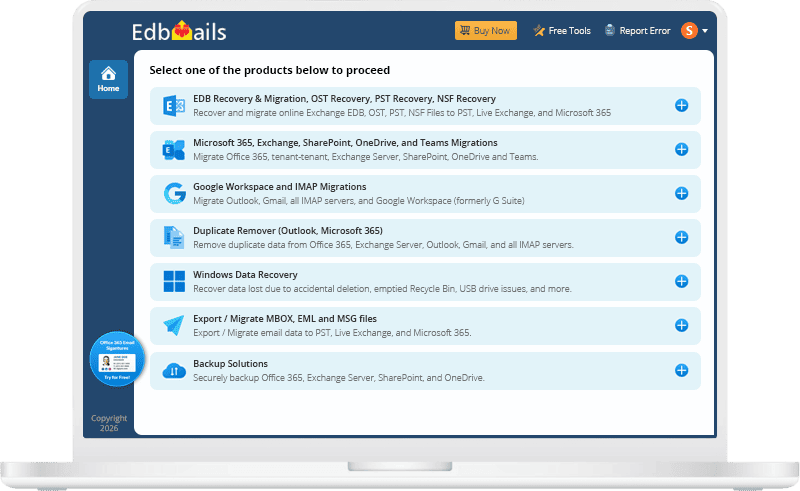
during license purchase for the application to automatically starts working as per your license.

One Download. Multiple Powerful Solutions.

EdbMails is an all-in-one solution for recovering, converting, and migrating EDB, OST, PST, and other email formats to Outlook, Office 365, and Exchange.

EDB Recovery and Migration

It performs the following operations:

  • EDB to PST Converter

    EdbMails for EDB to PST converter will assist you in exporting and migrating mailboxes from your Exchange EDB to a PST file. learn more...

  • EDB to Office 365

    Directly migrate Offline Exchange Database (EDB) files to Office 365 with EdbMails EDB to Office 365 migration tool. Migrate mailbox, public folder and archive mailbox data without losing any information. learn more...

  • EDB to Live Exchange

    Recover corrupt, damaged offline EDB files and restore your mailbox data by directly importing EDB into your live Exchange server using EdbMails EDB to Exchange migrator. learn more...

  • Public Folder to Exchange

    EdbMails directly migrates public folders from your offline EDB file to a live Exchange server — no live Exchange environment needed, folder structure and data intact. learn more...

  • Archive Mailbox to Office 365

    Directly migrate Offline Exchange Database (EDB) files to Office 365 with EdbMails EDB to Office 365 migration tool. Migrate mailbox, public folder and archive mailbox data without losing any information. learn more...

  • Public Folder to Office 365

    Recover corrupt, damaged offline EDB files and restore your mailbox data by directly importing EDB into your live Exchange server using EdbMails EDB to Exchange migrator. learn more...

OST Recovery and Migration

It performs the following operations:

  • OST to PST Converter

    EdbMails provides a fast and efficient solution for the quick recovery and conversion of inaccessible or deleted OST files to PST files format, with no size limitations on the OST files.

  • OST to Office 365

    EdbMails enables direct import of OST files into Office 365 and on-premises Exchange server, providing a streamlined solution that removes the need for complex processes or extra tools.

  • OST to Live Exchange

    EdbMails OST to PST converter is a reliable solution for extracting OST files created by Microsoft Exchange server and all versions of Outlook, making it highly versatile for various environments.

PST Recovery and Migration

It performs the following operations:

  • PST to PST Converter

    EdbMails can successfully repair PST files that fail to open in Outlook due to issues such as PST corruption, hardware failure, inaccessibility problems, accidental system shutdown and so on. Learn more...

  • PST to Office 365

    EdbMails can perform direct mailbox migration from PST files to Office 365, eliminating the need for manual upload operations. Learn more...

  • PST to Live Exchange

    EdbMails OST to PST converter is a reliable solution for extracting OST files created by Microsoft Exchange server and all versions of Outlook, making it highly versatile for various environments. Learn more...

MBOX Export and Migration

It performs the following operations:

  • MBOX to PST Converter

    Quickly export MBOX files from email clients such as Thunderbird, Entourage, Pocomail, Mulberry, Spicebird, Sylpheed, Apple Mail, and Mozilla Mail with EdbMails MBOX to PST converter. Learn more...

  • MBOX to Office 365

    EdbMails MBOX migrator allows you to directly import an MBOX file into an Office 365 or live Exchange server and migrate all of your data in a few clicks without requiring any technical expertise. Learn more...

  • MBOX to Live Exchange

    EdbMails can migrate an MBOX file from Apple’s native email client to On-Premise and live Exchange server in a few simple steps. Learn more...

NSF Export and Migration

It performs the following operations:

  • NSF to PST Converter

    Easily convert Lotus Notes NSF files to Outlook PST format with EdbMails NSF to PST Export Software. Learn more...

  • NSF to Office 365

    Effortlessly migrate IBM Lotus Notes NSF files to Office 365 with EdbMails, without any Outlook dependency. Learn more...

  • NSF to Live Exchange

    Directly migrate IBM Lotus Notes NSF files to Live Exchange with EdbMails, supporting Exchange 2007, 2010, 2013, 2016, and 2019. Learn more...

EML to PST Export

It performs the following operations:

  • EML to PST Export

    Effortlessly transform unlimited EML files from leading email clients like Thunderbird, Apple Mail, and eM Client into Outlook PST. With EdbMails, every email, attachment, and format stays perfectly intact—no loss, no compromise. Learn more...

PST to MSG Export

It performs the following operations:

  • PST to MSG Export

    Seamlessly convert PST files from any Outlook version into MSG format with EdbMails. Extract emails, attachments, and metadata with complete accuracy while preserving original formatting for a smooth and reliable conversion experience. Learn more...

MSG to PST Export

It performs the following operations:

  • MSG to PST Export

    Effortlessly convert unlimited MSG files into Outlook PST with EdbMails, ensuring complete data fidelity. Every email, attachment, and metadata element is preserved with precision—ideal for secure migration, reliable backups, and long-term archiving. Learn more...

Exchange Server Migration

It performs the following operations:

  • Exchange to Exchange

    Easily convert Lotus Notes NSF files to Outlook PST format with EdbMails NSF to PST Export Software. Learn more...

  • Exchange to Office 365

    Effortlessly migrate IBM Lotus Notes NSF files to Office 365 with EdbMails, without any Outlook dependency. Learn more...

  • Exchange to PST

    Exporting mailboxes from Exchange Server to PST (Personal Storage Table) files is a common requirement for organizations looking to backup, archive, or migrate mailbox data. Learn more...

  • Exchange to IMAP

    EdbMails provides a secure and dependable solution to migrate mailboxes from Exchange Server to an IMAP server, ensuring accurate migration of emails, folders, and complete mailbox data while maintaining zero disruption to business operations. Learn more...

  • Multiple PST files to Exchange server

    It enables you to import multiple PST files to the Exchange Server in a single operation. It supports all major Exchange Server versions including 2019, 2016, 2013, 2010, and 2007. Learn more...

Office 365 Migration

It performs the following operations:

  • Office 365 to Exchange

    EdbMails securely connects to your source Office 365 and target Exchange servers, directly migrating mailbox data regardless of the Exchange server versions, including Exchange 2019, 2016, 2013, 2010, and 2007. Learn more...

  • Office 365 to Office 365

    Perform direct tenant-to-tenant Office 365 migrations with full fidelity, preserving emails, permissions, and structure without data loss. Learn more...

  • Office 365 to PST

    EdbMails Office 365 migration software lets you seamlessly export Office 365 mailboxes, public folders, and archive mailboxes to Outlook PST files. Learn more...

  • Office 365 to IMAP

    Office 365 to an IMAP migration is essential for organizations seeking specific email management and more flexible systems. Learn more...

IMAP Email Backup and Migration

It performs the following operations:

  • IMAP to IMAP

    Easily migrate emails, folders from all IMAP servers including Gmail, GoDaddy, Rackspace, Zoho, Zimbra, Icewarp, cPanel, Yahoo Mail, G Suite, Amazon WorkMail, AOL.com, and Outlook.com. Learn more...

  • IMAP to Office 365

    EdbMails IMAP to Office 365 migration tool streamlines this process with secure, direct server-to-server migration and zero downtime. Learn more...

  • IMAP to Live Exchange

    Migrating from IMAP to Exchange Server is a strategic upgrade for organizations aiming to enhance email management, strengthen security, and improve collaboration within their environment. Learn more...

  • PST to IMAP

    EdbMails PST to IMAP migration transfers PST mailbox data to any IMAP server, preserving folders, emails, and attachments with secure, reliable processing. Learn more...

G Suite Migration

It performs the following operations:

  • G Suite to Office 365

    EdbMails G Suite to Office 365 migration securely transfers emails, contacts, calendars, and Drive data with complete folder and permission preservation. Learn more...

  • G Suite to Live Exchange

    EdbMails G Suite to Live Exchange migration securely transfers emails, contacts, and calendars to on-premises Exchange with complete folder structure preservation. Learn more...

  • G Suite to IMAP

    EdbMails G Suite to IMAP migration securely transfers emails and folders to any IMAP server while preserving the original mailbox structure. Learn more...

SharePoint Migration

It performs the following operations:

  • SharePoint Migration

    EdbMails SharePoint Migration Tool lets you easily migrate SharePoint sites between Office 365 tenants. You can migrate bulk sites, lists, libraries, documents, folders, files, site pages, and more. With secure, concurrent migration, you can ensure a fast and smooth migration of your data to a new tenant. Learn more...

Microsoft Teams Migration

It performs the following operations:

  • Microsoft Teams Migration

    Easily migrate Microsoft Teams data, including Chats and Channels, from one tenant to another with the EdbMails Microsoft Teams migration feature. The software automates tasks like team site mapping, target site creation, and ensures data integrity throughout the process. Learn more...

OneDrive Migration

It performs the following operations:

  • OneDrive Migration

    Migrate OneDrive files, folders, document libraries, photos, videos, shared content, and more effortlessly with EdbMails OneDrive Migration Tool. Perform bulk migrations quickly and securely between OneDrive users or tenants. Learn more...

Office 365 Backup

It performs the following operations:

  • Backup

    EdbMails Office 365 backup ensures secure, encrypted backups of mailboxes, public folders, and archives with easy full mailboxes or individual items with ease. Learn more...

  • Restore

    EdbMails Office 365 Restore provides secure, encrypted backup of mailboxes, public folders, and archives with quick full or granular recovery. Learn more...

Exchange Backup

It performs the following operations:

  • Backup

    EdbMails helps you take a complete backup of your On-Premise, Hosted, or live Exchange server recovery to protect your data in the event of a disaster, casualty, or for legal compliance. Learn more...

  • Restore

    The software supports incremental restore, It means, you can restore only the changes made since the last backup. Learn more...

SharePoint, OneDrive & Teams Backup

It performs the following operations:

  • Backup

    Back up SharePoint sites data, lists, libraries, documents, OneDrive files and folders, and Teams channels with EdbMails. Learn more...

  • Restore

    Restore SharePoint sites data, lists, libraries, documents, OneDrive files and folders, and Teams channels with EdbMails. Learn more...

Duplicate Remover

It performs the following operations:

  • Remove duplicates from Office 365

    EdbMails Duplicate Remover for Office 365 quickly removes duplicate mailbox items, reducing storage and improving performance with accurate filtering. Learn more...

  • Remove duplicates from Exchange

    EdbMails Duplicate Remover for Exchange efficiently removes duplicate mailbox items, optimizing storage and improving server performance with precise filtering. Learn more...

  • Remove duplicates from IMAP, Outlook

    EdbMails removes duplicate emails in Outlook and IMAP accounts, ensuring a clean mailbox, reduced storage usage, and improved performance. Learn more...

Windows Data Recovery

It performs the following operations:

  • Windows Data Recovery

    EdbMails Windows Data Recovery Software lets you easily recover and restore permanently deleted data from partitions on hard drives, SSDs, USB drives, SD cards, and external storage devices using advanced scanning technology. Learn more...


    Why EdbMails Stands Above the Rest

    High-Speed, Parallel Migration Engine

    Optimized threading and throttling ensure fast, reliable, large-scale data transfers without bottlenecks

    Enterprise-Grade Security & Data Integrity

    Maintains zero data loss with end-to-end processing and preserves folder hierarchy, metadata, and permissions.

    Real-Time Monitoring & Detailed Reports

    Track migration progress with live dashboards and exportable reports for auditing and compliance.

    Single Setup, Multiple Solutions

    One installation gives access to all EdbMails functionalities, simplifying deployment and maintenance.

    Frequently asked questions

    1. What does demo / free trial have?

      Demo / Free trial can Export, Migrate and Backup 30 items from each and every folder maintaining the exact source Mailbox folder hierarchy. You can perform migration and backup of Office 365 and Live Exchange Server.

    2. How to run EdbMails demo / trial version for a quick test / review?

      You can run EdbMails demo / trial version for a quick test / review using 2 easy steps:

      Step 1: Download and install the EdbMails application
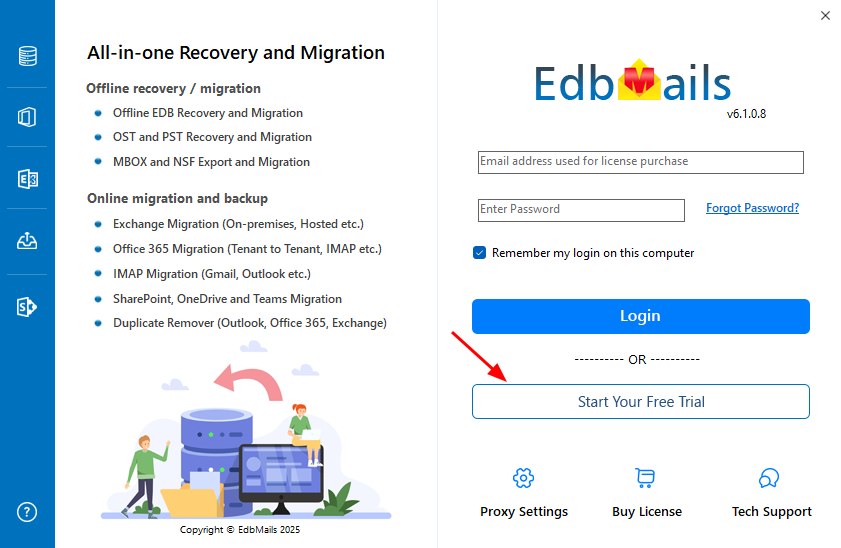
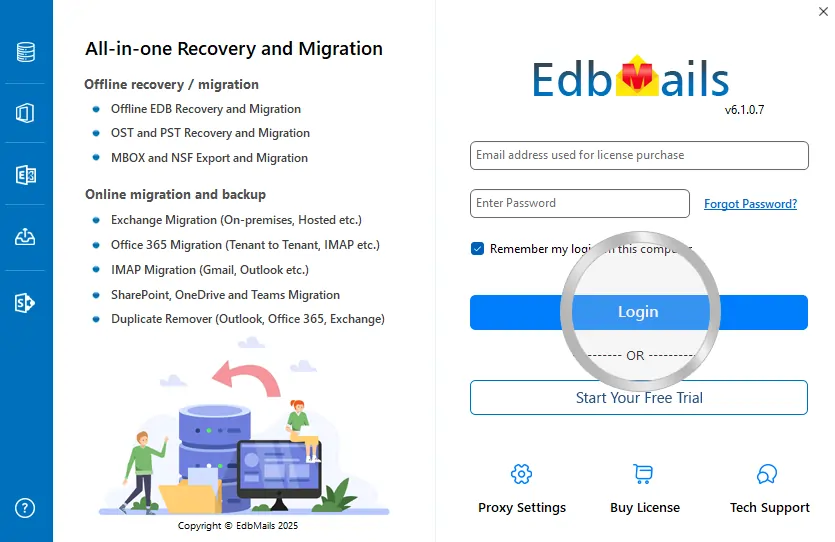
      Step 2: Click the ‘Start Your Free Trial’ button as shown in the below screenshot

      Demo login EdbMails

    3. How fast I will receive the KEY after purchasing EdbMails license?

      EdbMails does not require any separate KEY to use the application after purchasing the license. That is, your account will be automatically upgraded to the type of the license that you have purchased. You need to download and install the application and login using the EdbMails account credentials (E-mail Address and password) that you have created during license purchase.

    1. Do you provide the guarantee on EdbMails recovery and migration working?

      EdbMails guarantees money back within 30 days of its purchase on all the products. However, we recommend you to use Free Trial version to verify the export and migration operations, prior to purchase the license.

    2. How to purchase the license in EdbMails?

      Purchasing the license in EdbMails is simple. You can directly purchase the product online from the EdbMails website. EdbMails supports credit card, debit card, PayPal and Wire transfer as payment methods. Follow the below steps to purchase the license.

      1. Open EdbMails pricing page

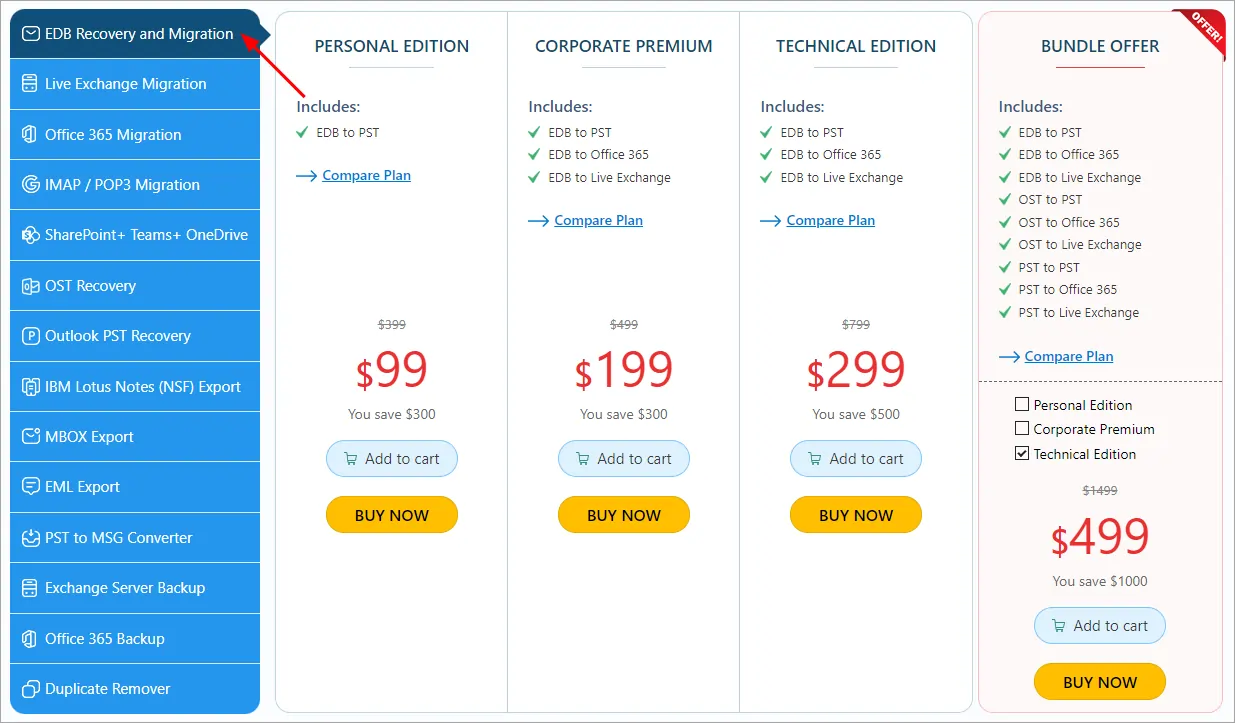
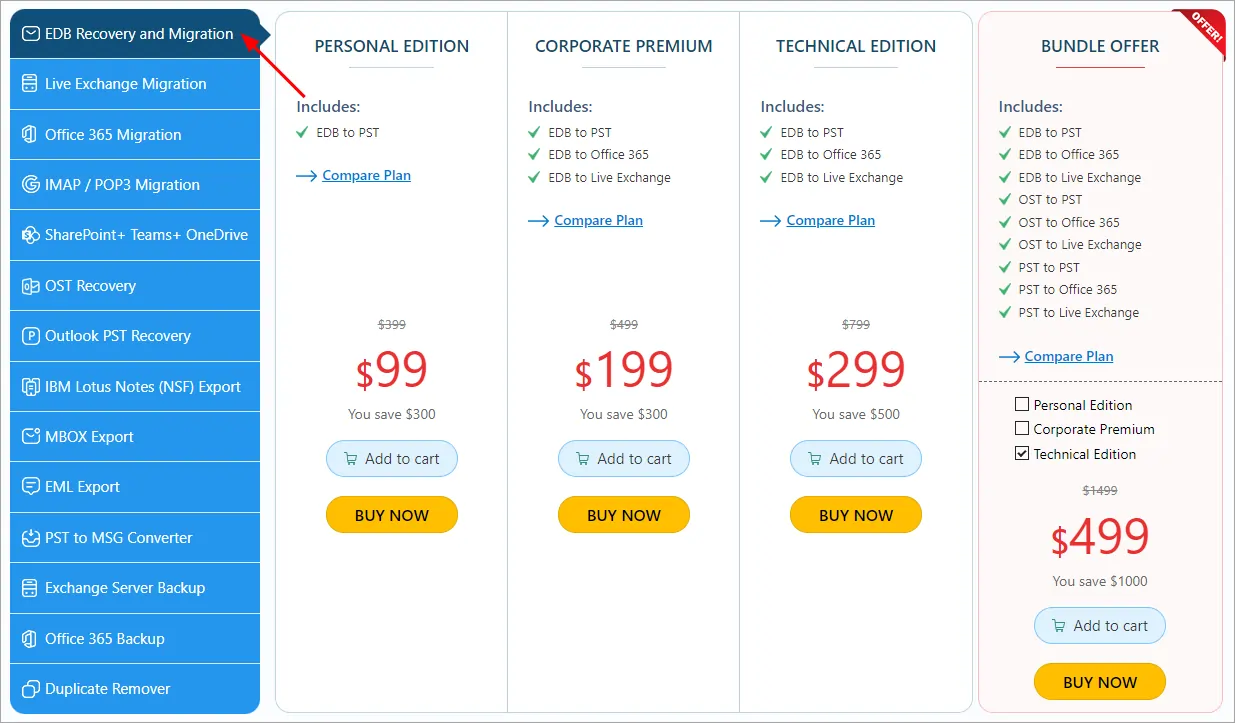
      2. Select the required product you want to purchase from the list. For Instance: To purchase the ‘EDB Recovery and Migration’ product.

      Select the product

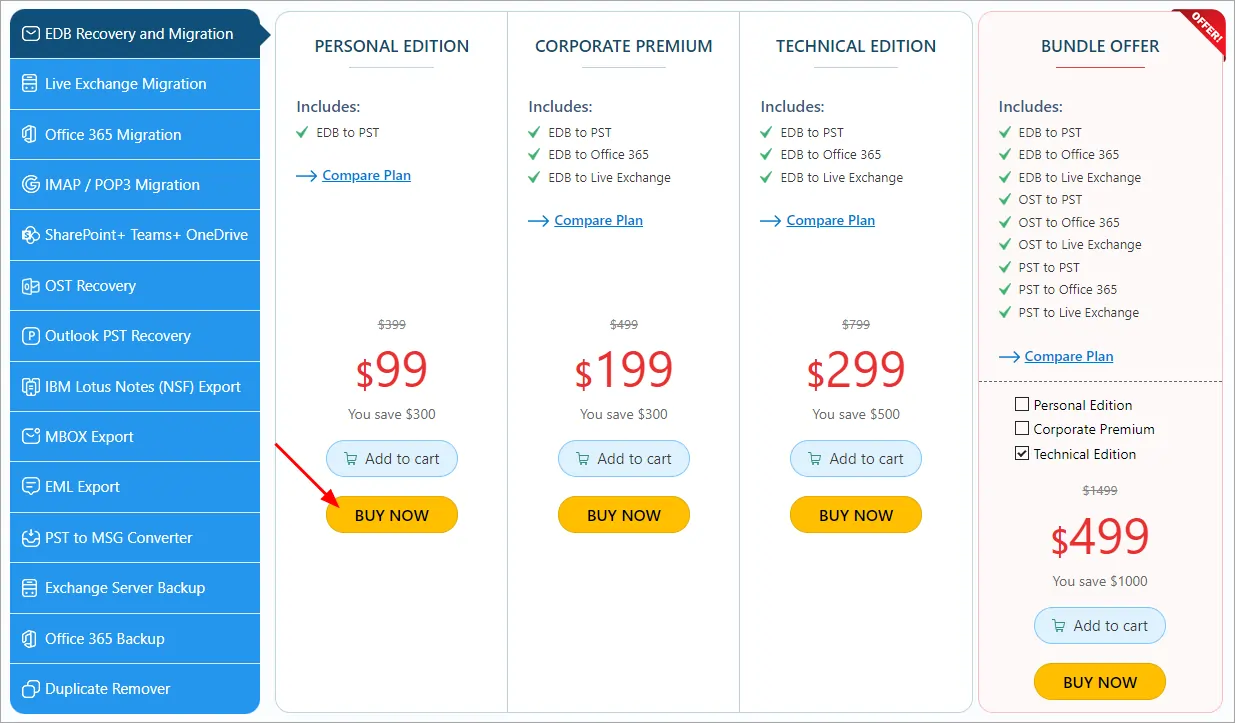
      3. Select the one of the license editions and click the ‘Buy Now’ button.

       Click here to know the personal, corporate and technical license edition differences.

      Click the ‘Buy Now’ button

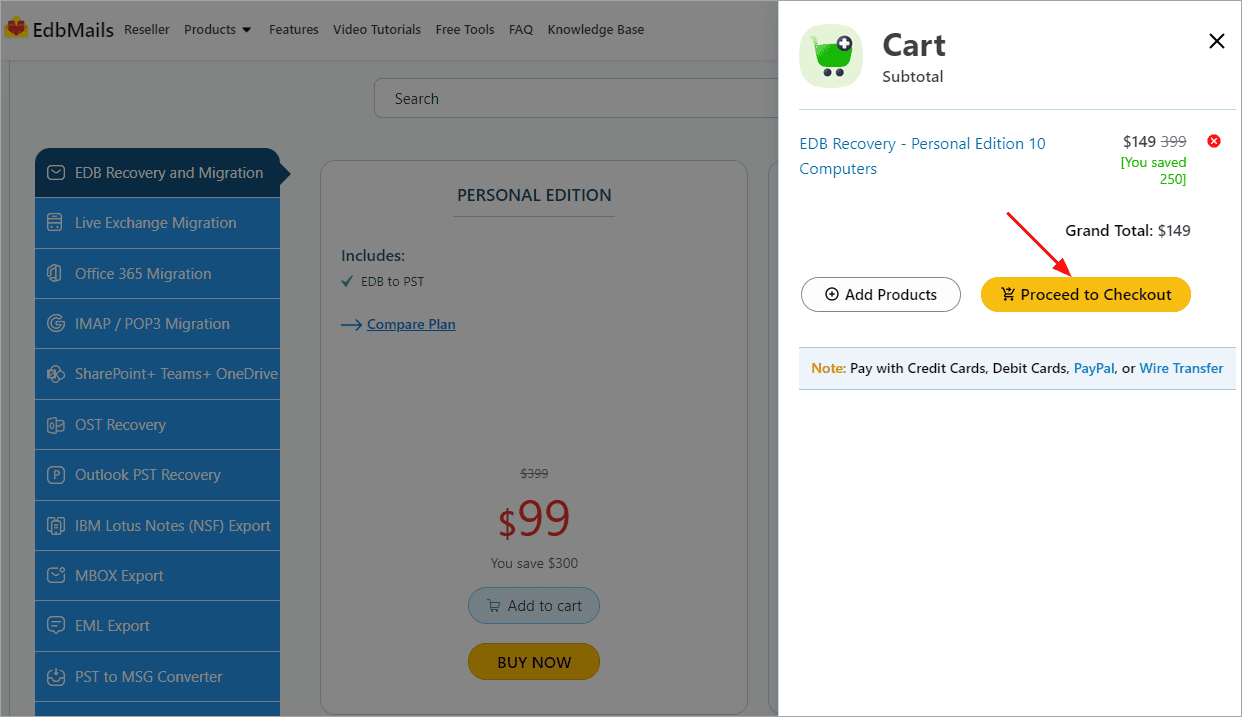
      4. Click the ‘Proceed to Checkout‘ button

      Click ‘Proceed to Checkout‘ button

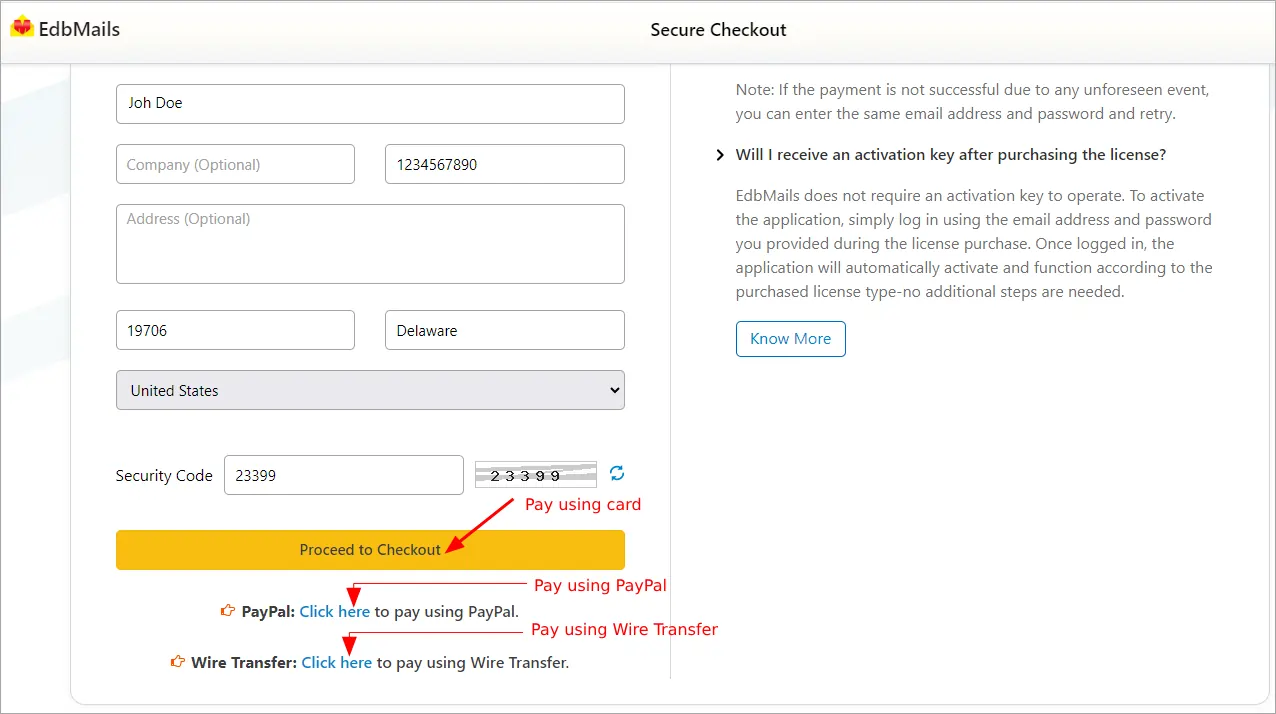
      5. In the billing form, fill all the required details and click the ‘Proceed to Checkout’ button to proceed with the purchase using your card. If you want to purchase using PayPal or Wire Transfer click the respective links on the bottom left side of the order page as shown in the screenshot below.

      Fill the billing details

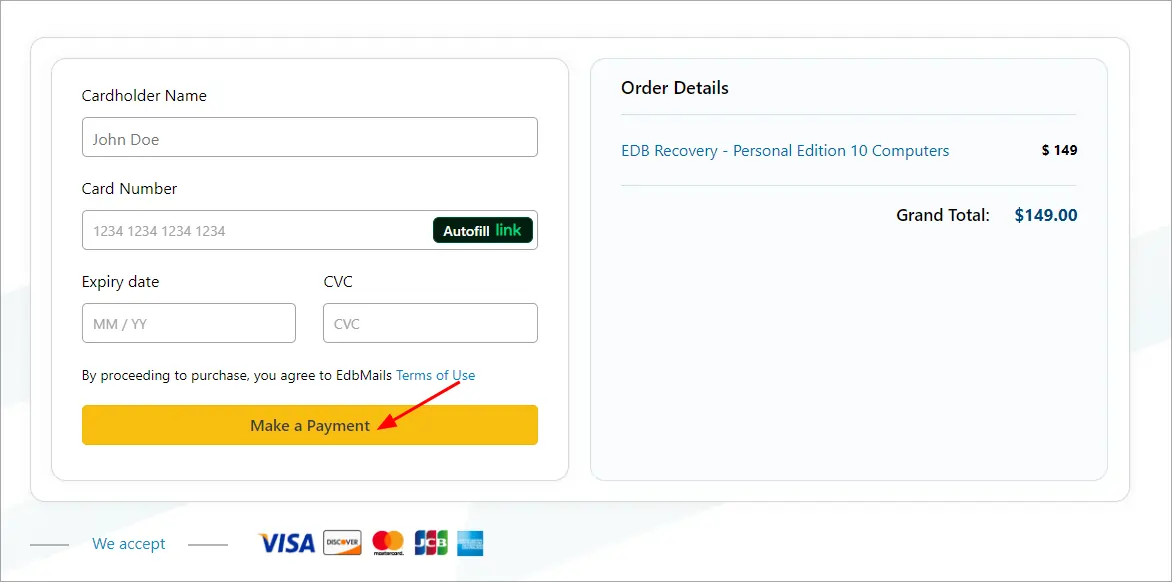
      6. If you want to purchase using a card, enter your card details and click the ‘Make a Payment’ button.

      Enter the card details

      7. To pay by Paypal, log into your PayPal account follow the wizard instructions.

       Click here to pay using Wire Transfer.

      EdbMails does not require any separate KEY to use the application after purchasing the license. That is, your account will be automatically upgraded to the type of the license that you have purchased. You need to download and install the application and login using the EdbMails account credentials (E-mail Address and password) that you have created before or during license purchase.

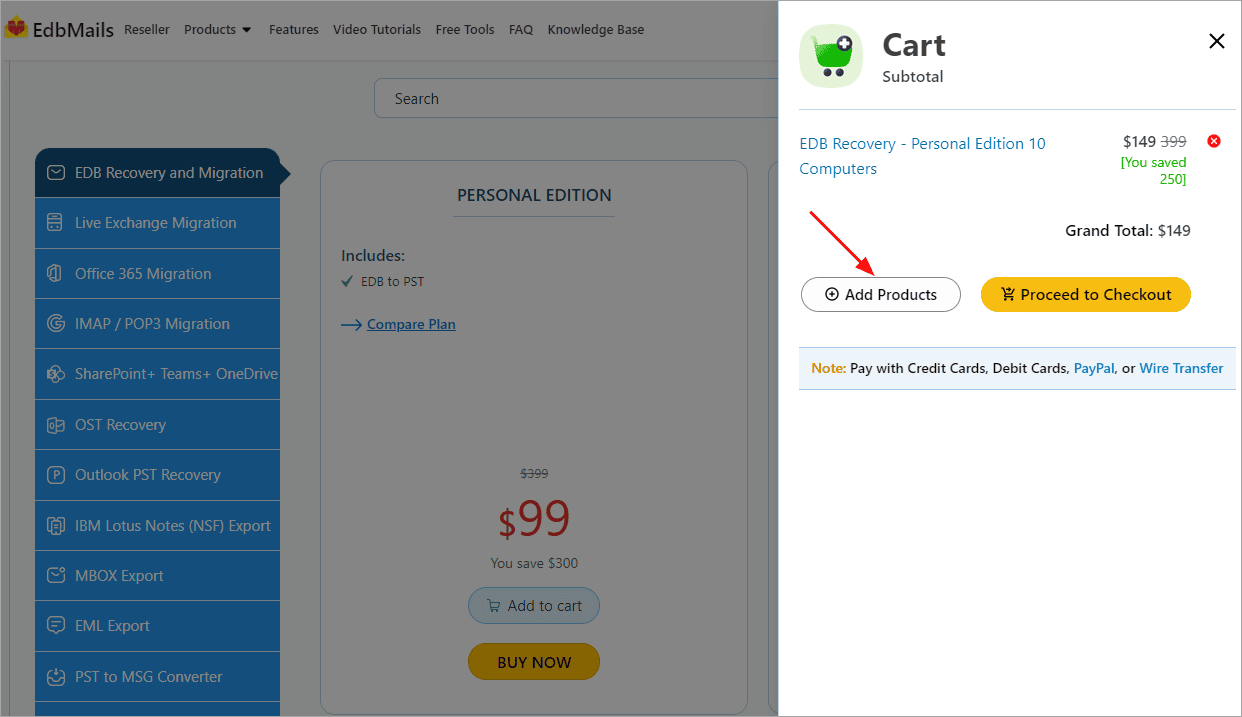
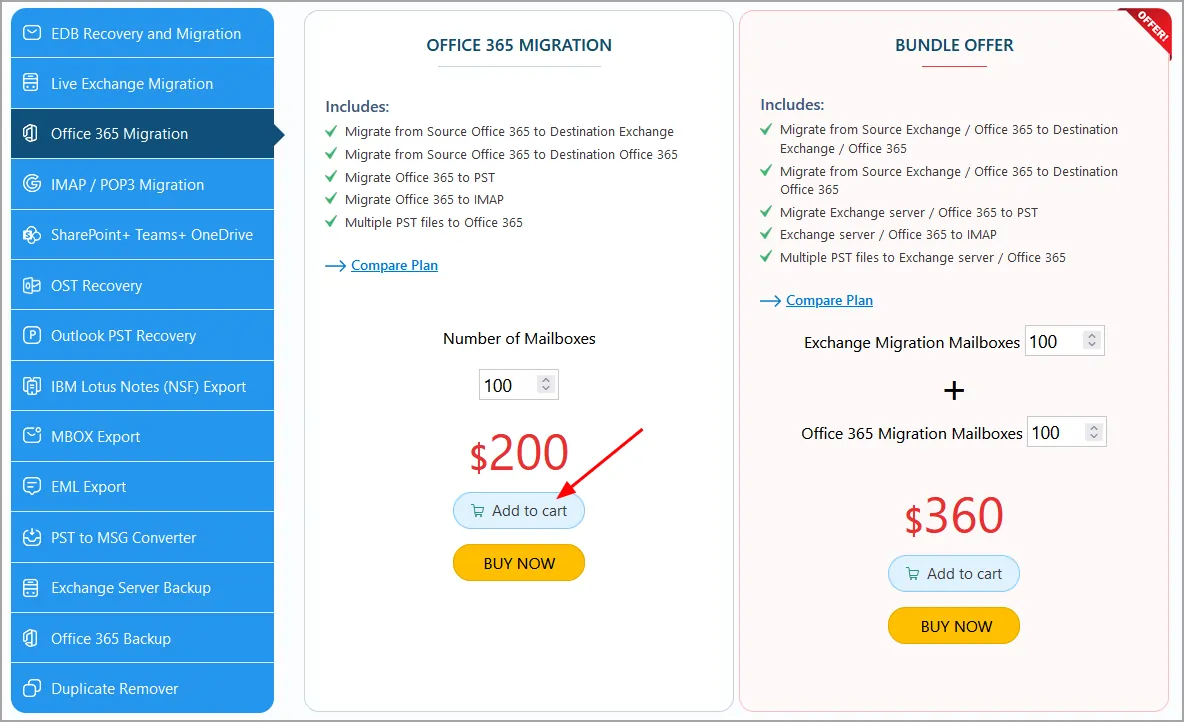
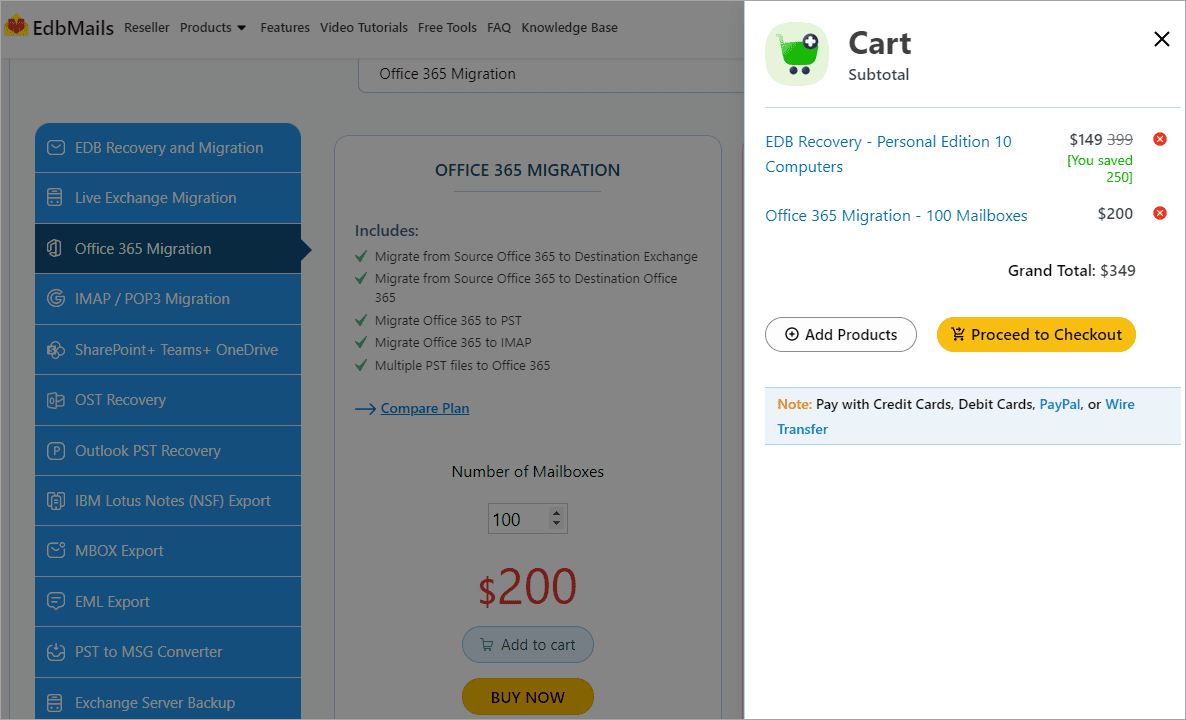
    3. How to add multiple products to your cart and buy the license?

      Select the license that you wish to purchase

      Select license

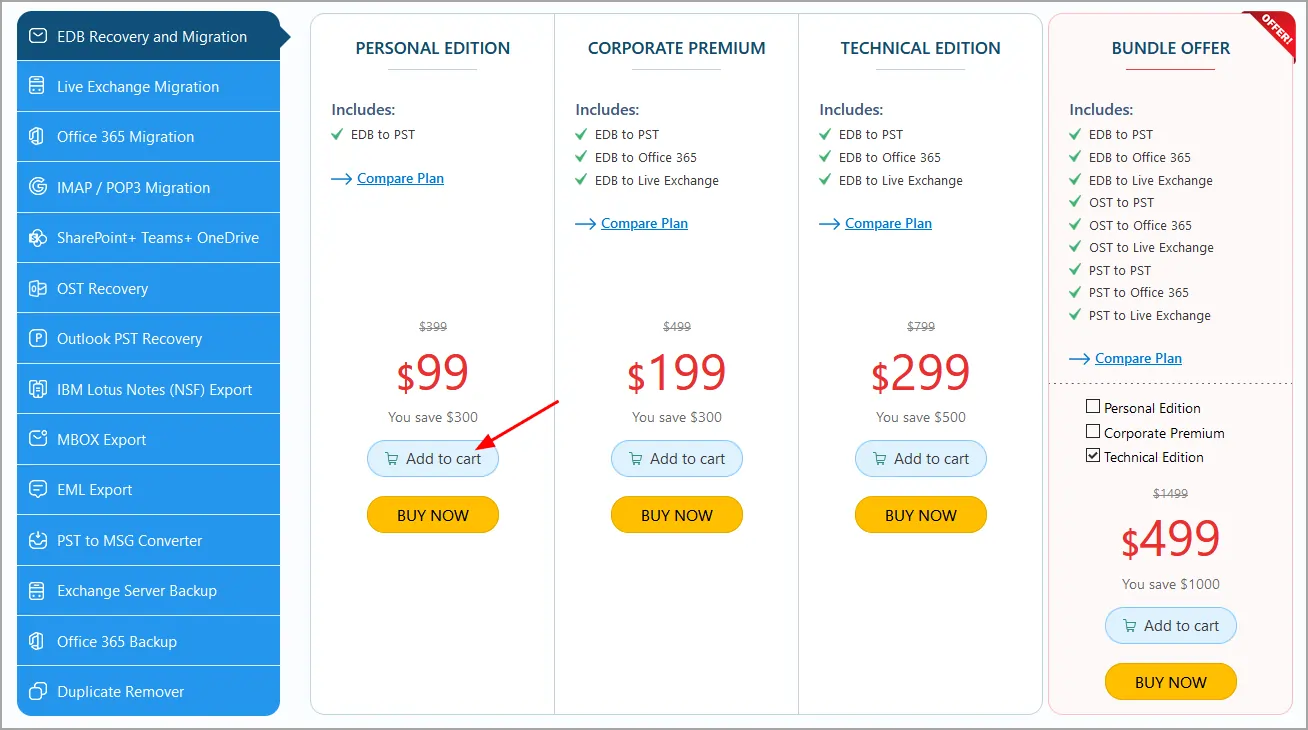
      Click the 'Add to cart' button

      Add to cart

      Click the ‘Add Products’

      Add more products

      Select other product that you wish to purchase and click the 'Add to cart' button

      License cart

      You can continue with adding more products or proceed to checkout

      Multiple products cart

    It’s time for a smarter recovery & migration

    EdbMails Intelligence redefines how email recovery and migration are delivered, empowering users to handle
    complex email migrations faster, smarter, and with complete reliability.

    Try our full-featured solution for free with advanced automation and intelligent processing.

    Buy NowRequest a Demo
    hidden msg

    EdbMails Demo / Trial Version

    Step 1. Download and install EdbMails

    Step 2. Click the 'Start Your Free Trial' button

    Demo login EdbMails

    download-logo

    There is only ONE EdbMails Setup for all the below products

    EdbMails Comprises of:

    • EDB Recovery and Migration
    • Live Exchange Migration
    • Office 365 Migration
    • IMAP Migration
    • Office 365 Backup
    • Live Exchange Backup
    • Duplicate Remover
    • SharePoint,Onedrive,Teams Migration
    • G Suite Migration
    • OST Recovery and Migration
    • PST Recovery and Migration
    • MBOX Export and Migration
    • NSF Export and Migration
    • EML to PST Export and Migration
    • PST to MSG Export and Migration
    • MSG to PST Export and Migration
    • SharePoint,Onedrive,Teams Backup
    • Windows Recovery
    • Home
    • Features
    • Pricing
    • Support
    • Download
    • Sitemap
    • FAQ
    • Video Tutorials
    • Technical Support
    • Live Chat
    • Contact Us
    Shifttocloud Inc.
    Rehoboth Beach, DE
    United States
    +1 (302) 416-3056

    Privacy Policy | Terms of Use | GDPR | Security | Press Releases

    @edbmails.com All rights are reserved

    Live Chat

    Hi, May I help you?

    Hide Chat Now