EdbMails EDB Recovery and Migration software
  • Products
    EdbMails
    All-in-one Recovery and Migration

    Trusted and internationally recognized software that delivers award winning solutions.

    Explore our products
    • Offline Recovery Tools
    • Migration Tools
    • G Suite Migration
    • IMAP Migration
    • Duplicate Remover
    • Windows Data Recovery
    • Backup

    Exchange EDB / Email Recovery Tools

    EdbMails offers a comprehensive suite of tools to recover and convert offline EDB, OST, and PST files into Outlook PST, migrate mailboxes to Office 365 and live Exchange Server, and export and migrate data from NSF, MBOX, EML, and MSG formats.

    EDB Recovery and Migration
    Recover EDB to PST, EDB to Office 365 and Exchange NO Duplicate Migration
    NSF Export and Migration
    Export NSF to PST, NSF to Office 365 and Exchange Migration
    OST Recovery and Migration
    Recover OST to PST, OST to Office 365 and Exchange Migration
    EML to PST Export
    EML files export to Outlook PST format
    PST Recovery and Migration
    Recover Outlook PST, PST to Office 365 and Exchange Migration
    PST to MSG Export
    Outlook PST files export to MSG format
    MBOX Export and Migration
    Export MBOX to PST, MBOX to Office 365 and Exchange Migration
    MSG to PST Export
    Export MSG files to Outlook PST files

    Exchange, Office 365, IMAP, SharePoint, OneDrive, Teams

    EdbMails lets you securely migrate mailboxes across Microsoft 365, Exchange, Google Workspace (G Suite), and IMAP-supported servers such as Outlook, Gmail, Zimbra, Zoho Mail, and cPanel, ensuring zero downtime.

    Exchange Server Migration
    Migrate between any Exchange Servers, Exchange to Office 365, Exchange to PST, PST files to Exchange.
    SharePoint Online Migration
    Migrate documents, lists, files and folders from SharePoint sites.
    Office 365 Migration
    Migrate between Office 365 tenants, Office 365 to Exchange, Office 365 to PST, PST files to Office 365.
    OneDrive for Business Migration
    Migrate documents, lists, files and folders from OneDrive.
    Microsoft Teams Migration
    Migrate Teams, chats, channels, documents, files and folders etc.

    Google Workspace / G Suite Migration

    EdbMails G Suite Migration Tool lets you easily migrate emails, calendars, contacts, tasks, and more from G Suite to Office 365, Exchange Server, and IMAP servers using a Google Admin account without requiring individual user credentials.

    G Suite Migration
    Migrate emails, calendars, contacts, tasks from G Suite to Office 365, G Suite to Exchange, G Suite to IMAP Servers
    G Suite to Office 365
    Migrate emails, calendars, contacts, tasks from Google Workspace / G Suite to Office 365
    G Suite to Exchange Server
    Migrate emails, calendars, contacts, tasks from Google Workspace / G Suite to on-Premise Exchange Server
    G Suite to IMAP
    Migrate emails, calendars, contacts, tasks from Google Workspace / G Suite to IMAP, Outlook, Zimbra, Zoho etc.

    IMAP Migration

    EdbMails IMAP Migration tool lets you easily migrate emails from IMAP servers such as Outlook, Gmail, Zoho Mail, Zimbra, cPanel, and more. Supports IMAP to IMAP, Office 365, Exchange Server, PST, and bulk PST to IMAP migration.

    IMAP Email Backup & Migration
    Backup and migrate emails from IMAP servers to PST, Office 365, and On-Premises Exchange Server
    IMAP to Office 365
    Migrate emails, folders, and attachments from IMAP servers to Office 365
    IMAP to Exchange
    Migrate emails, folders, and attachments from IMAP servers to on-premises Exchange Server
    IMAP to PST
    Export emails, folders, and attachments from IMAP servers to Outlook PST files for backup
    PST to IMAP
    Migrate emails, folders, and attachments from bulk PST files to IMAP servers

    Duplicate Remover

    EdbMails Duplicate Remover lets you easily remove duplicate items from Office 365 and Exchange Server, and from IMAP, Outlook, Gmail, Zimbra, Zoho Mail, etc., ensuring a clean and organized mailbox.

    Remove Duplicates from Office 365
    Remove duplicate emails, calendars, contacts, journal tasks, etc. from Office 365.
    Remove Duplicates from Exchange Server
    Remove duplicate emails, calendars, contacts, journal tasks, etc. from live Exchange Server.
    Remove Duplicates from IMAP, Outlook
    Remove duplicate emails, attachments from IMAP, Outlook, Gmail, Zimbra, Zoho Mail etc.

    Exchange, SharePoint, OneDrive, Teams and Office 365 Backup

    EdbMails enables secure, automated backup and recovery for Microsoft 365 services including Exchange Online, SharePoint, OneDrive, Teams, and Live Exchange Server with complete data protection and restore flexibility.

    Office 365 Backup
    Incremental, Granular, Encrypted and Compressed Office 365 Mailboxes Backup
    Exchange Server Backup
    Incremental, Granular, Encrypted and Compressed Exchange Mailboxes Backup
    SharePoint, OneDrive & Teams Backup
    Backup Online site collections, Team sites, Office 365 groups, all documents etc.

    Windows Data Recovery

    EdbMails Windows Data Recovery Software lets you recover permanently deleted data, including photos, videos, documents, and archived files, from partitions on hard drives, SSDs, USB drives, SD cards, and external storage devices.

    Windows Data Recovery
    Recover and restore permanently deleted data from hard drives, SSDs, USB drives, SD cards, and etc.
    Whitepaper
    Request a Demo
    Sign Up
  • Features
  • FAQ
  • Pricing
  • Download
  • Support
  • Sign in
User’s Manual
Windows Data Recovery

User Manual

User Manual

  • Overview
  • System Requirements
  • Installation
    • Installation process
    • Reinstall or Upgrade
    • How to uninstall
  • FAQs
  • Videos
  • Screenshots
    • SD Card Data Recovery
    • Recycle Bin Recovery
    • USB Data Recovery
    • Hard Drive Data Recovery
    • Photo Recovery
    • Video Recovery
    • Document Recovery
    • Archives Recovery
  • How it works?
    • SD Card Data Recovery
    • Recycle Bin Recovery
    • USB Data Recovery
    • Hard Drive Data Recovery
    • Photo Recovery
    • Video Recovery
    • Documents Recovery
    • Archives Recovery
  • Filter Operations
  1. Home
  2. Product
  3. SD Card Data Recovery Software for Windows using EdbMails
Download Buy Now

SD Card Data Recovery Software for Windows

Data loss on SD cards often happens due to accidental deletion, using Shift + Delete, or permanently removing files from the Recycle Bin. Important photos, videos, documents, and other files can become inaccessible, causing inconvenience or disruption to personal and professional work. EdbMails SD Card Data Recovery Software provides a secure and reliable solution to recover such deleted files on Windows systems. The software operates in read-only mode, ensuring that the original SD card remains untouched during the recovery process.

EdbMails focuses on recovering deleted and permanently deleted files, allowing users to restore only the data that is logically lost. It supports all standard SD and microSD cards, works with multiple file types, and is fully compatible with various Windows versions. Users can view files before recovery and selectively restore the data they need, making the process safe and controlled.

SD cards are commonly used in cameras, smartphones, and portable devices, which makes accidental deletion a frequent issue. With EdbMails, users can recover important files quickly and efficiently without worrying about overwriting existing data, ensuring a smooth and organized recovery experience.

  1. Key Features of EdbMails SD Card Data Recovery Software

    • Free unlimited scan and view items before purchase; free trial allows recovery of up to 30 items
    • Secure read-only recovery process that does not modify or overwrite the original SD card
    • Recovers files deleted accidentally, removed using Shift + Delete, or permanently deleted from the Recycle Bin
    • View recoverable files before restoration to verify data integrity
    • Selective file and folder recovery to restore only the required data
    • Category-based file filtering for faster navigation, including:
      • Photos (JPG, PNG, BMP, GIF, TIFF, WEBP, ICO)
      • Videos (MP4, AVI, MKV, MOV, WMV, FLV, WEBM)
      • Documents (PDF, DOC/DOCX, XLS/XLSX, PPT/PPTX, TXT)
      • Archives (ZIP, RAR, 7Z, TAR, GZ, BZ2, XZ)
      • System & Other Files (EXE, DLL, ISO, HTML, JSON, XML, MP3)
    • Supports SD and microSD cards across multiple Windows versions
  2. Prerequisites for SD Card Data Recovery

    Follow these recommendations before starting the scan:

    • Insert the SD or microSD card into a compatible card reader or adapter and connect it to your computer.
    • Confirm that the memory card is visible in Windows File Explorer.
    • Avoid saving new files to the SD card after data loss, as new data may overwrite the deleted files.
    • Ensure the card reader connection is stable before starting the scanning process.
    • Close other applications that may be accessing the SD card during recovery.
  3. Steps to Recover Deleted Files from an SD Card

    Follow the steps below to easily recover lost or deleted files from your SD card and safely get your data back.

    • Download and install the EdbMails application on your computer.
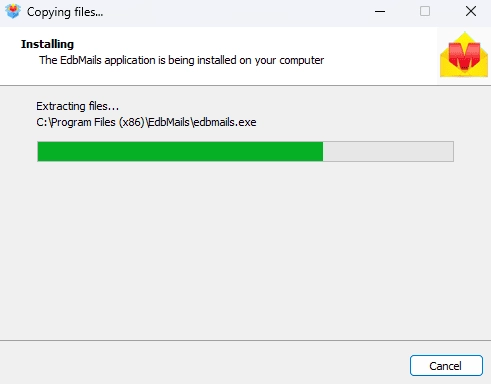
      Launch EdbMails software

    • Enter your email address and password to login. If you haven’t registered yet, click ‘Start Your Free Trial’ to explore the features.
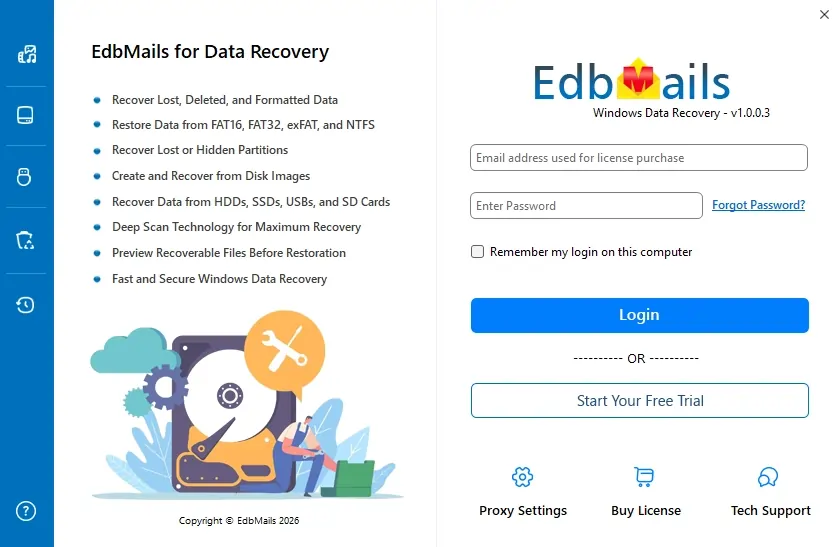
      Launch EdbMails software

    • Expand and select the ‘Windows Data Recovery’ option.

      Windows Data Recovery

    • Now, select the ‘PC / Hard Drive Recovery’ option.

      PC & Hard Drive Recovery

    • Insert the SD card into your computer so it can be detected by the recovery software.
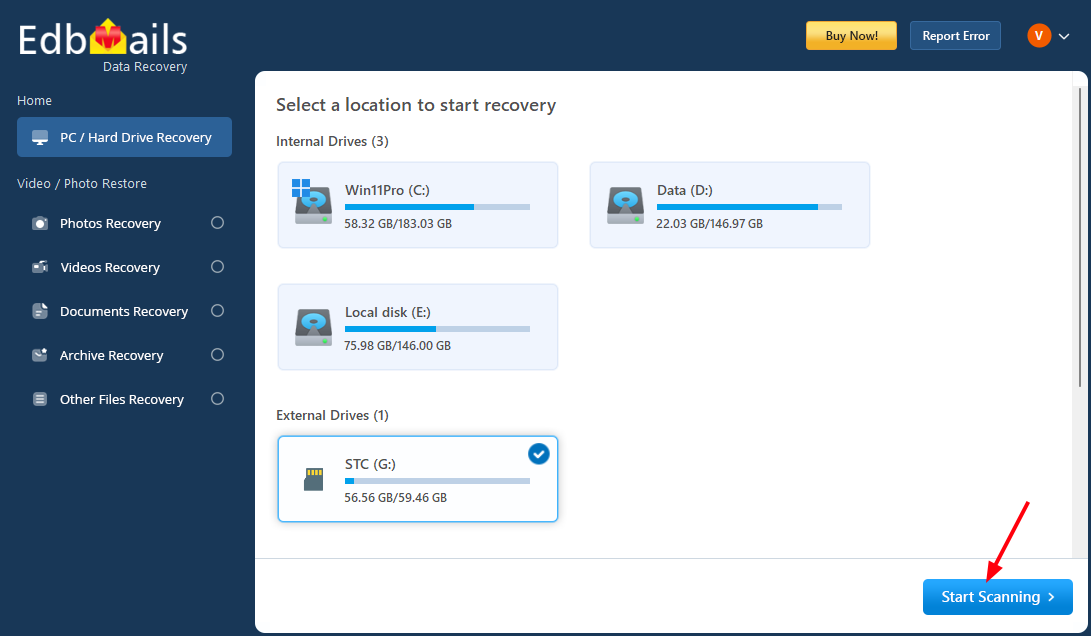
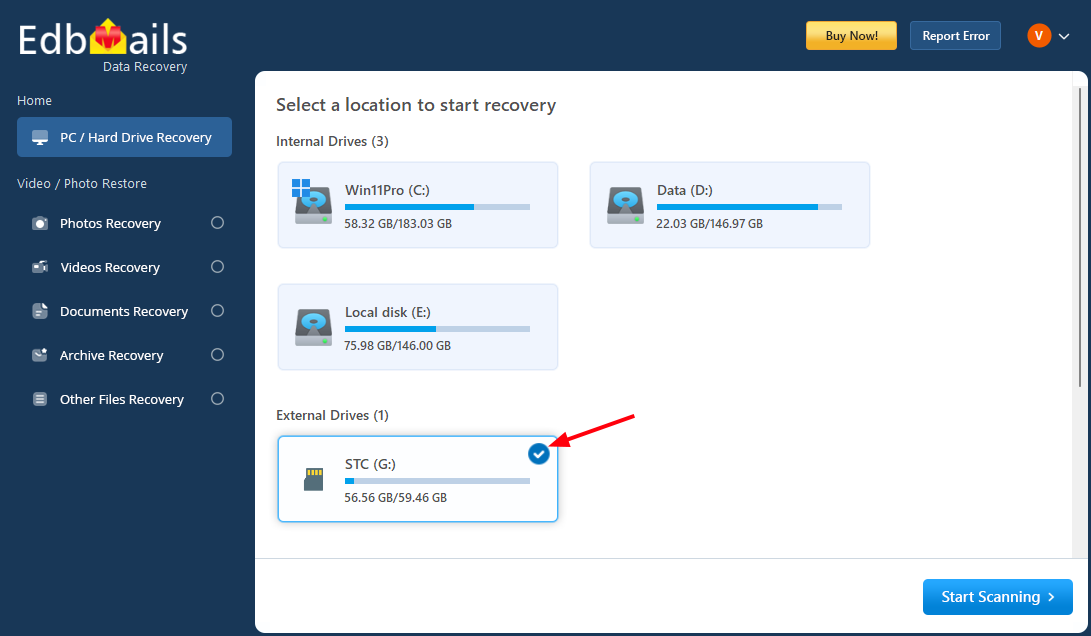
    • Select the SD card from the available drives to begin recovering your deleted files.
      Launch EdbMails software

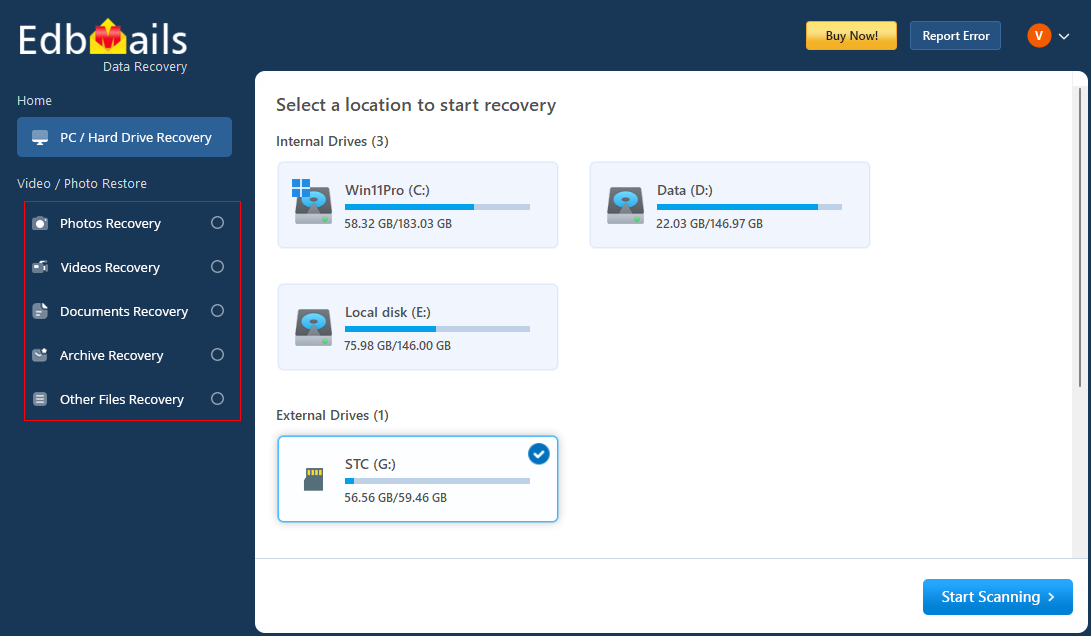
    • If needed, select the desired filter from the left-side navigation bar and click the ‘Apply’ button.
      Launch EdbMails software

    • Click the ‘Start Scanning’ button.

      Launch EdbMails software

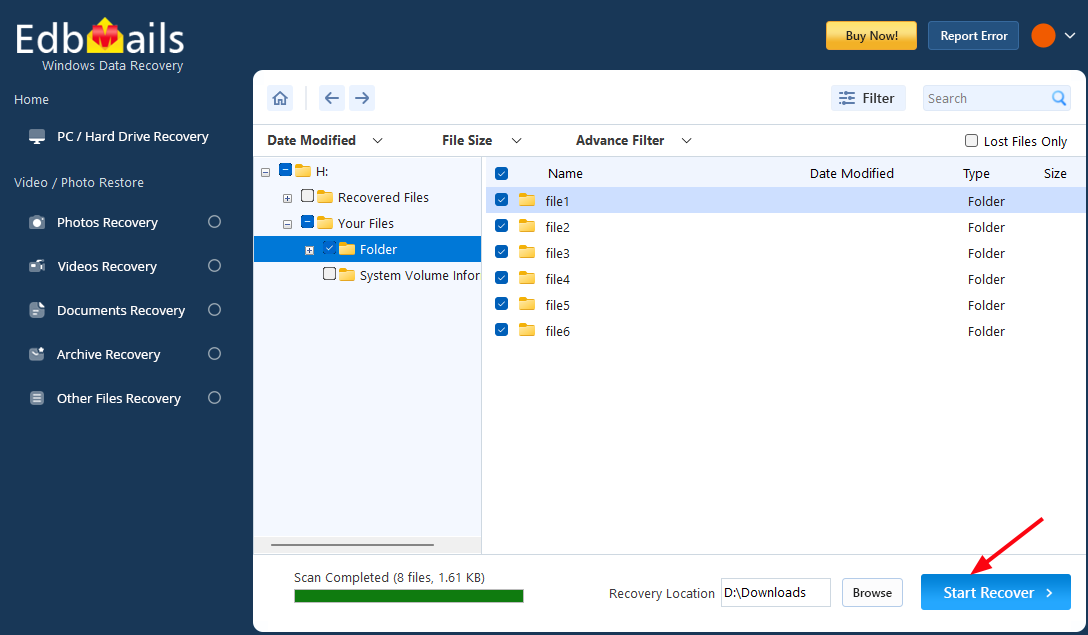
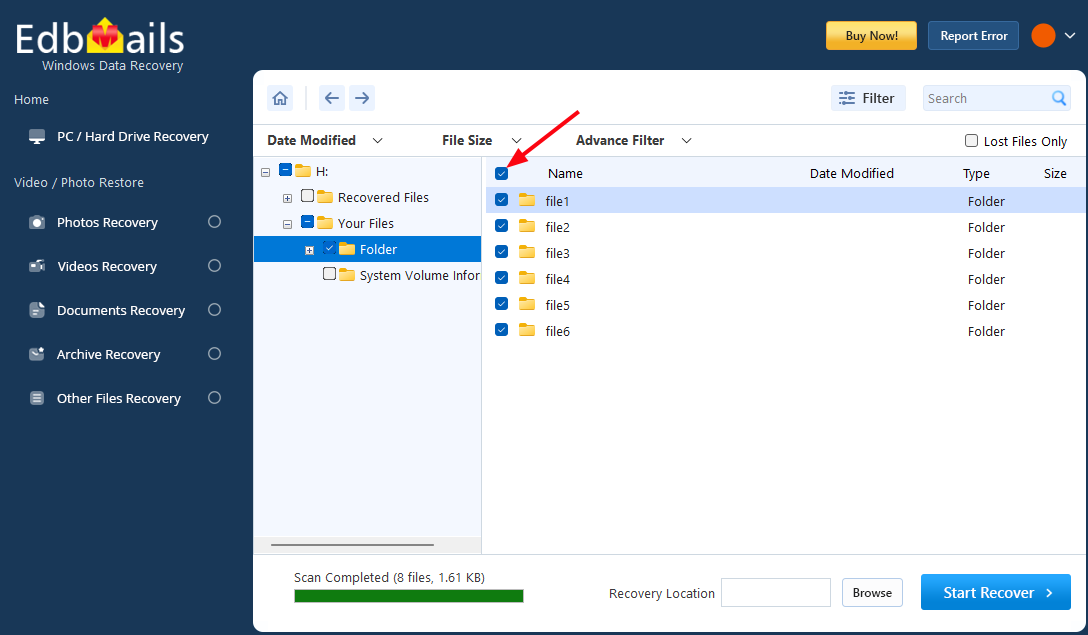
    • Select the required folders that you want to recover.
      Launch EdbMails software

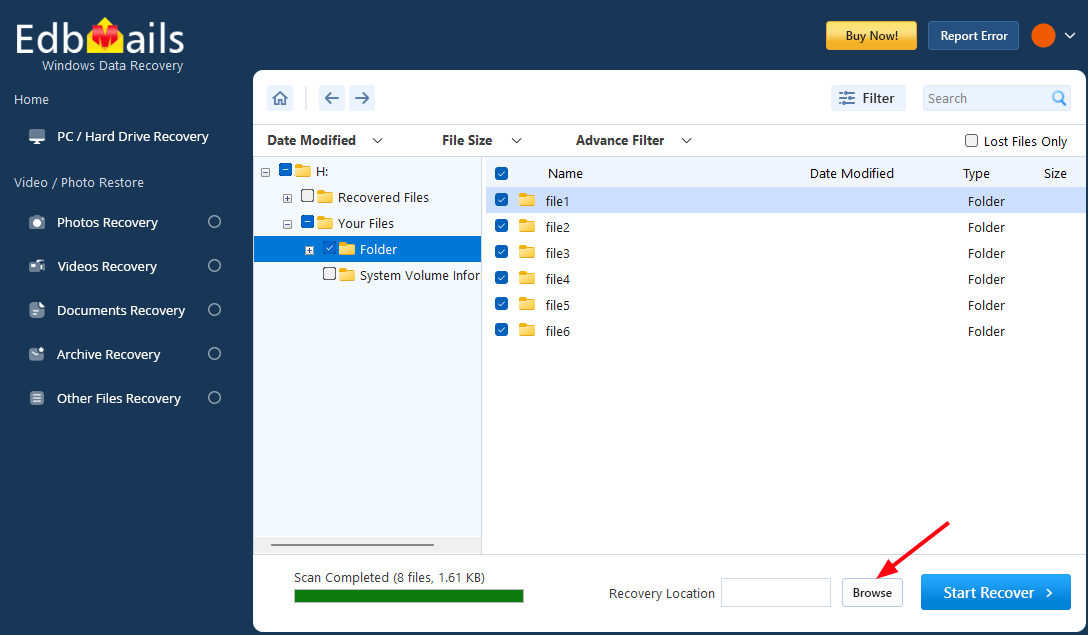
    • Click the ‘Browse’ button to select the recovery location.
      Launch EdbMails software

    • Choose the desired location and click ‘OK’.
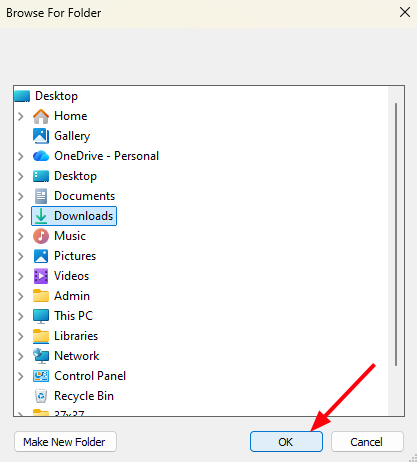
      Launch EdbMails software

    • Click the ‘Start Recover’ button.

      Launch EdbMails software

    • Once recovery is complete, the total number of recovered items will be displayed.
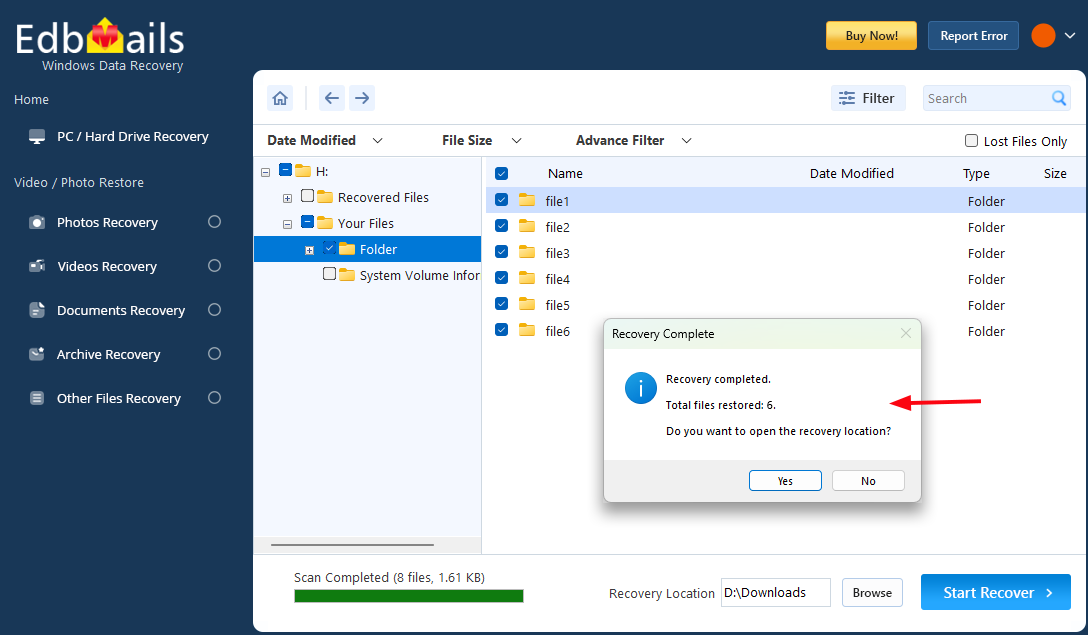
      Launch EdbMails software

    • Navigate to the recovery location to access your recovered files easily.

Supported SD Card Types

EdbMails SD Card Data Recovery Software supports recovery from a wide range of SD and microSD card types commonly used in cameras, smartphones, and portable storage devices.

Supported memory card types include:

  • SD (Secure Digital) Cards: Standard SD cards commonly used in digital cameras and portable devices.
  • SDHC (Secure Digital High Capacity) Cards: High-capacity SD cards designed to store large volumes of photos and videos.
  • SDXC (Secure Digital Extended Capacity) Cards: Advanced SD cards that support very large storage capacities and high-speed data transfer.
  • microSD Cards: Compact memory cards widely used in smartphones, tablets, drones, and action cameras.
  • microSDHC and microSDXC Cards: High-capacity microSD variants designed for modern mobile and multimedia devices.

EdbMails can recover deleted files from these memory cards when they are connected to a Windows system through a card reader or adapter.

Frequently Asked Questions

  1. Is EdbMails SD Card Data Recovery Software free?

    EdbMails offers a free trial so you can scan your SD card and preview all recoverable files before purchase. To complete the recovery process, a license is required.

  2. Can I recover files deleted using Shift + Delete from an SD card?

    Yes. The software supports recovery of files deleted using Shift + Delete, as well as files permanently removed from the Recycle Bin, provided the data has not been overwritten.

  3. Does the software modify my SD card during recovery?

    No. EdbMails performs recovery in secure read-only mode, ensuring that the original SD card data is not altered or overwritten during scanning.

  4. Can I restore recovered files back to the same SD card?

    It is recommended to save recovered files to a different location, such as your computer’s hard drive or an external storage device, to avoid overwriting existing data.


Additional resources:

  • SD Card Recovery
  • Hard Drive Data Recovery Software
  • USB Data Recovery
  • Video Recovery
  • Recycle Bin Recovery
  • Photo Recovery
lady image

 In this manual

IntoductionKey featuresPrerequisitesDeleted files from SD cardSupported SD Card TypesFAQs

Windows Data Recovery

Starts from $35

Buy Now

Need help?

24/7 Customer support

Contact us on Live chat

Personalized Demo

Book a personalized demo

Still need help?

Email us / Call us

@edbmails.com All rights are reserved Privacy Policy | Terms of Use | GDPR | Security | Press Releases

hidden msg
Live Chat

Hi, May I help you?

Hide Chat Now