EdbMails EDB Recovery and Migration software
  • Products
    EdbMails
    All-in-one Recovery and Migration

    Trusted and internationally recognized software that delivers award winning solutions.

    Explore our products
    • Offline Recovery Tools
    • Migration Tools
    • G Suite Migration
    • IMAP Migration
    • Duplicate Remover
    • Windows Data Recovery
    • Backup

    Exchange EDB / Email Recovery Tools

    EdbMails offers a comprehensive suite of tools to recover and convert offline EDB, OST, and PST files into Outlook PST, migrate mailboxes to Office 365 and live Exchange Server, and export and migrate data from NSF, MBOX, EML, and MSG formats.

    EDB Recovery and Migration
    Recover EDB to PST, EDB to Office 365 and Exchange NO Duplicate Migration
    NSF Export and Migration
    Export NSF to PST, NSF to Office 365 and Exchange Migration
    OST Recovery and Migration
    Recover OST to PST, OST to Office 365 and Exchange Migration
    EML to PST Export
    EML files export to Outlook PST format
    PST Recovery and Migration
    Recover Outlook PST, PST to Office 365 and Exchange Migration
    PST to MSG Export
    Outlook PST files export to MSG format
    MBOX Export and Migration
    Export MBOX to PST, MBOX to Office 365 and Exchange Migration
    MSG to PST Export
    Export MSG files to Outlook PST files

    Exchange, Office 365, IMAP, SharePoint, OneDrive, Teams

    EdbMails lets you securely migrate mailboxes across Microsoft 365, Exchange, Google Workspace (G Suite), and IMAP-supported servers such as Outlook, Gmail, Zimbra, Zoho Mail, and cPanel, ensuring zero downtime.

    Exchange Server Migration
    Migrate between any Exchange Servers, Exchange to Office 365, Exchange to PST, PST files to Exchange.
    SharePoint Online Migration
    Migrate documents, lists, files and folders from SharePoint sites.
    Office 365 Migration
    Migrate between Office 365 tenants, Office 365 to Exchange, Office 365 to PST, PST files to Office 365.
    OneDrive for Business Migration
    Migrate documents, lists, files and folders from OneDrive.
    Microsoft Teams Migration
    Migrate Teams, chats, channels, documents, files and folders etc.

    Google Workspace / G Suite Migration

    EdbMails G Suite Migration Tool lets you easily migrate emails, calendars, contacts, tasks, and more from G Suite to Office 365, Exchange Server, and IMAP servers using a Google Admin account without requiring individual user credentials.

    G Suite Migration
    Migrate emails, calendars, contacts, tasks from G Suite to Office 365, G Suite to Exchange, G Suite to IMAP Servers
    G Suite to Office 365
    Migrate emails, calendars, contacts, tasks from Google Workspace / G Suite to Office 365
    G Suite to Exchange Server
    Migrate emails, calendars, contacts, tasks from Google Workspace / G Suite to on-Premise Exchange Server
    G Suite to IMAP
    Migrate emails, calendars, contacts, tasks from Google Workspace / G Suite to IMAP, Outlook, Zimbra, Zoho etc.

    IMAP Migration

    EdbMails IMAP Migration tool lets you easily migrate emails from IMAP servers such as Outlook, Gmail, Zoho Mail, Zimbra, cPanel, and more. Supports IMAP to IMAP, Office 365, Exchange Server, PST, and bulk PST to IMAP migration.

    IMAP Email Backup & Migration
    Backup and migrate emails from IMAP servers to PST, Office 365, and On-Premises Exchange Server
    IMAP to Office 365
    Migrate emails, folders, and attachments from IMAP servers to Office 365
    IMAP to Exchange
    Migrate emails, folders, and attachments from IMAP servers to on-premises Exchange Server
    IMAP to PST
    Export emails, folders, and attachments from IMAP servers to Outlook PST files for backup
    PST to IMAP
    Migrate emails, folders, and attachments from bulk PST files to IMAP servers

    Duplicate Remover

    EdbMails Duplicate Remover lets you easily remove duplicate items from Office 365 and Exchange Server, and from IMAP, Outlook, Gmail, Zimbra, Zoho Mail, etc., ensuring a clean and organized mailbox.

    Remove Duplicates from Office 365
    Remove duplicate emails, calendars, contacts, journal tasks, etc. from Office 365.
    Remove Duplicates from Exchange Server
    Remove duplicate emails, calendars, contacts, journal tasks, etc. from live Exchange Server.
    Remove Duplicates from IMAP, Outlook
    Remove duplicate emails, attachments from IMAP, Outlook, Gmail, Zimbra, Zoho Mail etc.

    Exchange, SharePoint, OneDrive, Teams and Office 365 Backup

    EdbMails enables secure, automated backup and recovery for Microsoft 365 services including Exchange Online, SharePoint, OneDrive, Teams, and Live Exchange Server with complete data protection and restore flexibility.

    Office 365 Backup
    Incremental, Granular, Encrypted and Compressed Office 365 Mailboxes Backup
    Exchange Server Backup
    Incremental, Granular, Encrypted and Compressed Exchange Mailboxes Backup
    SharePoint, OneDrive & Teams Backup
    Backup Online site collections, Team sites, Office 365 groups, all documents etc.

    Windows Data Recovery

    EdbMails Windows Data Recovery Software lets you recover permanently deleted data, including photos, videos, documents, and archived files, from partitions on hard drives, SSDs, USB drives, SD cards, and external storage devices.

    Windows Data Recovery
    Recover and restore permanently deleted data from hard drives, SSDs, USB drives, SD cards, and etc.
    Whitepaper
    Request a Demo
    Sign Up
  • Features
  • FAQ
  • Pricing
  • Download
  • Support
  • Sign in
User’s Manual
Windows Data Recovery

User Manual

User Manual

  • Overview
  • System Requirements
  • Installation
    • Installation process
    • Reinstall or Upgrade
    • How to uninstall
  • FAQs
  • Videos
  • Screenshots
    • SD Card Data Recovery
    • Recycle Bin Recovery
    • USB Data Recovery
    • Hard Drive Data Recovery
    • Photo Recovery
    • Video Recovery
    • Document Recovery
    • Archives Recovery
  • How it works?
    • SD Card Data Recovery
    • Recycle Bin Recovery
    • USB Data Recovery
    • Hard Drive Data Recovery
    • Photo Recovery
    • Video Recovery
    • Documents Recovery
    • Archives Recovery
  • Filter Operations
  1. Home
  2. Product
  3. How to Recover Deleted Documents on Windows Using EdbMails
Download Buy Now

Document Recovery on Windows

Documents contain critical business records, academic work, financial data, and personal information. Accidental deletion of document files on Windows systems can lead to serious data loss, especially when files are permanently removed using Shift + Delete or after emptying the Recycle Bin.

EdbMails Windows Data Recovery Software enables secure recovery of deleted document files from HDDs, SSDs, USB drives, and SD cards detected by Windows. The software performs a comprehensive scan in secure read-only mode to identify recoverable files without modifying the original storage device.

If the deleted document data has not been overwritten, you can view the detected document files and selectively restore the required items to a safe location. This step-by-step guide explains how to recover deleted documents on Windows using EdbMails.

  1. Pre-requisites for Document Recovery

    Before starting the document recovery process, ensure the following:

    • Install EdbMails Windows Data Recovery Software on your computer.
    • Purchase and activate the required license for full recovery.
    • Ensure sufficient free storage space to save recovered documents.
    • Avoid writing new data to the affected drive to prevent overwriting deleted files.
  2. Steps to Recover Deleted Documents on Windows

    Use the steps below to safely restore your deleted documents with EdbMails.

    • Download and install the EdbMails application on your computer.
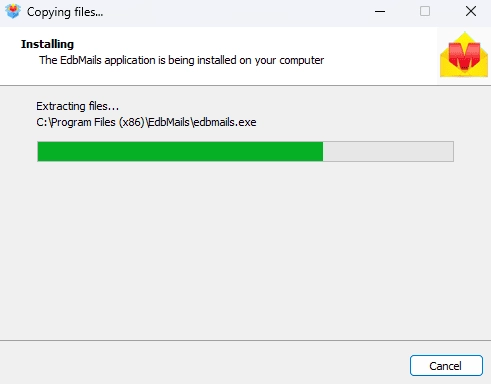
      Edbmails Software Installation

    • Enter your email address and password to login. If you haven’t registered yet, click ‘Start Your Free Trial’ to explore the features.
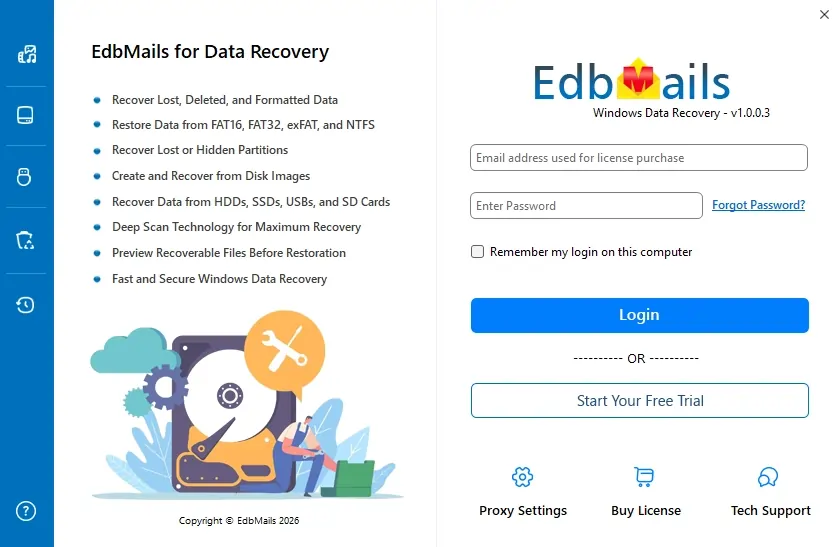
      Login to EdbMails Application

    • Expand and select the ‘Windows Data Recovery’ option.

      Windows Data Recovery

    • Now, select the ‘Documents Recovery’ option.

      Documents Recovery

    • Select the drive from which you want to recover items, then click the ‘Document Recovery’ filter on the left-side toolbar.
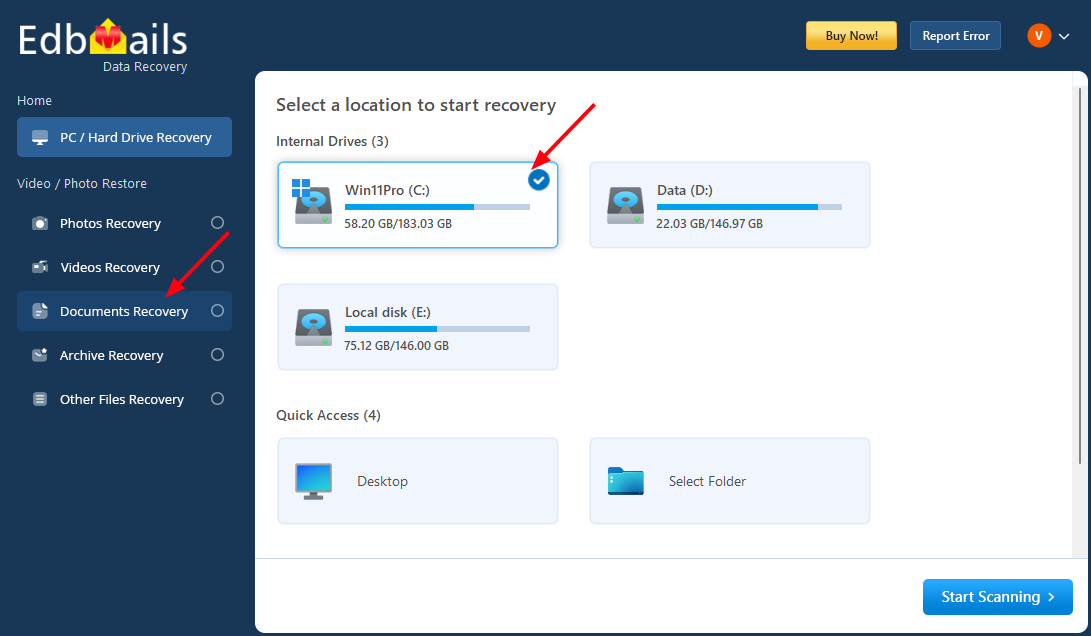
      Document Recovery

    • Select the file types you want to recover, then click ‘Apply’.

      Note: If you have additional file extensions, click the ‘Add’ button and enter the file type.
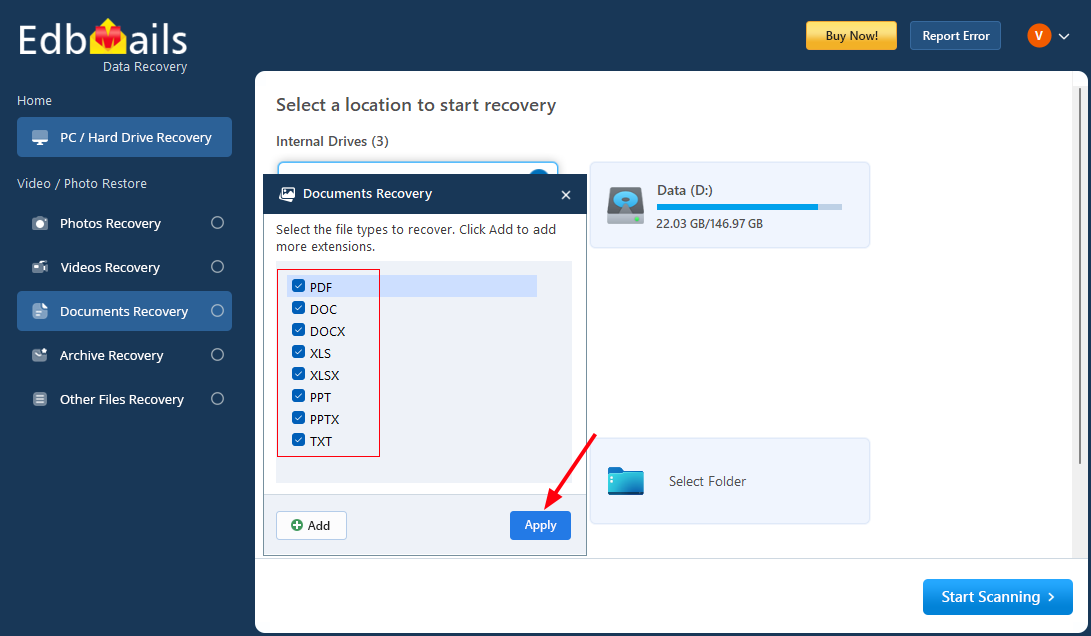
      Select File Types

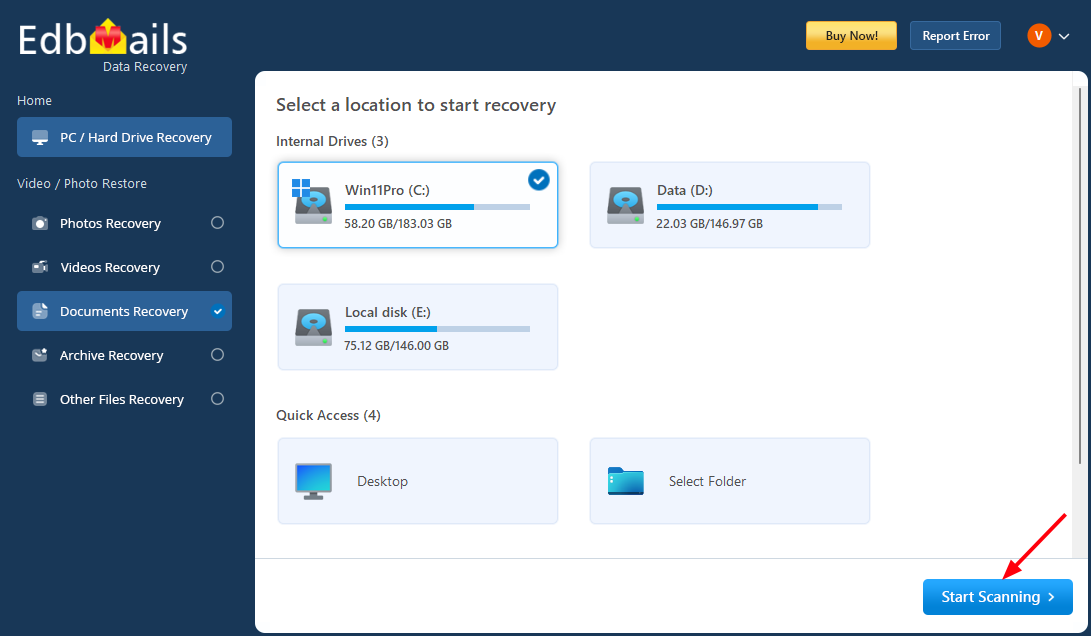
    • Click the ‘Start Scanning’ button.

      Start Scanning

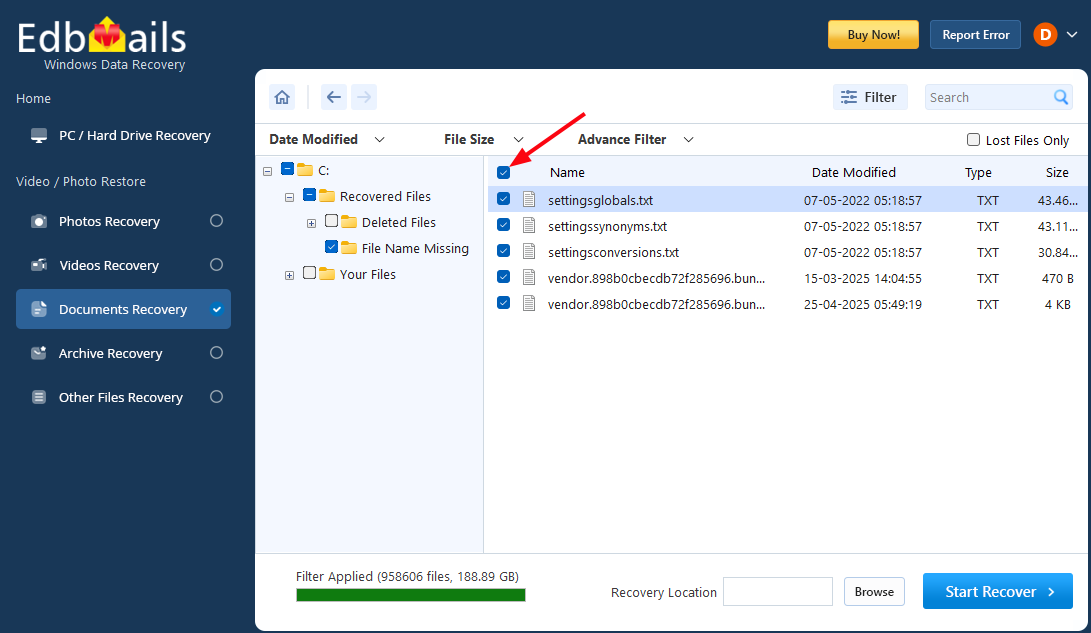
    • Select the items you want to recover.

      Select videos to recover

    • Click the ‘Browse’ button to select the recovery location.
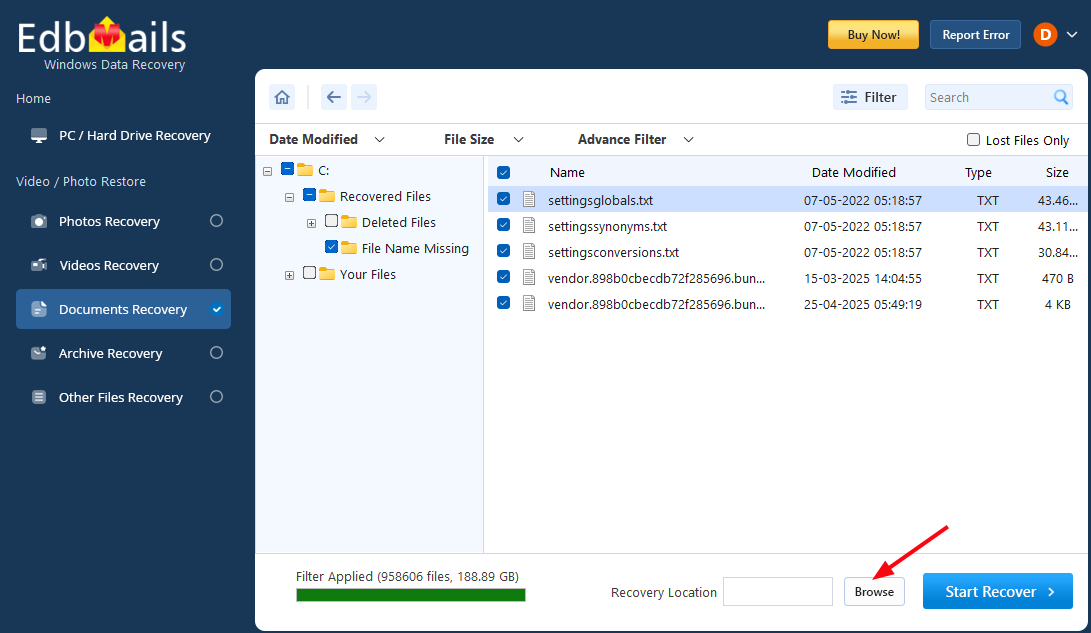
      Browse Recovery Location

    • Choose the desired location and click ‘OK’.
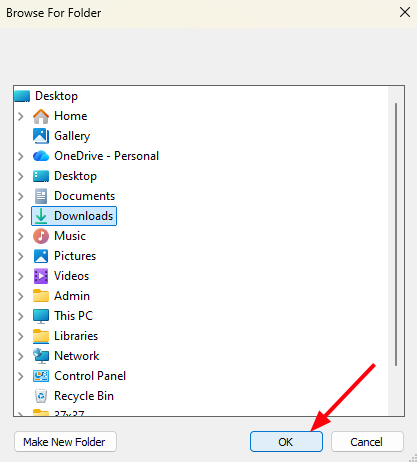
      Select recovery location

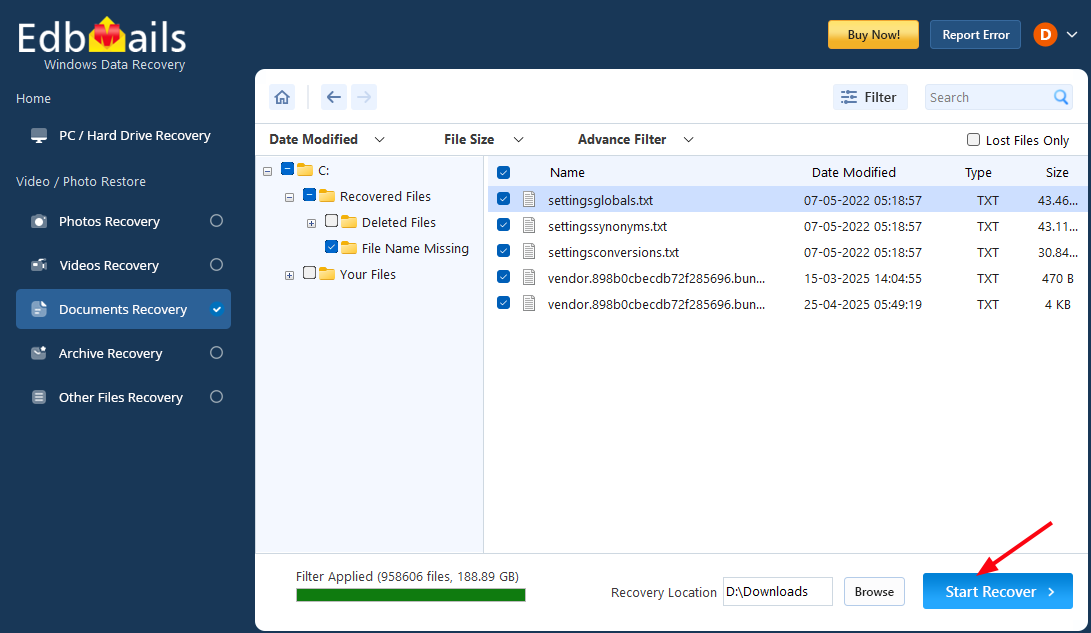
    • Click the ‘Start Recover’ button.

      Start Recover

    • Once recovery is complete, you will see the number of recovered documents.
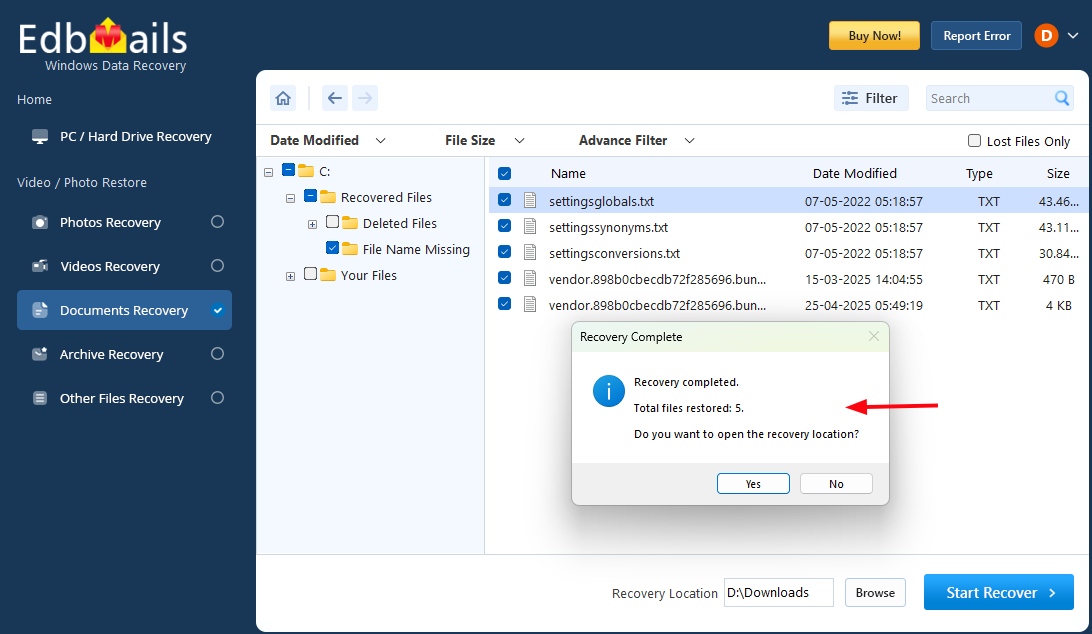
      Number of documents recovered

    • Go to the recovery location to view the recovered documents.

Supported Document File Formats

EdbMails Windows Data Recovery Software supports recovery of a wide range of commonly used document file formats stored on Windows-based storage devices. Whether the files were used for business records, academic projects, financial reports, presentations, or general documentation, the software scans the selected drive and identifies recoverable document files efficiently.

The supported document formats include:

  • PDF (.pdf) – Portable Document Format files are widely used for reports, contracts, invoices, manuals, and official documentation.
  • Microsoft Word (.doc, .docx) – Word processing files used for letters, reports, proposals, and other text-based documents.
  • Microsoft Excel (.xls, .xlsx) – Spreadsheet files commonly used for financial data, calculations, budgets, and data analysis.
  • Microsoft PowerPoint (.ppt, .pptx) – Presentation files used for meetings, training materials, and business slides.
  • Text Files (.txt) – Plain text documents used for notes, logs, and simple data storage.
  • CSV Files (.csv) – Comma-separated values files are typically used for structured data and database exports.
  • RTF Files (.rtf) – Rich Text Format documents supporting basic formatting across different platforms.
  • HTML / XML Files (.html, .xml) – Structured document files used for storing formatted and markup-based data.
  • JSON Files (.json) – Structured data files commonly used for configuration and data exchange purposes.

During the scanning process, recoverable documents are automatically organized under the Documents category, allowing you to quickly locate and view the required files. This structured classification simplifies navigation, particularly when scanning large storage devices with extensive data.

Benefits of Using EdbMails Document Recovery Software

  • Recovers permanently deleted documents from Windows storage devices.
  • Supports recovery from HDDs, SSDs, USB drives, and SD cards.
  • Allows users to view detected documents before recovery.
  • Enables selective recovery of required files and folders.
  • Organizes recoverable files into categories for easy navigation.
  • Performs secure read-only scanning without modifying original data.
  • Compatible with multiple Windows operating systems.
  • Simple and user-friendly interface suitable for individuals and professionals.

Additional resources:

  • SD Card Recovery
  • Hard Drive Data Recovery Software
  • USB Data Recovery
  • Video Recovery
  • Recycle Bin Recovery
  • Photo Recovery
lady image

 In this manual

IntoductionPre-requisitesSteps to Recover DocumentsSupported Document Formats Benefits

Windows Data Recovery

Starts from $35

Buy Now

Need help?

24/7 Customer support

Contact us on Live chat

Personalized Demo

Book a personalized demo

Still need help?

Email us / Call us

@edbmails.com All rights are reserved Privacy Policy | Terms of Use | GDPR | Security | Press Releases

hidden msg
Live Chat

Hi, May I help you?

Hide Chat Now